Unit 1 · 4 teaching hours · 19 min read
Problem Solving with a Computer, and the Shape of a C Program
What the syllabus asks for 8
- Program, programming language and its levels
- Problem solving: from a statement to a program
- Algorithms
- Flowcharts
- History and character of C
- Structure of a C program
- Edit, compile, link, run
- Errors and debugging
A computer does exactly what the program says, no more and no less.
Learning to program is therefore two skills: thinking a problem into exact steps (this chapter's first half) and writing those steps in a language the machine accepts (the second half).
Most beginners fail at the first skill and blame the second.
- The difference between a program, an algorithm and a language, and the three levels of language.
- Algorithms, pseudocode and flowcharts: how to write them and what makes a good one.
- A short history of C and why it is still taught.
- The anatomy of a C program and the edit → compile → link → run cycle.
- Kinds of errors (syntax, linker, runtime, logical) and how to debug each.
1.1 Program, programming language and its levels
A program is a finite sequence of instructions that a computer executes to solve a problem. A programming language is the notation used to write it.
| Level | Example | Who reads it | Notes |
|---|---|---|---|
| Machine language | 10110000 01100001 |
the CPU only | binary opcodes, different for every CPU family, no translation needed |
| Assembly language | MOV AL, 61h |
humans, with effort | one mnemonic per machine instruction; translated by an assembler |
| High-level language | c = a + b; |
humans | portable across CPUs; translated by a compiler or interpreter |
C sits in an unusual place. It is high-level (you write a + b, not register moves) but it exposes memory addresses and bits directly, so people call it a middle-level language.
That is why operating systems, compilers, databases and embedded firmware are still written in C.
Compiler, interpreter, assembler.
- A compiler translates the whole source file into machine code before anything runs; you then run the machine code. C is compiled. Fast programs; errors are reported at build time.
- An interpreter reads and executes one statement at a time (classic Python and JavaScript behaviour). Slower, but you see results immediately.
- An assembler translates assembly to machine code.
Programming paradigms in one line each. Procedural (C): a program is a set of functions operating on data. Object-oriented (Java, C++): a program is a set of interacting objects.
Functional (Haskell): a program is composition of functions without side effects. Logic (Prolog): a program is facts and rules.
1.2 Problem solving: from a statement to a program
Never begin by typing code. The dependable sequence is:
- Understand the problem. What is the input? What is the required output? What are the limits (range of numbers, empty input)?
- Plan the algorithm. Write the steps in pseudocode or a flowchart.
- Trace it by hand on a small input, including a tricky one.
- Code it.
- Compile, run, test with normal, boundary and invalid inputs.
- Debug the failures, then document (comments, a short description of what the program assumes).
Input: three marks (real numbers, 0–100). Output: their average. Processing: add, divide by 3. Limit: the divisor is a constant, so no division-by-zero risk. Boundary test: (0, 0, 0) → 0; (100, 100, 100) → 100.
A common bug: writing a + b + c / 3, which divides only c by 3.
1.3 Algorithms
An algorithm is a finite, ordered set of unambiguous steps that solves a problem and terminates. Five properties are expected in exam answers:
- Input: zero or more quantities supplied from outside.
- Output: at least one result.
- Definiteness: each step is precise and has one meaning.
- Finiteness: it ends after a finite number of steps for every valid input.
- Effectiveness: each step is basic enough to be done exactly in finite time.
Example 1 — largest of three numbers.
Algorithm Largest(a, b, c)
1. Start
2. Read a, b, c
3. max ← a
4. If b > max then max ← b
5. If c > max then max ← c
6. Print max
7. Stop
Example 2 — is a number prime? (trial division)
Algorithm Prime(n)
1. Read n
2. If n < 2 then print "not prime" and stop
3. i ← 2
4. While i × i ≤ n do
       If n mod i = 0 then print "not prime" and stop
       i ← i + 1
5. Print "prime"
It is enough to test divisors up to √n: if n = p × q with p ≤ q then p ≤ √n. For n = 97, only i = 2…9 is tried, not 2…96.
Example 3 — Euclid's GCD (about 300 BC, still the best method).
Algorithm GCD(a, b)
1. Read a, b
2. While b ≠ 0 do
       r ← a mod b ; a ← b ; b ← r
3. Print a
Trace for (48, 18): (48,18) → (18,12) → (12,6) → (6,0), answer 6.
Pseudocode is the same idea in structured English: use verbs like read, print, set, indent loops and decisions, and never use language-specific syntax such as semicolons. It is not executed; its job is to be unambiguous to a human.
1.4 Flowcharts
A flowchart is the diagram of an algorithm. Learn the five symbols exactly; examiners mark them.
| Symbol | Shape | Use |
|---|---|---|
| Terminator | oval / rounded rectangle | Start and Stop |
| Input / Output | parallelogram | Read, Print |
| Process | rectangle | assignment, calculation |
| Decision | diamond | a yes/no question; two exits labelled Yes/No (True/False) |
| Flow line | arrow | direction of control |
| Connector | small circle | continue on another page or place |
Rules: one Start, at least one Stop; every arrow has a head; a decision diamond has exactly one entry and two labelled exits; flow runs top to bottom, left to right where possible.
Text rendering of the flowchart for "largest of two numbers":
 (Start)
    |
 /Read a, b/
    |
 <a > b ?> --Yes--> [max = a] --+
    |                           |
    No                          |
    v                           |
 [max = b] ---------------------+
    |
 /Print max/
    |
 (Stop)
Advantages of flowcharts: quick visual overview, easy to explain to others, helps find logic errors before coding. Limitations: hard to draw and edit for big programs, no standard for showing data structures, can drift out of step with the code.
1.5 History and character of C
| Year | Event |
|---|---|
| 1960s | ALGOL 60 → CPL → BCPL (Martin Richards, 1967) → B (Ken Thompson, Bell Labs, 1970) |
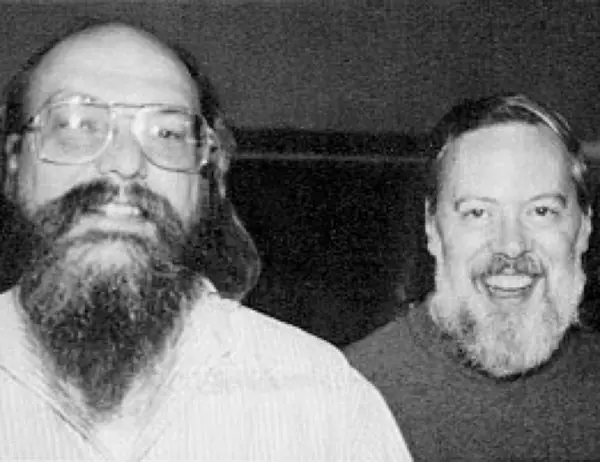
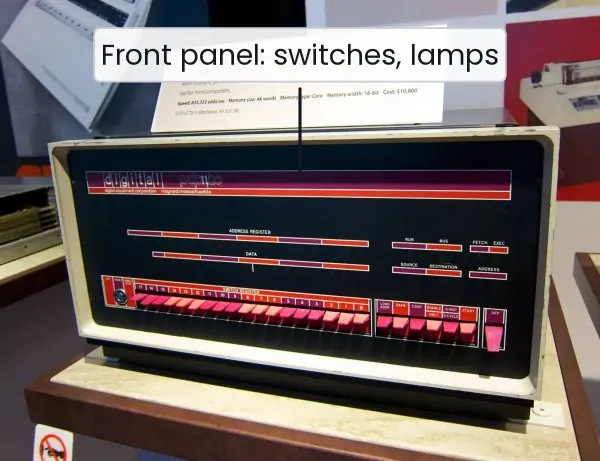
| 1972 | Dennis Ritchie at Bell Labs creates C on a DEC PDP-11, to rewrite UNIX |
| 1973 | the UNIX kernel is rewritten in C |
| 1978 | The C Programming Language by Kernighan and Ritchie ("K&R C") |
| 1989 | ANSI C (C89); adopted as ISO C90 |
| 1999 | C99: // comments, long long, _Bool, variable declarations anywhere, variable-length arrays |
| 2011 | C11: threads, _Generic, anonymous structs |
| 2018 | C17: bug-fix revision of C11 |
Features: small core (32 keywords in C89), fast, portable, structured (functions, blocks), rich operators, direct memory access through pointers, a standard library for the rest (I/O, strings, maths).
Weaknesses: no automatic bounds checking, manual memory management, no built-in strings, objects or exceptions. Many security bugs in real software are C buffer overflows; this course teaches you to avoid them.
1.5.1 Eight features of C
- Small and simple core. C has only 32 keywords, so a learner can know the whole language in a few weeks. Everything else, such as input, output and string handling, comes from library functions. A small core also makes compilers easy to write, which is why C exists on every machine from a Nepal Telecom SIM chip to a supercomputer.
- Speed and efficiency. C code is compiled into machine code with almost no hidden work added. A loop in C usually runs many times faster than the same loop in an interpreted language. This is why operating systems, game engines and database kernels are written in C.
- Portability. The same C source can be compiled on Windows, Linux or an Android phone with small changes. The standard library hides the differences between machines. The Nagarik App's fingerprint driver and the ATM firmware of a Nepali bank are often ported in this way.
- Structured programming. C divides a program into functions and uses
if,while,forandswitchfor control, which gives clear top-down design. Each function does one job and can be tested alone. A TU billing program, for example, can have separate functions for reading marks, finding grades and printing results. - Middle-level nature. C joins high-level ideas (functions, structures) with low-level power (pointers, bitwise operators, direct addresses). A programmer can write a device driver and a payroll report in the same language. This mixed character is why C is called a "middle-level" language.
- Rich set of operators and data types. C has arithmetic, relational, logical, bitwise, assignment and conditional operators, and types such as
int,float,char, arrays, structures and unions. One can express complex ideas in a short line. Users can also create their own types withstructandtypedef. - Pointers and dynamic memory. A pointer stores the address of a variable, so a program can reach any memory location and request memory at run time with
malloc. This gives full control over data structures such as linked lists and trees. It is also the most dangerous feature, because a wrong address crashes the program. - Extensible through libraries. A programmer can write functions, store them in header and object files, and reuse them in many programs. Standard libraries (
stdio.h,math.h,string.h) save work, and thousands of third-party libraries exist. The ability to grow the language by libraries keeps C alive after fifty years.
1.6 Structure of a C program
#include <stdio.h>

/* Program: area of a circle */
int main(void)
{
    const double PI = 3.14159;
    double r = 2.0;
    double area = PI * r * r;
    printf("Area = %.2f\n", area);
    return 0;
}
Area = 12.57
Line by line:
#include <stdio.h>is a preprocessor directive. Before compilation, the preprocessor pastes the contents of the headerstdio.hhere, which declaresprintfandscanf./* ... */is a comment (C99 also allows// to end of line). The compiler ignores comments.int main(void)is the entry point. Execution always starts atmain.intmeans it returns an integer to the operating system.{ ... }encloses the body: a sequence of declarations then statements; every statement ends with;.printf("Area = %.2f\n", area)prints formatted text;%.2fprints adoublewith 2 decimal places,\nis a newline.return 0;tells the operating system the program succeeded (non-zero means failure).
The general layout, in order: documentation comments → preprocessor directives (#include, #define) → global declarations → main() → other function definitions.
void main() is wrong in standard C (use int main). Forgetting ; produces an error on the next line, not the line with the missing semicolon. C is case-sensitive: Main, main and MAIN are three different names, and only main starts a program.
1.7 Edit, compile, link, run
hello.c ──preprocess──▶ expanded source ──compile──▶ hello.o (object code)
                                                        │
                       libc (printf etc.) ──── link ────┘──▶ hello (executable) ──run──▶ output
- Edit: write
hello.cin a text editor or IDE. - Preprocess:
#includeand#defineare expanded. - Compile: the compiler checks syntax and produces assembly, then object code (machine code with unresolved references such as the address of
printf). - Link: the linker joins object files and library code into one executable.
- Load and run: the operating system loads the executable into memory and calls
main.
With GCC on Linux or MinGW on Windows:
gcc -Wall -o hello hello.c
./hello
-Wall turns on warnings; always use it while learning, because many logical mistakes are first reported as warnings. In Turbo C or Code::Blocks the same steps are hidden behind Compile and Run buttons.

1.8 Errors and debugging
| Kind | When found | Example | How to fix |
|---|---|---|---|
| Syntax error | compile time | missing ;, unmatched {, misspelt keyword |
read the message and the previous line too |
| Linker error | link time | calling sqrt without linking the maths library (-lm), misspelt function name |
declare it, add the library |
| Runtime error | while running | division by zero, invalid pointer, array index out of range, "Segmentation fault" | test boundaries, check inputs |
| Logical error | the program runs and gives the wrong answer | a + b + c / 3 for an average |
trace by hand, print intermediate values |
| Warning | compile time | using a variable before assigning it | never ignore |
Debugging technique that works: (1) reproduce the bug with the smallest input; (2) print the values of variables at suspicious points with printf; (3) compare with a hand trace; (4) change one thing at a time; (5) for bigger bugs use a debugger (gdb: breakpoints, step, inspect).
Testing shows the presence of bugs, never their absence, so test normal, boundary (0, 1, maximum) and invalid input. Documentation: comments explain why, not what; a short header comment says what the program does and what it assumes.
Formula and fact sheet
- Algorithm = Input + Output + Definiteness + Finiteness + Effectiveness.
- Flowchart: oval = start/stop, parallelogram = I/O, rectangle = process, diamond = decision.
- C was created by Dennis Ritchie, 1972, Bell Labs; ANSI C 1989; C99 added
//comments. - Execution starts at
main().return 0;means success. - Phases: preprocess → compile → assemble → link → run. Errors: syntax, linker, runtime, logical.
- Test for primality only up to √n. GCD: repeat (a, b) → (b, a mod b).
Chapter summary
- Think in algorithms first; trace on paper; then code.
- Pseudocode is exact English, flowcharts are exact pictures; neither depends on a language.
- C is compiled, portable, close to hardware and the basis of Unix, Linux and most system software.
- A C program is directives, then
main, then other functions; statements end in;. gcc -Walland read every warning. A program that compiles can still be wrong: test and debug.
Practice
A. Short questions
- State the five properties of an algorithm. Which one does
while (1) { }violate? - Why is C called a middle-level language?
- Differentiate a compiler from an interpreter. Which category is C?
- Name the phases between
hello.cand a running program, and the output of each. - List the four kinds of errors with one example of each.
- What is the purpose of
#include <stdio.h>? What happens if it is omitted and you callprintf? - Who developed C, where, and when? Which operating system was rewritten in it?
B. Algorithm and flowchart tasks
- Write an algorithm and draw a flowchart to find whether a number is even or odd.
- Write an algorithm to find the sum of digits of a positive integer (for 4,305 the answer is 12).
- Write pseudocode to print the multiplication table of n up to 10.
- Trace Euclid's algorithm for GCD(84, 36) and for GCD(17, 5).
- Write an algorithm to reverse a number; trace it for 1,230 and say why the result is 321.
Answers and worked solutions
1. Input, output, definiteness, finiteness, effectiveness. while (1) { } never ends, so it violates finiteness.
2. It has high-level constructs (functions, loops, structures) and low-level access (pointers, bitwise operators, direct memory addresses).
3. A compiler translates the whole program before execution; an interpreter translates and runs one statement at a time. C is normally compiled.
4. Preprocessing → expanded source; compiling → assembly then object file (.o); linking → executable; running → output.
5. Syntax: missing ;. Linker: calling an undefined function. Runtime: division by zero. Logical: using + where * was needed.
6. It pastes the declarations of the standard I/O functions. Without it older compilers warn about an implicit declaration and C99 or later compilers report an error.
7. Dennis Ritchie, Bell Labs, 1972; UNIX.
8. Read n; if n mod 2 = 0 print "even" else print "odd". Flowchart: Start → parallelogram Read n → diamond "n mod 2 = 0?" → Yes: Print even, No: Print odd → Stop.
9. Read n; sum ← 0; while n > 0: sum ← sum + (n mod 10); n ← n div 10; print sum. For 4,305: 5, then 0, then 3, then 4 → 12.
10. Read n; for i from 1 to 10: print n × i.
11. (84,36) → (36,12) → (12,0): GCD 12. (17,5) → (5,2) → (2,1) → (1,0): GCD 1, so 17 and 5 are coprime.
12. rev ← 0; while n > 0: rev ← rev × 10 + n mod 10; n ← n div 10. For 1,230: rev 0, then 0, 3, 32, 321. The trailing zero becomes a leading zero, which an integer does not display.
Model answers: medium (5 marks) and long (10 marks) questions
Q (5 marks). Explain the steps in creating and running a C program, from the source file to the output. Name the file produced at each step.
A C program passes through five steps before it produces output (see Figure 1.1). In the edit step the programmer types the source code in an editor and saves it as hello.c.
In the preprocessing step the preprocessor removes comments, pastes the contents of every #include file and replaces every #define name; the result is an expanded source file.
In the compile step the compiler checks the syntax and translates the expanded source into assembly and then into an object file (hello.o) of machine code in which the address of library functions such as printf is still unknown.
In the link step the linker combines the object file with the library code from libc and fixes all the addresses, giving one executable file (hello or hello.exe).
In the load and run step the operating system copies the executable into memory and starts main.
| Step | Tool | Input | Output | Typical error |
|---|---|---|---|---|
| Edit | editor / IDE | ideas | hello.c |
typing mistake |
| Preprocess | cpp |
hello.c |
expanded source | missing header file |
| Compile | cc1 |
expanded source | hello.o |
syntax error |
| Link | ld |
.o + libc |
executable | undefined reference |
| Run | loader / OS | executable | output | division by zero |
For example, on Linux the command gcc -Wall -o hello hello.c performs the first four steps at once and ./hello runs the program. Using -Wall is good practice, because many logical mistakes first appear as warnings.
Q (10 marks). Describe the history of the C language and explain its important features. Why is C called a middle-level language?
Introduction. C is a general-purpose, structured, compiled programming language. It was created by Dennis Ritchie at Bell Laboratories, USA, in 1972 on a DEC PDP-11 computer (Plate 1.1).
Its purpose was to rewrite the UNIX operating system, which until then was written in assembly language.
History. ALGOL 60 (1960) gave the idea of structured blocks. CPL and then BCPL (Martin Richards, 1967) simplified it, and B (Ken Thompson, 1970) was a small version of BCPL for the first UNIX.
B had no data types, so Ritchie added types and structures and called the new language C. The UNIX kernel was rewritten in C in 1973. In 1978 Kernighan and Ritchie published The C Programming Language (K&R C).
The American standard ANSI C (C89) came in 1989, followed by C99 (// comments, long long), C11 (threads) and C17 (bug fixes).
Important features.
- A small core of 32 keywords, with everything else in libraries.
- High speed, because compiled code is close to machine code.
- Portability across machines with a standard library.
- Structured programming with functions and blocks.
- A rich set of operators (arithmetic, relational, logical, bitwise).
- Pointers and dynamic memory allocation.
- User-defined types through
struct,union,enumandtypedef. - Extensibility through header files and user libraries.
Why middle-level? C has high-level features: functions, loops, structured control and readable names.
It also has low-level features: pointers that hold raw addresses, bitwise operators that work on single bits, and register and inline assembly that reach the hardware.
Because it can express both a payroll report and a device driver, it sits between a high-level language such as Python and an assembly language.
| Language level | Example | Close to |
|---|---|---|
| High | Python, Java | human thinking |
| Middle | C | both human and machine |
| Low | Assembly | machine |
Conclusion. C joined the clarity of a high-level language with the control of assembly.
It is still the language of operating systems, embedded devices and compilers, so it remains the best first step for a BCA student who wants to understand how a computer really works.