Unit 6 · 4 teaching hours · 43 min read
The Application Layer
What the syllabus asks for 9
- Functions and architectures
- The Domain Name System
- DHCP and the bootstrap sequence
- The World Wide Web and HTTP
- Remote login and file transfer
- Electronic mail
- Network management and analysis tools
- Peer-to-peer and content delivery
- Seeing the ideas: names, pages, mail, transfers and monitors
Applications are why networks exist, and every application protocol is, underneath, just an agreement on what text or bytes to send over a TCP or UDP socket.
This unit looks at the protocols the syllabus names (DNS, DHCP, WWW, HTTP, HTTPS, Telnet, FTP, SMTP, POP, IMAP) and at the tools used to look at them (SNMP, MRTG, PRTG, Packet Tracer, Wireshark).
You will build a DNS message by hand, make a real HTTP request over a socket, and inspect real sockets with Linux tools.
- Application architectures: client–server, peer-to-peer; the socket API.
- DNS: hierarchy, records, resolution, message format. DHCP in context.
- The Web: URLs, HTTP messages, methods, status codes, cookies, caching, HTTP/2 and HTTP/3; HTTPS.
- Remote login and file transfer: Telnet, SSH, FTP. E-mail: SMTP, POP3, IMAP, MIME.
- Network management and analysis: SNMP, MRTG, PRTG, Packet Tracer, Wireshark.
6.1 Functions and architectures
The application layer provides the services that user programs see. An application protocol defines the types of messages (request, response), their syntax, semantics and the rules for when to send. Two architectures exist.
Client–server: a server with a fixed, well-known address waits; clients start the conversation; the server can be a single machine or a farm behind a load balancer.
Peer-to-peer: peers are clients and servers at once, which scales without server cost but is harder to manage and secure. An application chooses UDP when delay matters more than reliability and TCP when every byte must arrive.
6.2 The Domain Name System
People remember names; routers use addresses. DNS is a distributed, hierarchical database that translates names such as www.example.com to IP addresses. It runs over UDP port 53 (TCP for large replies and zone transfers).
Hierarchy
The name space is a tree read right to left: the root (a dot), top-level domains (generic: com, org, edu, gov, net; country codes such as np for Nepal), second-level domains (example, or com.np, edu.np, gov.np below .np), then hosts.
A zone is the part of the tree managed by one authority. Thirteen root server identities (a.root-servers.net … m.root-servers.net) exist, each replicated at hundreds of sites by anycast.
Resource records
| Type | Meaning | Example |
|---|---|---|
| A | name → IPv4 address | www.example.com A 93.184.216.34 |
| AAAA | name → IPv6 address | |
| NS | name server of a zone | example.com NS a.iana-servers.net |
| CNAME | alias to the canonical name | www CNAME web.example.com |
| MX | mail server with preference (lowest first) | example.com MX 10 mail.example.com |
| TXT | free text: SPF, DKIM, verification | |
| PTR | address → name (reverse lookup under in-addr.arpa) | |
| SOA | start of authority for a zone: serial, refresh, TTL |
Resolution
A host asks its local (recursive) resolver, typically at the ISP or a public service.
If the answer is not in its cache, the resolver queries the root, which refers it to the .com servers, which refer it to the example.com name server, which returns the answer.
This is iterative querying by the resolver; the host's own query is recursive ("do all the work and bring me the answer"). Each record has a TTL, the number of seconds a cache may keep it; caching makes most lookups local.
Attacks on DNS include cache poisoning (forged replies; DNSSEC adds signatures) and amplification DDoS (small spoofed queries produce large replies).
Message format
A DNS message has a 12-byte header (ID, flags, counts of questions, answers, authority and additional records), then the question (name, type, class) and the records.
A name is a list of labels, each preceded by its length, ending with a zero byte: www.example.com is 03 77 77 77 07 65 78 61 6d 70 6c 65 03 63 6f 6d 00, which is 17 bytes. A standard query for it is 12 + 17 + 4 = 33 bytes long.
Replies use a 2-byte compression pointer (c0 0c points at offset 12) to avoid repeating the name.
6.3 DHCP and the bootstrap sequence
When you join a network, a chain of protocols runs in order: DHCP gives you an IP address, mask, default gateway and DNS server (Unit 4); ARP finds the gateway's MAC; DNS resolves the server's name; TCP connects; HTTP (inside TLS) fetches the page.
When a page fails to load, test each step in turn: do I have an address (ip addr)? can I reach the gateway (ping)? does the name resolve (dig or nslookup)? does the port answer (curl -v)?
6.4 The World Wide Web and HTTP
A web page is a base HTML file referencing objects (images, scripts) each addressed by a URL: scheme://host[:port]/path?query#fragment, for example https://example.com:443/notes/unit6.html?v=2#dns.
HTTP is the web's application protocol: text-based request/response over TCP, port 80, stateless (the server keeps no memory between requests).
A request is: a request line (method, target, version), header lines, a blank line and an optional body.
GET /index.html HTTP/1.1
Host: www.example.com
Accept: text/html
Connection: close
The response has a status line, headers, a blank line and the body.
| Methods | Use | Status codes | Meaning |
|---|---|---|---|
| GET | fetch (safe, idempotent) | 200 OK | success |
| HEAD | headers only | 301 / 302 / 304 | moved / found (redirect) / not modified |
| POST | send data to be processed | 400 / 401 / 403 / 404 | bad request / unauthenticated / forbidden / not found |
| PUT / DELETE | replace / remove a resource (idempotent) | 429 | too many requests |
| OPTIONS | ask what is allowed | 500 / 502 / 503 | server error / bad gateway / unavailable |
Persistent connections and timing
HTTP/1.0 used a new TCP connection for every object (non-persistent); HTTP/1.1 keeps the connection open (persistent) and may pipeline.
Compare the page-load time for a base file plus 4 small objects with RTT = 50 ms (transmission times negligible): each TCP connection costs one RTT (handshake) and each request/response another RTT.
| Mode | Time | Working |
|---|---|---|
| Non-persistent, serial | 500 ms | 5 objects × (50 + 50) |
| Non-persistent, 4 parallel connections for the objects | 200 ms | base 100 + parallel objects 100 |
| Persistent, no pipelining | 300 ms | one handshake 50, base 50, then 4 × 50 |
HTTP/2 multiplexes many streams over one TCP connection with header compression; HTTP/3 runs over QUIC (UDP) to avoid TCP's head-of-line blocking and to combine the transport and TLS handshakes.
State, cookies and caching
The server sets a cookie (Set-Cookie: sid=abc123); the browser returns it with every later request to that site, which lets the server recognise a session (login, shopping cart) but also lets sites track users.
A web cache (browser or proxy) stores objects; a conditional GET (If-Modified-Since or If-None-Match with an ETag) returns 304 if unchanged, saving bandwidth. A CDN keeps copies near users.
Authentication and HTTPS
HTTP Basic authentication sends Authorization: Basic plus the Base64 of user:password; Base64 is an encoding, not encryption: nikit:s3cret becomes bmlraXQ6czNjcmV0 and anyone can reverse it.
HTTPS is HTTP inside a TLS connection on port 443 (Unit 7), providing encryption, integrity and server authentication. Modern browsers warn on plain HTTP.
6.5 Remote login and file transfer
Telnet (TCP 23) gives a remote terminal with no encryption, so passwords cross the network in plaintext; it survives only on lab devices. SSH (TCP 22) replaces it with encryption and key authentication, and also carries file copy (scp, sftp) and port forwarding.
FTP uses two connections: a control connection on port 21 (commands USER, PASS, LIST, RETR, STOR; replies like 220, 230, 226) and a data connection per transfer.
In active mode the server opens the data connection from port 20 to the client (blocked by firewalls and NAT); in passive mode the client opens both connections (PASV).
FTP is out of band: control and data are separate, and the control connection holds state. FTPS adds TLS; SFTP is a different protocol over SSH.
6.6 Electronic mail
A message is composed in a user agent (Outlook, Thunderbird, webmail), sent to the sender's mail server over SMTP (TCP 25, or 587 with authentication), relayed server to server to the recipient's mail server (found by the MX record) and fetched by the recipient with POP3 (TCP 110: download and usually delete; simple, offline) or IMAP (TCP 143: mailboxes stay on the server, folders synchronised across devices).
SMTP is a push protocol (the sender pushes), POP3 and IMAP are pull.
A minimal SMTP dialogue:
S: 220 mail.example.com ESMTP
C: HELO client.example.org
S: 250 mail.example.com
C: MAIL FROM:<a@example.org>
S: 250 OK
C: RCPT TO:<b@example.com>
S: 250 OK
C: DATA
S: 354 End data with <CR><LF>.<CR><LF>
C: Subject: Hello ... message ... then a line with a single dot
S: 250 Queued
C: QUIT
S: 221 Bye
SMTP carries 7-bit ASCII. MIME lets mail carry other content: headers such as Content-Type: image/jpeg and Content-Transfer-Encoding: base64.
Base64 groups 3 bytes into four characters from a 64-letter alphabet (the bytes "Man" become TWFu), so binary attachments grow by one third (a 300-byte file becomes 400 characters). Spam defences use SPF, DKIM and DMARC records in DNS.
6.7 Network management and analysis tools
SNMP (UDP 161, traps on 162) lets a manager query and set variables on agents in routers, switches and servers.
The variables are defined in a MIB (management information base), a tree of object identifiers; operations are GET, GETNEXT, SET and TRAP (agent-initiated alarm).
Versions 1 and 2c authenticate with a plaintext "community string"; v3 adds real authentication and encryption.
MRTG and PRTG poll SNMP counters (octets in and out of an interface, CPU load) on a schedule and draw traffic graphs; from two readings, utilisation = Δ octets × 8 / (Δ seconds × link speed).
Packet Tracer (Cisco) simulates networks for teaching: build topologies, configure routers and watch packets move.
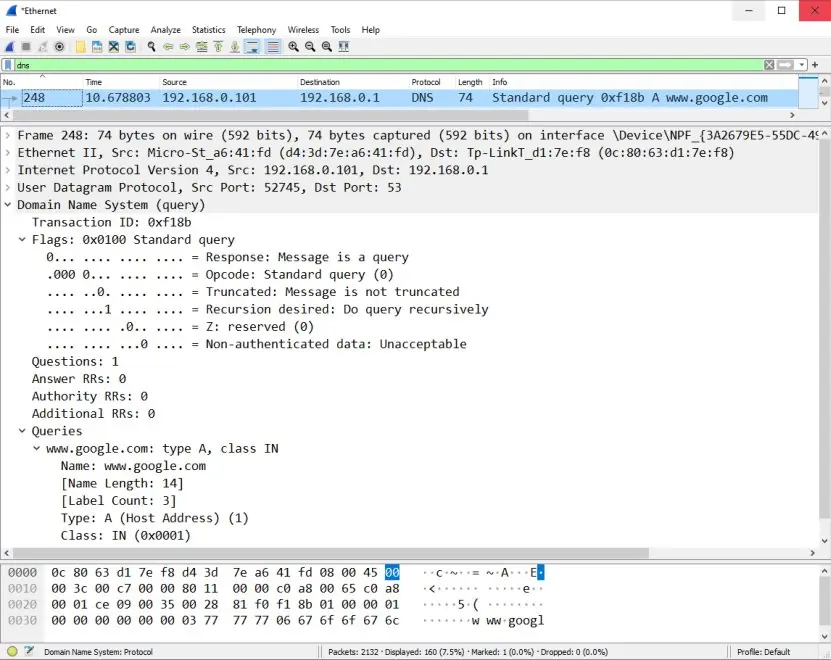
Wireshark captures frames from an interface and dissects them layer by layer; a display filter such as tcp.port == 80 or dns selects packets, a capture filter such as host 10.0.0.5 limits what is stored.
Capturing on a network you do not own or administer may be illegal and is certainly unethical.
6.8 Peer-to-peer and content delivery
In BitTorrent a file is cut into pieces; a tracker (or DHT) lists the peers; each peer downloads rarest pieces first and uploads to peers who upload to it (tit-for-tat).
Distribution time for a file of size F to N peers with upload u_s from the server and u peer upload is at least max(F/u_s, F/d_min, N F/(u_s + N u)); for large N the peer-to-peer time stays almost flat while the client–server time N F / u_s grows linearly.
A CDN places copies of popular content on servers near users and uses DNS to direct each user to a nearby copy.
Practising the commands
This program builds a DNS query for www.example.com from raw bytes, builds a reply with a compression pointer, parses it, makes a real HTTP request to a tiny local web server and prints the Base64 values quoted in this unit.
import base64, socket, struct, threading, http.server
def qname(name): return b"".join(bytes([len(p)]) + p.encode() for p in name.split(".")) + b"\x00"
query = struct.pack(">HHHHHH", 0x1234, 0x0100, 1, 0, 0, 0) + qname("www.example.com") + struct.pack(">HH", 1, 1)
print(len(qname("www.example.com")), len(query), query.hex())
reply = struct.pack(">HHHHHH", 0x1234, 0x8180, 1, 1, 0, 0) + qname("www.example.com") + struct.pack(">HH", 1, 1)
reply += b"\xc0\x0c" + struct.pack(">HHIH", 1, 1, 3600, 4) + bytes([93, 184, 216, 34])
rid, flags, qd, an, ns, ar = struct.unpack(">HHHHHH", reply[:12]); off = 12 + len(qname("www.example.com")) + 4
ptr, rtype, rclass, ttl, rdlen = struct.unpack(">HHHIH", reply[off:off + 12])
print("id=%#x flags=%#x answers=%d type=%d ttl=%d ip=%s" % (rid, flags, an, rtype, ttl, ".".join(map(str, reply[off + 12:off + 16]))))
class H(http.server.BaseHTTPRequestHandler):
    def do_GET(self):
        body = b"<h1>hello</h1>"; self.send_response(200); self.send_header("Content-Type", "text/html")
        self.send_header("Content-Length", str(len(body))); self.end_headers(); self.wfile.write(body)
    def log_message(self, *a): pass
srv = http.server.HTTPServer(("127.0.0.1", 50080), H); threading.Thread(target=srv.serve_forever, daemon=True).start()
s = socket.create_connection(("127.0.0.1", 50080))
s.sendall(b"GET /index.html HTTP/1.1\r\nHost: localhost\r\nConnection: close\r\n\r\n")
resp = b""
while True:
    chunk = s.recv(4096)
    if not chunk: break
    resp += chunk
print(resp.decode().split("\r\n")[0]); print(resp.split(b"\r\n\r\n")[1].decode()); srv.shutdown()
print(base64.b64encode(b"Man").decode(), base64.b64encode(b"nikit:s3cret").decode(), len(base64.b64encode(bytes(300))))
17 33 12340100000100000000000003777777076578616d706c6503636f6d0000010001
id=0x1234 flags=0x8180 answers=1 type=1 ttl=3600 ip=93.184.216.34
HTTP/1.0 200 OK
<h1>hello</h1>
TWFu bmlraXQ6czNjcmV0 400
The next program uses the Linux tools ip and ss and ping through the standard library to look at the sockets of the machine it runs on.
import socket, subprocess
srv = socket.socket(); srv.bind(("127.0.0.1", 50009)); srv.listen(1)
c = socket.create_connection(("127.0.0.1", 50009)); conn, _ = srv.accept()
def run(*cmd): return subprocess.run(cmd, capture_output=True, text=True).stdout.strip()
print(run("ip", "-4", "-br", "addr", "show", "lo"))
for line in run("ss", "-tan", "sport", "=", ":50009").splitlines(): print(" ".join(line.split()[:4]))
print(run("ping", "-c", "1", "-W", "1", "127.0.0.1").splitlines()[0])
c.close(); conn.close(); srv.close()
lo               UNKNOWN        127.0.0.1/8
State Recv-Q Send-Q Local
LISTEN 0 1 127.0.0.1:50009
ESTAB 0 0 127.0.0.1:50009
PING 127.0.0.1 (127.0.0.1) 56(84) bytes of data.
6.9 Seeing the ideas: names, pages, mail, transfers and monitors
Application protocols are agreements, and agreements have authors. Plate 6.1 shows three of them: Tim Berners-Lee (the Web), Paul Mockapetris (DNS) and, through the sign that celebrates him, Ray Tomlinson (e-mail with the @ sign).
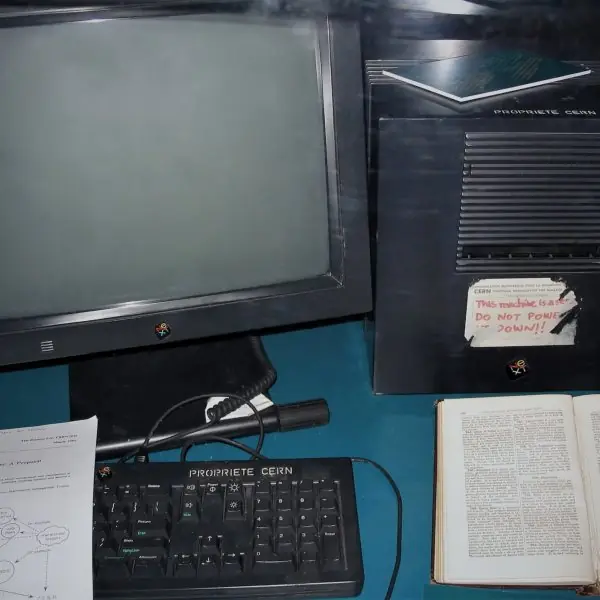
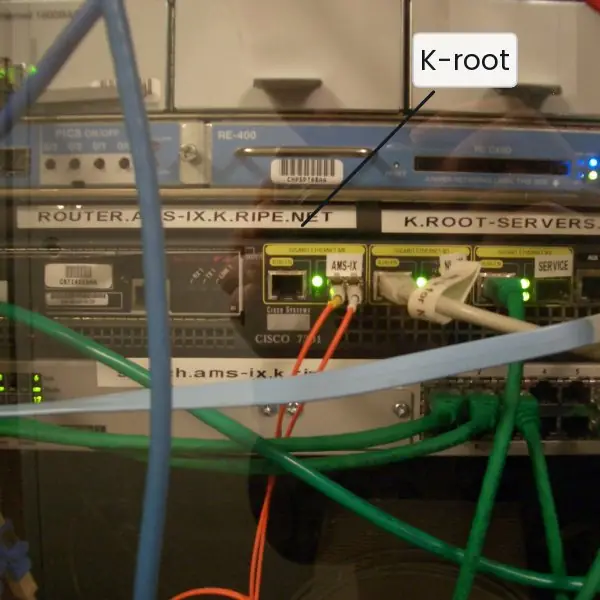
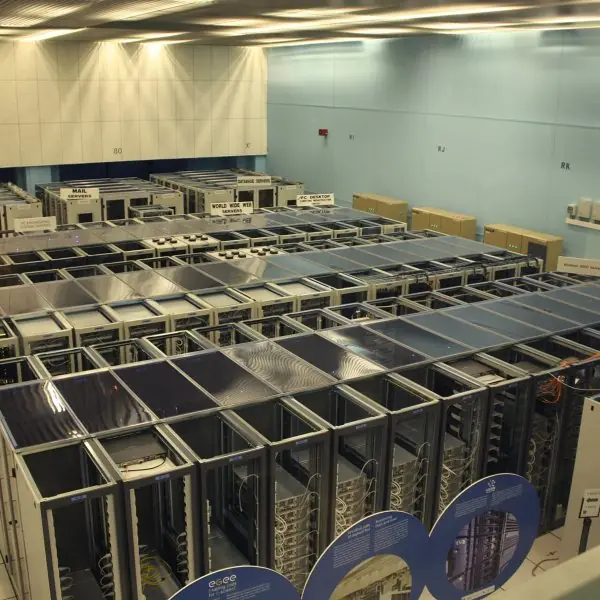
Plate 6.2 shows the machines behind the protocols: the first web server, a rack that really hosts a DNS root server, a VT100 terminal of the Telnet era and a data-centre hall.
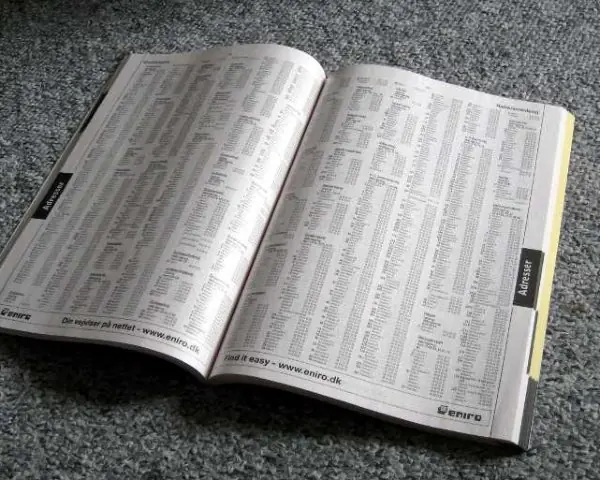
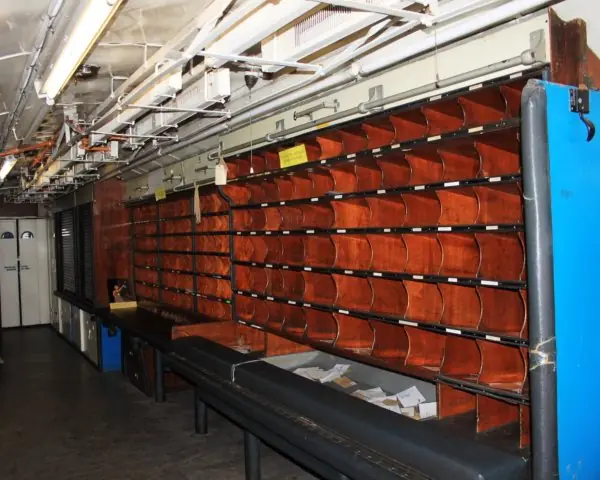
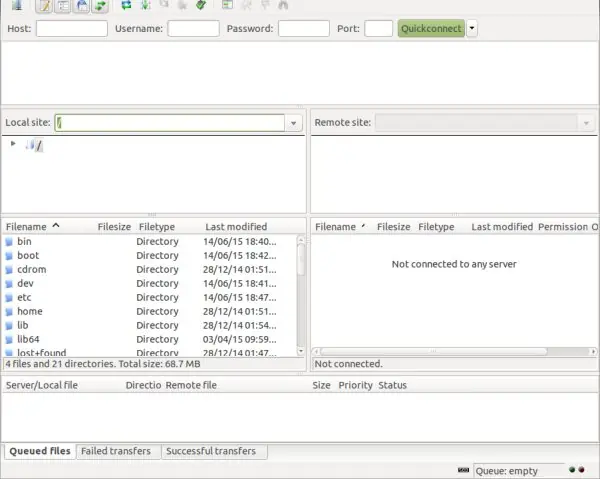
Plate 6.3 gives three analogies: a telephone directory for DNS, a post-office sorting rack for store-and-forward mail, and an FTP client with its two panes.
Plate 6.4 pairs a real Wireshark capture of a DNS query with the bytes it decodes to.
The figures that follow compute the unit's examples: the name tree, resolution time, the 33-byte query, HTTP messages, page-load time, caching, FTP ports, the mail path with Base64, peer-to-peer scaling, SNMP counters and the troubleshooting ladder.






6.9.1 Eight uses of application-layer protocols in Nepal
- Domain names for Nepali services. Addresses such as moe.gov.np, tu.edu.np and the banks' .com.np names are resolved by DNS through the zone tree of Fig. 6.1. A student only types a name, and the resolver walks root, np and the organisation's own name server in a few milliseconds (Fig. 6.2). Caching explains why the same site opens instantly the second time, and why a changed address can take hours to reach everyone: the old record lives until its TTL ends.
- Secure websites and payments. ConnectIPS, Fonepay, eSewa and internet banking all use HTTPS, which is HTTP inside TLS on port 443. The request and response have the shape of Fig. 6.4, and the Set-Cookie header keeps you logged in between pages. If the certificate or the connection fails, the browser stops with a warning instead of sending your password, which is the server authentication that plain HTTP lacks.
- Government portals and result sites. Pages such as exam results, the Nagarik App services and the Public Service Commission notices are web applications behind HTTP. On result day thousands of students ask for the same page, so caches and CDNs (Fig. 6.6) serve most requests without touching the origin server. A hit ratio of 80 percent cuts both the delay and the server load by about four fifths.
- E-mail in offices and colleges. Colleges and offices use mail servers or Google and Microsoft mail with their own domain. A message goes from the mail program to the sender's server by SMTP, is relayed to the server found by the MX record, and is collected with IMAP so that the phone and the laptop show the same folders (Fig. 6.8). Attachments are sent as Base64, which is why a 3 MB photo makes a 4 MB e-mail.
- Remote administration and file transfer. A web developer in Kathmandu manages a hosting server with SSH and uploads files with SFTP or FTPS. Old plain FTP and Telnet are avoided because passwords cross the network readable. Passive mode (Fig. 6.7) is the setting that makes an FTP client work from behind a home router, because every connection is opened outward by the client.
- Video, software and content delivery. Large video services and software-update providers keep cache servers inside many internet providers and use DNS to send each user to a nearby copy. The page or video then comes from a short path with a small round-trip time instead of from overseas. This is the same idea as the cache in Fig. 6.6 and is why popular videos start quickly even on a modest link.
- Monitoring an ISP or campus network. A network operations team polls router and switch counters with SNMP every five minutes and draws the graphs with MRTG or PRTG. From two readings they compute utilisation, as in Fig. 6.10, and set alarms when a link stays above about 80 percent. Packet Tracer is used in teaching labs to build the same network before touching real equipment.
- Fault finding and sharing files. When a page does not open, the ladder of Fig. 6.11 (address, gateway, name, port, application) finds the broken layer in a few minutes with ip addr, ping, nslookup and curl. Wireshark (Plate 6.4) shows the actual DNS and HTTP messages when the commands are not enough. Peer-to-peer tools such as BitTorrent spread large files, for example Linux images, over many students' computers (Fig. 6.9) so that no single server is overloaded.
Formula and fact sheet
- Ports: HTTP 80, HTTPS 443, DNS 53, SMTP 25 (587), POP3 110, IMAP 143, FTP 21 (data 20), SSH 22, Telnet 23, DHCP 67/68, SNMP 161/162, BGP 179.
- DNS records: A, AAAA, NS, CNAME, MX, TXT, PTR, SOA. Name encoding: length-prefixed labels, 0 terminator.
- HTTP codes: 2xx success, 3xx redirect, 4xx client error, 5xx server error.
- Page load (RTT 50 ms, base plus 4 objects): non-persistent 500 ms, persistent 300 ms.
- Base64: 3 bytes → 4 characters (+33 %).
- Link utilisation from SNMP counters = Δ octets × 8 / (Δ t × speed).
Chapter summary
- Application protocols are agreements over sockets: client–server or peer-to-peer, over TCP or UDP.
- DNS maps names to addresses with a distributed hierarchy of servers, caching by TTL and typed records.
- HTTP is a stateless text protocol; cookies add state, caching and persistent connections reduce load time; HTTPS adds TLS.
- FTP separates control and data connections; SMTP pushes mail, POP3 and IMAP pull it; MIME carries binary content as Base64.
- SNMP, MRTG, PRTG, Packet Tracer and Wireshark are the tools to monitor, simulate and analyse.
Practice
- Explain how a resolver finds www.example.com when nothing is cached.
- Encode the DNS name www.example.com as it appears in a query and give the size of the query message.
- List five DNS record types with their meaning.
- For a page of a base file and 4 objects with RTT = 50 ms, compute the load time for non-persistent serial and persistent HTTP.
- Differentiate GET and POST; give the meaning of 301, 304, 404 and 503.
- What is a cookie and how does it give HTTP state?
- Why does FTP use two connections? Compare active and passive mode.
- Compare POP3 and IMAP.
- What does MIME add to SMTP and why does Base64 enlarge the data by one third?
- What are SNMP, a MIB and a trap?
- What would you check, in order, if a page does not open?
Answers and worked solutions
1. The host asks its recursive resolver; the resolver asks a root server, which refers it to the .com servers; those refer it to the example.com name server, which returns the A record; the resolver caches it for its TTL and replies to the host.
2. 03 77 77 77 07 65 78 61 6d 70 6c 65 03 63 6f 6d 00, 17 bytes; the query is 12 header + 17 name + 4 (type and class) = 33 bytes.
3. A (IPv4 address), AAAA (IPv6), NS (authoritative server), CNAME (alias), MX (mail exchanger), also TXT, PTR, SOA.
4. Non-persistent serial: 5 × (50 + 50) = 500 ms. Persistent without pipelining: 50 (handshake) + 50 (base) + 4 × 50 = 300 ms.
5. GET retrieves and has no body, with parameters in the URL; POST sends data in the body. 301 permanent redirect, 304 not modified (use cache), 404 not found, 503 service unavailable.
6. A cookie is a small value set by the server and returned by the browser on each request; the server uses it as a key to its stored session data.
7. Control (commands) is separated from data; the control connection stays open while data connections come and go. In active mode the server connects back to the client (problems with NAT and firewalls); in passive mode the client opens both.
8. POP3 downloads (and normally deletes) mail to one device; IMAP keeps mail and folders on the server so multiple devices stay in sync.
9. MIME describes content type and encoding so that non-ASCII data and attachments can travel through 7-bit SMTP. Base64 turns 3 bytes (24 bits) into four 6-bit characters, so the size grows by 4/3.
10. SNMP is a protocol to monitor and manage devices; the MIB is the tree of named variables on an agent; a trap is an unsolicited alarm message from an agent to the manager.
11. (1) Link and address: ip addr, (2) gateway: ping, (3) name: nslookup or dig, (4) port: curl -v or telnet to the port, (5) the application: server logs.
Model answers for Unit 6
Q1. Explain the Domain Name System: hierarchy, resource records and the resolution of a name. (10 marks)
Introduction. People remember names such as www.example.com, but routers forward packets by IP address. The Domain Name System (DNS) is a distributed, hierarchical database that translates names into addresses and back.
It runs over UDP port 53 (TCP for large replies and zone transfers) and is used before almost every other application protocol.
Hierarchy. The name space is a tree read from right to left (Fig. 6.1).
The root is at the top, below it are the top-level domains (generic ones such as com, org, edu and country codes such as np), below them the second-level domains (example.com, or com.np, edu.np and gov.np under Nepal's code) and finally hosts.
A zone is the part of the tree managed by one authority, and an authority can delegate sub-zones to others. Thirteen root server identities exist, each copied at hundreds of sites by anycast, so no single machine is a bottleneck.
Resolution. The host sends one recursive query to its local resolver.
If the resolver has no cached answer it works iteratively (Fig. 6.2): it asks a root server, which refers it to the .com servers; those refer it to the name server of example.com, which returns the A record.
The resolver caches every answer for its TTL and replies to the host. With round-trip times of 2, 25, 30 and 40 ms a cold lookup takes 97 ms, but with the answer cached only 2 ms.
Resource records. Each entry is a typed record:
| Type | Meaning | Example |
|---|---|---|
| A / AAAA | name to IPv4 / IPv6 address | www.example.com A 93.184.216.34 |
| NS | authoritative name server of a zone | example.com NS a.iana-servers.net |
| CNAME | alias to the canonical name | www CNAME web.example.com |
| MX | mail server with preference (lowest first) | example.com MX 10 mail.example.com |
| PTR | address to name (reverse lookup) | under in-addr.arpa |
| TXT, SOA | free text (SPF, DKIM); zone start of authority | serial, refresh, TTL |
Message and security. A query has a 12-byte header, the question and the records; names are length-prefixed labels, so www.example.com takes 17 bytes and the query 33 bytes (Fig. 6.3).
Replies use a compression pointer to avoid repeating the name. Caching cuts delay and load, but forged replies can poison a cache, so DNSSEC adds digital signatures to the records.
Conclusion. DNS combines a hierarchy of delegated zones, typed records and TTL-based caching to give fast, scalable, fault-tolerant name lookup without any central server.
Q2. Explain HTTP: the messages, methods, status codes, persistent connections, cookies and caching. (10 marks)
Introduction. The Hypertext Transfer Protocol (HTTP) is the application protocol of the World Wide Web.
It is a text-based request and response protocol over TCP port 80 (443 with TLS for HTTPS), and it is stateless: the server keeps no memory of earlier requests.
A page is a base HTML file plus objects (images, scripts), each named by a URL of the form scheme://host:port/path?query#fragment.
Messages. A request has a request line (method, target, version), header lines, a blank line and an optional body. A response has a status line, headers, a blank line and the body (Fig. 6.4).
| Methods | Meaning | Status codes | Meaning |
|---|---|---|---|
| GET | fetch a resource (safe, idempotent) | 200 | OK |
| HEAD | headers only | 301 / 304 | moved permanently / not modified |
| POST | send data for processing | 400 / 401 / 403 / 404 | bad request / unauthorised / forbidden / not found |
| PUT / DELETE | replace / remove (idempotent) | 500 / 503 | server error / service unavailable |
Persistent connections. HTTP/1.0 opened a new TCP connection for every object (non-persistent); HTTP/1.1 keeps it open (persistent) and can pipeline requests.
For a base file and 4 objects with RTT = 50 ms the load time is 500 ms non-persistent serial, 300 ms persistent without pipelining and 150 ms pipelined (Fig. 6.5).
HTTP/2 multiplexes streams over one connection, and HTTP/3 uses QUIC over UDP to avoid head-of-line blocking.
State and caching. A cookie is a value sent by the server in Set-Cookie and returned by the browser in every later request, which lets the server keep a session (login, cart) but also lets sites track users.
A web cache stores objects; a conditional GET with If-None-Match returns 304 Not Modified without a body when the copy is current (Fig. 6.6). A hit ratio of 80 percent cuts the average delay from 200 ms to 48 ms.
Security. Basic authentication only Base64-encodes user:password, which anyone can decode, so HTTPS (HTTP inside TLS) is required for encryption, integrity and server authentication.
Conclusion. HTTP is simple and text-based, and persistence, caching, cookies and TLS were added around it to make the Web fast, stateful and secure.
Q3. Describe the architecture of electronic mail with SMTP, POP3, IMAP and MIME. (10 marks)
Introduction. Electronic mail is an asynchronous, store-and-forward service: the sender and the receiver need not be online together.
It has three parts: user agents (Outlook, Thunderbird, webmail), mail servers with mailboxes, and the protocols between them (Fig. 6.8).
Sending. The sender's user agent submits the message to its own mail server by SMTP (port 587 with authentication).
That server finds the recipient's mail server by the MX record of the destination domain, then relays the message by SMTP on port 25.
If the destination is unreachable the message waits in a queue and is retried, like the sorting racks of a post office in Plate 6.3.
Receiving. The recipient fetches mail from the mailbox with a pull protocol. POP3 (port 110) downloads messages and usually deletes them from the server, which is simple and works offline but ties the mail to one device.
IMAP (port 143) leaves the mail on the server and synchronises folders and flags, so a phone and a laptop show the same mailbox.
SMTP dialogue. The client sends HELO, MAIL FROM, RCPT TO and DATA, ends the message with a line holding only a dot, and sends QUIT; the server answers each command with a code such as 220, 250, 354 and 221.
MIME. SMTP carries only 7-bit ASCII, so MIME adds headers (Content-Type: image/jpeg, Content-Transfer-Encoding: base64). Base64 splits 3 bytes into four 6-bit values, so "Man" becomes TWFu and a 300-byte attachment becomes 400 characters, one third larger.
| Protocol | Port | Direction | Role |
|---|---|---|---|
| SMTP | 25 / 587 | push | send and relay |
| POP3 | 110 | pull | download, usually delete |
| IMAP | 143 | pull | keep on server, sync folders |
Spam defence. SPF, DKIM and DMARC records in DNS let a receiver check that a message really came from the domain it claims.
Example. When a student at a Kathmandu college mails a report to a teacher, the message first reaches the college's mail server, which asks DNS for the MX record of the teacher's domain, relays the message to that server by SMTP and leaves it in the mailbox.
The teacher's phone then reads it with IMAP, and the same message is still visible on the office computer.
If the receiving server is switched off, the sending server keeps the message in its queue and retries for several days before returning an error, which is the reliability that makes e-mail suitable for official work.
Conclusion. SMTP pushes, POP3 and IMAP pull, MIME carries any content, and DNS finds the servers, so mail works across millions of independent systems.
Q4. Why does FTP use two connections? Compare active and passive mode. (5 marks)
FTP separates commands from data.
The control connection goes from a client port to server port 21 and stays open for the whole session; it carries commands (USER, PASS, LIST, RETR, STOR) and replies (230 logged in, 226 transfer complete).
A new data connection is opened for every file or directory listing and closed afterwards. Because control is out of band, a transfer can be aborted, the session keeps its state, and large data flows do not mix with commands.
In active mode the client sends PORT with its own address and port (for example 51201) and the server opens the data connection from port 20 back to the client.
A firewall or NAT in front of the client normally blocks that incoming connection, so active mode often fails.
In passive mode the client sends PASV and the server replies 227 with a port, for example 156,64 meaning 156 x 256 + 64 = 40000; the client opens the data connection to that port, so every connection is outgoing and passes through NAT (Fig. 6.7).
| Feature | Active | Passive |
|---|---|---|
| Who opens the data connection | server (from port 20) | client |
| Command | PORT | PASV |
| Works behind NAT or firewall | usually not | yes |
FTP sends passwords in plaintext, so FTPS (FTP with TLS) or SFTP (a different protocol over SSH, port 22) should be used.
Q5. A page has a base file and 4 small objects and the round-trip time is 50 ms. Compute the load time for the HTTP modes. (5 marks)
Ignore transmission times, so each TCP handshake costs one round trip (50 ms) and each request and response costs one more (50 ms). The result is shown in Fig. 6.5.
| Mode | Working | Time |
|---|---|---|
| Non-persistent, serial | 5 objects x (50 + 50) | 500 ms |
| Non-persistent, 4 parallel connections | base (50 + 50), then 4 objects in parallel (50 + 50) | 200 ms |
| Persistent, no pipelining | handshake 50, base 50, then 4 x 50 | 300 ms |
| Persistent, pipelined (HTTP/2 style) | handshake 50, base 50, all 4 objects together 50 | 150 ms |
Each row is just a count of round trips multiplied by 50 ms, so the working is easy to check: serial non-persistent uses 10 round trips, persistent without pipelining uses 6, and the pipelined case uses 3.
Browsers open several parallel connections to the same server (usually up to six) for exactly this reason, trading extra connections for lower delay, but each connection still pays its own handshake.
Non-persistent HTTP is slow because it pays a handshake for every object and the operating system must allocate resources for each connection.
Persistence removes the repeated handshakes, and pipelining or multiplexing removes the waiting between requests.
The speed-up comes from fewer round trips, not from a faster link, which is why a nearby cache or CDN helps so much: it reduces the RTT itself.
Q6. Compare client-server and peer-to-peer architectures with the file-distribution time. (5 marks)
In client-server, a server with a fixed address answers requests from many clients.
It is easy to manage, secure and update, but the server's bandwidth and cost grow with the number of users, and it is a single point of failure unless replicated.
In peer-to-peer every host acts as client and server, so each peer that downloads a file also uploads pieces of it.
Capacity grows with the number of peers, but management, security and finding peers (a tracker or a distributed hash table) are harder.
For a file F sent to N users, client-server needs at least N F / u_s, where u_s is the server upload rate. Peer-to-peer needs at least max(F / u_s, F / d, N F / (u_s + N u)).
With F = 8000 Mbit, u_s = 20 Mbps, u = 1 Mbps and d = 10 Mbps, N = 30 takes 12 000 s for client-server but 4 800 s for peer-to-peer, and N = 100 takes 40 000 s against 6 667 s (Fig. 6.9).
The client-server time grows linearly while the peer-to-peer time levels off near F / u = 8 000 s.
BitTorrent works this way: a tracker lists the peers, pieces are fetched rarest first, and peers upload preferentially to those who upload to them (tit-for-tat). A CDN is the managed alternative: copies of popular content are placed on servers near users.
Q7. Explain SNMP, the MIB, MRTG and PRTG, Packet Tracer and Wireshark. (5 marks)
SNMP (Simple Network Management Protocol, UDP 161, traps on 162) lets a manager monitor and control agents running in routers, switches and servers.
Its operations are GET (read), GETNEXT (walk the tree), SET (change a value) and TRAP (an alarm sent by the agent). Versions 1 and 2c authenticate with a plaintext community string; version 3 adds authentication and encryption.
The variables are named in the MIB (Management Information Base), a tree of object identifiers: ifInOctets is 1.3.6.1.2.1.2.2.1.10, followed by the interface number (Fig. 6.10).
MRTG and PRTG poll SNMP counters on a schedule, usually every five minutes, and draw traffic graphs.
From two readings, utilisation = difference in octets x 8 / (seconds x link speed); a counter that wraps past 4 294 967 296 must be corrected, as in the worked example giving 10.67 percent, and fast links need 64-bit counters.
Packet Tracer is a Cisco simulator for teaching: you build a topology, configure routers and switches and watch packets move, without any hardware.
Wireshark is a packet analyser that captures frames from an interface and decodes every layer (Plate 6.4), so a DNS query, a TCP handshake or an HTTP request can be read byte by byte.
The first two tools answer "how busy is the network?", the last two "how does it work and what went wrong?".
Q8. Find the size of the DNS query for www.example.com and explain why Base64 enlarges data by one third. (5 marks)
A DNS message starts with a fixed 12-byte header: ID, flags, and four counts. The question then holds the name, a type and a class.
A name is a list of labels, each preceded by its length, and ends with a zero byte: www.example.com is 03 77 77 77 07 65 78 61 6d 70 6c 65 03 63 6f 6d 00, which is 1 + 3 + 1 + 7 + 1 + 3 + 1 = 17 bytes.
The type A (0001) and class IN (0001) add 4 bytes. The query is therefore 12 + 17 + 4 = 33 bytes (Fig. 6.3).
A reply repeats the question and adds one answer of 16 bytes (the 2-byte pointer c0 0c, type, class, a 4-byte TTL, a 2-byte length and the 4-byte address), so it is 12 + 21 + 16 = 49 bytes. Both fit easily in one UDP datagram.
SMTP can carry only 7-bit ASCII, so MIME turns binary data into text with Base64. Three bytes are 24 bits, which are regrouped into four 6-bit values, each of which selects one of 64 printable characters.
The bytes "Man" give the values 19, 22, 5 and 46 and the text TWFu (Fig. 6.8). Every 3 bytes become 4 characters, so the size grows by 4/3: a 300-byte file becomes 400 characters, an increase of 33 percent.
The price is paid for being able to send any file through a text-only system.