Unit 7 · 13 teaching hours · 29 min read
Contemporary Technologies
What the syllabus asks for 10
- E-commerce, e-business and digital payments
- E-governance
- Multimedia
- Artificial intelligence and machine learning
- Internet of Things (IoT)
- Big data
- Cloud computing
- Blockchain and cryptocurrency
- Virtual, augmented and mixed reality; robotics; 5G
- Green computing, e-waste and cyber ethics
Computing keeps changing.
This unit surveys the technologies that shape work and study today (e-commerce, e-governance, multimedia, artificial intelligence, the Internet of Things, big data, cloud computing, blockchain, virtual and augmented reality, robotics and mobile networks) and the ethical issues they raise.
For each, you get a definition, how it works, what it is used for, and its limits.
- E-commerce and e-governance models, with Nepali examples.
- Multimedia: how text, images, audio and video are digitised, with size calculations.
- AI and machine learning, IoT, big data, cloud, blockchain, VR/AR, robotics, 5G.
- Green computing, e-waste, and cyber ethics.
7.1 E-commerce, e-business and digital payments
E-commerce is buying and selling goods or services over electronic networks; e-business is the wider use of the Internet to run all business processes (supply, accounting, customer care).
| Model | Parties | Example |
|---|---|---|
| B2C | business → consumer | Daraz, an airline's online booking |
| B2B | business → business | supplier ordering through a portal |
| C2C | consumer → consumer | Facebook Marketplace, Hamrobazar |
| C2B | consumer → business | freelancers selling services |
| G2C / G2B | government with citizens / businesses | online tax filing |
Benefits: 24×7 reach, lower overheads, wider choice, easy price comparison. Limits: payment fraud, trust and delivery problems, limited Internet access in remote areas, returns and logistics.
Digital payments in Nepal: bank cards and mobile banking, QR payments interoperable through Fonepay, and digital wallets such as eSewa, Khalti and IME Pay.
A payment gateway links shop, bank and customer; the shop never sees the card secret, and the transaction is authorised, then settled. Nepal Rastra Bank licenses payment service providers.

7.2 E-governance
E-governance uses ICT to deliver government services and to make administration transparent and efficient.
Four interaction types: G2C (citizens: passport and licence applications, online tax filing), G2B (businesses: company registration, customs), G2G (between agencies: shared databases) and G2E (employees: payroll, leave).
Examples in Nepal include the online filing of income tax with the Inland Revenue Department, company registration, the national ID (NID) programme, online driving licence and passport booking, and the Government Integrated Data Centre.
Benefits: less corruption through less face-to-face handling, 24×7 service, lower cost and faster work.
Barriers: the digital divide (unequal access and skill), electricity and connectivity, security and privacy of citizen data, legacy paper processes, resistance to change.

7.3 Multimedia
Multimedia combines text, images, audio, video and animation, usually with interactivity. Everything is digitised: sampled, quantised and stored as bits.
- Image: a grid of pixels; size = width × height × bits per pixel / 8. Raster formats: JPEG (lossy photos), PNG (lossless, transparency), GIF (256 colours, animation); vector formats (SVG) store shapes and scale without blur.
- Audio: sampling rate × bit depth × channels. CD audio: 44,100 samples/s × 16 bits × 2 channels.
- Video: a sequence of frames (24–60 per second); compressed by codecs such as H.264 and H.265, which exploit similarity between frames.
- Compression: lossless (ZIP, PNG; exact recovery) versus lossy (JPEG, MP3, H.264; discards detail people barely notice).
Image 1920 × 1080 at 24 bits per pixel: 1920 × 1080 × 3 bytes = 6,220,800 bytes ≈ 5.93 MiB uncompressed.
Audio, 1 minute of CD quality: 44,100 × 16 × 2 = 1,411,200 bits per second = 176,400 bytes per second; × 60 = 10,584,000 bytes ≈ 10.1 MiB. MP3 at 128 kbps needs 128,000 × 60 / 8 = 960,000 bytes ≈ 0.92 MiB, about 11 times smaller.
Video, 1 second of uncompressed 1080p at 30 fps, 24-bit colour: 6,220,800 × 30 ≈ 187 MB. This is why compression is unavoidable.
Applications: education, entertainment, advertising, simulation, games, digital libraries. Authoring tools: Photoshop/GIMP (images), Audacity (audio), DaVinci Resolve/Premiere (video), Blender (3D and animation).



7.4 Artificial intelligence and machine learning
Artificial intelligence (AI) is the study of machines doing tasks that normally need human intelligence: perceiving, reasoning, learning, deciding.
Machine learning (ML) is the branch where a system learns patterns from data rather than being told explicit rules; deep learning uses many-layered neural networks.
| ML type | Learns from | Example |
|---|---|---|
| Supervised | labelled examples | spam filter, house-price prediction, exam-result classification |
| Unsupervised | unlabelled data | grouping customers by behaviour |
| Reinforcement | rewards through trial and error | game-playing agents, robot control |
Applications: speech recognition, translation, face and image recognition, recommendation systems, medical imaging, chatbots and large language models, self-driving research, fraud detection.
Limits and issues: AI needs large quantities of good data; it can inherit bias from that data; it can be confidently wrong; its decisions may be hard to explain; privacy, copyright and job-displacement concerns follow.
AI is a tool whose output needs human checking. The Semester V subject Artificial Intelligence is a full course.
Expert systems (rules from human experts, e.g. medical diagnosis aids) and natural language processing (NLP) are classical AI areas still in use.
7.4.1 Eight applications of AI and machine learning
- Language and translation. Machine learning translates text, converts speech to text and powers chatbots. Google Translate now handles Nepali, and voice typing lets a user dictate a message instead of typing it. These systems learn from millions of example sentences.
- Recommendation. YouTube, Netflix and Daraz suggest videos and products by learning from what similar users watched or bought. The program finds patterns in clicks, not meanings. This keeps users on the site and helps small sellers to be found.
- Computer vision. Cameras with AI read number plates, detect faces for phone unlock and sort fruit by quality. A phone camera that scans a document and extracts the text is a daily example. The model is trained on many labelled pictures.
- Healthcare. AI helps doctors to spot disease in X-ray, retina and skin images and to predict which patients need early care. It supports the doctor and does not replace the doctor. In Nepal such tools can extend specialist advice to district hospitals.
- Banking and fraud detection. Banks train models on normal spending so that an unusual card or wallet transaction is stopped or questioned at once. Credit scoring uses similar methods to estimate whether a loan will be repaid. Both reduce losses and speed up decisions.
- Agriculture. Farmers use phone apps that identify crop disease from a leaf photo, and models that use weather and soil data to suggest planting time. Better advice means higher yield for the same land. Satellite pictures help to estimate harvests across a district.
- Transport and navigation. Maps predict traffic and arrival time by learning from the speed of many phones. Ride apps such as Pathao match riders and passengers and set prices by demand. Self-driving cars use many sensors and AI, but are still experimental.
- Education. Adaptive learning software finds the topics where a student makes mistakes and gives more practice there. Automatic marking of multiple-choice sheets and plagiarism checks save teachers' time. AI tutors can answer questions, but their answers must be checked.
7.5 Internet of Things (IoT)
IoT is a network of physical objects with sensors, small processors and connectivity that collect and exchange data without human intervention.
An IoT system has four layers: sensing devices, connectivity (Wi-Fi, Bluetooth, LoRa, 4G/5G), a cloud platform that stores and analyses data, and an application that shows or acts on the result.
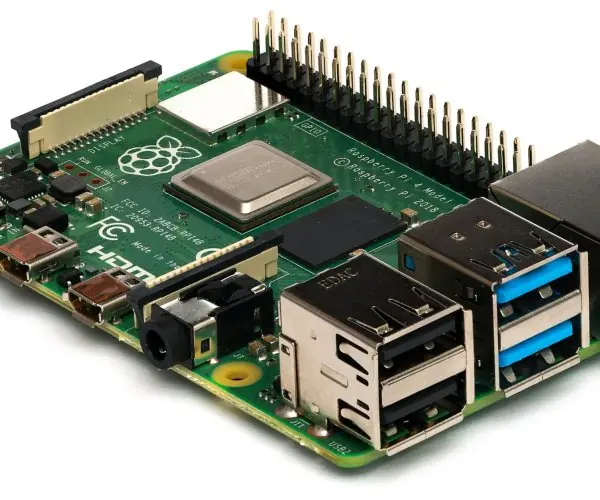
Examples: smart home (lights, thermostat), smart agriculture (soil-moisture sensors that trigger irrigation), health wearables, smart meters, vehicle tracking, industrial monitoring. Common hardware: Arduino, ESP32, Raspberry Pi.
Issues: security of cheap devices (default passwords make botnets), privacy of data collected at home, interoperability, power and connectivity.
7.5.1 Eight applications of the Internet of Things
- Smart homes. Wi-Fi bulbs, plugs, cameras and door locks are controlled from a phone, even from another city. Sensors switch lights off in an empty room and save electricity. A family in Kathmandu can check the front gate camera while at work.
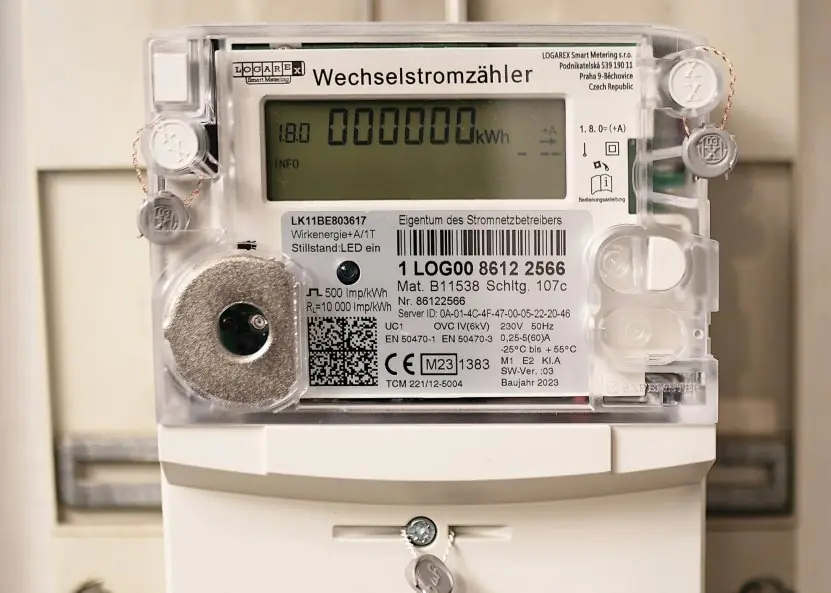
- Smart metering. A smart meter (Plate 7.2) records electricity use and sends it to the utility without a meter reader. Bills are accurate and faults or theft are found quickly. Nepal Electricity Authority has been moving towards such meters for large consumers.
- Agriculture. Soil-moisture and temperature sensors tell a farmer when to irrigate, and cold-store sensors guard vegetables and milk. Water is saved and crops are protected from stress. Tunnel farms in Nepal can use cheap Wi-Fi boards for this.
- Weather and disaster warning. Rain gauges and river-level sensors send readings to a server every few minutes. The Department of Hydrology and Meteorology uses such data for flood forecasts. Early warning gives villages time to move to safety.
- Healthcare. Wearable bands measure pulse and oxygen, and connected devices track blood sugar or blood pressure. The doctor sees a patient's readings without a visit. This helps old people and patients in remote hills.
- Industry and logistics. Sensors on machines predict a failure before it stops production, and GPS trackers show where each truck or parcel is. Fewer breakdowns and better delivery times follow. Many Nepali cargo and bus companies already use vehicle tracking.
- Smart cities and transport. Connected street lights, parking sensors, waste bins and traffic signals reduce cost and jams. A bin that reports when it is full saves needless collection trips. Such projects need reliable power and Internet to work.
- Security and safety. Smoke, gas and motion sensors send alarms to a phone. Cameras with motion detection record only when something moves. The risk is that weak default passwords let hackers take control, so devices must be updated and secured.
7.6 Big data
Big data is data too large, fast or varied for ordinary tools.
The classic description is the 3 Vs: Volume (terabytes to petabytes), Velocity (generated and processed in real time) and Variety (structured tables, semi-structured JSON, unstructured text, images, video); Veracity (data quality) and Value are often added.
Technologies: distributed storage and processing (Hadoop, Spark), NoSQL stores, data warehouses and lakes. Uses: recommendation, fraud detection, traffic and weather prediction, health analytics.
Issues: privacy, security, storage cost, and the risk of wrong conclusions from poor data. The BCA electives Data Mining and Data Warehouse and Business Intelligence extend this.
7.7 Cloud computing
Cloud computing delivers computing resources (servers, storage, databases, software) over the Internet on demand, billed by use, instead of owning them.
| Service model | You manage | Provider manages | Example |
|---|---|---|---|
| IaaS | OS, apps, data | servers, storage, network | AWS EC2, Azure VMs |
| PaaS | apps, data | OS, runtime, infrastructure | Google App Engine, Heroku |
| SaaS | just use it | everything | Gmail, Google Docs, Microsoft 365 |
Deployment models: public (shared, run by a provider), private (one organisation), hybrid (both), community. Features: on-demand self-service, broad network access, resource pooling, rapid elasticity, measured service.
Benefits: no upfront hardware cost, scale up and down, global access, built-in backup. Concerns: dependence on connectivity, data privacy and jurisdiction, vendor lock-in, outages.
Virtualisation (many virtual machines on one physical server) underlies it; edge computing processes data near its source to reduce delay. (Semester VIII: Cloud Computing.)

7.8 Blockchain and cryptocurrency
A blockchain is a shared, append-only ledger kept by many computers.
Transactions are grouped into blocks; each block stores a hash (a fixed-size fingerprint) of the previous block, so altering any old block changes every later hash and is detected.
A consensus rule (proof of work or proof of stake) decides who adds the next block, so no single authority is needed.
Uses: cryptocurrencies (Bitcoin, Ethereum), supply-chain tracing, land and academic-record verification, smart contracts.
Issues: energy use (proof of work), volatility and fraud in crypto markets, slow throughput, irreversible mistakes.
In Nepal, Nepal Rastra Bank has declared cryptocurrency trading illegal (2017 notice, reaffirmed since); learn the technology but follow the law.
7.8.1 Blockchain features and uses in brief
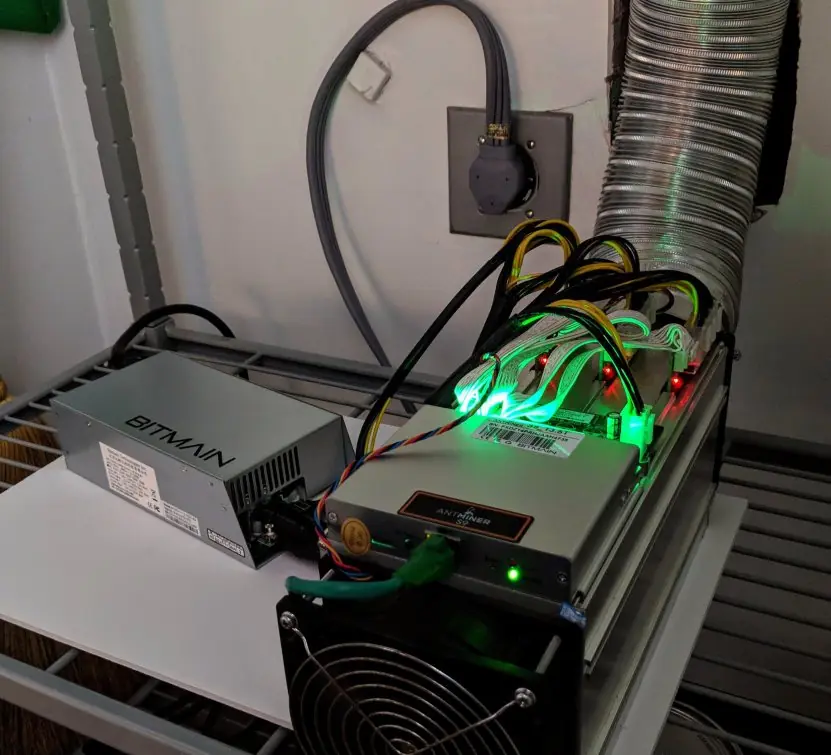
Blockchain is tamper-evident (Fig 7.5), shared (every node keeps a copy), transparent (rules and records can be checked) and slow and costly compared with a normal database (Plate 7.3).
Use it only where parties do not trust a single owner of the records; a college result database that one office controls does not need it.


7.9 Virtual, augmented and mixed reality; robotics; 5G
- Virtual reality (VR) immerses the user in a computer-generated world through a headset and motion tracking (training simulators, games, virtual field trips). Augmented reality (AR) overlays digital content on the real view (Pokémon Go, furniture preview in a phone camera, navigation arrows). Mixed reality lets virtual objects interact with the real ones.
- Robotics combines sensors, actuators and control software: industrial arms, surgical robots, drones, warehouse robots, agricultural robots. A robot senses → decides → acts.
- Drones (UAVs) are used for photography, surveying and delivery.
- 5G is the fifth cellular generation: higher speed (up to Gbps), very low latency (about 1 to 10 ms) and capacity for many devices. It enables remote surgery trials, IoT at scale and cloud gaming.
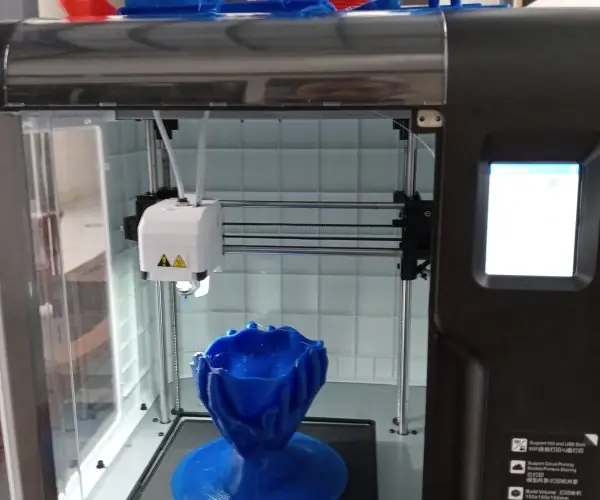
- 3D printing builds objects layer by layer from a digital model; quantum computing uses qubits that can be in superposition and may one day solve special problems (factoring, simulation) far faster; it is still experimental.
7.10 Green computing, e-waste and cyber ethics
Green computing is designing and using computers with less environmental harm: energy-efficient hardware, power management and sleep modes, virtualisation, cloud consolidation, recycling.
E-waste: discarded devices contain lead, mercury and cadmium; they must be recycled or refurbished, not burned or dumped. Extending a device's life is the greenest option.
Cyber ethics is acting responsibly online: respect for privacy, copyright and licences; no hacking or piracy; no cyberbullying or hate speech; honesty (no plagiarism, no fake news); protecting other people's data.
The digital footprint you leave (posts, searches, locations) is permanent in practice, so think before posting.
Digital divide: the gap between those who have access and skill and those who do not; closing it is a national task in Nepal (rural connectivity, community learning centres).
7.10.1 Eight ways to practise green computing
- Buy only what you need. A computer bought for 8 GB of work does not need a 64 GB machine. Fewer devices mean less metal mining and less waste. Colleges can plan purchases so that old labs are upgraded rather than replaced.
- Use power-saving settings. Sleep mode, a dark theme on OLED screens and an automatic screen timeout cut electricity use. A lab of fifty PCs left on overnight wastes many units. Switch off at the plug, since standby still draws power.
- Repair and upgrade. Adding RAM or an SSD can give an old laptop several more years. Cleaning dust and replacing a fan or battery is cheaper than a new laptop. Repair shops in Kathmandu's New Road and Putalisadak are part of this chain.
- Reuse and donate. Working computers can go to rural schools instead of a store room. Wipe personal data first with a proper erase tool. Sharing a printer and a projector in a department also saves resources.
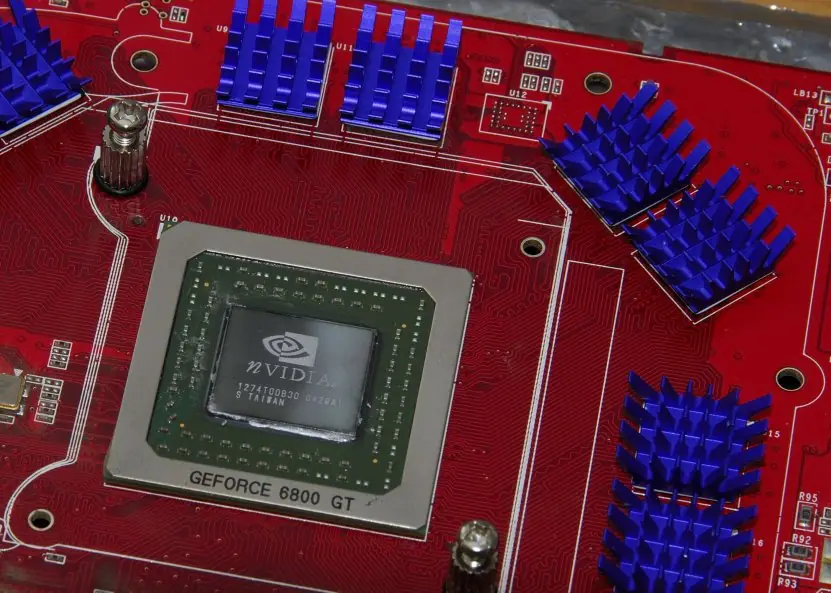
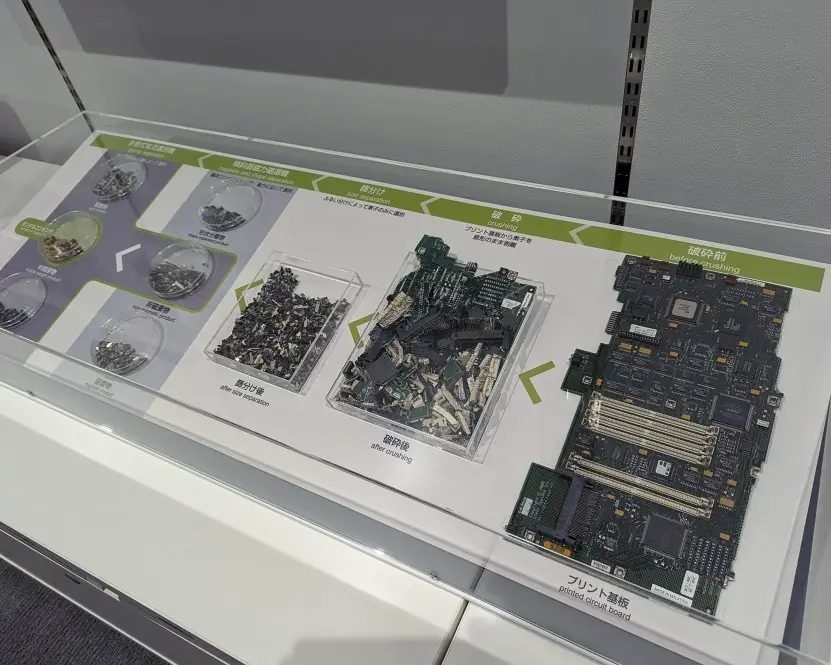
- Recycle through authorised handlers. E-waste contains lead, mercury, cadmium and brominated plastic, and also gold, copper and aluminium that can be recovered. Plate 7.4 shows an exhibit of a circuit board being dismantled into its materials. Give old devices only to collectors that recycle safely.
- Never burn or dump. Burning cables and plastic releases poisonous smoke, and dumped batteries pollute soil and water. Informal burning is common where collection is poor. Hand batteries and monitors to a proper collection point.
- Prefer efficient and long-life products. Look for low-power processors, LED monitors and devices with replaceable batteries. A product that lasts six years has half the footprint of one replaced every three. Energy labels help to compare models.
- Use shared and cloud services wisely. A well-run data centre uses power more efficiently than many small servers, and video calls at lower resolution save data and energy. Avoid keeping huge useless backups and mail archives. Nepal also uses hydropower, so the carbon cost of each unit is lower than in many countries.

Formula and fact sheet
- Image bytes = W × H × bits per pixel / 8. Audio rate = sample rate × bit depth × channels.
- 3 Vs of big data: volume, velocity, variety.
- IaaS / PaaS / SaaS; public / private / hybrid cloud.
- Supervised (labelled), unsupervised (unlabelled), reinforcement (rewards).
- E-commerce models B2C, B2B, C2C, C2B; e-governance G2C, G2B, G2G, G2E.
- Blockchain = linked blocks with hashes + consensus. Cryptocurrency trading is illegal in Nepal.
- IoT = sensors + connectivity + cloud + application. 5G = speed, low latency, many devices.
Chapter summary
- E-commerce and e-governance move trade and public service online; Nepali payment wallets and QR have made small payments digital.
- Multimedia is digitised media; compression (lossless or lossy) makes it practical.
- AI and ML learn from data; IoT collects data; big data and the cloud store and process it at scale.
- Blockchain provides a tamper-evident shared ledger; VR/AR, robotics and 5G extend where computing reaches.
- Every technology brings ethical and environmental responsibilities.
Practice
A. Short questions
- Define e-commerce. List its models with an example each.
- What is e-governance? Give four examples from Nepal.
- Differentiate lossy and lossless compression.
- Define AI, ML and deep learning.
- What is IoT? Name its four layers.
- What are the 3 Vs of big data?
- Differentiate IaaS, PaaS and SaaS.
- What is a blockchain?
- Differentiate VR and AR.
- What is e-waste? How can it be reduced?
B. Numerical problems
- Find the uncompressed size in MiB of a 1280 × 720 image with 24-bit colour.
- How many bytes does 3 minutes of mono audio at 44.1 kHz, 16-bit need?
- An MP3 is 4 MiB and plays for 4 minutes. Find its average bit rate in kbps.
C. Long questions
- Explain cloud computing with its service and deployment models.
- Discuss the benefits and challenges of e-governance in Nepal.
- Explain how machine learning differs from conventional programming, with examples of its three types.
- Explain blockchain and show how it makes records tamper-evident.
- Write short notes on green computing and e-waste management. (5 marks)
Answers and worked solutions
1. E-commerce is trading through electronic networks. B2C (Daraz), B2B (supplier portal), C2C (Hamrobazar), C2B (freelancing).
2. Use of ICT in government services. Online income-tax filing, company registration, passport/licence appointments, national ID.
3. Lossless recovers the original exactly (ZIP, PNG); lossy discards less-noticeable detail for smaller files (JPEG, MP3).
4. AI: machines performing tasks needing intelligence; ML: learning patterns from data; deep learning: ML with multi-layer neural networks.
5. Network of sensor-equipped connected objects. Layers: sensing devices, connectivity, cloud/analytics, application.
6. Volume, velocity, variety.
7. IaaS rents infrastructure (virtual servers); PaaS gives a platform to run your applications; SaaS provides ready software over the web.
8. A distributed, append-only ledger of blocks linked by hashes and maintained by consensus, making tampering evident.
9. VR replaces the real world with a virtual one; AR adds virtual content to the real world.
10. Discarded electronics containing toxic metals. Reduce by repair, reuse, refurbishing and certified recycling.
11. 1280 × 720 × 3 = 2,764,800 bytes ≈ 2.64 MiB.
12. 44,100 × 2 bytes × 180 s = 15,876,000 bytes ≈ 15.1 MiB.
13. 4 MiB = 4 × 1,048,576 × 8 = 33,554,432 bits; over 240 s = 139,810 bps ≈ 140 kbps.
14. Definition, five features, IaaS/PaaS/SaaS table, deployment models, benefits and concerns (§7.7).
15. Use §7.2: benefits (transparency, speed, cost, 24×7) and barriers (digital divide, security, infrastructure, skills).
16. Conventional programming: rules + data → answers. ML: data + answers → rules (a model). Supervised: spam filter; unsupervised: customer clustering; reinforcement: game agent.
17. A chain of blocks, each storing the hash of the previous block, copied on many nodes and extended by consensus (Fig 7.5, Plate 7.3).
18. Reduce, repair, reuse, recycle, dispose safely (Plate 7.4); the model answer follows.
Model answers: medium (5 marks) and long (10 marks) questions
Medium question (5 marks)
Q10. Explain the Internet of Things (IoT) with its layers and applications. (5 marks)
The Internet of Things is a network of physical objects with sensors, small processors and network connections that collect and exchange data without human typing (Plate 7.1).
- Sensing layer: sensors and actuators (temperature, motion, soil moisture, GPS) such as the PIR sensor in Plate 7.1.
- Network layer: Wi-Fi, Bluetooth, LoRa, 4G/5G or Ethernet carries the readings.
- Gateway/edge: a small computer such as a Raspberry Pi filters data and forwards it.
- Cloud/data layer: servers store and analyse the data.
- Application layer: dashboards, mobile apps and automatic actions.
| Domain | Nepali example |
|---|---|
| Agriculture | soil-moisture sensors that control irrigation in Terai farms |
| Smart home | motion light, smart meter of the electricity authority |
| Health | wearable heart-rate bands |
| Transport | GPS tracking of buses and ambulances |
| Environment | air-quality monitors in Kathmandu Valley |
Challenges. Weak device security, privacy, battery life, poor connectivity and standards. Example. A farmer's sensor sends moisture data through a gateway to the cloud, and the app starts the pump when the soil is dry.
Q18. Write short notes on green computing and e-waste management. (5 marks)
Green computing means designing, buying, using and disposing of computers so that they harm the environment as little as possible. It aims to save energy, reduce material use and keep poisonous waste out of soil and water.
- Energy saving: sleep mode, automatic screen timeout, efficient processors and LED screens reduce the electricity bill and carbon release. Switching off a lab at night saves many units.
- Longer life: adding RAM or an SSD, replacing a battery or fan and cleaning dust keeps a computer useful for years; a product used for six years has half the footprint of one replaced every three.
- Cloud and virtualisation: one well-run server shared by many users wastes less power than many idle machines.
E-waste is discarded electronic equipment: computers, phones, batteries, cables and monitors. It holds hazardous lead, mercury, cadmium and brominated plastics, but also valuable gold, copper and aluminium. Burning or dumping it poisons people and land.
| Step | Action | Example |
|---|---|---|
| Reduce | buy only what is needed | one shared printer |
| Repair, reuse | upgrade, donate | old lab PCs to a rural school |
| Recycle | authorised plant recovers metals | Plate 7.4 |
| Dispose | safe landfill or treatment only | batteries at collection points |
Example. A campus lab that replaces forty old PCs should first wipe the data, donate the working ones, and give the rest to a recycler, never to open burning.
Long question (10 marks)
Q14. Explain cloud computing with its service and deployment models. (10 marks)
Introduction. Cloud computing is the delivery of computing resources (servers, storage, databases, software) over the Internet on demand, usually paid by use.
NIST lists five characteristics: on-demand self-service, broad network access, resource pooling, rapid elasticity and measured service.
Service models (Figure 7.1)
- IaaS (Infrastructure as a Service): the provider gives virtual machines, storage and networks; the customer installs the OS and applications. Example: AWS EC2, Azure VM.
- PaaS (Platform as a Service): the provider gives the OS and runtime; the customer deploys only code and data. Example: Google App Engine, Heroku.
- SaaS (Software as a Service): ready-made software used through a browser. Example: Gmail, Google Docs, Microsoft 365.
Deployment models
- Public cloud: shared infrastructure owned by a provider (AWS, Azure, Google Cloud). Cheap and scalable.
- Private cloud: used by one organisation, in its own or hired data centre. More control and security, higher cost.
- Hybrid cloud: public and private clouds joined together; sensitive data stays private while peak load goes public.
- Community cloud: shared by organisations with common needs, such as several banks or universities.
| Model | Customer manages | Example |
|---|---|---|
| IaaS | OS, runtime, data, app | virtual server |
| PaaS | data and app | app platform |
| SaaS | only own data and settings | webmail |
Benefits. Low start-up cost, elasticity, access from anywhere, automatic backup and updates. Challenges. Internet dependence, data privacy and legal location of data, vendor lock-in and security responsibility.
Nepali example. A college hosts its results portal on a cloud VM (IaaS), uses Google Workspace for email (SaaS), and scales servers up during results week.
Conclusion. Cloud computing turns computing into a utility. The service model decides how much work the customer keeps, and the deployment model decides who shares the infrastructure.
Q15. Discuss the benefits and challenges of e-governance in Nepal. (10 marks)
Introduction. E-governance is the use of ICT by government to deliver services, share information and involve citizens. Its models are G2C, G2B, G2G and G2E (Figure 7.3).
Nepal's Digital Nepal Framework, the National ID project, the Nagarik App and the Electronic Transactions Act 2063 support it.
Benefits
- Transparency: online records and tracking reduce hidden decisions and bribery.
- Saves time and cost: a citizen applies for a PAN or driving-licence service online instead of travelling to several offices.
- Efficiency: shared data (G2G) avoids repeated forms and speeds up approvals.
- Wider access: remote districts can use services through mobile phones and common service centres.
- Accountability: every action is logged and signed with a digital signature (Figure 7.2).
- Revenue: online tax filing and customs systems increase collection.
Challenges
- Digital divide: low internet access, cost and digital literacy in rural areas.
- Security and privacy: large national databases attract hackers and need strong law and encryption.
- Infrastructure and power: unreliable electricity and network links.
- Legacy processes and resistance: paper rules, staff skills and lack of interoperability between offices.
| Aspect | Benefit | Challenge |
|---|---|---|
| Citizens | fast, cheap service | no device or skill |
| Government | efficiency, revenue | cost, staff training |
| Data | one source of truth | privacy and breaches |
Examples in Nepal. Online vehicle tax, Nagarik App documents, Inland Revenue return filing, customs clearance, and the Sutra payroll system.
Conclusion. E-governance makes services faster and more transparent. Its success in Nepal depends on connectivity, training, privacy law and trust.
Q16. Explain how machine learning differs from conventional programming, with examples of its three types. (10 marks)
Introduction. In conventional programming a human writes the rules; the program applies the rules to data and gives answers. In machine learning (ML) the computer receives data and answers, and it finds the rules itself. The learned rules are called a model.
| Basis | Conventional programming | Machine learning |
|---|---|---|
| Input | data and rules | data and expected answers |
| Output | answers | rules (model) |
| Rules written by | programmer | algorithm from examples |
| Suitable for | clear fixed logic (payroll) | patterns too complex to write (faces, speech) |
| Changes | edit the code | retrain with new data |
| Example | tax calculator | spam filter |
Three types of machine learning
- Supervised learning: learns from labelled examples. Classification predicts a category (spam or not spam, pass or fail); regression predicts a number (house price). Example: predicting whether a student will pass from attendance and marks.
- Unsupervised learning: finds structure in unlabelled data. Clustering groups similar items; association finds items bought together. Example: grouping customers of a Kathmandu supermarket by buying habits.
- Reinforcement learning: an agent acts in an environment and receives rewards or penalties, learning the best policy by trial and error. Example: a robot learning to walk, or a game-playing program.
Workflow. Collect data, clean it, split into training and test sets, train a model, evaluate accuracy, deploy and monitor. A model that memorises the training data is overfitted and fails on new data.
Applications. Nepali-language speech recognition, crop-disease detection from photographs, credit scoring and fraud detection in banks, and recommendations on video sites.
Conclusion. Machine learning replaces hand-written rules by rules learned from data. Supervised, unsupervised and reinforcement learning cover prediction, discovery and decision-making, and all depend on good-quality data.
Q17. Explain blockchain and show how it makes records tamper-evident. (10 marks)
Introduction. A blockchain is a shared, append-only record (ledger) kept as a chain of blocks. Each block holds a batch of transactions and the hash of the previous block.
The same copy is stored on many computers (nodes) with no central owner, which makes it the base technology of cryptocurrencies such as Bitcoin and is tried for land records, supply chains and certificates.
- Block structure: a block has data (for example, Sita pays Ram Rs 500), the previous block's hash, a timestamp and its own hash (Figure 7.5, panel A).
- Hash function: SHA-256 turns any input into a fixed-length digest. A tiny change in the input produces a completely different hash, and the input cannot be recovered from the hash.
- Linking: because each block stores the hash of the one before it, changing an old block changes its hash and breaks the stored link in the next block (panel B).
- Distributed copies: every node holds the chain and checks every new block, so one cheating node is outvoted by the honest majority.
- Consensus: nodes agree on the next block. In proof of work, miners search for a number (nonce) that makes the block hash start with a required number of zeros. The measured searches in Plate 7.3 needed 30, 61, 1,840, 60,091 and 552,177 hashes for one to five zeros, so each extra zero is about 16 times more work. In proof of stake, validators who lock coins are chosen instead, which uses far less electricity.
- Cryptography of ownership: a user signs a transaction with a private key, and everyone verifies it with the public key; no bank is needed to approve it.
- Smart contracts: programs stored on the chain run automatically when conditions are met, for example releasing a payment when a delivery is confirmed.
- Types: public (Bitcoin, Ethereum), private (one organisation) and consortium (a group of institutions).
| Point | Blockchain | Central database |
|---|---|---|
| Control | shared by nodes | one owner |
| Editing old records | very hard to hide | easy for the administrator |
| Speed and cost | slow, costly | fast, cheap |
| Trust needed | in the rules and majority | in the owner |
Limitations. Mining wastes energy, transactions are slow, records cannot easily be corrected, and cryptocurrency prices are volatile.
Nepal Rastra Bank does not recognise cryptocurrency as legal tender, so students should treat it as a technology topic and not an investment.
Conclusion. Blockchain gives tamper-evident records without a trusted middleman by combining hashes, copies on many nodes and consensus.
It is useful where several parties distrust a single record keeper, and unnecessary where one trusted office can keep a normal database.