Unit 6 · 6 teaching hours · 30 min read
Internet and the World Wide Web
What the syllabus asks for 6
- The Internet: history and structure
- Names, addresses and the journey of a web page
- The World Wide Web
- Internet services
- Security and safe use
- Eight uses of the Internet in Nepal
The Internet is the global network of networks; the World Wide Web is one service that runs on it.
People often use the words interchangeably, but the difference matters: email, video calls and online games use the Internet without using the Web.
This unit explains how the Internet is organised, how a web page reaches your screen, and how to use and protect yourself on it.
- History, structure and ISPs; the Internet versus the Web.
- URLs, DNS and HTTP: exactly what happens when you open a page.
- Browsers, search engines, email and other services.
- Web generations, intranet/extranet, and how a web page is built.
- Security threats, safe practices, and Nepal's legal context.
6.1 The Internet: history and structure
| Year | Milestone |
|---|---|
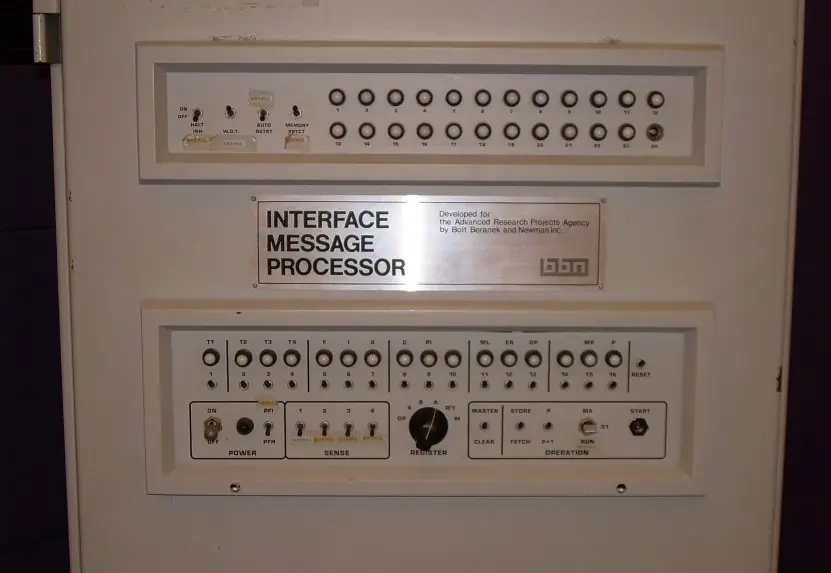
| 1969 | ARPANET connects four US universities (packet switching) |
| 1971 | first email (Ray Tomlinson, the @ sign) |
| 1983 | ARPANET switches to TCP/IP, the birth of "the Internet" |
| 1989–91 | Tim Berners-Lee at CERN proposes and builds the World Wide Web: HTML, HTTP, URL, first browser |
| 1993 | Mosaic, the first widely used graphical browser |
| 1998 | Google founded |
| 2004–2007 | social media (Facebook), smartphones (iPhone, 2007): Web 2.0 on mobile |
Nepal's first public email and Internet services appeared in the mid-1990s, and today broadband (fibre and wireless) and mobile data are the main access methods.
Structure. The Internet has no owner.
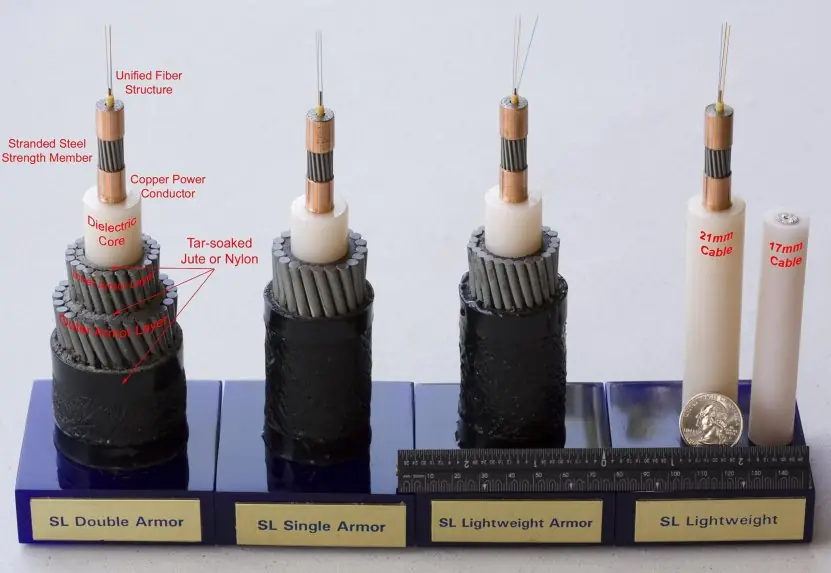
It is a hierarchy: Tier-1 carriers own global backbones and exchange traffic freely; Tier-2/3 ISPs buy transit and connect homes, colleges and businesses; IXPs (Internet exchange points) let networks swap traffic locally.
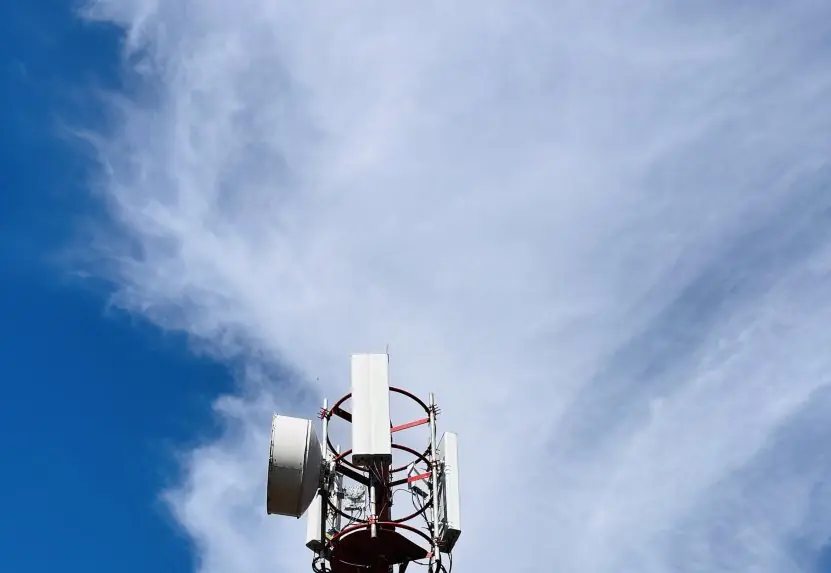
An ISP (Internet service provider) gives you access: dial-up (obsolete), ADSL, cable, FTTH (fibre to the home), wireless/WiMAX, mobile 4G/5G, VSAT satellite.
| Access technology | Typical speed | Note |
|---|---|---|
| Dial-up | ≤ 56 kbps | obsolete, blocks the phone line |
| ADSL | a few Mbps | over copper telephone line |
| FTTH | 50 Mbps to 1 Gbps | optical fibre to the building |
| 4G LTE / 5G | tens to hundreds of Mbps | mobile |
| VSAT | few Mbps, ~600 ms round trip | remote areas |
6.1.1 Eight features of the Internet
- Global reach. The Internet connects billions of devices in almost every country, so a student in Biratnagar can open the same website as a student in Boston. Distance changes only the delay, not the access. Nepali families abroad use it every day to talk to relatives in Nepal at almost no cost.
- Decentralised and ownerless. No single company or government runs the whole Internet; thousands of independent networks agree to exchange traffic. If one network fails, others carry on. In Nepal this shows in the many ISPs and mobile operators that interconnect at local exchange points.
- Packet switching. Data is cut into small packets that travel separately and are put back together at the destination. Links are shared by many users, which makes the network cheap and efficient. A video call from Pokhara to Kathmandu is therefore thousands of small packets, not one reserved circuit.
- Common open protocols. TCP/IP, DNS, HTTP and SMTP are public standards, so a phone, a laptop and a bank server from different makers can understand each other. Anyone may build a new service on them without asking permission. This openness is why ConnectIPS and Fonepay apps work on any Android or iPhone.
- Scalability. The same design has grown from four computers in 1969 to billions of devices, and IPv6 provides about 3.4 x 10^{38} addresses for future growth. New users and networks simply plug in. Nepal's mobile data users grew from almost none to millions in about fifteen years on this principle.
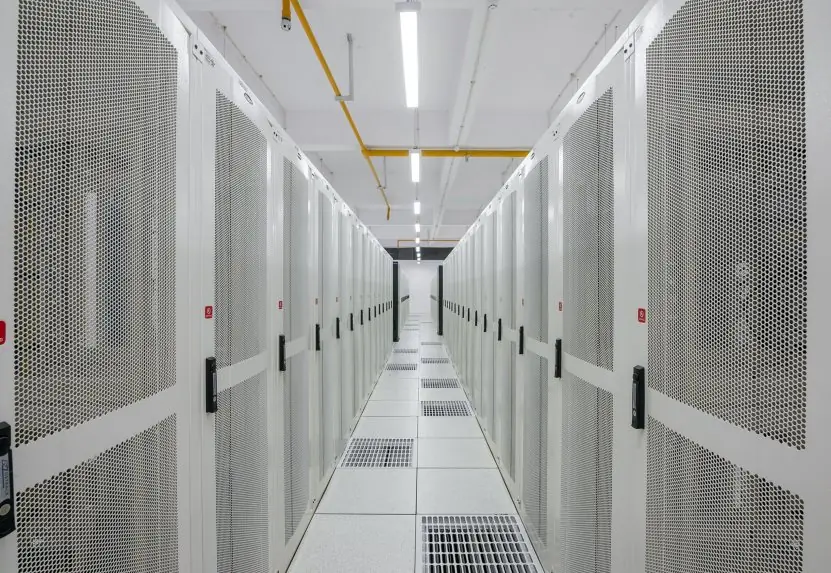
- Reliability through redundancy. Routers choose another path when a link breaks, and big sites keep copies in several data centres. Nepal links to the world through more than one border route, so a cut on one route does not stop all Internet traffic. A good design hides failures from the user.
- Many services in one network. Web, email, voice, video, file transfer, online games and the Internet of Things all use the same infrastructure. One broadband line can carry a Google Classroom lesson, a Viber call and a Netflix film at the same time. Multimedia makes the Internet useful for study, work and entertainment.
- Low cost and resource sharing. Information, software and storage are shared instead of being duplicated, and messages cost almost nothing compared with letters or phone calls. A college can serve notices, results and library books to thousands of students from one server. Cloud services such as Google Drive remove the need to buy expensive hardware.
6.2 Names, addresses and the journey of a web page
- IP address: the numeric address of a host (
142.250.77.46). Machines use it; people do not remember it. - Domain name: a readable name arranged right to left from the top-level domain (TLD):
www.tu.edu.np→.np(country TLD) →edu.np(education) →tu(organisation) →www(host). Generic TLDs:.com,.org,.net; Nepal's:.com.np,.edu.np,.gov.np,.org.np. - DNS (Domain Name System) is a distributed directory that translates names to IP addresses.
- URL = protocol + host + path + query + fragment:
https://www.example.com:443/notes/unit6.html?lang=en#dns
\___/   \_____________/ \_/ \______________/ \_____/ \_/
scheme      host       port      path        query  fragment
What happens when you type a URL and press Enter
- The browser checks its cache, then asks the OS resolver, then your ISP's recursive DNS server.
- If unknown, that server asks a root server → the TLD server (
.com) → the site's authoritative server, which returns the IP address. The answer is cached for its time-to-live. - The browser opens a TCP connection to the IP on port 443 (three-way handshake), then a TLS handshake to encrypt it (for HTTPS).
- It sends an HTTP request:
GET /notes/unit6.html HTTP/1.1plus headers (Host, cookies, User-Agent). - The web server returns a response: a status line, headers, and the HTML body.
- The browser parses the HTML, requests the CSS, JavaScript and images it refers to, lays out the page and shows it.
HTTP methods: GET (read), POST (send/create), PUT (replace), DELETE (remove). Status codes: 200 OK, 301 moved permanently, 304 not modified, 400 bad request, 401 unauthorised, 403 forbidden, 404 not found, 500 server error.
HTTP is stateless: the server does not remember you between requests, which is why cookies (small pieces of data the browser sends back) and sessions exist.
HTTPS is HTTP over TLS: it encrypts traffic and uses a certificate to prove the site's identity. The padlock means the connection is encrypted, not that the site is honest.


6.3 The World Wide Web
The Web is a system of linked hypertext documents. Its three pillars: HTML (structure), HTTP (transfer), URL (naming).
A web page is one document; a website is a collection; a web server (Apache, Nginx) serves them; a browser (Chrome, Firefox, Edge, Safari) fetches and renders them.
A minimal HTML page:
<!DOCTYPE html>
<html>
  <head><title>My first page</title></head>
  <body>
    <h1>Namaste</h1>
    <p>Read the <a href="https://www.tu.edu.np">TU site</a>.</p>
  </body>
</html>
- Static pages are the same for every visitor; dynamic pages are generated by server code (PHP, Node.js, Python) from a database. CSS styles pages; JavaScript adds behaviour in the browser.
- Web 1.0 (read-only pages), Web 2.0 (user-generated content, social media, interactive apps), Web 3.0 (semantic web and decentralised/blockchain ideas; still emerging and debated).
- Search engines (Google, Bing) work in three steps: crawl (bots follow links), index (store words per page) and rank (order results by relevance and link authority). Good queries use quotes for exact phrases,
site:tu.edu.npto limit a domain, and-wordto exclude. - Intranet: a private network inside an organisation using web technology; extranet: part of it opened to partners; the deep web is content not indexed (your email inbox); the dark web needs special software (Tor) and is a tiny part of it.
6.4 Internet services
| Service | Protocol | Notes |
|---|---|---|
| SMTP sends, POP3 downloads, IMAP syncs | address user@domain; fields To, Cc, Bcc, Subject, attachments |
|
| File transfer | FTP / SFTP | bulk upload and download |
| Remote login | SSH (Telnet is obsolete) | control a distant computer securely |
| VoIP and video calls | SIP, WebRTC | Zoom, Meet, Messenger |
| Streaming | HTTP adaptive streaming | YouTube, Netflix |
| Messaging and social media | proprietary | WhatsApp, Viber, Facebook |
| Cloud storage and apps | HTTPS | Google Drive, OneDrive |
| Online learning (e-learning) | HTTPS | Moodle, Google Classroom |
Email etiquette (also asked in Professional Communication): meaningful subject line, polite greeting, short paragraphs, check attachments before sending, use Cc only for people who need to know and Bcc to protect addresses, never send passwords.
6.5 Security and safe use
| Threat | What it is | Defence |
|---|---|---|
| Malware (virus, worm, trojan, ransomware, spyware) | harmful software; ransomware encrypts files for payment | updates, antivirus, no cracked software |
| Phishing | fake email or site that steals passwords | check the sender and URL, never click unexpected links |
| Spam | unsolicited bulk email | filters |
| Hacking / brute force | breaking into accounts | strong unique passwords, two-factor authentication |
| Man-in-the-middle | eavesdropping on traffic, e.g. on open Wi-Fi | HTTPS, VPN |
| DoS / DDoS | flooding a service so it fails | filtering, CDNs |
| Identity theft, cyberbullying, online fraud | misuse of personal data | share less, report quickly |
Good habits: a long passphrase per account (a password manager helps), 2FA on email and banking, installing updates, backups (the 3-2-1 rule: 3 copies, 2 media types, 1 off-site), checking the real URL before login.
Firewall: a filter between networks that allows or blocks traffic by rule. Encryption: scrambling data so only the key holder can read it. Digital signature: proves who sent a message and that it was not altered.
Legal and ethical context in Nepal. The Electronic Transactions Act, 2063 (BS) recognises electronic records and digital signatures and defines computer-related offences such as hacking, publishing illegal material and unauthorised access; the Cyber Bureau of Nepal Police investigates cybercrime.
Copyright law protects software and online content. Treat these as the starting point; your Professional Communication and Ethics and Cyber Security subjects return to them.
6.5.1 Eight habits that stop most attacks
- Use a long, unique passphrase for every account. A passphrase of four or five random words is easy to remember and very hard to guess. If one site is hacked, the same password must not unlock your email or bank. A password manager can store them safely.
- Switch on two-factor authentication (2FA). After the password, the service asks for a one-time code or an app approval. Even a thief who knows your password cannot enter without your phone. Use it on email, eSewa, Khalti and mobile banking first.
- Install updates quickly. Updates close security holes that attackers already know about. Many ransomware attacks succeed only on computers that missed an update for months. Turn on automatic updates for the operating system, browser and phone apps.
- Run antivirus and avoid cracked software. Pirated games and "free" activators are the commonest way for trojans to enter a PC. Install programs only from the official site or app store. A good antivirus scans downloads and warns before you open a dangerous file.
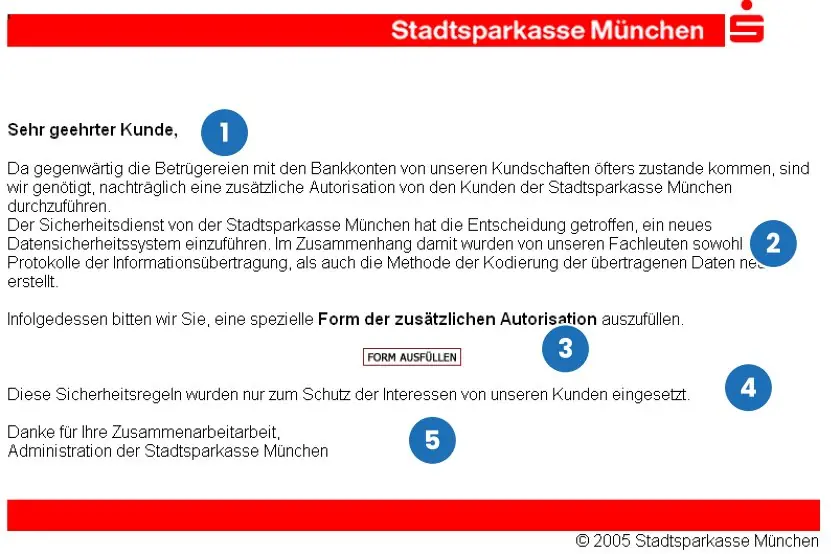
- Check the real address before you log in. Read the host part of the link and type the bank address yourself or use a saved bookmark. The padlock only means the connection is encrypted, not that the owner is honest. Fig 6.4 shows how a fake host is spotted.
- Be careful on public Wi-Fi. Anyone on an open network may try to watch or change your traffic. Use HTTPS sites only, avoid banking on open Wi-Fi, and use a VPN when you must. Your own mobile data is safer in a cafe or bus park.
- Keep backups using the 3-2-1 rule. Keep three copies of important files, on two kinds of media, with one copy off-site, such as cloud storage. Ransomware then cannot hold your project or thesis hostage. Test a restore once, because an untested backup may be useless.
- Think before you share, and report quickly. Do not post citizenship numbers, OTPs or photos of cards; they help criminals. If you are cheated or harassed online, keep screenshots, change passwords and report to the Cyber Bureau of Nepal Police. Fast reporting helps to block money transfers and stop the spread.


6.6 Eight uses of the Internet in Nepal

- Communication. E-mail, Viber, Messenger and video calls let people talk across the world for the price of data. Families of Nepali workers in the Gulf, Malaysia and Korea depend on them. Colleges and offices also use e-mail and group chats for notices.
- Education. Students use Google Classroom, Zoom, YouTube lessons and online libraries, and campuses publish results and notices on websites. During the COVID-19 lockdown, schools and Tribhuvan University campuses moved many classes online. The Internet also gives rural students access to books that their library does not hold.
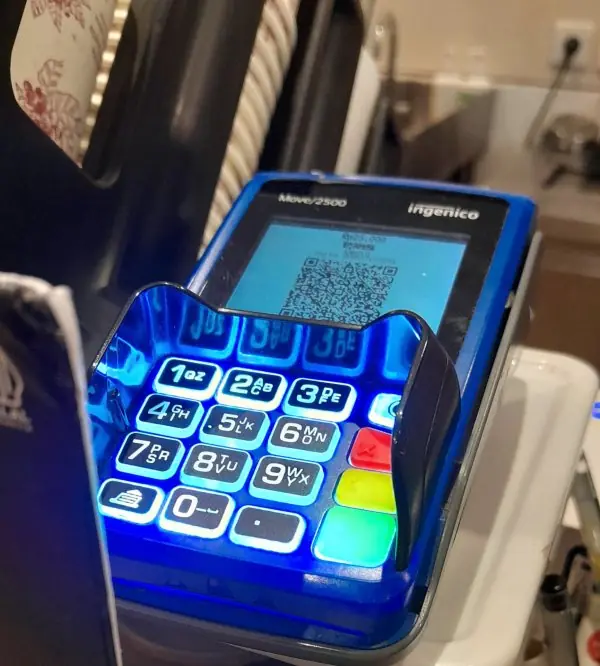
- Digital payments and banking. ConnectIPS, Fonepay QR, eSewa, Khalti and mobile banking allow bill payment, transfers and shopping without cash. A shopkeeper in a small town can accept a QR payment with just a phone. Every transaction travels over HTTPS and needs a PIN or OTP.
- E-governance. Citizens use the Nagarik App, online tax filing with the Inland Revenue Department, and online forms for passport and driving-licence services. This saves travel and reduces queues and middlemen. Government sites also publish budgets, notices and tender information.
- E-commerce and online services. Daraz, Foodmandu, Pathao and many Facebook shops sell goods and services online. Buyers compare prices and read reviews before paying, and sellers reach customers beyond their own city. Cash on delivery and QR payment both help trust.
- Health. Hospitals post timetables, book appointments and deliver reports online, and telemedicine links a village health post with a specialist in the city. Patients read reliable advice from the Ministry of Health and WHO sites. Wrong medical advice online is also a risk, so sources must be checked.
- Maps, GIS and navigation. Google Maps and OpenStreetMap guide drivers and delivery riders, and volunteers mapped damaged areas of Kathmandu Valley after the 2015 earthquake. GIS layers of rivers, roads and land use help planners. A GPS receiver such as Fig 6.3(b) needs the Internet only for map data, not for the satellite signal.
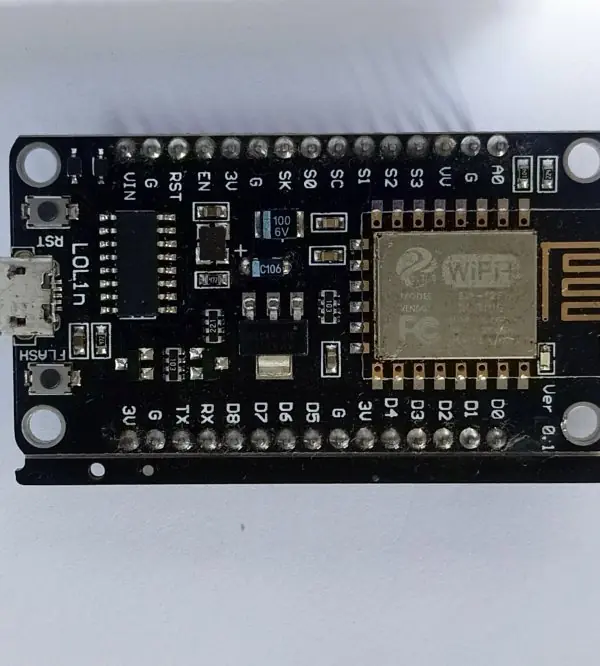
- Internet of Things and monitoring. Small Wi-Fi or mobile boards, like the one in Fig 6.3(a), read sensors and send the data to a server. Examples include rainfall and river-level gauges, smart meters, cold-storage temperature and school attendance. The Department of Hydrology and Meteorology publishes weather and flood information online for the public.
Formula and fact sheet
- Internet = network of networks; Web = a service (HTML + HTTP + URL).
- DNS: root → TLD → authoritative; cached by TTL.
- URL = scheme://host:port/path?query#fragment.
- HTTP 200 OK, 301 moved, 403 forbidden, 404 not found, 500 server error. HTTP is stateless; cookies add state.
- HTTPS = HTTP + TLS (encryption + identity).
- Email: SMTP out, POP3/IMAP in. Search engine: crawl → index → rank.
- 3-2-1 backup; two-factor authentication.
Chapter summary
- The Internet grew from ARPANET; the Web was added by Tim Berners-Lee around 1990.
- DNS turns names into IP addresses; HTTP/HTTPS carries requests and responses over TCP.
- Browsers render HTML, CSS and JavaScript; search engines crawl, index and rank.
- Email, VoIP, streaming and cloud services all ride on the Internet.
- Malware, phishing and weak passwords are the commonest threats; encryption, updates, 2FA and caution are the commonest defences.
- Bandwidth sets how fast bulk data moves; distance sets the delay (a geostationary satellite adds about 0.48 s of round trip).
- Nepal's main Internet uses: communication, education, payments, e-governance, e-commerce, health, maps and IoT.
Practice
A. Short questions
- Differentiate the Internet and the World Wide Web.
- What is an ISP? Name four access technologies.
- What does DNS do? Name the parts of the URL
https://www.tu.edu.np/exam?year=2082. - What is the difference between HTTP and HTTPS?
- What is a cookie? Why does HTTP need cookies?
- Differentiate POP3 and IMAP.
- What is phishing? How can it be recognised?
- Differentiate intranet and extranet.
B. Problems
- List the steps from typing
www.example.comto the page appearing. - A page makes 1 HTML request and 20 resource requests; each needs 80 ms of latency and 6 requests run in parallel at a time. Estimate the minimum load time of the resource phase.
- Write the HTML for a page with a heading, a paragraph and a link.
C. Long questions
- Explain how a search engine works.
- Discuss the common internet security threats and the measures against them.
- Compare Web 1.0, 2.0 and 3.0.
- Discuss the applications of the Internet with examples from Nepal.
Answers and worked solutions
1. The Internet is the physical and logical network of networks; the Web is a service on it that serves linked hypertext pages. Email and VoIP use the Internet but not the Web.
2. An ISP provides Internet access. ADSL, FTTH, 4G/5G, VSAT (also cable, wireless).
3. DNS translates names to IP addresses. Scheme https, host www.tu.edu.np (TLD .np), path /exam, query year=2082.
4. HTTPS encrypts HTTP using TLS and authenticates the server with a certificate.
5. A small data item stored by the browser and sent with later requests; HTTP is stateless, so cookies keep login sessions and preferences.
6. POP3 downloads mail to one device (usually deleting it from the server); IMAP keeps mail on the server and syncs all devices.
7. Phishing is a fake message or site that tricks you into giving credentials. Check the sender address, mismatched or misspelt URLs, urgency, and unexpected attachments or login requests.
8. An intranet is private to one organisation; an extranet gives selected outsiders (partners, suppliers) access to part of it.
9. The six steps of §6.2.
10. 20 requests in groups of 6 give ⌈20 / 6⌉ = 4 rounds; 4 × 80 = 320 ms (ideal).
11. See the HTML example of §6.3.
12. Crawl → index → rank; mention bots, inverted index, relevance and link analysis.
13. Table of §6.5.
14. Web 1.0 read-only static pages; Web 2.0 interactive, user-generated, social; Web 3.0 semantic/decentralised, with data meaning understood by machines.
15. The eight uses of §6.6: communication, education, payments, e-governance, e-commerce, health, GIS and IoT, each with a Nepali example.
Model answers: medium (5 marks) and long (10 marks) questions
Medium question (5 marks)
Q9. List and explain the steps from typing www.example.com to the page appearing. (5 marks)
- Cache check: the browser and operating system look for a saved IP address of the name. If none is found, a request goes to the DNS resolver of the ISP (Figure 6.1).
- DNS lookup: the resolver asks a root server, then the TLD server (
.com), then the authoritative server, which returns the IP address. The answer is cached for its time-to-live. - TCP connection: the browser opens a connection to port 443 using a three-way handshake (SYN, SYN-ACK, ACK) (Figure 6.2).
- TLS handshake: the server sends its certificate; the browser checks it and both sides agree on a session key, so everything after is encrypted (HTTPS).
- HTTP request: the browser sends
GET /and the server replies with200 OKand the HTML. - Rendering: the browser reads the HTML, requests the CSS, images and scripts, and draws the page.
| Step | Protocol | Result |
|---|---|---|
| Name to address | DNS (UDP 53) | IP address |
| Connect | TCP | reliable channel |
| Secure | TLS | encrypted session |
| Fetch | HTTP | HTML page |
Example. Opening a bank's internet-banking page in Kathmandu follows exactly these steps; the padlock in the address bar shows that the TLS step succeeded.
Long questions (10 marks)
Q12. Explain how a search engine works. (10 marks)
Introduction. A search engine (Google, Bing) is a web application that finds pages related to a user's words from billions of pages in a fraction of a second. It does this by preparing the answers in advance, in three main stages.
- Crawling: programs called crawlers (spiders, bots) start from known URLs, download each page and follow its links to discover new pages. A
robots.txtfile tells them which parts to skip. - Indexing: the engine analyses each page (words, title, headings, links, language, images) and stores it in an inverted index: for every word, a list of the pages containing it. Looking up a word becomes as fast as looking up a book's index.
- Query processing: the query is cleaned (lower case, spelling correction, stop words removed) and matched with the index to find candidate pages.
- Ranking: the candidates are scored by relevance (words in the title and body), authority (the PageRank idea that links from good pages count more), freshness, speed, mobile friendliness and user location.
- Results page: the top results are shown with title, URL and a snippet, plus ads, maps and images.
- Feedback: clicks and time spent improve later ranking.
- SEO: website owners improve titles, content and speed to rank higher; dishonest tricks are penalised.
| Stage | Input | Output |
|---|---|---|
| Crawl | URL list | raw pages |
| Index | raw pages | inverted index |
| Rank | query + index | ordered list |
Example. Searching "BCA entrance model question" returns Nepali college and notes sites because their pages contain those words and are linked from other sites.
Conclusion. A search engine is fast because crawling and indexing are done before the user searches; only matching and ranking happen at query time.
Q13. Discuss the common internet security threats and the measures against them. (10 marks)
Introduction. The Internet connects strangers, so data, money and identity are targets. Threats are matched by technical and human safeguards.
- Malware: viruses, worms, trojans, ransomware and spyware. Measure: antivirus, updates, no cracked software.
- Phishing: fake emails, SMS or sites that steal passwords. Measure: check the URL, never share OTPs, use two-factor authentication.
- Identity theft and social engineering: attackers trick people into revealing data. Measure: privacy settings, verify callers.
- Denial of service (DoS/DDoS): a flood of requests makes a site unavailable. Measure: filtering, rate limits, CDN.
- Man-in-the-middle and eavesdropping: data read on open Wi-Fi. Measure: HTTPS, VPN, WPA2/WPA3.
- Hacking and SQL injection: unauthorised access through weak passwords or bugs. Measure: strong passwords, patches, input checks, firewalls.
- Cyber bullying and harmful content: abuse on social media. Measure: report, block, awareness.
- Data breach and loss: stolen or lost data. Measure: encryption, backups, access control.
| Threat | Main safeguard |
|---|---|
| Malware | antivirus and updates |
| Phishing | two-factor authentication, alertness |
| DDoS | traffic filtering |
| Eavesdropping | HTTPS and VPN |
Legal note. Nepal's Electronic Transactions Act 2063 punishes hacking, data theft and online fraud; victims can report to the Cyber Bureau of Nepal Police.
Conclusion. No single tool is enough; safe internet use combines software protection, strong authentication, encryption and informed users.
Q14. Compare Web 1.0, 2.0 and 3.0. (10 marks)
Introduction. The Web has changed from read-only pages to social and then to intelligent, decentralised services.
| Basis | Web 1.0 (1990s) | Web 2.0 (2000s) | Web 3.0 (emerging) |
|---|---|---|---|
| Nature | read-only | read-write, social | read-write-own, semantic |
| Content by | site owners | users | users and machines |
| Technology | static HTML | AJAX, CSS, JS, mobile apps | AI, blockchain, semantic web |
| Control | website owner | large platforms | users and communities |
| Example | early static sites | Facebook, YouTube, Wikipedia | smart contracts, AI assistants |
| Data | hosted by owner | held by platforms | user-owned, decentralised |
- Web 1.0: pages were static, like an online brochure, and users only read.
- Web 2.0: blogs, wikis and social media let users create and share content, and sites became interactive.
- Web 3.0: data gets meaning, so software understands context; blockchain gives users ownership of data and assets.
- Impact in Nepal: online newspapers (Web 1.0), Facebook and YouTube creators (Web 2.0), digital wallets and AI chat tools (towards Web 3.0).
Conclusion. Each version adds interaction and intelligence; the trend is from owner-controlled to user-centred services.
Q13. Discuss the common Internet security threats and the measures against them. (10 marks)
Introduction. Internet security is the protection of users, devices and data from theft, damage and misuse while they are connected.
As banking, study and government services move online in Nepal (ConnectIPS, Fonepay, Nagarik App), a single successful attack can cost money, privacy or reputation.
Threats are of two kinds: technical attacks on machines and social attacks on people.
- Malware: harmful software such as viruses, worms, trojans, spyware and ransomware. A virus attaches itself to files, a worm spreads alone through networks, a trojan pretends to be useful, and ransomware encrypts files and demands payment. Defence: updates, antivirus, and no cracked software.
- Phishing: a fake e-mail, SMS or site that steals passwords and OTPs, as in the sample in Figure 6.4 and Plate 6.2. Warning signs are a generic greeting, urgency and a link whose host is not the real domain. Defence: read the host, type the address yourself, never share an OTP.
- Spam and scams: unwanted bulk messages, lottery and job frauds, and fake online shops. Defence: mail filters, checking seller reviews and paying by cash on delivery when unsure.
- Password attacks: guessing, brute force and reuse of leaked passwords. Defence: long unique passphrases and two-factor authentication.
- Man-in-the-middle: an attacker on open Wi-Fi watches or changes traffic. Defence: HTTPS (TLS), a VPN, and no banking on public networks.
- Denial of service (DoS/DDoS): a flood of requests from many infected machines makes a site unavailable. Defence: traffic filtering, content delivery networks and extra capacity.
- Identity theft, cyberbullying and online fraud: misuse of personal data, photos and accounts. Defence: share less, set privacy options, keep evidence and report to the Cyber Bureau of Nepal Police.
- Data loss: disks fail, devices are lost or ransomware locks files. Defence: the 3-2-1 backup rule.
| Threat | Target | Main defence |
|---|---|---|
| Malware | files, devices | updates, antivirus |
| Phishing | people | check host, 2FA |
| Man-in-the-middle | traffic | HTTPS, VPN |
| DDoS | servers | filtering, CDN |
| Ransomware | data | backups |
Legal protection. The Electronic Transactions Act, 2063 (BS) recognises electronic records and digital signatures and punishes hacking and unauthorised access; the Cyber Bureau investigates complaints.
A firewall filters traffic by rule, encryption hides content from outsiders, and a digital signature proves the sender and that the message was not changed.
Conclusion. No single tool is enough; security needs layers: technology (firewall, encryption, updates), good habits (passphrases, 2FA, backups) and law. Most successful attacks use human error, so awareness is the cheapest and strongest defence.
Q14. Compare Web 1.0, Web 2.0 and Web 3.0. (10 marks)
Introduction. The World Wide Web was proposed by Tim Berners-Lee at CERN around 1989-91. Its growth is described in three generations: the read-only web, the social and interactive web, and the emerging semantic and decentralised web.
The generations overlap, and the names describe a change in how people use the Web, not a version number of software.
- Web 1.0 (about 1991-2004), the read-only web. Pages were static HTML written by a few webmasters, and visitors could only read them. Examples are early university pages, online brochures and directories. Connections were slow dial-up, so pages were small and mostly text.
- Web 2.0 (about 2004 to today), the read-write web. Users create content: blogs, wikis, social networks, video sharing and online reviews. Pages are dynamic, generated by server code from databases, and JavaScript makes them interactive. Smartphones and cheap broadband made it mass-market; Facebook, YouTube, Wikipedia and Daraz are examples.
- Web 3.0 (emerging), the semantic and decentralised web. Two ideas are used under this name. The semantic web adds machine-readable meaning to data (structured data, ontologies, knowledge graphs) so that software can understand it. The decentralised web uses blockchains and peer-to-peer systems so that users, not one company, own their data and identity. Artificial intelligence assistants and cryptocurrencies are linked to this idea, but the term is still debated.
- Role of the user. In Web 1.0 the user is a consumer, in Web 2.0 a producer and consumer, in Web 3.0 an owner and participant.
- Technology. Web 1.0 used HTML and basic HTTP; Web 2.0 added CSS, JavaScript, AJAX, databases and APIs; Web 3.0 adds metadata standards, AI and distributed ledgers.
- Risks. Web 2.0 brought privacy loss, fake news and phishing at scale; Web 3.0 brings scams, energy use and legal uncertainty.
| Point | Web 1.0 | Web 2.0 | Web 3.0 |
|---|---|---|---|
| Content | static pages | user-generated | machine-understood data |
| User role | reader | creator and sharer | owner and participant |
| Control | webmasters | large platforms | users and networks |
| Technology | HTML, HTTP | JavaScript, databases, APIs | semantic data, AI, blockchain |
| Examples | early campus sites | Facebook, YouTube, Daraz | smart assistants, crypto wallets |
Conclusion. Each generation keeps the earlier ones: today's browser still shows static pages, runs social apps and is beginning to use semantic data. For Nepal the Web 2.0 stage is dominant, with growing e-governance and payments.
Q15. Discuss the applications of the Internet with examples from Nepal. (10 marks)
Introduction. The Internet is the global network of networks that lets computers exchange data using TCP/IP. Its cheap, fast and worldwide nature has made it a basic utility, like electricity, for study, business and government.
Plate 6.3 shows devices through which it reaches daily life, from a QR payment terminal to a sensor board.
- Communication: e-mail, Viber, Messenger and video calls connect families of migrant workers with Nepal at the cost of data. Offices and campuses use e-mail and groups for notices.
- Education: Google Classroom, Zoom, YouTube and online libraries support learning; campuses publish results online. During the COVID-19 lockdown, many Tribhuvan University campuses taught online.
- Digital payments and banking: ConnectIPS, Fonepay QR, eSewa, Khalti and mobile banking allow transfers and bill payment without cash, protected by HTTPS, PINs and OTPs.
- E-governance: the Nagarik App, online tax filing with the Inland Revenue Department and online forms for passports and licences save travel and reduce corruption by cutting middlemen.
- E-commerce: Daraz, Foodmandu and Pathao sell goods and services; small sellers on social media reach customers beyond their town.
- Health: online appointments, reports and telemedicine link rural health posts with city specialists.
- Maps and GIS: Google Maps and OpenStreetMap guide travel; volunteers mapped Kathmandu Valley after the 2015 earthquake; planners use GIS layers for roads, rivers and land use.
- Internet of Things: Wi-Fi boards such as the ESP8266 send sensor readings (rainfall, river level, temperature) to servers; the Department of Hydrology and Meteorology publishes weather and flood information online.
| Area | Nepali example | Benefit |
|---|---|---|
| Communication | Viber, e-mail | low-cost contact |
| Education | Google Classroom | learning anywhere |
| Payments | ConnectIPS, Fonepay | cash-free transfer |
| Governance | Nagarik App | fewer queues |
| Commerce | Daraz | wider market |
| Health | telemedicine | specialist access |
| GIS | OpenStreetMap | planning and navigation |
| IoT | river-level sensors | early warning |
Limitations. The same openness brings risks: phishing, fraud, misinformation and addiction, and the digital divide leaves remote villages with poor access and low skills.
Conclusion. The Internet has become a platform for almost every public and private service in Nepal. Its benefits grow with wider access, digital skills and safe habits, which is why Internet literacy is part of the BCA course.