Unit 7 · 6 teaching hours · 31 min read
Multimedia
What the syllabus asks for 3
- Introduction to Multimedia
- Components of Multimedia: Text, Graphics, Audio, Video and Animation
- Application of Multimedia
A page of a printed book can only carry text and pictures. A computer can carry text, pictures, recorded sound, moving video and animation at the same time, and it can let you choose what to look at next.
That combination is what we call multimedia, and it is the reason a computer can teach, entertain, advertise and diagnose in ways that no earlier medium could.
This is a short, definition-heavy unit and the marks are easy to collect. Learn the definition of multimedia and the five components in order, with two or three file formats and one piece of software for each.
Be ready to explain linear versus non-linear multimedia, raster versus vector graphics, and to list applications with one sentence of explanation each — a bare list rarely earns full marks.
7.1 Introduction to multimedia
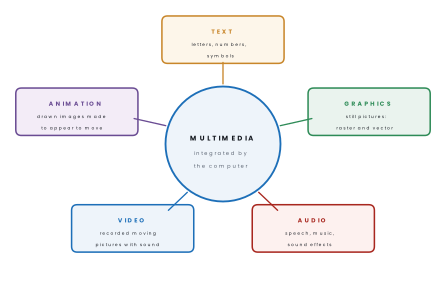
Multimedia is the integrated use of more than one medium — text, graphics, audio, video and animation — presented and controlled by a computer, usually with some degree of interactivity for the user.
The word itself gives the definition away: multi means many and media means the means of communicating. The key words in the definition are integrated (the media work together in one presentation, not side by side), computer controlled and interactive.
A textbook with photographs is not multimedia — it has two media but no computer and no interaction. A film is not multimedia either: it combines pictures and sound, but you cannot change what happens next.
A website with text, photographs, a video and buttons that let you choose a topic is multimedia.
Characteristics of multimedia:
- It combines two or more media in one presentation.
- It is digital — every medium is stored as numbers, so all of them can be edited, copied and transmitted by the same machine.
- It is integrated: the media are synchronised, so narration matches the picture on screen.
- It is usually interactive: the user controls the pace and the path through the content.
- It needs large storage and a fast processor, because sound and video carry far more data than text.
Linear (non-interactive) multimedia runs from beginning to end in a fixed order, with no control by the user — a cinema film, a slideshow that plays automatically, a television advertisement.
Non-linear (interactive) multimedia lets the user choose the order and the pace by clicking menus, buttons or links — a website, a computer game, an e-learning CD, an information kiosk.
A related idea is hypermedia: non-linear multimedia in which the pieces are joined by hyperlinks, so that clicking a word or a picture jumps to related content. The World Wide Web is the largest hypermedia system ever built.
What a multimedia computer needs. On the hardware side: a fast processor, plenty of RAM, a good graphics card (GPU), a sound card with speakers or headphones, a high-resolution monitor, large secondary storage, and capture devices such as a microphone, a scanner, a digital camera and a webcam.
On the software side: media players, an image editor, a sound editor, a video editor, an animation tool and an authoring tool that ties them all together.
| Advantages | Disadvantages |
|---|---|
| Uses sight and sound together, so people understand and remember more | Needs expensive hardware and software |
| Makes abstract ideas visible — a beating heart, a running engine | Files are very large; sharing needs fast internet |
| The user controls the pace, so learning is self-directed | Producing good content takes skill, time and money |
| One copy serves any number of students, anywhere | Too much animation and sound distracts from the message |
| Attracts and holds attention in advertising and teaching | Can encourage passive watching instead of active thinking |
7.2 Components of multimedia
The five components are text, graphics, audio, video and animation. Learn them in that order: it is the order the syllabus uses, and it runs from the smallest files to the largest.
Text
Text is the oldest and smallest component — a page of plain text is a few kilobytes. It carries precise meaning that a picture cannot: a name, a date, a price, an instruction.
In a multimedia product, text appears as headings, body text, captions, menu labels and buttons.
- A font (typeface) is a complete set of characters in one design — Arial, Times New Roman, Preeti. Its size is measured in points (1 point = 1/72 inch), and its style may be regular, bold, italic or underlined.
- Static text simply sits on the screen; hypertext is text that links to other content when clicked.
- Common formats:
.txt(plain text, no formatting),.rtf(rich text),.docx,.pdf,.html. - Software: Notepad, MS Word, LibreOffice Writer.
Graphics
Graphics are still pictures — photographs, drawings, diagrams, logos, charts. They are the fastest way to show what something looks like. There are two fundamentally different ways a computer can store a picture, and the difference is examined nearly every year.
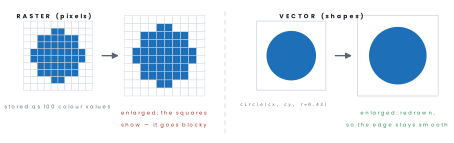
A raster (bitmap) image is stored as a grid of pixels, each with its own colour value. Enlarging it stretches the pixels, so the image becomes blurred or blocky — it is resolution dependent.
A vector image is stored as mathematical descriptions of shapes — lines, curves, circles with their coordinates, thicknesses and fills. The computer redraws the shapes at whatever size is asked for, so the image stays perfectly sharp — it is resolution independent.
| Raster | Vector | |
|---|---|---|
| Made of | pixels | mathematical shapes |
| On enlarging | blurred, blocky | stays sharp |
| File size | large, grows with resolution | small, grows with complexity |
| Best for | photographs, scanned images | logos, icons, maps, technical drawings |
| Formats | JPEG, PNG, GIF, BMP, TIFF | SVG, AI, EPS, CDR |
| Software | Adobe Photoshop, GIMP, MS Paint | Adobe Illustrator, CorelDRAW, Inkscape |
Three ideas describe any raster image. Resolution is the number of pixels, written as width × height (1920 × 1080).
Colour depth (or bit depth) is the number of bits used per pixel: 1 bit gives 2 colours, 8 bits give 256, and 24-bit "true colour" gives 2²⁴ ≈ 16.7 million.
Compression shrinks the file, and is either lossy (JPEG — throws away detail the eye is unlikely to miss, so the file is small but quality falls each time it is re-saved) or lossless (PNG, GIF — nothing is discarded and the original can be rebuilt exactly).
Problem. Find the uncompressed size of a 1024 × 768 photograph stored in 24-bit true colour, in megabytes.
Solution. Each pixel takes 24 bits = 3 bytes.
So 2.25 MB for one picture. A JPEG of the same photograph is typically 200–400 KB, roughly a tenth of the size — which is exactly why lossy compression exists, and why raw video is impossible to stream without it.
Audio
Audio is sound in digital form — narration, music, sound effects, warning beeps.
Sound reaches a microphone as a continuous (analogue) wave, and the computer converts it into numbers by sampling: measuring the height of the wave many thousands of times a second and storing each measurement.
- Sampling rate is how many measurements are taken per second, in hertz. CD quality is 44,100 Hz (44.1 kHz).
- Bit depth is how precisely each measurement is stored — 16 bits for CD audio.
- Channels: mono is one channel, stereo is two, surround sound more.
Higher values in any of these give better sound and a bigger file.
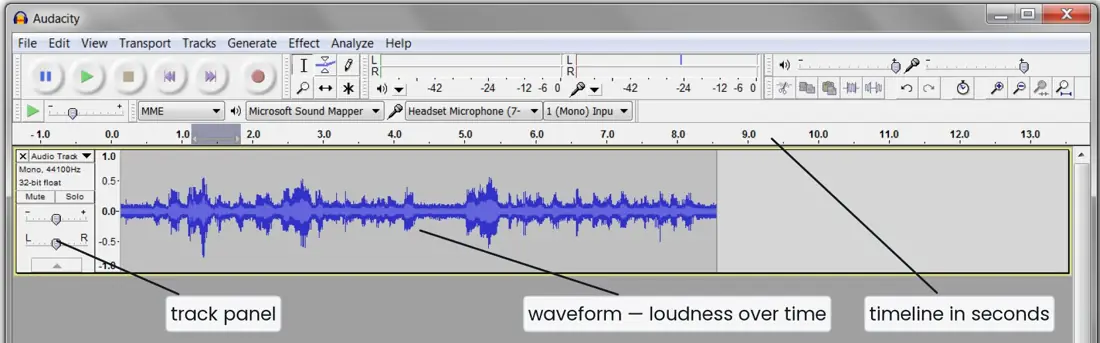
- Formats: MP3 (lossy, small, universal), WAV (uncompressed, large, full quality), AAC, OGG, WMA, MIDI (not a recording at all — a list of instructions saying which note to play on which instrument, so the files are tiny).
- Software: Audacity, Adobe Audition, Sound Forge.
Problem. A song lasts 3 minutes and is recorded in stereo at 44,100 Hz with a bit depth of 16 bits. Find its uncompressed size in megabytes, and say roughly how large the MP3 would be.
Solution. Work out the bytes stored every second, then multiply by the duration.
So about 30.3 MB as a WAV file. The 2 in the first line is the number of channels — halve the answer and you have the mono figure.
An MP3 of the same song at 128 kbps stores 128,000 ÷ 8 = 16,000 bytes per second, giving 2,880,000 bytes ≈ 2.75 MB, about one eleventh of the size. That saving is why MP3 displaced the CD.
Video
Video is a sequence of still images (frames) captured from the real world and played back fast enough to look continuous, almost always with a synchronised sound track.
The number of frames shown per second is the frame rate; 24 frames per second is the cinema standard, and 25 or 30 fps is normal for television and the web.
Video is the largest of the five components. One second of uncompressed 1920 × 1080 true-colour video at 30 fps would be about 178 MB, so video is always compressed, by codecs such as H.264 and H.265.
A codec (coder–decoder) is the software that compresses a video or audio stream for storage and decompresses it for playback.
The container format —
.mp4, .avi, .mkv — is the wrapper that holds the compressed video, the
audio and the subtitles together; it is not the same thing as the codec inside.

- Formats: MP4 (the default choice today), AVI, MKV, MOV, WMV, FLV, WebM.
- Software: Adobe Premiere Pro, Kdenlive, OpenShot, Windows Video Editor.
Animation
Animation is the process of creating the illusion of movement by displaying a rapid sequence of still images that differ slightly from one another. The images are drawn or generated, not captured from the real world — that is what separates animation from video.
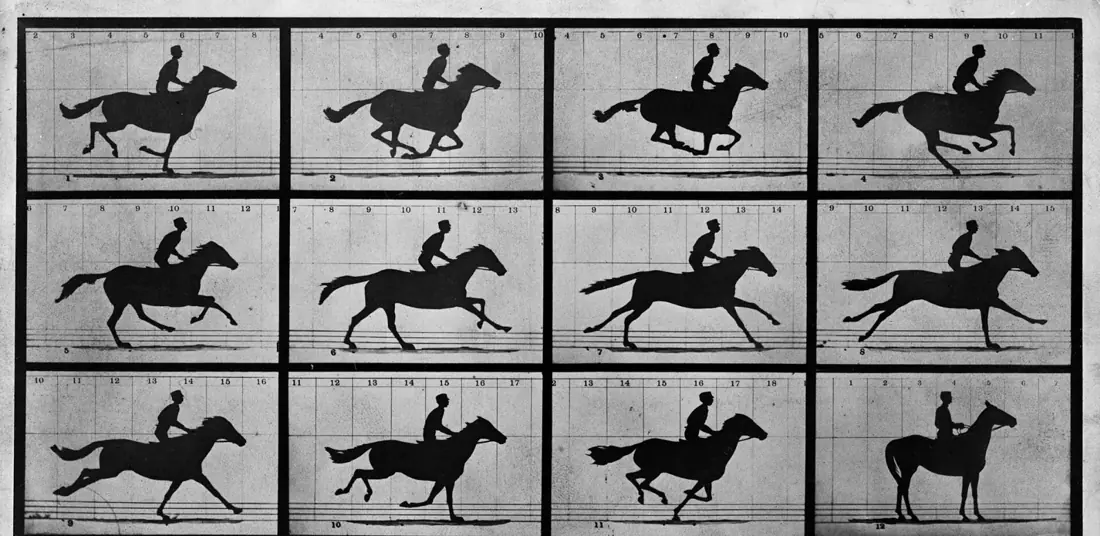
Animation works because of persistence of vision: the human eye retains an image for about a sixteenth of a second after it disappears, so images shown faster than about 16 per second blend into continuous motion.
Kinds of animation:
- Cel or frame-by-frame animation — every frame is drawn separately, the traditional cartoon method.
- Tweening (in-betweening) — the artist draws only the first and last frames (the key frames) and the software calculates all the frames between them.
- Path animation — an object is moved along a drawn path.
- Morphing — one image is gradually transformed into another.
- 2D animation works in height and width only; 3D animation builds objects in a three-dimensional space with depth, lighting and camera angles, and is what modern animated films use.
Formats: GIF (short looping animations, 256 colours), SWF (the old Flash format, now obsolete), SVG with CSS or JavaScript, MP4 for rendered 3D work. Software: Adobe Animate, Blender, Synfig Studio, Autodesk Maya.
Both show a fast sequence of frames, and both may be stored in an MP4 file, so students mix them up.
The difference is where the frames come from: video frames are captured from reality by a camera; animation frames are created by an artist or computed by software.
A recording of a football match is video; a cartoon of a football match is animation.
7.3 Applications of multimedia
Education and training. Computer-assisted learning packages, e-learning websites, virtual laboratories and interactive encyclopedias.
A simulated chemistry experiment can be repeated without cost or danger, and a video of a heart beating teaches anatomy better than a still diagram. Flight and driving simulators train pilots and drivers without risking an aircraft.
Entertainment. Computer and mobile games, animated films, streaming services, digital music. This is the industry that has driven most multimedia hardware development, because games demand the fastest graphics processors.
Business and advertising. Multimedia presentations to clients, video conferencing, animated television and web advertisements, product demonstrations and virtual showrooms where a customer can rotate a product on screen.
Public information and kiosks. Touch-screen kiosks at airports, museums, banks and hospitals; digital notice boards; government information portals. Because they are interactive, a visitor finds just the item wanted instead of reading a whole board.
Medicine. Scanned images from MRI and CT machines assembled into three-dimensional views; surgical simulators on which surgeons practise; patient education videos; telemedicine, in which a specialist in Kathmandu examines images and video sent from a district hospital.
Engineering and science. Computer-aided design (CAD) of buildings and machines, three-dimensional walk-throughs of a building before it is built, scientific visualisation of weather and earthquake data.
Journalism and publishing. Online newspapers combining text, photographs, video and interactive graphs; e-books with embedded audio; digital archives.
Arts and entertainment production. Digital photography and photo editing, music production, film special effects and computer-generated imagery (CGI).
Problem. A school is making an interactive CD about Nepal's national parks. For each requirement below, say which component of multimedia should be used and in which file format, and give the reason.
(i) The scientific name of each animal. (ii) A map of the park that must stay sharp when a visitor zooms in. (iii) The call of a bird. (iv) A ranger explaining how the park is patrolled. (v) A diagram showing how a river changes course over fifty years.
Solution.
(i) Text, stored in the page itself or as .html — a name must be exact and
readable, which only text guarantees, and it costs almost no storage.
(ii) Vector graphics, as SVG — a map is made of lines and areas, and a vector map is redrawn at every zoom level, so it never goes blocky. A JPEG map would blur as soon as it was enlarged.
(iii) Audio, as MP3 — a real recorded sound, compressed so that a whole library of calls fits on the disc. WAV would be truer but roughly ten times larger.
(iv) Video, as MP4 — a person speaking must be captured from reality, and the picture must stay synchronised with the sound. H.264 in an MP4 container is playable on every device.
(v) Animation, as an animated GIF or a short MP4 — the fifty-year change was never filmed, so the frames must be drawn or computed. Tweening between a key frame for 1975 and one for 2025 produces the in-between years automatically.

Eight applications of multimedia explained
1. Education and e-learning. Animated diagrams, narrated slides and video lessons make difficult topics easier to understand and remember.
A student in a remote district can watch a recorded science experiment that the school cannot afford to perform. Digital textbooks and online classes use all five media together.
2. Entertainment and games. Films, music, streaming services and computer games are the best-known uses of multimedia. A game combines graphics, animation, sound and text, and it reacts to the player.
This is a large industry, and many young people in Nepal now work in animation and game studios.
3. Business and advertising. Companies use presentations, product videos and animated advertisements to explain and sell their products. A short video on social media can reach thousands of customers at low cost.
Multimedia kiosks in shops and banks show information without staff.
4. Training and simulation. Pilots, drivers, doctors and technicians practise on simulators that combine graphics, sound and movement. Mistakes in a simulation cost nothing and harm nobody. This is cheaper and safer than training on real equipment.
5. Medicine and health. Multimedia shows the working of the body in 3D animation, and X-ray, CT and ultrasound images are stored and viewed as digital pictures. Health-awareness videos teach villagers about hygiene or vaccination.
Doctors can discuss a case through video calls.
6. Journalism and communication. Online news mixes text, photographs, video and audio, so a story is understood quickly. Radio, television and web portals in Nepal use multimedia to show events and weather updates. Video calls connect families across the world.
7. Tourism and information kiosks. Virtual tours, 360-degree photographs and videos of trekking routes let visitors see a place before they travel. Hotels and tourism boards use multimedia brochures and websites.
Information kiosks at airports guide travellers with maps and audio.
8. Art, design and publishing. Graphic designers, animators and musicians create posters, films and songs on computers. Multimedia lets a magazine or a book include sound and video in its digital edition.
Design and printing houses depend on graphics software every day.
Advantages of multimedia. It makes learning interesting and easy to remember; it presents information in several forms for different learners; it is interactive; and it can be copied and shared at low cost.
Disadvantages. It needs a powerful computer, large storage and fast Internet; production is costly and slow; and too much animation or sound can distract the user.
Chapter summary
- Multimedia is the computer-controlled, integrated use of more than one medium — text, graphics, audio, video and animation — usually with interactivity.
- Linear multimedia runs in a fixed order with no user control (a film); non-linear multimedia lets the user choose the path (a website, a game). Hypermedia is non-linear multimedia joined by hyperlinks.
- Text is the smallest component and carries exact meaning; fonts are
measured in points (1 point = 1/72 inch); formats
.txt,.rtf,.docx,.pdf,.html. - Graphics are still pictures. Raster images are grids of pixels, are resolution dependent and go blocky when enlarged (JPEG, PNG, GIF, BMP); vector images store shapes as mathematics, are resolution independent and stay sharp (SVG, AI, EPS, CDR).
- Image size depends on resolution (pixels), colour depth (24-bit true colour = 16.7 million colours) and compression — lossy (JPEG) discards detail, lossless (PNG, GIF) does not.
- Audio is digitised by sampling: CD quality is 44,100 Hz at 16 bits. MP3 is lossy and small, WAV is uncompressed and large, MIDI stores instructions rather than sound.
- Video is captured frames plus synchronised sound, measured in frames per
second (24 fps cinema, 25–30 fps television). A codec compresses it;
a container (
.mp4,.avi,.mkv) holds the parts together. - Animation is drawn or computed frames, not captured ones, and works by persistence of vision. Methods: frame-by-frame, tweening between key frames, path animation and morphing; 2D against 3D.
- Applications: education and training, entertainment, business and advertising, public information kiosks, medicine, engineering, journalism and the arts.
Practice questions
Group A — Multiple choice (1 mark each)
- Which one is not a component of multimedia? [1]aTextbAnimationcCompilerdAudio
- A cinema film that cannot be controlled by the viewer is an example of [1]alinear multimediabnon-linear multimediachypermediadinteractive media
- Which type of graphic stays sharp when it is enlarged? [1]abitmapbrastercvectordJPEG
- The standard sampling rate of CD-quality audio is [1]a8,000 Hzb22,050 Hzc44,100 Hzd96,000 Hz
- The number of frames displayed per second in a video is called its [1]aresolutionbframe ratecbit depthdsampling rate
- Which file format uses lossy compression? [1]aPNGbBMPcJPEGdGIF
- Creating the frames between two key frames automatically is called [1]amorphingbtweeningcrenderingdsampling
- Animation is possible because of [1]apersistence of visionbrefractioncsamplingdcompression
- In 24-bit true colour, the number of colours available is about [1]a256b65,536c16.7 milliond4.3 billion
Answers to Group A
1. (c) — a compiler is a translator program, not a medium.
2. (a) — linear multimedia runs start to finish with no user control.
3. (c) — vector images are redrawn from stored shapes.
4. (c) — 44.1 kHz at 16 bits is CD quality.
5. (b) — frames per second.
6. (c) — JPEG discards detail the eye is unlikely to notice.
7. (b) — tweening, short for in-betweening.
8. (a) — the eye holds an image for about 1/16 of a second.
9. (c) — 2²⁴ ≈ 16.7 million.
Group B — Short answer (5 marks each)
- Define multimedia. Explain any four of its characteristics. [5]
- Differentiate between linear and non-linear multimedia with two examples of each. [5]
- Differentiate between raster and vector graphics with any five points. [5]
- What is animation? Explain any four types of animation. [5]
- Explain the audio and video components of multimedia, naming three file formats and one piece of software for each. [5]
- Calculate the uncompressed size, in megabytes, of a 1600 × 1200 image stored in 24-bit colour. Explain why compression is necessary. [5]
Answers to Group B
1. Multimedia is the integrated, computer-controlled use of more than one medium — text, graphics, audio, video and animation — usually with interactivity.
Characteristics: it combines two or more media; everything is digital; the media are integrated and synchronised; it is normally interactive, with the user choosing the path and the pace; and it demands large storage and a fast processor.
2. Linear multimedia plays from beginning to end in a fixed order with no user control — examples: a cinema film, an automatically playing slideshow.
Non-linear multimedia lets the user choose what to see next through menus, buttons and links — examples: a website, a computer game.
Linear content is easier and cheaper to produce; non-linear content holds attention longer and suits self-paced learning.
3. Raster (bitmap) graphics are made of a grid of tiny coloured squares called pixels, and vector graphics are made of mathematical shapes (lines, curves, polygons) with colour and position.
| Point | Raster graphics | Vector graphics |
|---|---|---|
| Made of | Pixels | Mathematical shapes |
| When enlarged | Becomes blurred or blocky | Stays sharp |
| File size | Large, grows with the number of pixels | Small |
| Best for | Photographs and realistic images | Logos, maps, diagrams, fonts |
| Formats | JPEG, PNG, GIF, BMP | SVG, AI, EPS, CDR |
| Software | Photoshop, GIMP | Illustrator, Inkscape, CorelDRAW |
A photograph of Mount Everest must be raster, because the colour changes smoothly from pixel to pixel, whereas the logo of a school is best made as a vector so that the same file can be printed on a small card and on a large banner without losing quality.
Converting a raster picture to vector is difficult, but a vector can be changed to raster easily by saving it as an image.
4. Animation is the illusion of movement created by displaying a rapid sequence of still images that differ slightly, the images being drawn or computed rather than captured.
Types: frame-by-frame (cel), where every frame is drawn separately; tweening, where only the key frames are drawn and the software fills in the rest; path animation, where an object follows a drawn path; and morphing, where one image is gradually transformed into another.
5. Audio is digitised sound — narration, music and effects — produced by sampling an analogue wave, typically at 44,100 Hz and 16 bits. Formats: MP3 (lossy, small), WAV (uncompressed), MIDI (instructions, not a recording).
Software: Audacity. Video is a sequence of frames captured from the real world with synchronised sound, measured in frames per second and always compressed by a codec. Formats: MP4, AVI, MKV. Software: Adobe Premiere Pro (or Kdenlive).
6. 1600 × 1200 = 1,920,000 pixels. At 24 bits = 3 bytes per pixel, that is 5,760,000 bytes, and 5,760,000 ÷ (1024 × 1024) = 5.49 MB.
Compression is necessary because uncompressed images and especially video are far too large to store in quantity or send over a network — one second of uncompressed 1080p video at 30 fps is about 178 MB, which no ordinary internet connection could stream.
Group C — Long answer (8 marks each)
- (a) Define multimedia and explain the five components with one example of each. [5](b) Explain any three hardware requirements and any three software requirements of a multimedia computer. [3]
- (a) Explain any six applications of multimedia, with one sentence on how multimedia helps in each. [6](b) State any two advantages and any two disadvantages of multimedia. [2]
Answers to Group C
1. (a) The definition is in §7.1. Text — the caption naming a photograph; smallest component, carries exact meaning. Graphics — a photograph of Mount Everest or a vector map of a national park; still pictures, raster or vector.
Audio — a recorded narration or a bird call, digitised by sampling. Video — a filmed interview; frames captured from reality with synchronised sound.
Animation — a cartoon showing how a river changed course; frames drawn or computed rather than captured.
1. (b) Hardware: a fast processor to decode compressed video in real time; a graphics card (GPU) to render images and 3D scenes; a sound card with speakers, and large secondary storage because media files are huge; capture devices such as a microphone, scanner, webcam or digital camera. Software: an image editor such as GIMP; a sound editor such as Audacity; a video editor such as Kdenlive; media players and an authoring tool to combine everything.
2. (a) Education — simulations and videos make dangerous or invisible processes safe to watch and repeatable. Entertainment — games and animated films are built entirely from multimedia.
Business and advertising — animated advertisements and virtual showrooms let a customer examine a product before buying. Public information kiosks — a touch screen at an airport or museum lets each visitor find only the item wanted.
Medicine — MRI and CT slices are assembled into 3D views, and surgeons rehearse on simulators. Engineering — CAD models and 3D walk-throughs show a building before it is built.
Journalism — online news combines text, photographs, video and interactive graphs in one story.
2. (b) Advantages: it uses sight and sound together, so people understand and remember more; the user controls the pace, which suits self-directed learning.
Disadvantages: it needs expensive hardware, software and skill to produce; the files are very large, so sharing them needs fast internet and plenty of storage.
Group D — Long answer (10 marks each), with full model answers
- Define multimedia. Explain its five components with examples. [10]
- Explain the applications of multimedia and state its advantages and disadvantages. [10]
- What is animation? Explain its types and the principle behind it. [10]
Model answer D1: multimedia and its components (10 marks)
Introduction. Multimedia is the integrated, computer-controlled use of two or more media, namely text, graphics, audio, video and animation, usually with interactivity so that the user can choose what to see and hear.
Components.
- Text: the oldest and smallest component; it carries exact meaning in titles, captions and menus, for example the caption below a photograph. Formats: TXT, DOC, PDF.
- Graphics: still pictures, either raster (photographs, made of pixels) or vector (logos and maps, made of shapes). Formats: JPEG, PNG, GIF, SVG.
- Audio: digitised sound such as narration, music and effects, produced by sampling an analogue wave, typically at 44,100 Hz and 16 bits. Formats: MP3 (lossy), WAV (uncompressed), MIDI (instructions). Software: Audacity.
- Video: a sequence of frames captured from the real world with synchronised sound, measured in frames per second and compressed by a codec. Formats: MP4, AVI, MKV. Software: Premiere Pro, Kdenlive.
- Animation: the illusion of movement made by showing drawn or computed images in rapid sequence, for example a cartoon or an animated diagram of a river.
| Component | Example | Typical format |
|---|---|---|
| Text | Caption | TXT, PDF |
| Graphics | Photograph of Everest | JPEG, PNG |
| Audio | Narration | MP3, WAV |
| Video | Filmed interview | MP4 |
| Animation | Cartoon | GIF, SWF |
Characteristics. It combines two or more media, is digital, is integrated and synchronised, is normally interactive and needs large storage and a fast processor.
For example, an uncompressed 1600 × 1200 picture in 24-bit colour takes about 5.49 MB, so compression is essential.
Conclusion. The strength of multimedia is that the five components together explain an idea better than any one alone, which is why it is used in education, business and entertainment.
Model answer D2: applications, advantages and disadvantages (10 marks)
Introduction. Multimedia is used wherever information must be explained clearly and attractively. The main areas are as follows.
- Education: animated lessons, e-books and online classes.
- Entertainment: films, music, streaming and games.
- Business and advertising: presentations, product videos and kiosks.
- Training and simulation: flight, driving and medical simulators.
- Medicine: 3D animation of the body, digital X-ray and CT images, health videos.
- Journalism and communication: online news with text, photos and video; video calls.
- Tourism: virtual tours and 360-degree views of trekking routes.
- Art and design: posters, animation, music and digital publishing.
| Area | How multimedia helps |
|---|---|
| Education | Makes difficult ideas easy to see and remember |
| Medicine | Shows the body in 3D and stores images digitally |
| Training | Safe, cheap practice without real risk |
| Tourism | Lets people see a place before travelling |
Advantages. Learning is interesting and memorable; information is shown in several forms for different learners; it is interactive; and digital copies are easy to share.
Disadvantages. It needs a powerful computer, large storage and fast Internet; production is costly and slow; and too much animation or sound can distract the user.
Conclusion. The benefits of multimedia are large in education and communication, but the cost and the equipment it needs must be planned for.
Model answer D3: animation (10 marks)
Introduction. Animation is the illusion of movement created by showing a rapid sequence of still images that differ slightly.
It works because of persistence of vision: the eye keeps an image for a fraction of a second, so frames shown faster than about 12 per second blend into motion.
Films use 24 frames per second; the Muybridge photographs of a galloping horse of 1878 showed that motion can be broken into stills and joined again.
Types of animation.
- Frame-by-frame (cel) animation: every frame is drawn separately; it gives full control, but needs a great deal of work. Traditional cartoons are made this way.
- Tweening: the animator draws only the key frames and the software fills in the frames between them.
- Path animation: an object follows a drawn path, for example a bus moving along a road in a presentation.
- Morphing: one image is changed gradually into another, as in film effects.
- 2D and 3D animation: 2D uses flat drawings, and 3D uses models that are lit and rendered by the computer, as in modern films and games.
Example of the amount of work. A film at 24 frames per second needs 1,440 frames for one minute, which shows why tweening and software tools are used.
| Type | Who makes the in-between frames | Example |
|---|---|---|
| Frame-by-frame | The artist, by hand | Traditional cartoon |
| Tweening | The software | Flash and presentation animation |
| Path | The software, along a path | A moving vehicle |
| Morphing | The software, blending two images | Face transformation |
Software. Blender, Synfig, Adobe Animate and PowerPoint's animation tools.
Conclusion. Animation is the art of making still pictures move, and software has made it possible for a student with a laptop to create it.
Practise more: Computer Science question bank