Unit 4 · 5 teaching hours · 30 min read
Application Package
What the syllabus asks for 2
- Introduction to Office Package: Word processor, Presentation tool, Spreadsheet package, DBMS
- Introduction to domain specific tools: school management system, inventory management system, payroll system, financial accounting, hotel management, weather forecasting system
Most people who use a computer never write a line of code. They write letters, add up columns of figures, make slides and look things up in a database — and they do it with ready-made application packages.
This short unit surveys the four members of the standard office package and then looks at the domain-specific software written for one particular line of work: a school, a shop, a payroll office, a hotel or a weather service.
Only five teaching hours, but questions appear every year.
Be able to name the four office packages with two features and two examples of each, write correct spreadsheet formulas, define field, record, table and primary key, and describe at least three domain-specific systems in terms of their inputs, processing and outputs.
4.1 Introduction to office packages
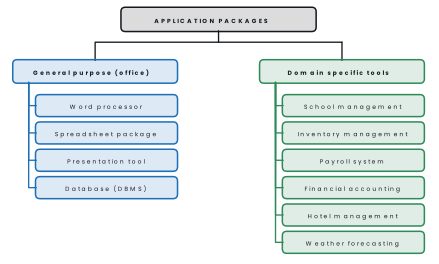
An application package (or package software) is ready-made application software developed for general use and sold to many customers, rather than written for one organisation.
An office package (office suite) is a bundle of such programs that share a common look, a common file format and the ability to exchange data with each other.
The best known office suites, as of 2025, are Microsoft 365 / MS Office (Word, Excel, PowerPoint, Access, Outlook), the free and open-source LibreOffice (Writer, Calc, Impress, Base), the web-based Google Workspace (Docs, Sheets, Slides), WPS Office, and Apple's iWork (Pages, Numbers, Keynote).
(a) Word processor
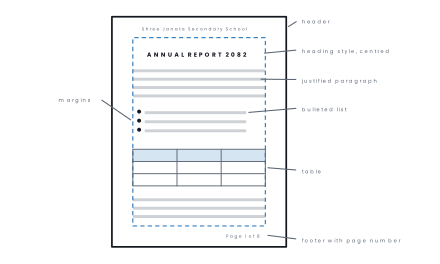
A word processor is application software used to create, edit, format, store and print text documents such as letters, reports, notices and books.
Examples: MS Word, LibreOffice Writer, Google Docs, WPS Writer, Apple Pages.
Main features
- Typing with automatic word wrap, insert and overtype modes.
- Editing: cut, copy, paste, undo/redo, and find and replace.
- Formatting of characters (font, size, bold, italic, underline, colour), paragraphs (alignment, indent, line spacing, bullets and numbering) and pages (margins, orientation, size, columns).
- Styles and templates so that every heading in a long report looks the same.
- Tables, pictures, shapes, charts, equations and symbols.
- Header and footer with automatic page numbers.
- Spelling and grammar check, thesaurus, word count.
- Mail merge — one letter combined with a list of names to produce many personalised letters.
- Track changes and comments for reviewing, and export to PDF.
(b) Spreadsheet package
A spreadsheet package is application software that arranges data in a grid of rows and columns and performs calculations on it automatically using formulas and built-in functions.
Examples: MS Excel, LibreOffice Calc, Google Sheets, WPS Spreadsheets, Apple Numbers.
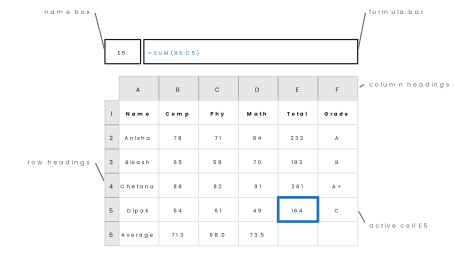
A file is a workbook; each page of it is a worksheet.
Columns are named
with letters (A, B, C …), rows with numbers (1, 2, 3 …), and the box where a
column and a row meet is a cell whose address is the column letter
followed by the row number, such as C5.
A rectangular block of cells is a
range, written B2:E6.
Main features
- Formulas always begin with
=and may use the operators+ - * / ^and the comparison operators. - Built-in functions such as
SUM,AVERAGE,MAX,MIN,COUNT,COUNTIF,IF,ROUND,RANK,TODAY,VLOOKUP. - Automatic recalculation: change one number and every dependent cell updates at once — this is the whole point of a spreadsheet.
- Cell references: relative (
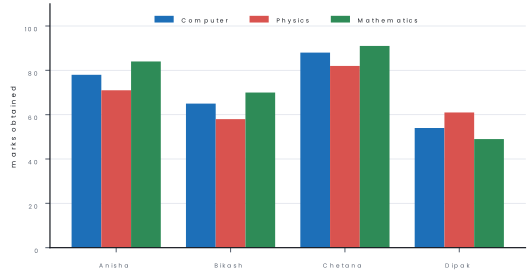
B2, which changes when the formula is copied), absolute ($B$2, which never changes) and mixed (B$2,$B2). - Charts — column, bar, line, pie, scatter — drawn from a range of cells and updated automatically.
- Sorting, filtering, conditional formatting, data validation, pivot tables, "what-if" analysis and Goal Seek.
Problem. A worksheet holds student names in column A and marks in Computer,
Physics and Mathematics in columns B, C and D for rows 2 to 11. Write formulas
to find(a) the total of the first student,(b) the average of the first student,(c) the highest total in the class,(d) the result "Pass" or "Fail" using a pass
mark of 40 in each subject, and(e) the percentage of the first student when the
full marks per subject is stored in cell H1.
Solution.
| Cell | Formula | What it does |
|---|---|---|
E2 |
=SUM(B2:D2) |
total of the three subjects |
F2 |
=AVERAGE(B2:D2) |
mean mark, same as =E2/3 |
G2 |
=MAX(E$2:E$11) |
the highest total in the class |
H2 |
=IF(MIN(B2:D2)>=40,"Pass","Fail") |
fails if any subject is below 40 |
I2 |
=E2/(3*$H$1)*100 |
percentage; $H$1 is absolute so it does not move |
Each formula is then copied down to row 11 by dragging the fill handle. The
relative references B2:D2 become B3:D3, B4:D4 and so on automatically,
while $H$1 stays fixed.
When a formula is copied, a relative reference moves with it. If the divisor
or a lookup table must stay put, lock it with dollar signs ($H$1). Forgetting
this is the commonest reason a copied column of formulas produces #DIV/0! or
nonsense after the first row.
(c) Presentation tool
Presentation software is application software used to create a sequence of electronic slides containing text, pictures, charts, sound and video, which are displayed one after another to support a talk.
Examples: MS PowerPoint, LibreOffice Impress, Google Slides, Prezi, Canva.
Main features: slide layouts and placeholders; design themes,
templates and the slide master that fixes the look of every slide;
transitions between slides and animations within a slide; speaker
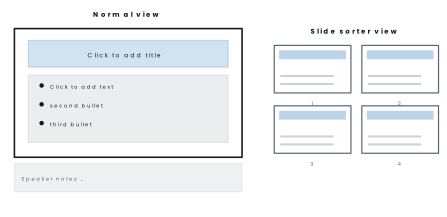
notes and handouts; views — Normal, Slide Sorter, Reading and
Slide Show (F5); rehearse timings; insert tables, charts, SmartArt, audio,
video and hyperlinks; and export to PDF or video.
(d) Database management system (DBMS)
A database is an organised collection of related data stored so that it can be retrieved and updated easily. A database management system (DBMS) is the software that creates a database, stores the data, and lets users insert, query, update, delete and protect it.
Examples: MS Access, LibreOffice Base, MySQL, PostgreSQL, Oracle, Microsoft SQL Server, SQLite, MongoDB.
In a relational DBMS data is held in tables:
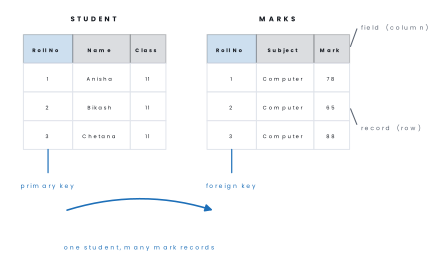
- A field (column or attribute) is one item of information, for example Roll No or Address.
- A record (row or tuple) is the complete set of fields about one entity, for example everything about one student.
- A primary key is a field whose value is different in every record and is never empty; it identifies a record uniquely.
- A foreign key is a field in one table that holds the primary key of another table, and is what links the two tables together.
The four objects of a desktop DBMS such as MS Access are tables (store the data), queries (ask questions of it), forms (a friendly screen for data entry) and reports (formatted printed output).
Common field data types are Text/Short Text, Number, Date/Time, Currency, Yes/No, AutoNumber and Memo/Long Text.
Problem. Design a table for a school library that records books. Give the fields, a suitable data type for each, and state the primary key.
Solution.
| Field name | Data type | Reason |
|---|---|---|
BookID |
AutoNumber | unique, never repeats — primary key |
Title |
Short Text | the name of the book |
Author |
Short Text | name of the writer |
Publisher |
Short Text | publishing house |
Price |
Currency | money value, two decimal places |
DateAdded |
Date/Time | when the library bought it |
Issued |
Yes/No | whether it is out on loan |
BookID is the primary key because no two books may share it and it can never be
left blank. Title would be a poor key, because a library may hold two different
books with the same title.
| Word processor | Spreadsheet | Presentation | DBMS | |
|---|---|---|---|---|
| Works with | text documents | numbers in a grid | slides | tables of records |
| Basic unit | character, paragraph, page | cell, worksheet | slide | field, record |
| Key strength | formatting and printing text | automatic calculation and charts | visual support for a talk | storing and querying large data |
| Typical file | .docx, .odt |
.xlsx, .ods |
.pptx, .odp |
.accdb, .sql |
| Example | MS Word, Writer | MS Excel, Calc | PowerPoint, Impress | MS Access, MySQL |
Advantages and limitations of application packages
Eight advantages
- Low cost. The maker sells one program to thousands of buyers, so the price per user is small. A school can buy or download an office suite for a few thousand rupees, or use LibreOffice free of charge. Writing the same software privately would cost lakhs.
- Ready to use. A package is tested and installed within minutes, so work can begin the same day. A bank clerk does not have to wait months for a programmer. This saves time as well as money.
- Reliable and well tested. Because millions of people use it, most bugs have been found and removed in earlier versions. Crashes and wrong answers are therefore rare. A formula such as SUM in a spreadsheet can be trusted.
- Easy to learn. Menus, toolbars and shortcuts such as Ctrl+C and Ctrl+S are the same in every program of the suite. A student who learns Word finds Excel familiar. Videos, books and classroom courses are easy to find.
- Regular updates and support. The maker releases security patches and new features, and offers a help desk or an online forum. Updates close holes through which viruses could enter. Microsoft 365 and Google Workspace update automatically.
- Compatibility and data sharing. Files made in common formats such as DOCX, XLSX, PDF and CSV open on any computer. A table copied from Excel can be pasted into a Word report or a PowerPoint slide. This helps offices that exchange files with banks and ministries.
- Many functions in one suite. Letters, calculations, presentations and databases are all covered by one purchase. Staff do not need to learn separate unrelated tools. An office needs only one licence type.
- Training and skills are portable. An employee who knows an office package can work in any organisation. Job advertisements for Tribhuvan University offices, banks and municipalities ask for exactly these skills. This makes learning the package a useful investment.
Seven limitations
- Not made to measure. A package cannot match the exact workflow of one organisation, so some features are missing or unused. A hospital needs patient wards and bed numbers that Excel does not know.
- Unused features. Large suites contain hundreds of functions most users never touch, which take up disk space and memory.
- Licence cost for many users. The price grows with the number of computers, and a yearly subscription must be renewed.
- Piracy and security risk. Cracked copies carry viruses and receive no updates.
- Vendor dependence. The user must follow the maker's pricing, changes and end-of-support dates, as happened when support for Windows 10 ended in October 2025.
- Limited customisation. Reports and screens can be changed only within what the package permits.
- File-format lock-in. Files saved in a special format may not open perfectly in a competing package.
4.2 Introduction to domain-specific tools
Domain-specific software is application software designed for one particular field of work. It contains the rules, vocabulary and reports of that field already built in, so it cannot usefully be used anywhere else.
A general package can be bent to almost any purpose, but a domain-specific system is built around the workflow of one industry. Compare the two:
| General purpose package | Domain-specific tool | |
|---|---|---|
| Users | everybody | one line of business |
| Cost | low, mass produced | higher; may be custom built |
| Features | broad but shallow | exactly what that field needs |
| Training | general computer skill | job-specific training |
| Example | MS Excel used to keep stock | a full inventory management system |
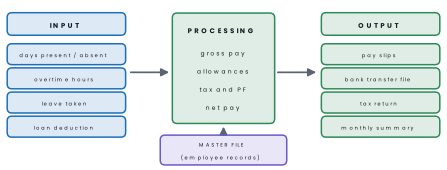
Almost every such system has the same three-part shape: input of transactions, processing against stored master data, and output of reports.

(a) School management system
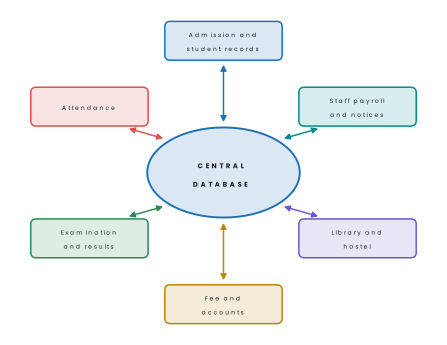
Handles admission and student records, class routines, daily attendance, examination marks and result processing, fee collection and dues, the library, the hostel and transport, payroll for the staff, and SMS or app notices to parents.
In Nepal, community schools report their data through the government's IEMIS (Integrated Educational Management Information System) platform.
(b) Inventory management system
Records every item in a store with a code, name, unit, rate and reorder level; posts each purchase and each sale; keeps the stock balance up to date; warns when an item falls below its reorder level; values the stock; and prints purchase orders and stock reports.
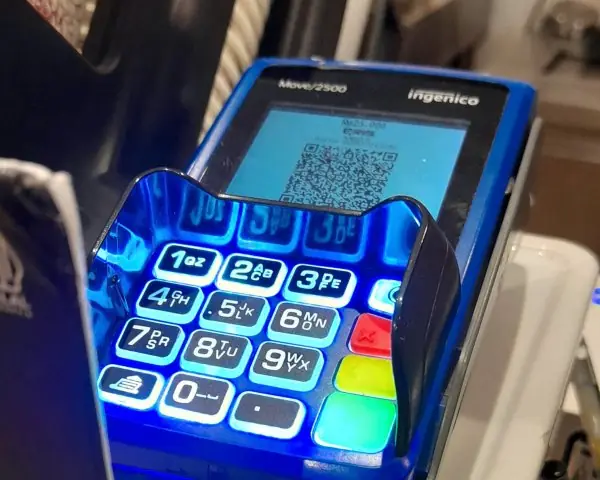
Barcode or QR scanning at the counter is the usual input method.
(c) Payroll system
Keeps a master file of employees with grade, basic salary and allowances; accepts monthly attendance, overtime, leave and loan data; computes gross pay, then deductions (income tax, provident fund, CIT, insurance, advances) and finally net pay; prints pay slips and the bank transfer file; and produces statutory tax returns.
(d) Financial accounting system
Maintains the chart of accounts; records journal vouchers of every receipt, payment, purchase and sale; posts them to the ledger automatically; and prints the trial balance, trading and profit-and-loss account, balance sheet, VAT returns, and party-wise receivables and payables.
Widely used examples are Tally, Busy, Sage, QuickBooks and Odoo.
(e) Hotel management system
Handles room inventory and tariffs, online and telephone reservations, check-in and check-out, housekeeping status, restaurant and laundry billing posted to the room, the final guest folio, and occupancy and revenue reports.
It usually connects to online travel agents and to a payment gateway.
(f) Weather forecasting system
Collects readings of temperature, pressure, humidity, rainfall, wind speed and direction from ground stations, balloons, radar and satellites; feeds them into numerical weather prediction models, which solve the equations of the atmosphere on a three-dimensional grid; and issues forecasts, flood and landslide warnings and aviation bulletins.
Because the models are enormous, this work is done on supercomputers. In Nepal the Department of Hydrology and Meteorology publishes the national forecast and monsoon and flood warnings.
| System | Typical inputs | Typical outputs |
|---|---|---|
| School management | admission forms, attendance, marks, fees | mark ledger, grade sheet, fee receipt, attendance report |
| Inventory | purchase and sales vouchers, item master | stock balance, reorder alert, valuation report |
| Payroll | attendance, overtime, leave, loans | pay slip, bank file, tax statement |
| Financial accounting | vouchers of all transactions | ledger, trial balance, profit and loss, balance sheet |
| Hotel management | reservations, check-in, restaurant bills | guest folio, occupancy report, revenue report |
| Weather forecasting | station, radar and satellite readings | forecast maps, warnings, aviation bulletins |
Problem. Name the most suitable software for each task and justify it:(a) preparing a two-page notice for the school notice board;(b) preparing the examination result ledger with totals, percentages and division;(c) a talk on "Cyber Safety" for the school assembly;(d) keeping the records of 4,000 library books with searching and issue tracking;(e) running the daily billing of a 50-room hotel.
Solution.(a) Word processor (MS Word) — the job is formatting and printing text.(b) Spreadsheet (MS Excel) — repetitive arithmetic on rows of marks, done by formulas that recalculate automatically.(c) Presentation tool (PowerPoint) — slides with pictures and bullet points support a spoken talk.(d) DBMS (MS Access or MySQL) — thousands of records that must be searched, related to borrowers and kept consistent; a spreadsheet would be slow and unsafe.(e) A hotel management system — a domain-specific tool, because room status, reservations, restaurant posting and the guest folio are built in.
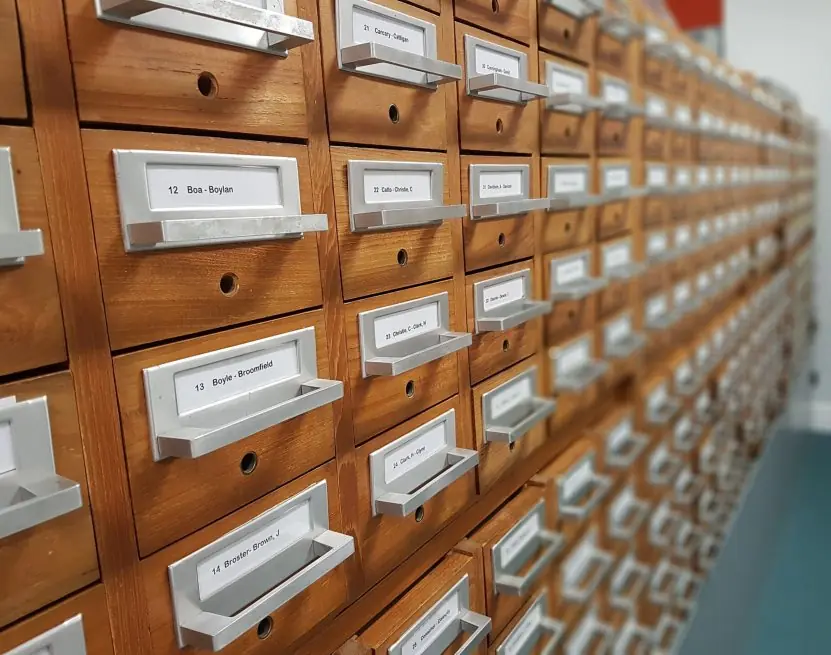
Both look like a grid, but a spreadsheet stores values you calculate with, while a DBMS stores records you retrieve and relate.
A DBMS enforces data types, prevents duplicate keys, links tables, handles many users at once and copes with millions of records — none of which a spreadsheet does well.

Chapter summary
- An application package is ready-made software sold to many users; an office package bundles a word processor, spreadsheet, presentation tool and DBMS that share a common interface.
- A word processor creates and formats text: editing, styles, tables, header and footer, spell check, mail merge. Examples: MS Word, LibreOffice Writer.
- A spreadsheet holds data in cells addressed by column letter and row
number, calculates with formulas beginning with
=and functions such asSUM,AVERAGE,MAX,IF, and draws charts. References may be relative (B2), absolute ($B$2) or mixed. - Presentation software builds a deck of slides with layouts, themes,
transitions and animations, shown with
F5. - A DBMS stores data in tables of records made of fields, identified by a primary key and linked by a foreign key; its objects are tables, queries, forms and reports.
- Domain-specific tools are built for one field: school management, inventory, payroll, financial accounting, hotel management and weather forecasting. Describe each by its inputs, processing and outputs.
Practice questions
Group A — Multiple choice (1 mark each)
- Which of the following is not part of a standard office package? [1]aword processorbspreadsheetccompilerdDBMS
- In a spreadsheet, the intersection of a row and a column is called a [1]arangebcellcfielddworksheet
- Every spreadsheet formula must begin with [1]a
+b#c=d@ =SUM(B2:B10)adds [1]aB2 and B10 onlyball cells from B2 to B10ccolumn B entirelydrows 2 to 10 entirely- A field that uniquely identifies each record in a table is the [1]aforeign keybindexcprimary keydattribute
- A row of a database table is also called a [1]afieldbrecordcquerydform
- Mail merge is a feature of [1]aa spreadsheetba word processorca DBMSdpresentation software
- Which of these is a domain-specific software? [1]aMS ExcelbLibreOffice Impressca hotel management systemdGoogle Chrome
- The view used to reorder the slides of a presentation is [1]aNormal viewbSlide Sorter viewcReading viewdNotes page
Answers to Group A
1. (c) — a compiler is system software.
2. (b) — a cell.
3. (c) — the equals sign.
4. (b) — the colon means "through", so the whole range is added.
5. (c) — the primary key.
6. (b) — a record (tuple).
7. (b) — a word processor.
8. (c) — it serves one line of business only.
9. (b) — Slide Sorter view.
Group B — Short answer (5 marks each)
- What is an application package? Name the four components of an office package and write two features of each. [5]
- Define cell, range, worksheet and workbook. Write the formulas to find the
total, the average, the largest and the smallest of the marks stored in cells
C3toC20. [5] - Differentiate between a relative, an absolute and a mixed cell reference with one example of each, and explain why absolute references are needed. [5]
- Define database, DBMS, field, record and primary key. Name two DBMS packages. [5]
- What is domain-specific software? Differentiate it from a general purpose package under any four headings. [5]
- Explain any two of the following with their inputs and outputs: inventory management system, payroll system, hotel management system. [5]
Answers to Group B
2. A cell is the box where one column meets one row, addressed as C3. A range is a rectangular block of cells, written C3:C20. A worksheet is
one page of the grid; a workbook is the whole file containing several
worksheets.
Total =SUM(C3:C20); average =AVERAGE(C3:C20); largest =MAX(C3:C20);
smallest =MIN(C3:C20).
3. Relative (B2) changes when the formula is copied — copying
=B2*2 from C2 to C3 gives =B3*2. Absolute ($B$2) never changes,
because the dollar signs lock both the column and the row. Mixed (B$2 or
$B2) locks only one of the two.
Absolute references are needed when a formula must always refer to one fixed cell, such as a rate of tax or a full-marks value, while being copied down a column.
4. A database is an organised collection of related data; a DBMS is the software that creates and manages it; a field is one column or attribute; a record is one complete row about one entity; a primary key is a field whose value is unique and never empty, so it identifies a record. Examples of a DBMS: MS Access and MySQL (also Oracle, PostgreSQL).
1. An application package is ready-made software made for general use and sold to many users. The four components of an office package are:
| Component | MS Office / LibreOffice | Two features |
|---|---|---|
| Word processor | Word / Writer | Formatting of text; spelling check; mail merge; tables and pictures |
| Spreadsheet | Excel / Calc | Formulas and functions; charts; sorting and filtering; what-if analysis |
| Presentation tool | PowerPoint / Impress | Slides with animation and transitions; slide master; speaker notes |
| DBMS | Access / Base | Tables, queries, forms and reports; relationships; data validation |
5. Domain-specific software is written for one field of work, such as a school or a hotel.
| Point | General purpose package | Domain-specific software |
|---|---|---|
| Users | Everybody | One line of business |
| Features | Broad but shallow | Exactly what the field needs |
| Cost | Low, mass produced | Higher, may be custom built |
| Training | General computer skill | Job-specific training |
| Example | MS Word, MS Excel | School management, payroll |
6.
Inventory management system Inputs: item master (code, name, rate, reorder level), purchase bills, sales bills scanned by barcode. Processing: stock balance = opening + purchases − sales; the reorder level is checked.
Outputs: stock report, low-stock warning, purchase order, stock valuation.
Hotel management system Inputs: room master and tariff, guest booking and check-in details, food and laundry orders. Processing: room allocation, bill calculation with 13% VAT and service charge, availability update at check-out.
Outputs: guest invoice, room status board, occupancy and revenue reports.
Group C — Long answer (8 marks each)
- (a) What is a spreadsheet package? Explain any four of its features. [4](b) A worksheet stores the names of 20 students in column A and their marks in five subjects in columns B to F, in rows 2 to 21. Write the formulas for the total, the average, the percentage out of 500, the result (Pass if the average is 40 or above) and the highest total in the class, and explain how the formulas are copied to the remaining rows. [4]
- (a) What is a DBMS? Explain the terms table, field, record, primary key and foreign key with a suitable example. [5](b) Explain the four objects of MS Access and state the purpose of each. [3]
- (a) What is domain-specific software? [2](b) Explain the school management system, the payroll system and the weather forecasting system, mentioning the inputs, the processing and the outputs of each. [6]
Answers to Group C
1. (b) With the first student in row 2:
total G2 =SUM(B2:F2); average H2 =AVERAGE(B2:F2); percentage I2
=G2/500*100; result J2 =IF(H2>=40,"Pass","Fail"); highest total K2
=MAX($G$2:$G$21).
Select G2:K2, then drag the small square fill handle at the bottom-right
corner down to row 21 (or copy and paste).
The relative references B2:F2 become
B3:F3, B4:F4 and so on, while the absolute reference $G$2:$G$21 stays
pointing at the whole column of totals.
2. (b) Tables store the data in rows and columns and are the only object that actually holds data. Queries ask questions of one or more tables — select, filter, sort, calculate — and can also update or delete records.
Forms provide a friendly on-screen layout for entering and editing one record at a time. Reports produce formatted, printable output such as a mark ledger or a fee statement, with grouping and totals.
3. (b)
School management inputs — admission forms, daily attendance, exam marks, fee receipts; processing — validation, totalling, grading, dues calculation; outputs — grade sheets, mark ledgers, attendance and fee reports, SMS to parents.
Payroll inputs — employee master data, attendance, overtime, leave, loans; processing — gross pay, then tax, provident fund and other deductions, then net pay; outputs — pay slips, bank transfer file, tax returns.
Weather forecasting inputs — temperature, pressure, humidity, rainfall and wind readings from ground stations, radar and satellites; processing — numerical weather prediction models run on supercomputers; outputs — forecast maps, rainfall and flood warnings, aviation bulletins.
Group D — Long answer (10 marks each), with full model answers
- What is a spreadsheet package? Explain its features and show how the total, average and result are calculated, with an example. [10]
- What is a DBMS? Explain its objects, key terms and advantages, with an example from a school. [10]
- What is domain-specific software? Compare it with a general purpose package and explain any four such systems. [10]
Model answer D1: spreadsheet package, features and formulas (10 marks)
Introduction. A spreadsheet package is application software that arranges data in a grid of rows and columns and calculates results automatically with formulas. MS Excel, LibreOffice Calc and Google Sheets are examples.
The point where a column meets a row is
a cell, addressed as B3; a block of cells is a range, written B2:D4; one page of
cells is a worksheet, and the file holding several worksheets is a workbook.
Features.
- Formulas and functions:
=SUM(B2:D2),AVERAGE,MAX,MIN,COUNT,IF,RANK. - Automatic recalculation: change one mark and every dependent result changes at once.
- Cell references: relative (
B2), absolute ($B$2) and mixed (B$2), which control what happens when a formula is copied. - Charts and graphs: column, line and pie charts are drawn from the cells.
- Sorting and filtering: a class list can be arranged by total or filtered to show only the failed students.
- Formatting and validation: number formats, colours, conditional formatting and data validation rules.
- Multiple worksheets and import or export: CSV, PDF and database files.
- What-if analysis and pivot tables: changing an input to see the effect, and summarising large lists.
Worked example. Names are in column A and the marks of three subjects in B to D.
| A | B Math | C Science | D English | E Total | F Average | G Result | |
|---|---|---|---|---|---|---|---|
| 2 | Asha | 78 | 85 | 70 | 233 | 77.7 | Pass |
| 3 | Bikash | 45 | 38 | 52 | 135 | 45.0 | Pass |
| 4 | Chandra | 30 | 28 | 41 | 99 | 33.0 | Fail |
In row 2 the formulas are E2 =SUM(B2:D2), F2 =AVERAGE(B2:D2) and G2
=IF(F2>=40,"Pass","Fail"). They are copied down with the fill handle, and the relative
references become B3:D3 and B4:D4.
The highest total is =MAX($E$2:$E$4), which gives 233; the
dollar signs keep the range fixed when the formula is copied.
Conclusion. A spreadsheet replaces hand calculation with formulas that update by themselves, which is why every school result sheet and office budget is prepared in one.
Model answer D2: DBMS, objects and advantages (10 marks)
Introduction. A database is an organised collection of related data, and a DBMS (Database Management System) is the software that creates, stores, protects and retrieves it. MS Access, MySQL, Oracle and PostgreSQL are examples.
A school keeps students, subjects and marks in a database instead of in separate paper registers.
Key terms. A table stores data in rows and columns. A field is one column (an attribute),
such as Name. A record is one complete row about one entity. A primary key is a field
whose values are unique and never empty, such as StudentID.
A foreign key is a field in one table that holds the primary key of another table and links the two.
| StudentID (primary key) | Name | Class |
|---|---|---|
| 101 | Asha Karki | 11 |
| 102 | Bikash Rai | 11 |
| MarkID | StudentID (foreign key) | Subject | Marks |
|---|---|---|---|
| 1 | 101 | Computer | 78 |
| 2 | 102 | Computer | 45 |
Objects of MS Access. Tables hold the data; queries select, sort and calculate; forms give a friendly screen for entering one record; reports make printable output such as a mark ledger; (macros and modules automate tasks).
Advantages.
- Less data redundancy, because each fact is stored once.
- Better consistency, since a changed address is changed everywhere.
- Security through passwords and user rights.
- Data sharing by many users at the same time.
- Integrity rules, such as no two students with the same ID.
- Fast search and report generation with queries.
- Backup and recovery after a failure.
- Data independence: programs are not affected when the storage changes.
Conclusion. A DBMS turns scattered records into one shared, secure and consistent store, which is why schools, banks and the Tribhuvan University EMIS all depend on one.
Model answer D3: domain-specific software (10 marks)
Introduction. Domain-specific software is application software designed for one particular field of work. It has the rules, forms and reports of that field built in, so it cannot be used usefully anywhere else.
Almost every such system follows the pattern input, processing, output, working on a stored master file.
| Point | General purpose package | Domain-specific software |
|---|---|---|
| Users | Everybody | One line of business |
| Features | Broad but shallow | Exactly what the field needs |
| Cost | Low | Higher, often custom built |
| Training | General computer skill | Job-specific training |
| Example | Excel for keeping stock | A full inventory system |
Four systems.
- School management system. Inputs: admission forms, daily attendance, exam marks and fee receipts. Processing: validation, totals, grading and dues. Outputs: mark ledger, grade sheet, fee report and SMS to parents. Government schools report through IEMIS.
- Inventory management system. Inputs: item codes, purchase bills and sales scanned by barcode. Processing: stock balance = opening + purchases − sales, with a reorder level check. Outputs: stock report, purchase order and stock valuation.
- Payroll system. Inputs: employee master, attendance, overtime, leave and loans. Processing: gross pay, then tax, provident fund and other deductions, then net pay. Outputs: pay slips, bank transfer file and tax return.
- Weather forecasting system. Inputs: temperature, pressure, humidity, rainfall and wind readings from stations, radar and satellites. Processing: numerical models on a supercomputer. Outputs: forecast maps and rainfall or flood warnings, as issued in Nepal by the Department of Hydrology and Meteorology (DHM).
Why domain-specific? It saves time because the work-flow is ready, reduces errors by validating entries, and produces the official reports a regulator expects.
Conclusion. General packages serve everybody, but a business whose work follows fixed rules is better served by a system built around those rules.
Practise more: Computer Science question bank