Unit 1 · 6 teaching hours · 21 min read
Introduction to Python and Basic Elements
What the syllabus asks for 9
- What is Python?
- Tokens: identifiers, keywords, comments, indentation
- Variables and dynamic typing
- Data types
- Operators
- Type conversion
- Console input and output
- Useful built-in functions
- Seeing the ideas: the people, the machines and the path of a program
Python is the language in which you can write a working program on the first day and still be productive in your tenth year. It is used for web back ends, data analysis, automation, teaching, and most of artificial intelligence.
In this unit you will run your first programs and learn the basic vocabulary: values, variables, types, operators and input/output.
- What Python is, its features, versions and how to run it.
- Identifiers, keywords, variables, dynamic typing, indentation and comments.
- Numbers, strings, booleans,
None; operators and precedence; type conversion. - Console input and output; useful built-in functions.
Every code block in this book was executed with Python 3.12; the output shown below each block is the real output.
1.1 What is Python?
Python was created by Guido van Rossum (first released 1991).
It is interpreted (code is run by the interpreter without a separate compile-and-link step), dynamically typed (a variable has no declared type; values do), high-level, object-oriented (and also procedural and functional), and has a very large standard library ("batteries included") plus hundreds of thousands of third-party packages on PyPI.
| Feature | Meaning |
|---|---|
| Simple, readable syntax | indentation instead of braces; close to pseudo-code |
| Interpreted, cross-platform | the same source runs on Windows, Linux and macOS |
| Dynamic typing and automatic memory management | no type declarations; a garbage collector frees memory |
| Large standard library and ecosystem | files, networks, dates, databases, testing, data science |
| Free and open source | PSF licence |
Applications: web development (Django, Flask), data analysis and visualisation (NumPy, Pandas, Matplotlib), machine learning (scikit-learn, PyTorch), automation and scripting, scientific computing, education, game prototypes, embedded boards (MicroPython).
Limitations: slower than C or Java for heavy numeric loops (use NumPy or compiled extensions), and less suited to mobile apps or hard real-time code.
Versions. Python 2 ended in 2020; always use Python 3. Features used here need Python 3.10 or later (match) and 3.8 or later (the walrus operator, f-string =).
Installing and running
Install from python.org (Windows: tick "Add Python to PATH"), or use sudo apt install python3 on Ubuntu. Three ways to run code:
- Interactive interpreter (REPL): type
python(orpython3) and enter statements at the>>>prompt; ideal for experiments. - Script mode: save code in
hello.pyand runpython hello.py. - IDEs and notebooks: IDLE (bundled), VS Code, PyCharm, Jupyter notebooks.
print("Namaste, Nepal!")
print(2 + 3 * 4)
Namaste, Nepal!
14
1.2 Tokens: identifiers, keywords, comments, indentation
An identifier names a variable, function or class. Rules: letters (including Unicode), digits and underscore; cannot start with a digit; case-sensitive (marks ≠ Marks); cannot be a keyword.
Convention (PEP 8): snake_case for variables and functions, CapWords for classes, UPPER_CASE for constants.
Keywords are reserved words. Python 3.12 has 35 of them; you can list them yourself:
import keyword
print(len(keyword.kwlist))
print(keyword.kwlist[:12])
print(keyword.iskeyword("lambda"), keyword.iskeyword("print"))
35
['False', 'None', 'True', 'and', 'as', 'assert', 'async', 'await', 'break', 'class', 'continue', 'def']
True False
print is a built-in function, not a keyword, so it can be (mis)used as a variable name; do not.
Comments start with # and run to the end of the line. A string literal used as the first statement of a function or module is a docstring (documentation, retrievable with help()).
Indentation is syntax. A block (the body of if, for, def) is the set of lines indented by the same amount (four spaces by convention). Mixing tabs and spaces or wrong indentation raises IndentationError.
Statements end at the line end; a long statement can continue inside brackets or after a backslash; several statements may share a line with ; (avoid).
1.3 Variables and dynamic typing
A variable is a name bound to an object. Assignment x = 5 does not copy a value into a box; it makes the name x refer to an int object. The same name can later refer to an object of a different type, and several names can refer to the same object.
x = 10
print(x, type(x), id(x) == id(10))
x = "ten"
print(x, type(x))
a = b = 7
a, b = b + 1, a
print(a, b)
10 <class 'int'> True
ten <class 'str'>
8 7
a, b = b + 1, a evaluates the right side first (8, 7), then assigns: tuple unpacking makes swapping a one-liner. Constants do not exist as a language feature; capitalised names signal "do not change".
1.4 Data types
| Type | Example | Notes |
|---|---|---|
int |
42, -7, 0b101, 0o17, 0xFF, 1_000_000 |
unlimited size |
float |
3.14, 2e-3 |
IEEE 754 double, ~15–17 significant digits |
complex |
3 + 4j |
.real, .imag |
bool |
True, False |
subclass of int (True == 1) |
str |
"Pokhara", 'it''s', """multi-line""" |
immutable sequence of Unicode characters |
NoneType |
None |
absence of a value |
list, tuple, range |
[1, 2], (1, 2), range(5) |
sequences (Unit 3) |
set, dict |
{1, 2}, {"a": 1} |
unordered collection, mapping (Unit 3) |
print(2 ** 100)
print(0.1 + 0.2, 0.1 + 0.2 == 0.3)
print(abs(0.1 + 0.2 - 0.3) < 1e-9)
print(type(3), type(3.0), type(3 + 4j), type(True), type("3"), type(None))
print(True + True, isinstance(True, int))
1267650600228229401496703205376
0.30000000000000004 False
True
<class 'int'> <class 'float'> <class 'complex'> <class 'bool'> <class 'str'> <class 'NoneType'>
2 True
Integers never overflow, but floats are binary approximations: 0.1 + 0.2 is 0.30000000000000004. Compare floats with a tolerance (math.isclose), never with ==.
1.5 Operators
| Category | Operators | Notes |
|---|---|---|
| Arithmetic | + - * / // % ** |
/ always gives a float; // floors; % has the sign of the divisor; ** is power |
| Comparison | == != < > <= >= |
can be chained: 1 < x < 10 |
| Logical | and or not |
short-circuit; return one of the operands |
| Bitwise | & \| ^ ~ << >> |
on integers |
| Assignment | = += -= *= /= //= %= **= &= \|= ^= <<= >>= |
augmented forms |
| Identity | is, is not |
same object? |
| Membership | in, not in |
in a sequence, set, dict keys |
print(7 / 2, 7 // 2, -7 // 2, 7 % 3, -7 % 3, 2 ** 10)
print(divmod(17, 5), round(2.5), round(3.5), round(3.14159, 2))
print(5 & 3, 5 | 3, 5 ^ 3, ~5, 1 << 4, 256 >> 2)
x = 5
print(1 < x < 10, x > 3 and x < 4, not x == 5)
print("" or "default", 0 and 99, [] or [1])
print("a" in "banana", 3 not in [1, 2, 3])
3.5 3 -4 1 2 1024
(3, 2) 2 4 3.14
1 7 6 -6 16 64
True False False
default 0 [1]
True False
Python's round uses banker's rounding (round half to even): round(2.5) is 2.
Precedence and associativity
From highest to lowest: **; unary + - ~; * / // %; + -; shifts; &; ^; |; comparisons, is, in; not; and; or; conditional x if c else y; assignment.
Most operators associate left to right; ** associates right to left: 2 ** 3 ** 2 is 2 ** 9. When in doubt, use parentheses.
print(2 + 3 * 4 ** 2 / 8)
print(2 ** 3 ** 2, (2 ** 3) ** 2)
print(-3 ** 2, (-3) ** 2)
print(not True or True, not (True or True))
8.0
512 64
-9 9
True False
1.6 Type conversion
Python does implicit conversion in mixed arithmetic (int + float gives float) but never between strings and numbers; use explicit conversion functions int(), float(), str(), bool(), list(), tuple(), set().
print(3 + 4.5, int("42") + 1, float("2.5"), str(99) + "!")
print(int(3.99), int(-3.99), int("101", 2), bin(10), hex(255))
print(bool(0), bool(""), bool([]), bool("False"), bool(-1))
try:
    int("12.5")
except ValueError as e:
    print("ValueError:", e)
7.5 43 2.5 99!
3 -3 5 0b1010 0xff
False False False True True
ValueError: invalid literal for int() with base 10: '12.5'
Truthiness. In a condition, 0, 0.0, "", [], (), {}, set() and None are false; everything else is true.
1.7 Console input and output
print(*objects, sep=" ", end="\n", file=...) writes text; input(prompt) reads a line and always returns a string. Convert it if you need a number.
print("a", "b", "c", sep="-")
print("no newline", end=" | ")
print("same line")
name, marks = "Sita", 87.456
print(f"{name} scored {marks:.1f} ({marks / 100:.1%})")
print(f"{255:#x} {255:08b} {1234567.891:,.2f} {'left':<8}|{'right':>8}|")
print("%s has %d credits" % ("BCA", 126))
print("{} and {}".format("tea", "momo"))
a-b-c
no newline | same line
Sita scored 87.5 (87.5%)
0xff 11111111 1,234,567.89 left    |   right|
BCA has 126 credits
tea and momo
The f-string (f"…{expr:format}…") is the modern way to format; the specification after the colon controls width, alignment, precision and base. To read data, you write:
# noexec
name = input("Name: ")
age = int(input("Age: "))
print(f"{name} will be {age + 1} next year")
(That block is not executed here because it waits for the keyboard.) The next program feeds input from a prepared string so that its output can be shown:
import io, sys
sys.stdin = io.StringIO("Ram\n19\n")
name = input("Name: ")
age = int(input("Age: "))
print(f"{name} will be {age + 1} next year")
Name: Age: Ram will be 20 next year
1.8 Useful built-in functions
| Function | Purpose | Example |
|---|---|---|
type(x), isinstance(x, T) |
type of an object | isinstance(3, int) |
len(s) |
number of items | len("momo") == 4 |
min, max, sum, abs |
aggregates | sum([1, 2, 3]) |
round, pow, divmod |
arithmetic helpers | pow(2, 10, 1000) |
sorted, reversed, enumerate, zip |
iteration helpers | (Unit 3) |
range |
arithmetic sequence | range(2, 10, 3) |
help(x), dir(x), id(x) |
introspection | dir("") lists string methods |
chr, ord |
character ↔ code | ord("A") == 65 |
print(len("Kathmandu"), min(4, 9, 2), max("apple", "pear"), sum(range(1, 101)))
print(pow(2, 10), pow(2, 10, 1000), chr(65), ord("a"), abs(-3.5))
print(list(range(2, 20, 5)), list(reversed("abc")))
import math
print(math.sqrt(144), math.pi, math.floor(-2.5), math.ceil(-2.5), math.gcd(12, 18))
9 2 pear 5050
1024 24 A 97 3.5
[2, 7, 12, 17] ['c', 'b', 'a']
12.0 3.141592653589793 -3 -2 6
Importing libraries. import math loads a module; from math import sqrt imports a name; import numpy as np gives an alias. Unit 4 covers modules in depth.
1.9 Seeing the ideas: the people, the machines and the path of a program
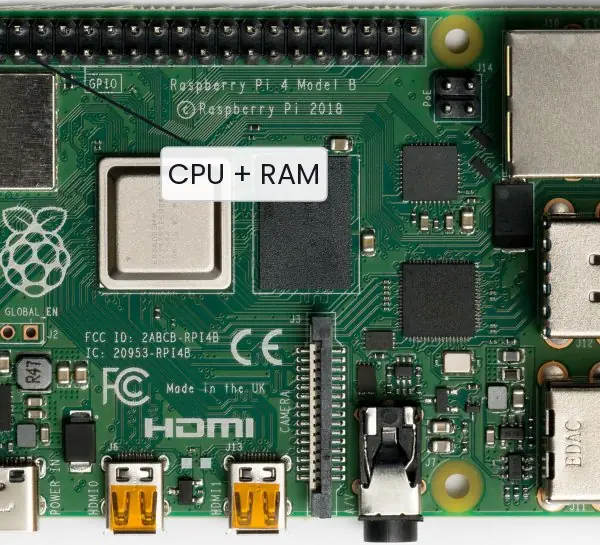
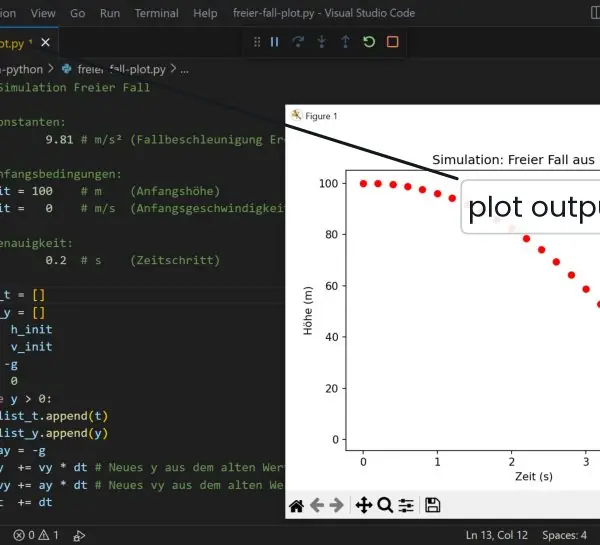
Python is easier to understand when you see where it comes from, where it runs and what happens to a file after you press Enter. The plate shows its designer, a tiny board that runs it in classrooms and a code editor with a plot window.
The figures show the path from hello.py to output, and how a name in Python points to an object instead of holding a value.



The next block runs these three situations, so you can compare the pictures with real output.
x = 5
y = x
print(x is y, id(x) == id(y))
x = x + 1
print(x, y, x is y)
a = [1, 2]
b = a
b.append(3)
print(a, b, a is b)
True True
6 5 False
[1, 2, 3] [1, 2, 3] True
1.9.1 Eight reasons why Python is so widely used
- Simple, readable syntax. A Python program looks close to plain English:
if marks >= 40:needs no braces or semicolons. A beginner can write a working program on the first day, and a team can read each other's code easily. This is why many Nepali colleges now teach Python before any other language. - Interpreted, so testing is quick. You can type a line at the
>>>prompt and see the result at once. There is no long compile and link step between a change and a test. A student can check a formula for the Tribhuvan University result sheet in a few seconds. - Dynamic typing. You do not declare
intorfloatbefore using a name, so a program is shorter and quicker to write. The cost is that some type errors only appear when the line runs. Good tests, which Unit 8 covers, make up for this. - Very large standard library. Python comes with modules for maths, dates, files, CSV, JSON, web access, databases and testing, which is why people say it has "batteries included". A script that reads a CSV file of exam marks and prints the average needs only a few lines. You do not have to install or write these parts yourself.
- Huge third-party ecosystem. The package index PyPI holds hundreds of thousands of packages, installed with
pip install. NumPy, Pandas and Matplotlib serve data analysis, Django and Flask serve websites, and scikit-learn and PyTorch serve machine learning. Nepali start-ups use these to build things such as fee dashboards and farm-price predictors. - Works on every platform. The same source file runs on Windows, Linux and macOS, and also on a Raspberry Pi. A program written in a college lab on Windows can run on a Linux server without changes in most cases. This saves the cost of rewriting software for each system.
- Strong community and free of cost. Python is open source under the PSF licence, so a college pays no licence fee. Millions of users write tutorials and answer questions in forums, so a student who meets an error finds help in minutes. This matters in a country where software budgets are small.
- Good for automation, glue code and prototypes. Python scripts can rename 500 files, send reports, read a Fonepay statement or join a database to a spreadsheet. Programmers also use it to test an idea before writing the final version in a faster language. The weakness is speed: a loop of a hundred million steps is slower than in C, so heavy work is handed to NumPy or to compiled code.
Formula and fact sheet
- Python: interpreted, dynamically typed, indentation-delimited, batteries included.
- Types:
int,float,complex,bool,str,None, collections. /true division,//floor division,%modulo,**power (right-associative).- Truthy/falsy: empty or zero values are false.
and/orreturn an operand. - f-string:
f"{value:width.precisiontype}". input()returnsstr.
Chapter summary
- Python is a readable, interpreted, general-purpose language with a rich library; use Python 3.
- Variables are names bound to objects; types belong to objects, not names.
- Operators follow a precedence table; floats are approximate; use parentheses and tolerances.
- Convert types explicitly; format output with f-strings.
Practice
- List five features of Python and two limitations.
- Which of these are valid identifiers:
_total,2marks,class,Total_1,my-var? - Predict the output of
print(7 // 2, -7 // 2, 7 % -3, 2 ** 3 ** 2). - Explain why
0.1 + 0.2 == 0.3isFalseand how to compare floats correctly. - What does
input()return? Write a program that reads two numbers and prints their average to two decimals. - What is the value of
bool("False")? Explain. - Write one statement that swaps two variables without a temporary.
- Show how to print
Total = 1,234,567.50from the number 1234567.5 using an f-string.
Answers and worked solutions
1. Features: simple syntax, interpreted, dynamic typing, large standard library, cross-platform, open source. Limitations: slower than compiled languages for tight numeric loops; weaker on mobile and hard real-time systems.
2. Valid: _total, Total_1. Invalid: 2marks (starts with a digit), class (keyword), my-var (hyphen is the minus operator).
3. Run:
print(7 // 2, -7 // 2, 7 % -3, 2 ** 3 ** 2)
3 -4 -2 512
Floor division rounds toward minus infinity (3 and −4); 7 % -3 takes the sign of the divisor (−2); ** is right-associative (2 ** 9 = 512).
4. 0.1 and 0.2 have no exact binary representation, so the sum is 0.30000000000000004. Compare with a tolerance:
import math
print(0.1 + 0.2 == 0.3, math.isclose(0.1 + 0.2, 0.3))
False True
5. input() returns a string. Program (input simulated):
import io, sys
sys.stdin = io.StringIO("7\n10\n")
a = float(input())
b = float(input())
print(f"Average = {(a + b) / 2:.2f}")
Average = 8.50
6. bool("False") is True: any non-empty string is truthy; only the empty string is false.
7. a, b = b, a.
8.
total = 1234567.5
print(f"Total = {total:,.2f}")
Total = 1,234,567.50
Model answers (5 and 10 marks)
Q1. Explain dynamic typing and name binding in Python with examples. (5 marks)
In Python a variable is a name that is bound to an object; it is not a box with a fixed type. The type belongs to the object, so one name can refer to an integer now and a string later. This is dynamic typing, and the interpreter checks types only when a line runs.
Name binding (Fig. 1.2). The statement x = 5 creates an int object holding 5 and binds the name x to it. The statement y = x does not copy the object; it binds a second name to the same object.
Because integers, strings and tuples are immutable, x = x + 1 builds a new object and moves only the name x. Lists and dictionaries are mutable, so two names bound to one list see every change made through either name.
Type checking at run time. type(x) shows the type of the current object, and isinstance(x, int) tests it. An operation that does not fit the type, such as "5" + 2, raises a TypeError at that line.
v = 40
print(type(v), v + 2)
v = "forty"
print(type(v), v + "-two")
a = [1, 2]
b = a
b.append(3)
print(a, b, a is b)
print(id(v) == id(a))
<class 'int'> 42
<class 'str'> forty-two
[1, 2, 3] [1, 2, 3] True
False
Advantages: shorter code, one function works on many types (duck typing). Disadvantages: some mistakes show up only at run time, and aliasing of mutable objects can surprise a beginner; use b = a.copy() when a separate list is needed.
Q2. Explain implicit and explicit type conversion in Python with a program. (5 marks)
Type conversion changes a value from one type to another. Python does it in two ways.
1. Implicit conversion (coercion). Python converts a value by itself when no information is lost. In a mixed expression an int is widened to a float, and a bool is treated as 0 or 1. So 3 + 2.5 gives the float 5.5, and True + 1 gives 2.
Python never converts a string to a number silently: "3" + 4 raises a TypeError.
2. Explicit conversion (casting). The programmer calls a constructor: int(), float(), str(), bool(), list(), tuple(), set(). int("42") turns text into a number, int(3.9) truncates toward zero to 3, and int("3.9") raises a ValueError because the text is not a whole number. round(3.9) is used when rounding is wanted. bool("False") is True, because any non-empty string is true.
Input. input() always returns a str, so a number read from the keyboard must be converted before it is used in arithmetic.
marks = "72"
total = int(marks) + 8
print(total, type(total))
print(3 + 2.5, True + 1, int(3.9), round(3.9), int(-3.9))
print(float("1e3"), str(25) + "%", bool(""), bool("False"))
try:
    int("3.9")
except ValueError as e:
    print("ValueError:", e)
80 <class 'int'>
5.5 2 3 4 -3
1000.0 25% False True
ValueError: invalid literal for int() with base 10: '3.9'
Rule: convert early, once, at the point where data enters the program, and handle ValueError when the data comes from a user.
Q3. What is Python? Explain its features, its applications and its limitations, and describe how a Python program is executed. (10 marks)
Introduction. Python is a high-level, interpreted, dynamically typed, general-purpose language created by Guido van Rossum and first released in 1991.
Its design goal is readable code, and its name comes from the comedy show Monty Python's Flying Circus. Only Python 3 is in use today, because Python 2 reached its end of life in January 2020.
Features.
- Readable syntax: blocks are marked by indentation, not by braces.
- Interpreted: code runs without a separate compile-and-link step (Plate 1.1c shows the quick edit-and-run cycle).
- Dynamically typed: names are bound to typed objects at run time (Fig. 1.2).
- Multi-paradigm: procedural, object-oriented and functional styles can be mixed.
- Large standard library and PyPI: files, dates, networking, databases, testing and data science are available.
- Portable and free: one source runs on Windows, Linux, macOS and a Raspberry Pi (Plate 1.1b).
- Automatic memory management: reference counting plus a garbage collector frees unused objects.
- Extensible: speed-critical parts can be written in C, as NumPy does.
Execution (Fig. 1.1). python hello.py starts the interpreter. It compiles the source to bytecode, stores it in __pycache__ as a .pyc file, and the Python Virtual Machine runs the instructions one by one.
A syntax error stops the run before execution; an exception occurs during execution.
Applications: web back ends (Django, Flask), data analysis (Pandas), visualisation (Matplotlib), machine learning, automation scripts, teaching, scientific computing and embedded boards (MicroPython). In Nepal it is used in data work for banks and in college projects.
Comparison with C.
| Point | Python | C |
|---|---|---|
| Execution | bytecode run by the PVM | compiled to machine code |
| Typing | dynamic | static |
| Memory | automatic (garbage collector) | manual (malloc, free) |
| Speed | slower for tight loops | very fast |
| Code length | short | longer |
| Best use | scripts, data, web, teaching | systems, drivers, embedded |
Limitations: slower than compiled languages for heavy numeric loops, higher memory use, the Global Interpreter Lock limits threads on several cores for CPU-bound code, weak support for mobile apps, and type errors appear late.
Conclusion. Python trades some speed for clarity and a huge ecosystem, which makes it the best first language for a BCA student and a practical tool for data and automation work.