Unit 1 · 6 teaching hours · 31 min read
Foundations for Advanced Java: Threads, I/O and Serialization
What the syllabus asks for 6
- The map of the Java platform
- Multithreading
- Streams and files
- Object serialization
- Collections and generics in a line
- Seeing the ideas: threads, streams and serialization
You already know how to write a Java class (OOP in Java, Semester II).
Everything in this book (windows that stay responsive while a download runs, a database server answering ten clients, a servlet container handling hundreds of requests) rests on three ideas you must be able to use fluently: doing several things at once (threads), moving data in and out of programs (streams) and turning an object into bytes and back (serialization).
Every program in this book was compiled with a real JDK (OpenJDK 17) and run; the output you see is the output that came out.
- Threads: creating, life cycle, synchronisation, thread pools and futures.
- Streams and files: byte and character streams, try-with-resources,
java.nio.file. - Object serialization:
Serializable,transient,serialVersionUID. - How the rest of the book fits together (the Java platform map).
1.1 The map of the Java platform
| Edition | What it is | In this book |
|---|---|---|
| Java SE | the language and core libraries: collections, I/O, threads, networking, Swing, JDBC, RMI | Units 1–5 and 7 |
| Jakarta EE (formerly Java EE) | enterprise APIs: Servlets, JSP, JSF, EJB, JPA, JMS | Unit 6 |
| Java ME / Android | small devices | not covered |
The rest of the units: Unit 2 builds graphical interfaces with Swing and event handling; Unit 3 talks to databases with JDBC; Unit 4 does network programming with sockets and HTTP; Unit 5 calls objects on other machines with RMI (and explains CORBA); Unit 6 writes server-side web components (servlets and JSP); Unit 7 packages reusable components as JavaBeans.
Since Jakarta EE 9 (2020) the enterprise packages moved from javax.servlet to jakarta.servlet.
Older textbooks, Tomcat 9 and below, and this book's compiled examples (servlet API 4.0) use javax.servlet; Tomcat 10 and above expects jakarta.servlet. The code is otherwise identical.
1.2 Multithreading
A thread is an independent path of execution inside a process; threads of one process share its memory. A GUI uses one thread to draw windows and others to do work; a server uses one per client or a pool.
Multitasking among processes is managed by the operating system; multithreading is cheaper because threads share heap memory (and therefore need care).
Creating threads
- Extend
Threadand overriderun(). - Implement
Runnableand pass it tonew Thread(runnable)(preferred: the class remains free to extend something else; a lambda works becauseRunnablehas one method). - Submit a
RunnableorCallableto anExecutorService(preferred in real programs).
start() creates the new thread and calls run() in it; calling run() directly merely calls a method in the current thread.
Life cycle
A thread is new (created), runnable (after start(), ready or running), blocked (waiting for a monitor lock), waiting or timed waiting (wait(), join(), sleep(ms)) and terminated (when run() ends). join() makes the caller wait until another thread finishes; sleep pauses the current thread; interrupt() politely asks a thread to stop.
Priorities (1–10) are hints only. Daemon threads do not keep the JVM alive.
Synchronisation
Two threads executing count++ can both read the same value and both write back value + 1, losing an update: a race condition. The increment is really three steps (read, add, write). Remedies:
synchronizedmethods or blocks acquire the monitor lock of an object; only one thread at a time may hold it. Entering a synchronised region also makes earlier writes visible (memory visibility).volatileguarantees visibility of one variable but not atomicity of compound actions.java.util.concurrent.atomicclasses (AtomicInteger) do lock-free atomic updates;ReentrantLockgives explicit locking withtryLock.wait()/notify()/notifyAll()(inside synchronized code) let threads cooperate, as in the producer–consumer pattern.
Deadlock occurs when threads wait for locks in a circle (thread 1 holds A and wants B while thread 2 holds B and wants A). Avoid it by always acquiring locks in the same global order.
Executors and futures
Creating a thread per task is wasteful. An ExecutorService keeps a pool of worker threads that run submitted tasks; a Callable<V> returns a result, delivered through a Future<V> whose get() waits for it.
import java.util.concurrent.*;
import java.util.*;
public class ThreadDemo {
    static int safe = 0; static final Object lock = new Object();
    public static void main(String[] args) throws Exception {
        Thread[] ts = new Thread[4];
        for (int i = 0; i < ts.length; i++) {
            ts[i] = new Thread(() -> { for (int k = 0; k < 50_000; k++) { synchronized (lock) { safe++; } } }, "worker-" + i);
            ts[i].start();
        }
        for (Thread t : ts) t.join();
        System.out.println("synchronized counter = " + safe);
        ExecutorService pool = Executors.newFixedThreadPool(3);
        List<Future<Long>> fs = new ArrayList<>();
        for (int n = 1; n <= 5; n++) {
            final int m = n;
            fs.add(pool.submit(() -> { long s = 0; for (long j = 1; j <= m * 1000L; j++) s += j * j; return s; }));
        }
        for (int i = 0; i < fs.size(); i++) System.out.println("sum of squares up to " + (i + 1) * 1000 + " = " + fs.get(i).get());
        pool.shutdown();
        System.out.println("terminated: " + pool.awaitTermination(1, TimeUnit.SECONDS));
    }
}
synchronized counter = 200000
sum of squares up to 1000 = 333833500
sum of squares up to 2000 = 2668667000
sum of squares up to 3000 = 9004500500
sum of squares up to 4000 = 21341334000
sum of squares up to 5000 = 41679167500
terminated: true
Four threads each add 1 fifty thousand times, so the total is exactly 200,000 only because of the synchronized block; without it the result would usually be smaller and different on each run.
The five tasks run concurrently, but the futures are read in submission order so the output is deterministic.
1.3 Streams and files
Java I/O is built from streams: a sequence of data flowing from a source or to a destination.
| Bytes | Characters | |
|---|---|---|
| Input | InputStream (FileInputStream, ByteArrayInputStream) |
Reader (FileReader, InputStreamReader) |
| Output | OutputStream (FileOutputStream) |
Writer (FileWriter, PrintWriter) |
| Buffered | BufferedInputStream |
BufferedReader, BufferedWriter |
| Objects | ObjectInputStream, ObjectOutputStream |
n/a |
Wrapping one stream in another (a decorator) adds capabilities: new BufferedReader(new InputStreamReader(socket.getInputStream())) reads text lines from a network socket.
Always close streams; the try-with-resources statement closes anything that implements AutoCloseable even when an exception occurs.
The modern java.nio.file API (Files, Path) does common tasks in one call: Files.readAllLines, Files.write, Files.walk.
import java.io.*;
import java.nio.file.*;
import java.util.*;
public class FileDemo {
    public static void main(String[] args) throws IOException {
        Path p = Files.createTempFile("nebians", ".txt");
        Files.write(p, Arrays.asList("Advanced Java", "JDBC and Servlets", "RMI"));
        try (BufferedReader br = Files.newBufferedReader(p)) {
            String line; int lines = 0, words = 0;
            while ((line = br.readLine()) != null) { lines++; words += line.split("\\s+").length; }
            System.out.println(lines + " lines, " + words + " words");
        }
        try (PrintWriter pw = new PrintWriter(new FileWriter(p.toFile(), true))) { pw.println("appended line"); }
        System.out.println("now " + Files.readAllLines(p).size() + " lines, last = " + Files.readAllLines(p).get(3));
        System.out.println("size in bytes: " + Files.size(p));
        Files.delete(p);
        System.out.println("exists after delete: " + Files.exists(p));
    }
}
3 lines, 6 words
now 4 lines, last = appended line
size in bytes: 50
exists after delete: false
1.4 Object serialization
Serialization converts an object (and everything reachable from it) to a byte stream; deserialization rebuilds an equal object. It is how objects are saved to disk, sent over sockets and passed between machines in RMI (Unit 5).
- The class must implement the marker interface
java.io.Serializable; all its non-transient field types must be serializable too, otherwiseNotSerializableException. - Fields marked
transientare skipped and come back as defaults (null, 0): use it for passwords, caches and handles such as open files. staticfields belong to the class, not the object, and are not serialized.serialVersionUIDidentifies the class version; if the sender's and receiver's UIDs differ, deserialization throwsInvalidClassException. Declare it explicitly.- A subclass of a non-serializable class needs the superclass to have a no-argument constructor, which is run on deserialization.
writeObject/readObjectprivate methods customise the format;Externalizablegives full control.
import java.io.*;
public class SerialDemo {
    static class Student implements Serializable {
        private static final long serialVersionUID = 1L;
        String name; int roll; transient String password;
        Student(String n, int r, String p) { name = n; roll = r; password = p; }
        public String toString() { return name + " #" + roll + " password=" + password; }
    }
    public static void main(String[] args) throws Exception {
        Student s = new Student("Sita", 7, "secret");
        ByteArrayOutputStream bos = new ByteArrayOutputStream();
        try (ObjectOutputStream out = new ObjectOutputStream(bos)) { out.writeObject(s); }
        System.out.println("before: " + s);
        try (ObjectInputStream in = new ObjectInputStream(new ByteArrayInputStream(bos.toByteArray()))) {
            Student t = (Student) in.readObject();
            System.out.println("after : " + t);
        }
        System.out.println("bytes produced: " + (bos.size() > 0));
    }
}
before: Sita #7 password=secret
after : Sita #7 password=null
bytes produced: true
The transient password is gone after the round trip. Serialization is also a security risk: never deserialize untrusted data (it can run attacker-chosen code), and prefer JSON for public interfaces.
1.5 Collections and generics in a line
Servlets, JDBC and GUI code all pass around List, Map and Set.
Remember the rules: ArrayList (fast random access), LinkedList (fast insertion at the ends), HashMap (key → value, no order), TreeMap (sorted keys), HashSet; use the generic form (List<String>) so the compiler checks types and no casts are needed; Collections.synchronizedList or ConcurrentHashMap when threads share a collection.
1.6 Seeing the ideas: threads, streams and serialization
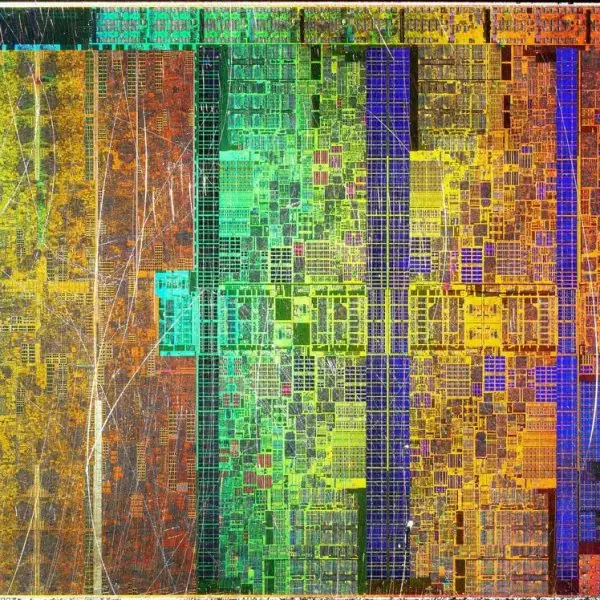
Concurrency is easier to understand when you can watch it. Plate 1.1 shows the people, the place and the processor behind it. Figure 1.1 maps the Java platform.
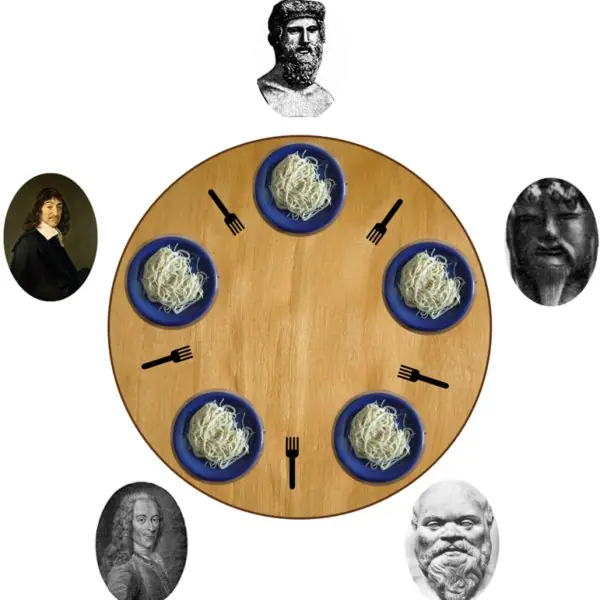
Figures 1.2 to 1.7 follow a thread from birth to death, show a lost update, a deadlock, the dining philosophers, a bounded buffer and a thread pool, and Plate 1.2 gives an everyday picture for each.
Figures 1.8 to 1.11 do the same for streams, character sets and serialization. Every program behind a number was compiled with OpenJDK 17 and run, and the figure code re-checks the arithmetic.










1.6.1 Eight uses of threads, streams and serialization in Nepal
- Many users on one server. When thousands of people pay a bill through a wallet such as Fonepay or ConnectIPS at the same time, the server cannot serve them one after another. It keeps a pool of threads, as in Figure 1.7, and gives each request to a free thread. A pool of fixed size also protects the server, because extra requests wait in a queue instead of using up all memory.
- Apps that stay responsive. An app such as Nagarik App must keep the screen alive while it downloads a document. The download runs in a second thread and the screen thread only draws. If the download ran on the screen thread, the app would freeze and users would think it had crashed.
- Batch jobs. A utility such as the Nepal Electricity Authority prints bills for lakhs of customers at the end of the month. The work can be cut into slices, one task per slice, and run on a thread pool, as the sum of squares in Figure 1.7 was cut into four tasks. Shared totals must then be protected by
synchronizedor an atomic class (Figure 1.3). - Reading data files. Weather stations of the Department of Hydrology and Meteorology send readings that arrive as text files. A program reads them line by line through a
BufferedReader, which makes thousands of times fewer calls than reading byte by byte (Figure 1.8). The program can then average, clean and store the values. - Names in Nepali. Result sheets of schools and campuses carry names in Devanagari. A program must read and write them with the UTF-8 character set, because the same word that is five characters long is 15 bytes in UTF-8 (Figure 1.9). Forgetting the character set is the commonest reason for question marks in a printed result.
- Logs and backups. Every server writes a log of what it did, and offices copy files to a backup disk each night. Both are stream jobs: a buffered output stream collects many small writes and sends them in large blocks. The
try-with-resourcesstatement guarantees that the file is closed even when an error occurs. - Saving the state of an application. An application that keeps a list of records in memory, such as a cache of student records in an education management system, can write the whole object graph to a file with serialization and read it back after a restart. Fields such as passwords are marked
transientso that they never reach the disk (Figure 1.10). The class needs an explicitserialVersionUIDso that old files can still be read after a small change. - Sending objects between programs, with care. Two Java programs, for example a branch application and a central bank server, can pass objects through a socket or RMI, and both use serialization. Never read serialized data from an untrusted sender, because crafted data can run harmful code. For public interfaces, such as an API used by many mobile apps, use JSON instead.
Formula and fact sheet
- Thread creation:
new Thread(runnable).start();start()notrun(). States: new, runnable, blocked, waiting, timed waiting, terminated. - Race condition fix:
synchronized, atomic classes or locks. Deadlock needs a circular wait; order locks globally. - Executor:
Executors.newFixedThreadPool(n),submit(Callable)→Future.get(),shutdown(). - Streams: bytes (
InputStream/OutputStream), characters (Reader/Writer); try-with-resources closes automatically. - Serialization:
Serializable,transientskipped,staticskipped, explicitserialVersionUID.
Chapter summary
- A thread is an independent path of execution sharing the process's memory; shared mutable data needs synchronisation.
- Executors and futures are the practical way to run tasks concurrently and collect results.
- Java I/O is layered streams; try-with-resources and
java.nio.filemake file work short and safe. - Serialization turns an object graph into bytes (and back) and underlies persistence and RMI;
transientfields are not saved.
Practice
- Differentiate a process from a thread. Give two ways to create a thread.
- Why is
start()used rather thanrun()? - Show how a race condition can lose an update and fix it with
synchronized. - Describe the life cycle of a thread.
- What is a deadlock and how can it be avoided?
- Write code that reads a text file line by line and counts words using try-with-resources.
- Differentiate byte streams from character streams; name a decorator and its effect.
- What do
Serializable,transientandserialVersionUIDdo? - Why must
Serializabledata from untrusted sources not be deserialized? - Explain how a
Callableand aFuturediffer from aRunnable.
Answers and worked solutions
1. A process has its own memory space; threads of a process share memory. Create threads by extending Thread and overriding run(), or by passing a Runnable (or lambda) to new Thread(...); or use an executor.
2. start() creates a new thread of execution and calls run() there; calling run() executes it in the caller's thread without concurrency.
3. Two threads read count = 5 at the same time and both write 6, losing one increment. Put count++ inside synchronized (lock) { ... } (or use AtomicInteger), so that only one thread updates at a time: four threads of 50,000 increments then produce exactly 200,000.
4. New → runnable (after start) → running; it may be blocked on a lock, waiting (wait, join) or timed waiting (sleep); when run() returns it is terminated.
5. Threads waiting for each other's locks in a cycle. Avoid by acquiring locks in a fixed order, holding few locks, using timeouts (tryLock) or higher-level concurrency classes.
6. try (BufferedReader br = Files.newBufferedReader(path)) { String line; while ((line = br.readLine()) != null) words += line.split("\\s+").length; }, as in the FileDemo program.
7. Byte streams move raw bytes; character streams convert bytes to characters using an encoding. BufferedReader wraps a Reader and adds buffering and readLine().
8. Serializable marks a class as convertible to bytes; transient excludes a field; serialVersionUID is the version stamp checked at deserialization.
9. Deserialization can instantiate arbitrary classes and run their code; attacker-crafted streams have been used to execute commands. Use data formats such as JSON and validate input.
10. Runnable.run() returns nothing and cannot throw checked exceptions; Callable.call() returns a value and may throw; the Future returned by submit lets the caller wait for that value (get) or cancel the task.
Model answers for Unit 1
Q1. What is a thread? Explain the ways of creating a thread and the life cycle of a thread. (10 marks)
Introduction. A thread is an independent path of execution inside a process. Threads of one process share its heap memory, so they are cheaper to create and switch than processes.
A GUI uses one thread to draw and others to work; a server uses a pool of threads, one for each request.
Creating threads. (1) Extend Thread and override run().
(2) Implement Runnable and pass it to new Thread(runnable); this is preferred because the class can still extend another class, and a lambda can be used because Runnable has one method.
(3) Submit a Runnable or Callable to an ExecutorService, the usual way in real programs. In all cases start() creates the new thread and calls run() in it; calling run() directly only calls a method in the current thread.
Life cycle (Fig. 1.2). A thread goes through six states of Thread.State:
| State | Meaning | How it is entered |
|---|---|---|
| NEW | created, not started | new Thread(...) |
| RUNNABLE | ready or running | start() |
| BLOCKED | waiting for a monitor lock | entering a synchronized block that another thread holds |
| WAITING | waiting without a time limit | wait(), join() |
| TIMED_WAITING | waiting for a limited time | sleep(ms), wait(ms) |
| TERMINATED | finished | run() ends |
A real run of a test program printed NEW, RUNNABLE, WAITING, TIMED_WAITING, WAITING, BLOCKED and TERMINATED, so every state was seen. interrupt() politely asks a thread to stop; priorities 1 to 10 are only hints; daemon threads do not keep the JVM alive.
Conclusion. Create threads with Runnable or an executor, call start(), and remember that the operating system, not the program, decides which runnable thread gets the processor.
Q2. What is a race condition? How does synchronized remove it? Name two other remedies. (10 marks)
Introduction. A race condition occurs when the result of a program depends on the order in which threads touch shared data. The standard example is count++, which is really three steps: read, add one, write.
How an update is lost (Fig. 1.3). Let count be 5. If T1 and T2 both read 5 before either writes, both compute 6 and both write 6, so the final value is 6 instead of 7.
If one thread finishes its three steps before the other begins, the result is 7.
A real run with two threads adding 1,000,000 times each ended at 1,985,476 for the unsynchronized counter, which lost 14,524 increments (0.73 percent), and the loss is different on every run.
Synchronized. A synchronized method or block takes the monitor lock of an object. Only one thread can hold it, so the three steps of count++ cannot interleave, and the real run gave exactly 2,000,000.
Leaving the block also makes the new value visible to the other threads (memory visibility).
| Remedy | Idea | Note |
|---|---|---|
synchronized |
one thread at a time holds the monitor | simple; may cause blocking |
AtomicInteger |
hardware compare-and-set, no lock | exact 2,000,000 in the real run |
ReentrantLock |
explicit lock, tryLock possible |
must unlock in finally |
volatile |
visibility of one variable only | does not make count++ atomic |
Conclusion. Shared mutable data must be protected; the smaller the protected region, the less the threads wait.
Q3. What is a deadlock? State the conditions and explain how it can be avoided, using the dining philosophers problem. (10 marks)
Introduction. A deadlock is a state in which each thread of a group waits for a lock held by another thread of the group, so none can go on. A traffic gridlock is the everyday picture (Plate 1.2).
Example (Fig. 1.4). T1 holds lock A and wants B, while T2 holds B and wants A. The wait-for graph has the cycle T1, B, T2, A, T1. A real run with these two threads ended with both threads BLOCKED, and findDeadlockedThreads() reported 2 threads.
Four conditions (Coffman). (1)
Mutual exclusion a lock can be held by one thread only. (2)
Hold and wait a thread keeps one lock while it asks for another. (3)
No pre-emption a lock cannot be taken away. (4)
Circular wait the threads form a cycle of waiting. Removing any one prevents deadlock.
Dining philosophers (Fig. 1.5). Five philosophers sit at a round table with a fork between neighbours, and each needs both neighbouring forks.
If every philosopher takes the left fork first, all five hold one fork and wait for the right one: a circular wait.
If every philosopher takes the lower-numbered fork first, only P4 changes (fork 0 before fork 4), the cycle is broken, and a real run gave every philosopher 3 meals.
Avoiding deadlock. Acquire locks in one global order; use tryLock with a time limit and back off; hold as few locks as possible; keep locked regions short.
Conclusion. Deadlock cannot be repaired by luck; it is prevented by design, most simply by a global lock order.
Q4. Explain the producer–consumer problem and how it is solved in Java. (5 marks)
In the producer–consumer problem one or more threads produce items and others consume them through a shared buffer of limited size.
The producer must wait when the buffer is full and the consumer must wait when it is empty, and no item may be lost or used twice (Plate 1.2, the factory line).
Classical solution. Keep the buffer in an object and guard it with synchronized.
The producer calls wait() while the buffer is full and notifyAll() after adding; the consumer calls wait() while it is empty and notifyAll() after removing.
The wait() call is placed in a while loop, not an if, because a woken thread must test the condition again.
Simple solution. Use a BlockingQueue such as ArrayBlockingQueue: put() blocks when the queue is full and take() blocks when it is empty, so the waiting is done for you.
In Fig. 1.6 the buffer holds 3 items; the producer fills it faster than the consumer empties it, the buffer is full at the red steps, and all 10 items come out in order with the sum 55, as in a real run with two threads.
Q5. What are executors, Callable and Future? How do they differ from Runnable? (5 marks)
Creating a new thread for every task is costly. An ExecutorService keeps a pool of threads and runs submitted tasks on them; Executors.newFixedThreadPool(n) makes a pool of n threads, and shutdown() stops it after the queued tasks finish.
A Runnable has void run(): it returns nothing and cannot throw a checked exception.
A Callable<V> has V call() throws Exception: it returns a value and may throw. submit(callable) returns a Future<V>, a receipt for a result that may not be ready; get() waits until the result is ready (or rethrows the failure), isDone() tests it and cancel() tries to stop the task.
Example (Fig. 1.7). Eight tasks of 4, 3, 5, 2, 6, 1, 3 and 2 units on a pool of 3 threads finish at time 10, where one thread needs 26 units: a speed-up of 2.6 times, not 3, because task T5 ends last.
In a real run four Callable tasks summed squares of 1 to 1000 in slices, and the four Future values 5,239,625, 36,552,125, 99,114,625 and 192,927,125 add up to 333,833,500 = 1000 × 1001 × 2001 / 6.
Q6. Differentiate byte streams from character streams. Why are buffered streams and a character set important? (5 marks)
Byte streams (InputStream, OutputStream) move raw 8-bit bytes and suit images, audio, class files and serialized objects.
Character streams (Reader, Writer) move 16-bit characters and convert between bytes and text using a character set; they suit text files. InputStreamReader is the bridge from a byte stream to a character stream.
Buffering (Fig. 1.8). A call to the operating system is slow.
Reading a 1,000,000-byte file one byte at a time through FileInputStream made 1,000,001 calls in a real run, but wrapped in BufferedInputStream it made only 124, which is 8,065 times fewer. BufferedReader adds readLine().
Character set (Fig. 1.9). The Nepali word नेपाल has 5 characters but 15 bytes in UTF-8 and 10 bytes in UTF-16, and it cannot be stored in ISO-8859-1. Reading UTF-8 bytes as ISO-8859-1 gives 15 wrong characters.
Always name the charset, for example StandardCharsets.UTF_8, and close files with try-with-resources.
Q7. What is serialization? Explain Serializable, transient, static and serialVersionUID, and the dangers of deserialization. (10 marks)
Introduction. Serialization converts an object, and everything reachable from it, into a stream of bytes; deserialization builds an equal object from the bytes. It is used to save objects to disk, send them through sockets and pass them in RMI (Unit 5).
Rules.
- The class must implement the marker interface
java.io.Serializable, and so must the types of all its non-transient fields; otherwiseNotSerializableExceptionis thrown. transientfields are skipped and come back as null or 0; use it for passwords, caches and open files.staticfields belong to the class and are not written.serialVersionUIDnames the version of the class; if the value in the stream differs from the class,InvalidClassExceptionis thrown, so declare it explicitly.- Sharing is preserved (Fig. 1.11): two Persons that share one Address give a stream of 198 bytes with a back-reference, against 204 bytes for two separate Addresses, and after reading they still share one Address. The copy is never
==to the original.
The stream (Fig. 1.10). Writing Student(Sita, 7, password) gave 78 bytes: the header AC ED 00 05, a description of the class (name, serialVersionUID 1, fields roll and name) and then the values roll = 7 and name = Sita.
The transient password is absent, so reading gives password = null.
Dangers. Deserialization can construct objects of any serializable class on the classpath and run their code, so data from an untrusted source can run harmful code.
Never deserialize untrusted data; filter classes with ObjectInputFilter, or use JSON for public interfaces.
Conclusion. Serialization is convenient for trusted, same-version Java programs and risky everywhere else.
Q8. Write a program that reads a text file line by line and counts its lines and words using try-with-resources. (5 marks)
The program writes a three-line sample file and then reads it back with a BufferedReader.
The reader is declared in the parentheses of try, so it is closed automatically, even if an exception occurs. readLine() returns null at the end of the file, and split("\\s+") cuts a line at runs of white space.
import java.io.*;
import java.nio.file.*;
public class WordCount {
    public static void main(String[] args) throws IOException {
        Path p = Files.createTempFile("w", ".txt");
        Files.writeString(p, "Nepal is a country\nKathmandu is its capital\nPokhara has a lake\n");
        int lines = 0, words = 0;
        try (BufferedReader r = Files.newBufferedReader(p)) {
            String s;
            while ((s = r.readLine()) != null) {
                lines++;
                if (!s.isBlank()) words += s.trim().split("\\s+").length;
            }
        }
        System.out.println("lines=" + lines + " words=" + words);
    }
}
lines=3 words=12
The three lines hold 4, 4 and 4 words, so 12 words in all. The text is read with the default character set; for Nepali text use Files.newBufferedReader(p, StandardCharsets.UTF_8).
Q9. Differentiate a process from a thread, and say why multithreading helps on a multi-core processor. (5 marks)
A process is a running program with its own address space, files and resources. A thread is a unit of execution inside a process; threads of the same process share its heap, code and open files but each has its own stack and program counter.
| Point | Process | Thread |
|---|---|---|
| Memory | separate address space | shared heap of the process |
| Creation and switch | slow, heavy | fast, light |
| Communication | pipes, sockets, shared memory | shared variables (need locks) |
| Failure | one process rarely harms another | an unhandled error can affect the whole process |
Multi-core use (Plate 1.1). A processor die has several cores, and each core runs one thread at a time.
A program with one thread can use only one core; a program with several threads can run them at the same moment on different cores, as the pool of 3 workers in Fig. 1.7 finished eight tasks in 10 units against 26 units for a single worker.
Threads also hide waiting: while one thread waits for a disk or a network, another keeps working. The price is the need for synchronisation and the risk of deadlock.