Unit 3 · 10 teaching hours · 22 min read
Software Requirement Analysis and Specification
What the syllabus asks for 8
- System and software requirements
- Types of software requirements
- Requirements engineering process
- Elicitation and analysis
- Requirements validation
- Software requirements specification (SRS)
- Feasibility study
- Requirements in pictures: a lesson from the year 2000
The hardest part of building a software system is deciding precisely what to build. No other part so cripples the resulting system if done wrong, and none is more difficult to repair later.
A famous tunnel-bore analogy: the cost of fixing a requirements error found in operation can be 50 to 100 times that of fixing it at the requirements stage, according to Boehm's classic studies (the exact multiplier varies by project and has been debated, but the direction is not disputed).
This unit teaches how requirements are classified, gathered, analysed, validated, written down and checked for feasibility.
- System versus software requirements; user, functional, non-functional and domain requirements.
- Elicitation techniques: interviews, viewpoints, scenarios, use cases, ethnography.
- Validation, the Software Requirements Specification (SRS), and feasibility study.
3.1 System and software requirements
A requirement is a description of a service the system should provide or a constraint on it. Requirements are written at different levels of detail for different readers:
| Level | Reader | Style |
|---|---|---|
| User requirements | clients, managers, end users | natural language, simple tables and diagrams: "The system shall let a librarian issue a book" |
| System requirements | engineers, architects, testers | structured, precise, detailed: inputs, outputs, rules, limits |
Example. User: "The library system shall remind members of overdue books." System: "1.1 Every day at 06:00 the system shall list loans overdue by one or more days. 1.2 For each, it shall send an SMS to the member's registered number. 1.3 No member shall be sent more than one reminder per day."
3.2 Types of software requirements
Functional requirements
Statements of services the system must provide, how it reacts to inputs and how it behaves in particular situations.
Example "A user shall be able to search the catalogue by title, author or ISBN."
Non-functional requirements (NFRs)
Constraints on services or the system as a whole: performance, reliability, security, usability, portability, standards. They often matter more than functional ones; a system that does everything but is too slow or unsafe is useless. Three classes:
| Class | Examples |
|---|---|
| Product requirements | speed (response < 2 s for 95 % of searches), reliability (availability 99.5 %), usability (a new user learns the basics in 30 minutes), portability |
| Organisational requirements | development process, standards (ISO), delivery dates, implementation language |
| External requirements | legal (privacy law), ethical, interoperability with other systems, regulations |
Writing NFRs testably. "The system shall be easy to use" is a goal; "Trained staff shall be able to issue a book in under 20 seconds and make fewer than 2 errors per 100 transactions" is a verifiable requirement.
Metrics: speed (transactions per second, response time), size (MB), ease of use (training time, error rate), reliability (mean time to failure, availability), robustness (restart time), portability (number of target systems).
Domain requirements
Come from the application domain and reflect its characteristics: a train-control system must respect braking rules from the railway's regulations; a banking system must follow interest calculation rules.
If the developers do not know the domain they will miss implicit requirements, so domain experts take part.
3.3 Requirements engineering process
The process has four activities, repeated in a spiral: feasibility study, elicitation and analysis, specification, and validation; requirements management runs through all of them, tracking changes.
3.4 Elicitation and analysis
Elicitation is hard: stakeholders do not know what they want, express it in their own terms, conflict with each other, and requirements change during analysis (because the business changes).
The stages: discovery, classification and organisation, prioritisation and negotiation, and documentation.
Viewpoints
Each stakeholder (a person or system with an interest) sees the system differently.
Viewpoint-oriented approaches organise requirements around them: interactor viewpoints (people and systems that interact, such as librarians, members), indirect viewpoints (those who influence requirements without interacting, such as the management and regulators), and domain viewpoints (domain constraints).
For a university result system: students, teachers, examination controller, IT staff, the Dean's office.
Interviewing
Closed interviews use a predefined list of questions; open interviews explore issues freely. Real interviews mix them.
Good practice: be open-minded, prompt with a prototype or a starting question, and remember that interviewees use domain jargon and omit what is obvious to them.
Interviews are poor for discovering domain constraints and organisational politics.
Scenarios
Scenarios are real-life examples of how the system might be used. Each includes: the situation before, the normal flow of events, what can go wrong and how it is handled, other concurrent activity, and the state after.
Initial assumption: the librarian is logged in and the member has presented a card.
Normal the librarian scans the card; the system displays the member's name and loans; the librarian scans the book; the system records the loan and due date (14 days) and prints a slip.
What can go wrong the card is expired (system refuses and shows the message), the member has five loans already (refuses), the book is reserved for another member (warns).
Other activity another terminal may be searching the catalogue.
End state the book is marked on loan.
Use cases
A use case describes an interaction between an actor (a person or external system) and the system to achieve a goal.
A use-case diagram shows actors (stick figures), use cases (ovals) and the system boundary (a rectangle); relationships: association (actor takes part), include (a use case always invokes another, such as "Issue book" includes "Verify membership") and extend (optional behaviour, such as "Pay fine" extending "Return book").
A structured text use case:
| Field | Content |
|---|---|
| Name | Issue book |
| Actor | Librarian (primary), Member |
| Precondition | Librarian authenticated; member card valid |
| Main flow | 1. Scan card. 2. System displays member. 3. Scan book. 4. System records loan and due date. 5. System prints slip. |
| Alternative flows | 2a. Card expired → show message, end. 3a. Limit exceeded → refuse. 3b. Book reserved → warn, ask to confirm. |
| Postcondition | Loan recorded; copy status = On loan |
Use cases and scenarios give the functional requirements as seen by users; they are effective for discovery but weak at expressing non-functional and domain requirements.
Ethnography
An analyst observes how people really work, spending time in the workplace.
Because people often cannot articulate their tacit knowledge or how they cope with exceptions, ethnography reveals real processes, cooperation and social constraints, such as informal workarounds in a hospital ward or a bank counter.
It needs time and does not reveal new features that the system could offer, so it is combined with other techniques.
Other techniques
Questionnaires (wide reach, shallow), workshops/JAD sessions (conflicts solved in the room), prototyping (users react to something concrete), document analysis (existing forms and reports), and brainstorming.
Prioritisation and negotiation
Stakeholders disagree, so requirements are prioritised, often by MoSCoW (Must, Should, Could, Won't) or by value and cost; conflicts are negotiated with explicit trade-offs and agreed ownership.
3.5 Requirements validation
Check that the requirements define the system the customer really wants. Errors found here are far cheaper than later. Checks:
- Validity: does the system provide the functions that best support the users?
- Consistency: no conflicting requirements.
- Completeness: all functions and constraints included.
- Realism: implementable with the technology and budget available.
- Verifiability: testable; can the final system be shown to meet it?
Techniques: requirements reviews (systematic manual analysis by a team of client and developer staff, with a checklist), prototyping (let users try a model), test-case generation (if a test cannot be written the requirement is probably vague).
Requirements change is unavoidable: management must keep traceability (links from each requirement to its source, design and tests), control change through a formal request, impact analysis and approval, and baseline each version.
3.6 Software requirements specification (SRS)
The SRS is the official statement of what the developers must implement. Readers: customers (to check), managers (to plan), engineers (to build), testers (to validate), maintainers. The IEEE 830 structure:
- Introduction: purpose, scope, definitions and acronyms, references, overview.
- Overall description: product perspective, product functions (summary), user characteristics, constraints, assumptions and dependencies.
- Specific requirements: external interface requirements (user, hardware, software, communication), functional requirements (organised by feature, use case or class), performance requirements, design constraints, quality attributes (reliability, availability, security, maintainability), other requirements.
- Appendices and index.
Characteristics of a good SRS (IEEE 830): correct, unambiguous, complete, consistent, ranked for importance, verifiable, modifiable, traceable.
Natural-language ambiguity is the big problem, so structured aids help: structured natural language with standard forms, tables and decision tables, pseudo-code (program design language), graphical models (DFD, use cases, state diagrams), and mathematical (formal) specifications for safety-critical systems.
"The system shall respond quickly and be user friendly" fails the test: quickly and friendly are unverifiable.
Rewrite: "The system shall display search results within 2 seconds for 95 % of queries with up to 10 concurrent users. 90 % of first-time librarians shall complete an issue transaction without help after a 30-minute training session."
3.7 Feasibility study
Before major effort is invested, ask: is the project worth doing, and can it be done? A feasibility report answers whether the system:
| Type | Question |
|---|---|
| Technical | can it be built with available technology and skills? |
| Economic | do the benefits exceed costs (cost-benefit analysis, payback)? |
| Operational | will it be used by the people and fit the organisation? |
| Schedule | can it be delivered in the time available? |
| Legal | does it comply with law and contracts? |
The feasibility study is short (a few weeks) and ends with a go / no-go recommendation, with alternatives (do nothing, buy, build, outsource) and their costs. Estimates from Unit 8 (COCOMO, function points) feed the cost side.
3.8 Requirements in pictures: a lesson from the year 2000
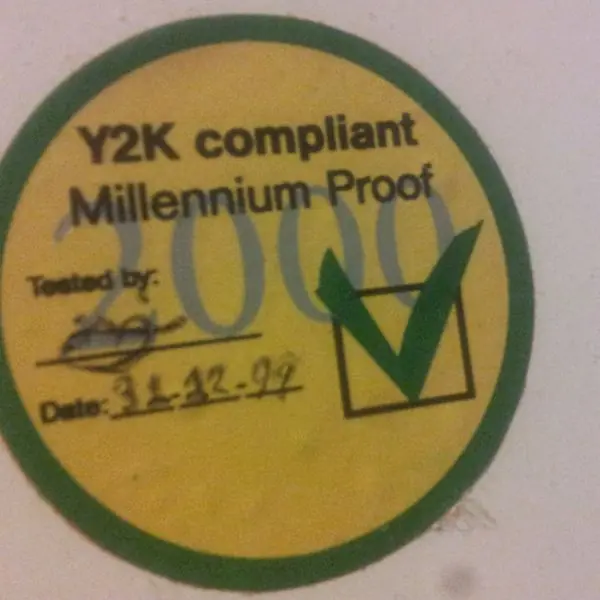
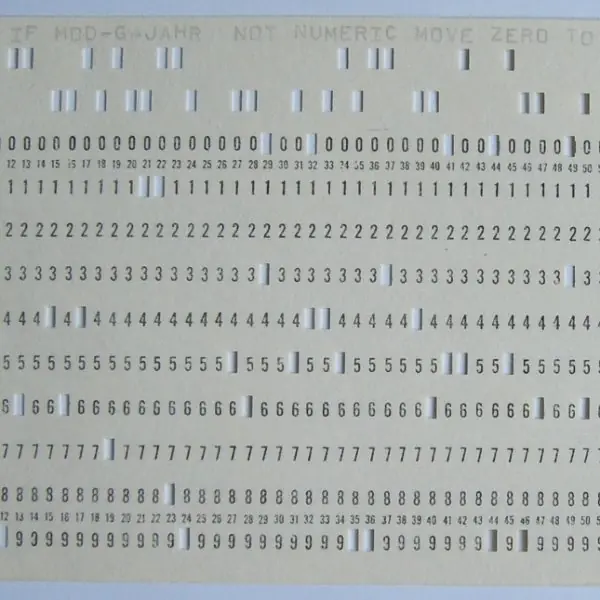
A requirement that is never written down is a requirement that is never tested. Plate 3.1 shows the best-known example: the year-2000 problem.
The Figures 3.1 to 3.6 then draw the requirements engineering process, a use case diagram, testable quality requirements, prioritisation, the layout of an SRS and a feasibility calculation.


3.8.1 Eight characteristics of a good SRS
- Correct. Every requirement stated is something the system must really do, as confirmed by the customer. A wrong requirement, such as a wrong grading rule for a University result system, is built faithfully and produces wrong results. Review with the users is the only way to check correctness.
- Unambiguous. Each requirement can be read in only one way by customer, designer and tester. Words such as "fast", "user-friendly" and "etc." are replaced by measurable statements, as in Figure 3.3. Ambiguity is the main source of disputes between a client and a software company.
- Complete. All functions, inputs, outputs, interfaces and quality needs are included, and every response to every input is defined. Gaps are costly, because the programmers fill them with their own guesses. The year-2000 case in Plate 3.1 is a gap that survived for thirty years.
- Consistent. No two requirements contradict each other and the same term always means the same thing. If one section says marks are out of 100 and another says out of 50, the design cannot satisfy both. A glossary and a careful review catch these conflicts.
- Ranked for importance and stability. Each requirement is marked essential, desirable or optional, and by how likely it is to change. This lets the team build the important and stable parts first, as in Figure 3.4. It also tells the client what can be cut when money or time is short.
- Verifiable. There is a finite, cost-effective way to check that the finished product meets each requirement, such as a test, an inspection or a demonstration. "The system shall be reliable" fails this test; "99.5 per cent availability per month" passes it. Unverifiable requirements cannot be accepted or rejected.
- Modifiable. The structure is organised so that a change touches only one place, with no repetition of the same fact. Requirements change constantly, for example when a fee rule changes, so the document must be easy to update. Numbered requirements and a good table of contents help.
- Traceable. Every requirement has a unique number, and each can be followed forward to design, code and tests and backward to its source. When a requirement changes, the team can find everything that is affected. Traceability is also how an auditor or a client checks that nothing was left out.
Formula and fact sheet
- User requirements (natural language, for clients) versus system requirements (detailed, for developers).
- Functional / non-functional (product, organisational, external) / domain requirements. NFRs must be verifiable with a metric.
- Elicitation: viewpoints, interviews, scenarios, use cases (include, extend), ethnography.
- Validation checks: validity, consistency, completeness, realism, verifiability.
- SRS qualities: correct, unambiguous, complete, consistent, ranked, verifiable, modifiable, traceable.
Chapter summary
- Requirements are written at user and system levels and divided into functional, non-functional and domain requirements.
- Elicitation uses viewpoints, interviews, scenarios, use cases and ethnography, followed by prioritisation and negotiation.
- Validation uses reviews, prototypes and test-case writing to catch errors early.
- The SRS records the agreed requirements in a standard structure; the feasibility study decides whether to proceed.
Practice
- Differentiate user and system requirements with an example.
- Distinguish functional, non-functional and domain requirements, with an example of each for a hospital system.
- Rewrite "The system should be fast and easy to use" as verifiable requirements.
- Describe three elicitation techniques and a weakness of each.
- Draw (describe) a use case diagram for an online ticket booking system, including one include and one extend relationship.
- List five checks used in requirements validation.
- Outline the structure of an SRS and list four qualities of a good SRS.
- What is a feasibility study and which types of feasibility are considered?
- Why is it said that errors in requirements are the most expensive?
Answers and worked solutions
1. User: "The system shall let patients book appointments online" (natural language for clients). System: "Booking shall accept doctor, date and slot; refuse a slot already booked; send a confirmation SMS within 60 seconds" (detailed, for developers).
2. Functional: "The doctor can view a patient's history." Non-functional: "Search results appear within 3 seconds; 99.9 % availability; compliant with patient-privacy law." Domain: "Drug dosage calculations shall follow the hospital's clinical protocol."
3. "95 % of page loads shall complete in under 2 seconds with 50 concurrent users. A first-time user shall be able to complete a booking within 3 minutes, without help, in at least 90 % of trials."
4. Interviews (rich detail; miss tacit knowledge and politics); scenarios (concrete; poor for non-functional needs); ethnography (shows real work; slow, finds no new ideas); use cases (clear goals; weak for domain constraints).
5. Actors: Customer, Payment Gateway, Admin. Use cases: Search tickets, Book ticket, Pay, Cancel booking. "Book ticket" «include» "Pay"; "Cancel booking" «extend» "Issue refund" (optional, if the ticket is refundable).
6. Validity, consistency, completeness, realism, verifiability (and traceability).
7. Introduction; overall description; specific requirements (interfaces, functions, performance, constraints, quality attributes); appendices. Qualities: correct, unambiguous, complete, consistent, verifiable, modifiable, traceable, ranked.
8. A short study at the start of a project to decide whether it is worth doing and possible. Technical, economic, operational, schedule and legal feasibility.
9. Requirements are the basis for all later work. A mistake propagates into design, code and tests; correcting it late means redoing all of them and often rebuilding trust with the customer, so the cost multiplies by the phase.
Model answers: medium (5 marks) and long (10 marks) questions
Q1 (5 marks). Differentiate between functional and non-functional requirements with examples for a college result system.
Introduction. Functional requirements say what the system must do; non-functional requirements (NFRs) say how well it must do it or under what constraints (section 3.2).
- Functional requirements describe services, inputs, outputs and behaviour. Examples: the examiner shall enter marks from 0 to 100; the system shall calculate the GPA from the marks; the student shall view a result by entering a roll number.
- Non-functional requirements describe quality and constraints: performance, reliability, security, usability, portability and legal rules. Example: a result page shall load within 2 seconds for 95% of requests with 500 users.
- Testing. A functional requirement is tested by checking a result for given inputs; an NFR is tested by measurement (load test, uptime log), as in Figure 3.3.
- Importance. A system that fails a functional requirement does not work; a system that fails an NFR works badly or unsafely, and NFRs often decide the architecture.
| Aspect | Functional | Non-functional |
|---|---|---|
| Describes | services and behaviour | qualities and constraints |
| Example | calculate GPA | 99.5% availability |
| Verified by | functional test | measurement |
| Failure means | feature missing | poor quality |
Conclusion. Both kinds belong in the SRS; vague NFRs must be rewritten as numbers.
Q2 (5 marks). Explain any four requirements elicitation techniques.
Introduction. Elicitation is discovering what stakeholders need; no single technique is enough, so analysts combine several (section 3.4).
- Interviews. The analyst asks closed and open questions of stakeholders, such as examination officers. They give detailed knowledge but depend on the person's memory and honesty.
- Scenarios and use cases. A typical use is described step by step, such as "Examiner enters marks" (Figure 3.2). Scenarios make requirements concrete and expose missing steps.
- Questionnaires and surveys. Many users answer fixed questions, which is cheap for large groups such as all students, but the answers are shallow and cannot be followed up.
- Observation (ethnography). The analyst watches people work in their real setting, for example the clerk at the admission counter. This reveals tacit knowledge that people forget to mention, and shows workarounds and problems.
- Prototyping and workshops (extra). A mock-up screen makes users react, and a joint workshop resolves conflicting viewpoints quickly.
Conclusion. Interviews give depth, questionnaires give breadth, observation gives truth and prototypes give feedback.
Q3 (10 marks). Explain the requirements engineering process with a diagram. Describe feasibility study, elicitation, specification, validation and management.
Introduction. Requirements engineering (RE) is the process of finding out, analysing, documenting and checking the services a system must provide and the constraints on it.
It is the foundation of the project, because Figure 1.1 shows that a requirement fault found after release costs about one hundred times more than one found on paper.
Process (Figure 3.1).
- Feasibility study. A short study decides whether the system is technically possible, economically worthwhile and operationally acceptable. In Figure 3.6 the project pays back in 2.4 years with a five-year return of 108.3%, so it is feasible. The output is a feasibility report.
- Elicitation and analysis. The analyst finds requirements from stakeholders using interviews, scenarios, use cases, observation and prototypes (Q2), then classifies them, finds conflicts, and negotiates and ranks them (Figure 3.4). Viewpoints, such as students, examiners and administrators, are listed so that nobody is missed.
- Specification. The agreed requirements are written as the software requirements specification (SRS) in a standard layout (Figure 3.5), using natural language, tables and models. Each requirement is numbered, atomic and testable.
- Validation. The SRS is checked for validity, consistency, completeness, realism and verifiability by reviews, prototypes and by writing test cases from the requirements. Errors send the team back, as the dashed arrow shows.
- Requirements management. Requirements change during the project, so changes are controlled: each change is logged, its impact is assessed using the trace links, and it is approved before being built.
| Activity | Input | Output |
|---|---|---|
| Feasibility | idea, budget | feasibility report |
| Elicitation | stakeholders | requirement lists, models |
| Specification | agreed lists | SRS |
| Validation | SRS | validated SRS, test cases |
| Management | change requests | controlled versions |
Problems. Stakeholders do not know what they want, express needs in their own terms, conflict with each other, and the environment changes. The process therefore must be iterative.
Conclusion. A systematic RE process produces a validated, traceable SRS; it is the cheapest place to remove faults, and the Y2K case in Plate 3.1 shows what an unwritten requirement costs.
Q4 (10 marks). What is an SRS? Describe its structure and the characteristics of a good SRS. Draw a use case diagram for a college result system.
Introduction. A software requirements specification (SRS) is the official statement of what the developers must build. It is the contract between customer and developer, the basis for design and testing, and the reference for later maintenance.
Structure (IEEE 830, Figure 3.5). Section 1 Introduction: purpose, scope, definitions, references and overview.
Section 2 Overall description: product perspective, functions, user classes, operating environment, constraints, assumptions.
Section 3 Specific requirements: external interfaces, functional requirements, performance, design constraints and quality attributes, each as a numbered statement such as "REQ-3.2.2 The system shall reject a mark above 100". Section 4 Appendices and index.
Characteristics (section 3.8.1). Correct, unambiguous, complete, consistent, ranked for importance and stability, verifiable, modifiable and traceable. An ambiguous requirement such as "fast response" is replaced by "95% of result queries return within 2 seconds".
Use case diagram (Figure 3.2). Actors: Student, Examiner, Administrator. Use cases: View result (includes Log in), Enter marks, Publish results, Manage users.
The student is linked to View result; the examiner to Enter marks; the administrator to Publish results and Manage users. The system boundary is drawn as a rectangle around the use cases.
One use case, in detail.
Enter marks Precondition: examiner is logged in. Main flow: choose subject and batch; enter marks; system validates 0 to 100; examiner saves. Alternative: invalid mark, message shown, entry repeated. Postcondition: marks stored.
| Characteristic | Test question |
|---|---|
| Unambiguous | can it be read two ways? |
| Complete | is every input case covered? |
| Verifiable | which test checks it? |
| Traceable | which design item and test does it map to? |
Conclusion. A good SRS reduces rework, prevents disputes and is the single document from which design, coding and testing start.