Unit 8 · 3 teaching hours · 23 min read
Security Management
What the syllabus asks for 6
- The security problem
- User authentication
- User authorization
- Program threats
- System threats
- Seeing the ideas: tokens, keys, fingerprints and attacks
An OS holds your files, passwords and bank sessions. Security is the discipline of keeping the wrong people and programs away from them while letting the right ones work.
Protection (Unit 7) is the mechanism; security is the larger problem of authenticating users and resisting attack. The numbers in this unit were computed in Python (bca/tools/check_os_misc.py).
- The security problem and the goals: confidentiality, integrity, availability.
- User authentication: passwords, their weaknesses, hashing and salting, one-time passwords, biometrics.
- Authorization.
- Program threats (Trojan horse, trap door, buffer overflow) and system threats (worms, viruses, denial of service).
8.1 The security problem
A system is secure if its resources are used and accessed as intended under all circumstances. The classical goals are the CIA triad:
| Goal | Meaning | Violated by |
|---|---|---|
| Confidentiality | only authorised parties read the data | eavesdropping, stolen database |
| Integrity | only authorised parties change the data | tampering, virus altering files |
| Availability | legitimate users can use the system | denial of service, ransomware |
Attackers exploit the weakest link, often people (social engineering: phishing, a caller pretending to be IT support).
Security is therefore needed at four levels: physical (locked server room), human (training, careful password handling), operating system (this unit and Unit 7) and network.
8.2 User authentication
Authentication proves who you are. The three families of evidence:
- Something you know: password, PIN.
- Something you have: smartphone, smart card, hardware token.
- Something you are: fingerprint, face, iris.
Using two or more families is multi-factor authentication (MFA), for example an ATM card plus PIN, or a bank app password plus an SMS or authenticator code.
Passwords and their vulnerabilities
Passwords are cheap but weak. Attacks: guessing (birthdays, "123456"), dictionary attack (try common words and variations), brute force (try everything), shoulder surfing, keylogging, phishing, and reuse of a leaked password on other sites.
Brute-force cost depends on the character set and the length. At an assumed 10⁹ guesses per second (a good GPU against a fast unsalted hash):
| Password | Possibilities | Time at 10⁹ guesses/s |
|---|---|---|
| 8 lowercase letters (26⁸) | 208,827,064,576 | 209 seconds (about 3.5 minutes) |
| 8 letters + digits (36⁸) | 2,821,109,907,456 | 2,821 seconds ≈ 47 minutes |
| 8 printable ASCII (95⁸) | 6,634,204,312,890,625 | 6.6 × 10⁶ s ≈ 77 days |
| 12 printable ASCII (95¹²) | 5.4 × 10²³ | 5.4 × 10¹⁴ s ≈ 17 million years |
Length beats complexity. Adding four characters multiplies the work by 95⁴ ≈ 81 million. Real users pick predictable passwords, so the true search space is far smaller than the table, which is why dictionary attacks work.
Encrypted (hashed) passwords
A system must never store passwords in plain text. It stores a one-way hash h(password); at login it hashes the typed password and compares. A stolen file then yields only hashes. Two refinements are essential:
- Salt: a random value stored beside the hash and mixed in, so two users with the same password get different hashes and precomputed (rainbow) tables become useless.
- Slow hashing: functions such as bcrypt, scrypt, Argon2 and PBKDF2 repeat the computation thousands of times, making each guess expensive.
Real output of Python's hashlib for the password nepal123 (first 32 hex digits shown):
sha256('nepal123')        = bda4423a69fcc5aed2bad4acb580dd5a...
sha256(salt+'nepal123')   = 22a43f6baab6158b6aa47bba7dbc0b2b...
pbkdf2-sha256 x100000     = eddbe59cb38808bb7557e8263a9de235...
The same password gives completely different digests once salted and stretched. UNIX stores these in /etc/shadow, readable only by root, instead of the world-readable /etc/passwd.
SHA-256 is designed to be fast, which helps the attacker. The 10⁹ guesses/s assumed above is realistic against it. PBKDF2 with 100,000 iterations makes each guess about 100,000 times slower, cutting that rate to roughly 10⁴ guesses/s per device.
One-time passwords
A one-time password (OTP) is valid for a single login, so a captured one is useless. Methods: a printed list; a hash chain (S/KEY); and the standard HOTP (counter-based) and TOTP (time-based) algorithms.
HOTP computes HMAC-SHA-1(secret, counter), takes 4 bytes selected by the low nibble of the digest, and keeps the last digits. For the RFC 4226 test secret 12345678901234567890, the real codes for counters 0 to 9 computed here are:
755224 287082 359152 969429 338314 254676 287922 162583 399871 520489
These agree with the RFC's published test values. TOTP uses the counter ⌊time / 30 s⌋; authenticator apps and many Nepali banks' mobile apps follow this scheme. (The RFC 6238 test vector for time 59 s gives 94287082 with 8 digits.)
Biometrics
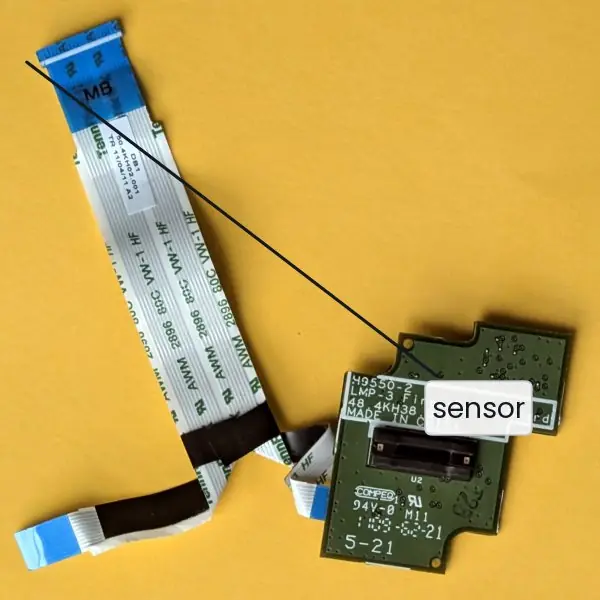
Fingerprint, face, iris and voice recognition identify you. Weaknesses: they cannot be changed if stolen, they have false accept and false reject rates (set the threshold to trade one against the other), and they raise privacy concerns.
Typically used as one factor among several.
8.3 User authorization
Authentication asks who are you; authorization asks what may you do. After login, each process carries the user's identity and every access is checked against permission bits, ACLs or capabilities (Unit 7).
Good practice: least privilege (run the web server as an unprivileged user), separation of duties, auditing (logs of access and failures), and short-lived credentials.
On UNIX the setuid bit lets a program run with its owner's rights (so passwd can write the password file); a flaw in such a program is a route to full control, so these programs are kept few and small.
8.4 Program threats
Trojan horse
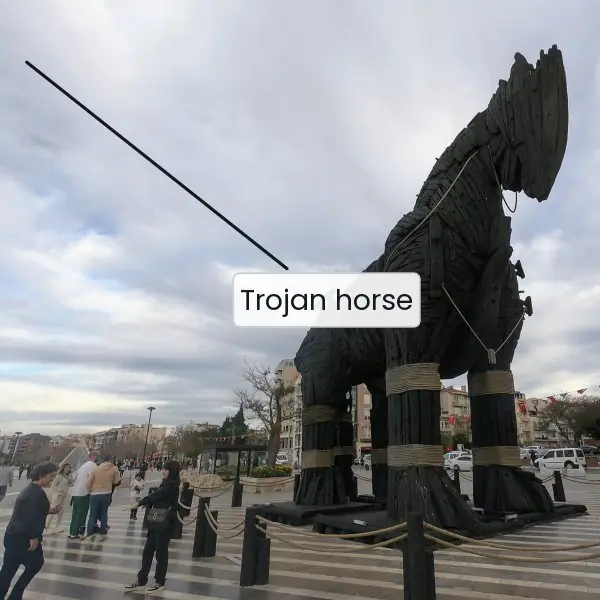
A program that appears useful but contains hidden malicious code, running with the user's rights: a "free game" that sends files out, a fake installer. A variant is a spoofed login screen that records the typed password.
Defence: install software only from trusted sources, verify checksums and signatures, and never put the current directory first in PATH.
Trap door (back door)
A secret entry point left by the programmer: a hard-coded password or a special input that skips authentication. It may be added by an insider and is hard to find in a large code base; defences are code review and source-code control.
(A well-known fictional example: a login that accepts a magic username without checking the password.)
Stack and buffer overflow
The most common exploit of C programs. A function copies input into a fixed array without checking its size; extra bytes overwrite neighbouring memory, including the return address saved on the stack.
The attacker supplies input that places machine code in the buffer and replaces the return address to point at it.
void greet(const char *name) {
    char buf[16];
    strcpy(buf, name);        /* no length check: 16+ bytes overflow buf */
    printf("Hello, %s\n", buf);
}
The safe version bounds the copy: snprintf(buf, sizeof buf, "%s", name) or strncpy with explicit termination.
Defences: bounds-checked languages, stack canaries (a secret value checked before return), non-executable stack (NX), address-space layout randomisation (ASLR), and compiler warnings.
The classic functions to avoid are gets, strcpy, sprintf and scanf("%s") without a width.
8.5 System threats
| Threat | What it is | Spreads by |
|---|---|---|
| Virus | code attached to a host program; runs when the host runs; infects other files | user running infected files, e-mail attachments, USB drives (needs a host and user action) |
| Worm | self-contained program that copies itself across a network without a host or user action | exploiting network service flaws (the Morris worm 1988; Blaster, WannaCry 2017) |
| Denial of service (DoS) | makes a service unavailable by exhausting resources | flooding with requests; DDoS uses thousands of compromised machines (a botnet) |
| Ransomware | encrypts the victim's files and demands payment | phishing, unpatched services |
| Spyware / keylogger | records activity | bundled software |
Virus types: file infector, boot-sector, macro (documents), polymorphic (changes its code to evade scanners).
Defences: keep the OS patched, use an antivirus (signature and behaviour-based), a firewall, regular backups (the only reliable cure for ransomware), disable macros from unknown sources, and teach users not to click unknown links.
For DoS: rate-limiting, traffic filtering, upstream scrubbing, and spare capacity.
A small web server can handle 2,000 requests per second. An attacker with 500 bots sending 10 requests each per second produces 5,000 requests per second: 2.5 times capacity.
Legitimate requests are dropped or time out, and the service is down without a single file being touched. This is an attack on availability, not confidentiality.
8.6 Seeing the ideas: tokens, keys, fingerprints and attacks
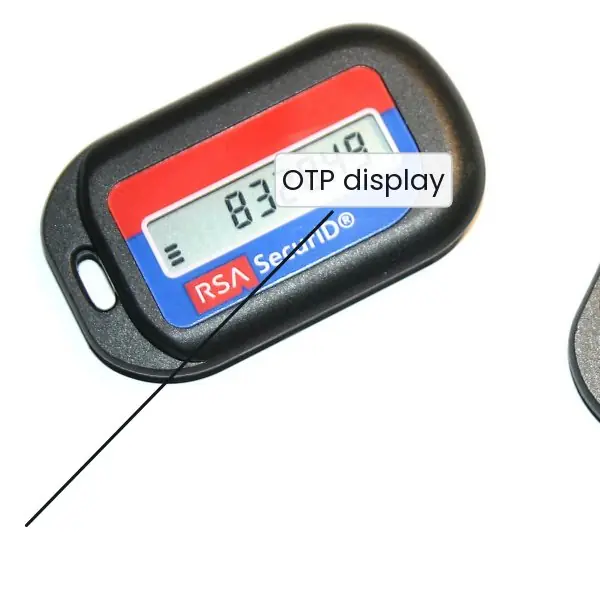
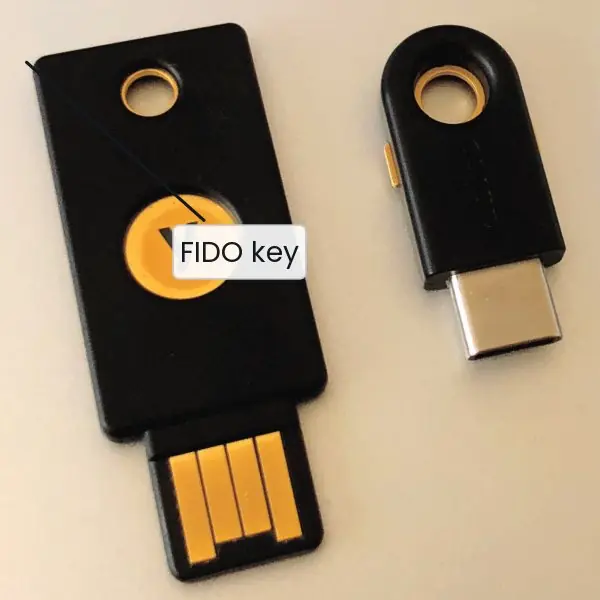
Security looks abstract until you hold the hardware. The plate shows four real objects: a statue of the original Trojan horse, a one-time-password token, a FIDO security key and a fingerprint sensor board.
The figures then follow a password through salting and slow hashing, put brute-force times on one logarithmic scale, draw the stack before and after a buffer overflow, and count a denial-of-service attack in requests per second.


8.6.1 Eight practical security rules for a student or a small office
- Use long passphrases. Length gives far more protection than odd symbols, because twelve printable characters take millions of years to brute-force while eight take days. A phrase of four unrelated words is easy to remember and hard to guess. A student should never use a birth date or a name for the ConnectIPS or eSewa login.
- Never reuse a password. When one website leaks its password file, attackers try the same email and password on banks and social media. A different password for every account stops one leak from becoming ten. A password manager can remember them all for you.
- Turn on a second factor. Something you have, such as an SMS code, a TOTP app or a FIDO key, makes a stolen password useless on its own. Banking and wallet apps in Nepal already ask for an OTP or PIN for transfers. Use the same idea for email and for the college portal.
- Keep the system patched. Worms such as WannaCry spread through a hole that already had a fix. Updating the OS and the browser closes those holes, often within days of the announcement. A lab computer that never updates is a free door for a worm.
- Install software only from trusted sources. A Trojan horse looks like a free game, a cracked editor or a fake installer, but runs with your own rights. Download from the official site or the system store and compare the published checksum when one is given. If a program asks for rights that it does not need, say no.
- Run with least privilege. Do daily work as an ordinary user and use the administrator account only to install or configure. Then a virus or a Trojan can damage only the files of one user instead of the whole machine. A web server should also run as an unprivileged account.
- Back up regularly and test the restore. Ransomware locks the files, and a recent backup on a disk that is not always connected is the only reliable cure. The 3-2-1 habit means three copies, on two kinds of media, with one stored somewhere else. A school office that keeps marks sheets on one PC must follow it.
- Be careful with messages and links. Phishing uses fear or greed: a fake bank SMS, an email about a prize, a call from false IT support. Check the address, never enter a password after clicking a link in a message, and ask a person you can trust. Most attacks begin with a person, not with a machine.
Formula and fact sheet
- CIA: confidentiality, integrity, availability.
- Search space = (alphabet size)^length; time = space ÷ guess rate; average success after half the space.
- Hash passwords with a salt and a slow function (bcrypt, scrypt, Argon2, PBKDF2).
- MFA = two of: know, have, are.
- Virus needs a host and user action; worm spreads alone; Trojan disguises itself; trap door bypasses authentication; overflow overwrites the return address.
Chapter summary
- Security aims at confidentiality, integrity and availability and must be applied at physical, human, OS and network levels.
- Passwords are weak against guessing and brute force; they must be stored salted and hashed; longer is far better than "complex".
- OTPs (HOTP/TOTP), tokens and biometrics add factors; authorization applies least privilege after login.
- Program threats (Trojan, trap door, buffer overflow) abuse trust in code; system threats (viruses, worms, DoS) abuse trust in the network and the host.
Practice
- Define the CIA triad with an example violation of each.
- Explain three password attacks and two defences.
- Why should passwords be stored hashed and salted? What does the salt prevent?
- How long does exhaustive search of 6 lowercase letters take at 10⁸ guesses per second?
- What is multi-factor authentication? Give an example from Nepali banking or e-wallets.
- Distinguish authentication and authorization.
- Explain how a buffer overflow lets an attacker run code, and three defences.
- Differentiate virus, worm and Trojan horse.
- What is a DoS attack? How does DDoS differ?
- How does a TOTP code stay valid for only a short time?
Answers and worked solutions
1. Confidentiality: leaked exam paper before the exam. Integrity: marks changed in the result database. Availability: the result portal is knocked offline by a flood on the night results are published.
2. Dictionary attack (try common words), brute force (try all combinations), phishing (trick the user into typing it). Defences: long, unique passwords and a password manager; MFA; rate-limiting and lockout; slow salted hashing.
3. A stolen file of plain passwords gives immediate access; a hashed file does not reveal the password directly. The salt makes identical passwords produce different hashes and defeats precomputed rainbow tables; the attacker must attack each user separately.
4. 26⁶ = 308,915,776 combinations ÷ 10⁸ = 3.09 seconds to try everything (about 1.5 s on average).
5. Authentication with two or more factor types. Example: a banking app login with password (know) plus a one-time code sent by SMS or an authenticator app on the registered phone (have).
6. Authentication establishes identity (password check); authorization decides what the authenticated identity may do (file permissions, ACL).
7. An unchecked copy writes past a buffer onto the saved return address; the attacker supplies shellcode and an address pointing to it, so on return the CPU executes it. Defences: bounds-checked functions and languages, stack canaries, NX stack, ASLR.
8. Virus: attaches to a host program, needs user action to run and spread. Worm: stand-alone, spreads over the network by itself. Trojan: pretends to be useful, does not self-replicate.
9. DoS makes a service unavailable by overwhelming it with requests or exhausting resources. DDoS does it from many distributed machines (a botnet), making it hard to block by address.
10. The code is HMAC(secret, ⌊time/30⌋). When the 30-second window moves on, the counter changes and the old code no longer matches; the server accepts only the current (and maybe adjacent) windows.
Model answers (5 and 10 marks)
Q1. What is the security problem? Explain the CIA triad and the levels at which security must be applied. (5 marks)
A system is secure if its resources are used and accessed only as intended, under all circumstances. The security problem is that attackers need to find only one weak point, while the defender must close all of them.
Protection (Unit 7) is the mechanism that enforces permissions; security is the wider task of authenticating users and resisting attack.
The goals are the CIA triad:
| Goal | Meaning | Example violation |
|---|---|---|
| Confidentiality | only authorised parties can read data | a stolen password file is published |
| Integrity | only authorised parties can change data | a virus alters marks in a results file |
| Availability | legitimate users can use the service | a DoS flood takes a web server offline (Figure 8.4) |
Security has to be applied at four levels because a chain fails at its weakest link. Physical: locked server room, power backup. Human: training against phishing and social engineering, careful password handling.
Operating system: authentication, permissions, patching, antivirus. Network: firewalls and encrypted connections. A strong OS can be defeated by a user who gives away a password, so no single level is enough.
Q2. How does an operating system store passwords safely? Explain hashing, salting and slow hashing. (5 marks)
A system must never store passwords in plain text, because anyone who read the file would learn every password. Instead it stores a one-way hash h(password).
At login the typed password is hashed and compared with the stored value (Figure 8.1). The hash cannot be reversed, so a stolen file gives only digests.
Two refinements are essential.
- Salt. A random value, stored beside the hash and mixed into the input. Two users with the same password then get different digests, and precomputed (rainbow) tables become useless. Real output for the password
nepal123: plain SHA-256 beginsbda4423a69fcc5ae, the salted version begins22a43f6baab6158b. - Slow hashing. Functions such as bcrypt, scrypt, Argon2 and PBKDF2 repeat the work thousands of times. PBKDF2 with 100,000 rounds begins
eddbe59cb38808bband makes each guess about 100,000 times slower than plain SHA-256, which helps the defender and hurts a brute-force attacker.
UNIX keeps the digests in /etc/shadow, readable only by root, instead of the world-readable /etc/passwd. Plain SHA-256 alone is a poor choice, since it was designed to be fast.
Length also matters: twelve printable characters need about 17 million years at 10⁹ guesses per second (Figure 8.2).
Q3. Explain the methods of user authentication. Why is multi-factor authentication stronger? (10 marks)
Introduction. Authentication proves who you are before the OS grants any rights. Authorization (what you may do) comes afterwards. The evidence falls into three families: something you know, something you have and something you are (Plate 8.1).
1. Passwords (know). Cheap and familiar, but weak: users guess, reuse, share or write them down. Attacks are guessing, dictionary attack, brute force, shoulder surfing, keylogging and phishing.
At 10⁹ guesses per second eight lowercase letters fall in 209 seconds, eight letters and digits in 47 minutes, eight printable characters in 77 days, and twelve printable characters in about 17 million years.
Passwords must be stored salted and slow-hashed (Figure 8.1).
2. One-time passwords (have). An OTP is valid for one login, so a captured code is useless. Methods are a printed list, a hash chain (S/KEY), and the standard HOTP (counter-based) and TOTP (time-based, new code every 30 seconds).
The code is computed from a shared secret by HMAC-SHA-1, so the server and the token agree without sending the secret. Hardware tokens such as RSA SecurID and authenticator apps work this way.
3. Tokens and smart cards (have). A FIDO key or smart card holds a private key and signs a challenge from the server. It resists phishing because the key signs only for the real site.
4. Biometrics (are). Fingerprint, face, iris and voice. They are convenient, but they cannot be changed if copied, they have a false accept rate and a false reject rate that trade against each other, and they raise privacy concerns.
5. Multi-factor authentication (MFA). Two or more families together, for example an ATM card plus PIN, or a banking app password plus an OTP. An attacker who steals one factor still lacks the other, and the factors fail in different ways.
| Method | Family | Main weakness | Strength |
|---|---|---|---|
| Password | know | guessing, reuse, phishing | cheap, easy to change |
| OTP / TOTP | have | token loss, real-time phishing | useless once used |
| FIDO key / smart card | have | loss of the device | phishing-resistant |
| Biometrics | are | cannot be changed, error rates | nothing to remember |
Conclusion. No single method is perfect, so a system should combine them in proportion to the value it protects and follow authentication with authorization by least privilege.
Q4. Describe the program threats and system threats an operating system faces and the defences against each. (10 marks)
Introduction. Threats are grouped by where they come from: program threats abuse trust in code that runs with a user's rights, and system threats abuse trust in the host and the network.
Program threats.
- Trojan horse. A program that looks useful but hides malicious code, running with the user's rights (Plate 8.1a). A variant is a fake login screen that records the password. Defence: install from trusted sources, verify checksums and signatures.
- Trap door (back door). A secret entry point left by the programmer, such as a hard-coded password. It is hard to find in large code, so defences are code review and controlled source repositories.
- Stack and buffer overflow. Input longer than a fixed array overwrites neighbouring memory, including the saved return address (Figure 8.3). Defences are bounds-checked functions, stack canaries, non-executable stacks (NX) and address-space layout randomisation (ASLR).
System threats.
- Virus. Code attached to a host program; it runs when the host runs and infects other files. Types: file infector, boot-sector, macro and polymorphic.
- Worm. A self-contained program that copies itself over a network without a host file or user action, using flaws in network services (the Morris worm of 1988; WannaCry in 2017).
- Denial of service (DoS / DDoS). Exhausts a resource so that real users are refused. In Figure 8.4 a botnet of 500 machines turns 500 normal requests per second into 5,500 against a capacity of 2,000, and only 36.4 percent of requests are served.
- Ransomware and spyware. Ransomware encrypts files and demands payment; spyware and keyloggers record activity.
| Threat | Needs a host? | Needs user action? | Main target | Key defence |
|---|---|---|---|---|
| Trojan horse | yes (disguise) | yes (install) | confidentiality | trusted sources |
| Virus | yes | yes | integrity | antivirus, patching |
| Worm | no | no | availability | patches, firewall |
| DoS | no | no | availability | rate limits, filtering |
| Ransomware | no | often (phishing) | availability | backups |
Conclusion. The common defences are a patched OS, antivirus, a firewall, least privilege, regular backups and trained users. Backups are the only reliable cure for ransomware.
Q5. What is a buffer overflow? How can it be prevented? (5 marks)
A buffer overflow happens when a program copies more data into a fixed-size array than it can hold, so the extra bytes overwrite neighbouring memory.
On the stack the neighbours include the saved frame pointer and the return address (Figure 8.3).
An attacker supplies input that puts machine code in the buffer and changes the return address to point at it, so the function returns into the attacker's code with the program's rights.
The cause is an unchecked copy such as the following.
void greet(const char *name) {
    char buf[16];
    strcpy(buf, name);              /* no length check */
    printf("Hello, %s\n", buf);
}
A real run, compiled with and without a stack canary, gave:
$ ./g_safe Ram
Hello, Ram
returned normally
$ ./g_safe AAAAAAAAAAAAAAAAAAAAAAAAAAAAAAAA
*** stack smashing detected ***: terminated        (exit 134)
$ ./g_raw  AAAAAAAAAAAAAAAAAAAAAAAAAAAAAAAA        (no canary)
Segmentation fault                                 (exit 139)
Prevention. Use bounded functions such as snprintf, check input lengths, use bounds-checked languages, enable stack canaries (a secret value checked before return), a non-executable stack (NX) and ASLR, and treat compiler warnings as errors.