Unit 1 · 2 teaching hours · 20 min read
Introduction to Operating Systems
What the syllabus asks for 6
- What is an operating system?
- History and generations of operating systems
- Types of operating systems
- Functions of an operating system
- Key hardware ideas an OS relies on
- Seeing the ideas: three machines, two roles, one utilisation curve
Switch on a laptop in Kathmandu and within seconds you can run a browser, a music player and a download at the same time, each convinced it owns the machine. None of them talks to the disk, the screen or the network card directly.
One program sits between them and the hardware and keeps order: the operating system (OS).
- What an OS is, through its two classic roles: resource manager and extended machine.
- A short history of OS generations, from vacuum tubes to smartphones.
- The main types of OS (batch, multiprogramming, time-sharing, real-time, distributed and others).
- The functions an OS performs, which become Units 3 to 8 of this book.
1.1 What is an operating system?
A computer has hardware (CPU, memory, disks, keyboard, display, network card) and application software (a spreadsheet, a compiler, a game).
Between them lies the operating system: the program that runs in privileged mode and manages the hardware on behalf of every other program.
An operating system is system software that manages the computer's hardware resources and provides a convenient, safe and efficient environment in which user programs can run.
Two goals pull against each other. Convenience: a programmer writes fopen("marks.txt") without knowing which disk sectors hold the file. Efficiency: the CPU, memory and disks should be kept busy and shared fairly.
A phone OS leans towards convenience and battery life; a mainframe OS towards throughput.
The two views: resource manager and extended machine
OS as an extended machine (top-down view). Raw hardware is ugly. Talking to a disk means programming a controller with block numbers, motor, head and error registers.
The OS hides this behind clean abstractions: files instead of disk blocks, processes instead of CPU time slices, address spaces instead of physical RAM, sockets instead of network card registers.
To the application programmer the OS makes the machine look easier to use than the real hardware, which is why it is called an extended (or virtual) machine.
OS as a resource manager (bottom-up view). A real machine has many resources and many competitors. Without control, two programs could print on the same page at once or overwrite each other's memory.
The OS keeps track of who uses what, grants requests, resolves conflicts and accounts for usage. Sharing happens in two ways:
- Time multiplexing: users take turns (one CPU, one printer).
- Space multiplexing: each gets a part (memory divided among processes, a disk divided among files).
Where the OS sits
| Layer | Examples | Mode |
|---|---|---|
| Application programs | browser, Word, games | user mode |
| Utilities / shell | bash, File Explorer, ls |
user mode |
| Operating system (kernel) | scheduler, memory manager, file system, drivers | kernel mode |
| Hardware | CPU, RAM, disk, NIC | physical |
The CPU has at least two modes. In kernel mode every instruction is allowed. In user mode privileged instructions (I/O, changing the memory map, halting) cause a trap.
An application asks the kernel for service through a system call, which switches the CPU into kernel mode, runs OS code and returns.
If any program could execute a privileged instruction, a buggy or malicious program could disable interrupts or overwrite another program's memory. The mode bit is the hardware foundation of OS protection, which is why Unit 2 treats the kernel as special.
1.2 History and generations of operating systems
| Generation | Years | Hardware | Software style |
|---|---|---|---|
| Zeroth | 1945–55 | vacuum tubes, plugboards | no OS; the programmer operated the machine directly |
| First | 1955–65 | transistors, mainframes | batch systems: jobs on punched cards, run one after another by a resident monitor (e.g. IBM FMS) |
| Second | 1965–80 | integrated circuits | multiprogramming and time-sharing: OS/360, CTSS, MULTICS, early UNIX (1969) |
| Third | 1980–90s | LSI, microprocessors, PCs | single-user PC systems (CP/M, MS-DOS), GUIs (Mac OS, Windows), UNIX workstations |
| Fourth | 1990s–now | cheap multicore, networks, mobile | Windows NT family, Linux (1991), Android, iOS, virtualisation, cloud OS |
The common theme: each step kept the expensive CPU busier. On a first-generation batch machine the CPU idled while an operator mounted tapes.
Multiprogramming keeps several jobs in memory so that when one waits for I/O, the CPU switches to another. Time-sharing adds rapid switching so that many users, each at a terminal, get interactive response.
Suppose each job spends 80 % of its time waiting for I/O. With one job, CPU utilisation is 20 %. With n jobs in memory, the probability that all are waiting is 0.8ⁿ, so the utilisation is 1 − 0.8ⁿ.
For n = 4 that is 1 − 0.4096 = 59 %; for n = 10 it is 1 − 0.107 = 89 %. This is the classic degree-of-multiprogramming model; real systems do slightly worse because jobs are not perfectly independent.
1.3 Types of operating systems
| Type | Idea | Example uses |
|---|---|---|
| Batch | similar jobs grouped, run without user interaction | payroll runs, bank end-of-day processing |
| Multiprogramming | several jobs in memory; CPU switches on I/O wait | most mainframes of the 1970s |
| Time-sharing (multitasking) | CPU switched among users every few milliseconds for interactive response | UNIX, Linux, Windows desktops |
| Multiprocessor / parallel | two or more CPUs share memory and bus | servers, multicore laptops (SMP) |
| Real-time | correct result within a deadline; hard (missing = failure) and soft (missing = degraded quality) | pacemakers, ABS brakes (hard); video streaming (soft); FreeRTOS, VxWorks |
| Distributed | many computers appear as one system | clusters, cloud back ends (Unit 9) |
| Network OS | machines know about each other; users log in to a specific one | file/print servers on a college LAN |
| Embedded | small fixed-function device, limited memory | routers, smart TVs, microwave controllers |
| Mobile | touch UI, power management, app sandboxing | Android, iOS |
Interactive versus batch: what changes?
A batch OS optimises throughput (jobs per hour); a time-sharing OS optimises response time; a real-time OS optimises predictability. These are different objectives and they lead to different schedulers (Unit 3).
A hard real-time system may have a slower average speed than a desktop. What matters is that the worst-case response time is guaranteed. A desktop that is "usually fast" but occasionally stalls for a second is unacceptable in an airbag controller.
1.4 Functions of an operating system
| Function | What it does | Covered in |
|---|---|---|
| Process management | creates, schedules, synchronises and terminates processes and threads | Unit 3 |
| Deadlock handling | prevents, avoids or detects circular waiting for resources | Unit 4 |
| Memory management | allocates RAM, virtual memory, protection | Unit 5 |
| I/O device management | drivers, buffering, disk scheduling | Unit 6 |
| File management | files, directories, access control | Unit 7 |
| Security and protection | authentication, authorisation, threat defence | Unit 8 |
| Networking and distribution | message passing, RPC | Unit 9 |
| User interface | command-line shell or GUI | Unit 2 |
| Accounting and error handling | usage statistics, recovery from hardware faults | all |
1.5 Key hardware ideas an OS relies on
- Interrupts. A signal from a device (disk finished, key pressed, timer expired) makes the CPU save its state and jump to an interrupt handler. Without interrupts the OS would have to poll every device continuously.
- Timer. A hardware clock that interrupts the CPU periodically. This lets the OS take the CPU back from a program that never gives it up, which is what makes preemptive multitasking possible.
- Memory protection registers. Base and limit registers stop one process from addressing another's memory.
- DMA (direct memory access). Lets a controller move blocks between a device and RAM without the CPU copying every byte (Unit 6).
- Bootstrap. At power-on, firmware (BIOS/UEFI) runs a tiny program that loads the kernel from disk into RAM and jumps to it.
- The keyboard controller raises an interrupt. 2. The CPU finishes the current instruction, saves the program counter and switches to kernel mode. 3. The interrupt handler reads the scan code and queues it for the keyboard driver. 4. The OS wakes the process waiting for input (for example your text editor). 5. The scheduler eventually runs the editor, which draws the letter. Every step is OS work you never see.
1.6 Seeing the ideas: three machines, two roles, one utilisation curve
An operating system is easiest to understand by looking at the machines it grew up on.
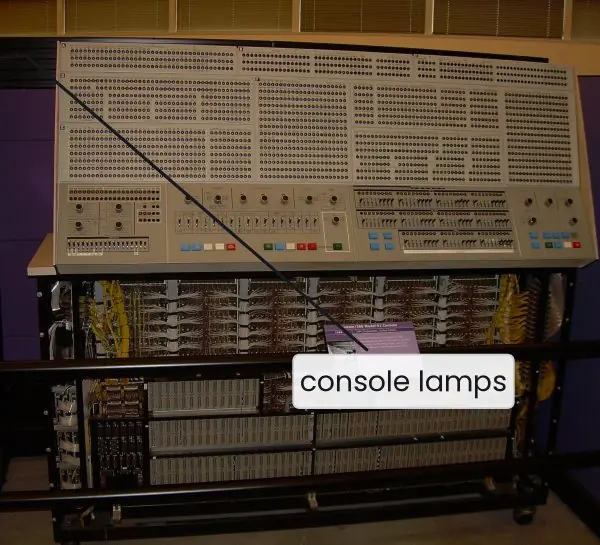
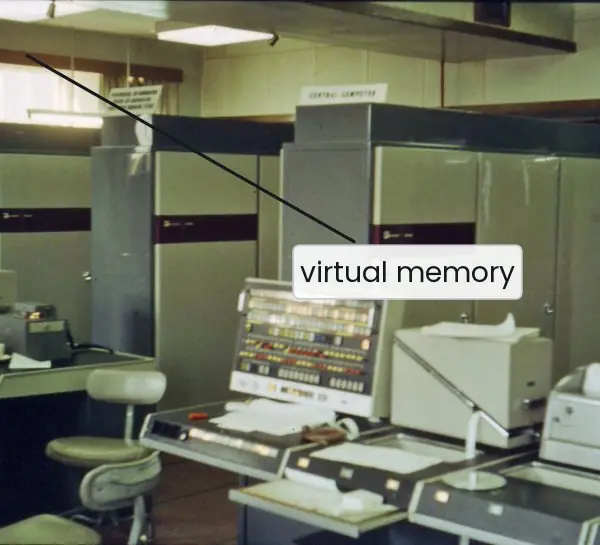
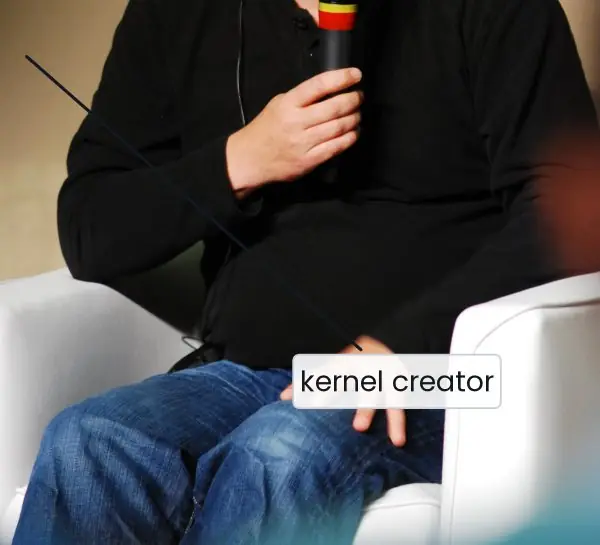
The plate below shows three landmarks: the console of an IBM System/360 mainframe, the Manchester Atlas that first used virtual memory, and the creator of Linux.
The figures that follow draw the two roles of an OS, the utilisation curve of multiprogramming and the user/kernel mode switch.


1.6.1 Eight functions of an operating system
- Process management. The OS creates processes, decides which one uses the CPU and ends them when they finish. A student who has a browser, a music player and a code editor open on a Tribhuvan University lab PC is using this function every second. Without it only one program could run at a time.
- Memory management. The OS gives every program its own part of RAM and keeps track of what is free. It also stops one program from reading another's data. On a phone with 4 GB of RAM this is what lets the Nagarik App and a game live together.
- File management. The OS stores data as named files in folders, so users never think about disk sectors. It records who may read or write each file. Your result PDF from the Examination Control Office is found by name, not by track number.
- Device (I/O) management. The OS talks to printers, keyboards and network cards through drivers. It queues requests and uses buffers so that slow devices do not stall the CPU. A cyber cafe printer shared by ten computers works because of this.
- Security and protection. The OS checks passwords, assigns permissions and separates user mode from kernel mode. This keeps a mistake or a virus in one program from damaging the rest. Banking software such as ConnectIPS relies on it at every login.
- Resource allocation. When many programs ask for the CPU, memory or disk at once, the OS decides who gets what and for how long. Good allocation keeps all the resources busy and every user satisfied. A web server for the SEE results site gets thousands of requests and still answers each one.
- User interface. The OS offers a command line or a graphical shell so people can start programs and manage files. The same hardware feels different under Windows, Ubuntu and Android because the interface differs. A simple, consistent interface is why a first-time user can learn a computer in a day.
- Error detection and accounting. The OS watches for hardware faults, bad instructions and full disks, and reports them or recovers. It also records how much CPU time and disk each user consumes. A university server uses these records to share fairly among departments.
Formula and fact sheet
- Multiprogramming CPU utilisation with n jobs, each waiting a fraction p of the time: 1 − pⁿ.
- Two roles: extended machine (hides hardware) and resource manager (shares hardware).
- Two sharing styles: time multiplexing and space multiplexing.
- Two CPU modes: user and kernel. System call = controlled entry to kernel mode.
- Generations: tubes → transistors/batch → ICs/multiprogramming/time-sharing → PCs → networked/mobile.
Chapter summary
- An OS is the privileged layer that manages hardware and offers abstractions (files, processes, address spaces) to applications.
- It acts both as an extended machine and as a resource manager.
- OS history is a history of keeping the CPU busy: batch, multiprogramming, time-sharing, personal computers, distributed and mobile systems.
- Batch, time-sharing, real-time, distributed, network, embedded and mobile OS types differ in their main goal: throughput, response time, deadlines, transparency, or power and footprint.
- Interrupts, a timer, protection registers and the user/kernel mode bit are the hardware that makes an OS possible.
Practice
- Define an operating system. Explain its two roles with one example each.
- Why is the OS called an "extended machine"? Give three abstractions it provides.
- Distinguish between multiprogramming and time-sharing.
- A system keeps 5 jobs in memory; each waits for I/O 70 % of the time. Compute CPU utilisation.
- Differentiate hard and soft real-time systems with an example of each.
- Why must the OS run in kernel mode while applications run in user mode?
- List four functions of an operating system and name the hardware support each needs.
- Explain how a timer interrupt enables preemptive multitasking.
Answers and worked solutions
1. An OS is system software that manages hardware and provides an environment for programs. Resource manager: it divides 8 GB of RAM among running processes and decides which one gets the CPU. Extended machine: it lets a program write printf output without knowing the display controller's registers.
2. It makes raw hardware look like a simpler, more powerful machine. Abstractions: file (instead of disk blocks), process (instead of CPU time), virtual address space (instead of physical memory); also socket, window.
3. Multiprogramming keeps several jobs in memory to use the CPU while one waits for I/O; switching happens mainly on I/O waits, so interactive response may be poor. Time-sharing extends this by switching on a timer every few milliseconds so that each interactive user sees quick response.
4. Utilisation = 1 − pⁿ = 1 − 0.7⁵ = 1 − 0.16807 = 0.832, i.e. 83.2 %.
5. Hard: missing a deadline is a failure, e.g. a car airbag controller. Soft: a missed deadline only degrades quality, e.g. a dropped video frame during streaming.
6. Privileged instructions (I/O, memory-map changes, disabling interrupts) in the hands of any program would let it crash or spy on others. Mode separation confines these instructions to the trusted kernel; applications request them through system calls.
7. Process management (timer and interrupts); memory management (base/limit registers or an MMU); I/O management (interrupts and DMA); file management (disk controller); security (mode bit).
8. The timer raises an interrupt after a fixed interval. The handler enters the kernel, which can save the running process's state and give the CPU to another process, even if the first never called the OS. Without this, a looping program would hold the CPU forever.
Model answers (5 and 10 marks)
Q1. Define an operating system. Explain its two roles with an example of each. (5 marks)
An operating system (OS) is system software that manages the hardware of a computer and provides a convenient and safe environment in which application programs can run.
It sits between the user (or application) and the hardware, as drawn in Figure 1.1. Windows, Linux, macOS and Android are common examples.
Role 1: extended machine. Raw hardware is hard to use: a disk has thousands of numbered blocks and a CPU knows only machine instructions.
The OS hides this complexity and offers simple abstractions: a file instead of disk blocks, a process instead of raw CPU time and a virtual address space instead of physical memory.
A programmer who writes fopen("marks.txt") never learns where on the disk the bytes lie.
Role 2: resource manager. A computer has limited CPU, memory and devices, and many programs want them at once. The OS allocates them, keeps track of who uses what, and prevents conflicts.
For example, it divides 8 GB of RAM among a browser, an editor and a media player and decides which of them runs on the CPU next.
| Point | Extended machine | Resource manager |
|---|---|---|
| View | top-down, from the user | bottom-up, from the hardware |
| Goal | convenience | efficiency and fairness |
| Example | file abstraction | CPU scheduling |
Both roles together make the computer easy to use and fully utilised.
Q2. Distinguish between multiprogramming and time-sharing. If each job waits for I/O 70 percent of the time, find the CPU utilisation with 5 jobs. (5 marks)
Multiprogramming keeps several jobs in main memory at the same time. When the running job waits for an I/O operation, the OS gives the CPU to another job, so the CPU is rarely idle.
The aim is throughput, that is, more jobs completed per hour. Switching happens mainly on I/O waits, so a user may wait a long time for a reply.
Time-sharing (multitasking) extends this idea by switching the CPU among jobs at fixed short intervals, called time slices (typically 10 to 100 ms), using a timer interrupt.
Every user at a terminal feels that the machine belongs to him. The aim is a short response time.
| Point | Multiprogramming | Time-sharing |
|---|---|---|
| Switching trigger | I/O wait | timer interrupt and I/O wait |
| Main goal | CPU utilisation, throughput | response time |
| User interaction | little or none | interactive |
| Example | IBM OS/360 batch mix | UNIX, Linux, Windows |
Calculation. With I/O-wait fraction p = 0.7 and n = 5 jobs, the probability that all jobs wait together is p^{n} = 0.7^{5} = 0.16807. So the CPU utilisation is 1 - 0.16807 = 0.832, that is, 83.2 percent.
With one job it would have been only 30 percent, so multiprogramming almost trebles the use of the CPU (Figure 1.2 shows the same curve for p = 0.8).
Q3. Explain the generations of operating systems with their hardware and software features. (10 marks)
Introduction. The history of operating systems follows the history of computer hardware. Each generation made the CPU busier and the machine easier to use. The photographs in Plate 1.1 show landmarks of the second and fourth generations.
Zeroth generation (1945-55): vacuum tubes and plugboards. There was no OS. A programmer booked the machine, wired a plugboard or loaded cards by hand and ran the program personally. Computing was slow, and most of the time went into setting up.
First generation (1955-65): transistors and batch systems. Computers became reliable enough to be sold. Jobs were punched on cards, copied to tape and run one after another by a small resident monitor such as IBM's FMS.
The CPU still waited while slow card readers and printers worked, so utilisation was low.
Second generation (1965-80): integrated circuits, multiprogramming and time-sharing. The IBM System/360 with OS/360 kept several jobs in memory so the CPU could switch on I/O waits.
CTSS and MULTICS introduced time-sharing, and Atlas introduced virtual memory. UNIX was written at Bell Labs in 1969 and later rewritten in C.
Third generation (1980-90s): microprocessors and personal computers. Cheap chips made single-user machines possible. CP/M and MS-DOS offered a command line; Mac OS and Windows added the graphical user interface.
UNIX workstations brought networking and multitasking to engineers.
Fourth generation (1990s-now): networks, mobile and cloud. Windows NT and Linux (1991) gave PCs a full multitasking, protected OS. Android and iOS run on phones, and virtualisation lets one server host many virtual machines in the cloud.
| Generation | Years | Hardware | OS feature | Example |
|---|---|---|---|---|
| Zeroth | 1945-55 | vacuum tubes | no OS | ENIAC |
| First | 1955-65 | transistors | batch, resident monitor | IBM FMS |
| Second | 1965-80 | integrated circuits | multiprogramming, time-sharing | OS/360, UNIX |
| Third | 1980-90s | microprocessor, LSI | PC and GUI | MS-DOS, Windows 3.1 |
| Fourth | 1990s-now | multicore, mobile | networked, virtual, cloud | Linux, Android |
Conclusion. The common trend is better use of the expensive CPU, from idle waiting to batch, then multiprogramming, then time-sharing, and now virtualisation. Today an OS must also be secure and connected, which are the topics of Units 8 and 9.
Q4. Compare batch, time-sharing, real-time and distributed operating systems. (5 marks)
An operating system is chosen by its main objective. A batch system gathers similar jobs and runs them without a user present, so it maximises throughput; a bank's end-of-day interest run is an example.
A time-sharing system switches among interactive users every few milliseconds, so it minimises response time; Linux servers and Windows desktops belong here. A real-time system must give a correct result before a deadline.
In a hard real-time system such as a pacemaker or an ABS brake, a missed deadline is a failure; in a soft real-time system such as video streaming it only reduces quality.
A distributed system joins many computers so that they look like one, as in cloud back ends of eSewa and Khalti.
| Type | Objective | User interaction | Example |
|---|---|---|---|
| Batch | throughput | none | payroll run |
| Time-sharing | response time | high | Linux, Windows |
| Real-time | meeting deadlines | sensor driven | VxWorks, FreeRTOS |
| Distributed | sharing and reliability | transparent | cloud cluster |
Real-time does not mean fast; it means predictable in the worst case.