Unit 7 · 5 teaching hours · 22 min read
Network and System Security - Firewalls, IDS, VPN and Wireless
What the syllabus asks for 7
- Firewalls
- Intrusion detection and prevention
- VPNs
- Wireless security
- Common attacks and defences
- Key management and a security checklist
- Seeing network defences: walls, zones, sensors and radios
Cryptography protects data in transit and at rest, but a network also needs perimeters, sensors and discipline: something that decides which packets may enter, something that notices an intruder who got in anyway, safe wireless links, protection against malware and, underneath it all, careful management of keys.
This last unit covers firewalls (with a rule-matching program that was executed), intrusion detection (with the base-rate calculation that surprises everyone), VPNs, wireless security, common attacks and their defences, and key management.
- Firewall types, rule ordering and default-deny, with an executed first-match example.
- IDS and IPS: signature and anomaly detection; detection rate, false alarms and the base-rate fallacy with numbers.
- VPNs, Wi-Fi security (WEP to WPA3), common attacks (DoS, spoofing, SQL injection, phishing, malware) and defences.
- Key management and a practical security checklist.
7.1 Firewalls
A firewall enforces a policy on traffic between networks of different trust (the Internet and a college LAN).
Types: a packet-filter firewall inspects each packet's header (protocol, source and destination address and port) against rules, statelessly; a stateful inspection firewall tracks connections (it allows return traffic only for connections that were initiated from inside); an application-layer firewall / proxy understands protocols (HTTP, SQL) and can filter content; a next-generation firewall (NGFW) adds application identification, intrusion prevention, and TLS inspection; a web application firewall (WAF) protects web apps from injection and cross-site scripting; a host firewall runs on each machine.
A DMZ (demilitarised zone) is a separate segment for public servers (web, mail) so that a compromised server cannot reach the internal LAN directly.
The principles: default deny (anything not explicitly allowed is blocked), least privilege (open only the ports needed), first match wins (rules are checked in order, so specific rules go before general ones), log what is denied, and review rules regularly.
The program evaluates four packets against an ordered rule list (rule 3 blocks SSH to one server from outside; rule 4 then allows web access to it; rule 5 is the default deny):
import ipaddress

rules = [
    ("allow", "tcp", "10.0.0.0/24", "any", 80),
    ("allow", "tcp", "10.0.0.0/24", "any", 443),
    ("deny", "tcp", "any", "10.0.0.7", 22),
    ("allow", "tcp", "any", "10.0.0.7", 80),
    ("deny", "any", "any", "any", 0),
]

def match(rule, proto, src, dst, port):
    act, rp, rs, rd, rport = rule
    if rp not in ("any", proto):
        return False
    if rs != "any" and ipaddress.ip_address(src) not in ipaddress.ip_network(rs):
        return False
    if rd != "any" and dst != rd:
        return False
    return rport in (0, port)

tests = [("tcp", "10.0.0.5", "203.0.113.9", 443), ("tcp", "198.51.100.4", "10.0.0.7", 22),
         ("tcp", "198.51.100.4", "10.0.0.7", 80), ("udp", "10.0.0.5", "8.8.8.8", 53)]
for t in tests:
    for i, r in enumerate(rules, 1):
        if match(r, *t):
            print(t[0], t[1], "->", t[2] + ":" + str(t[3]), "=>", r[0], "(rule %d)" % i)
            break
tcp 10.0.0.5 -> 203.0.113.9:443 => allow (rule 2)
tcp 198.51.100.4 -> 10.0.0.7:22 => deny (rule 3)
tcp 198.51.100.4 -> 10.0.0.7:80 => allow (rule 4)
udp 10.0.0.5 -> 8.8.8.8:53 => deny (rule 5)
Swapping rules 3 and 4 would not change these four results, but moving the broad deny of rule 5 to the top would block everything: the order is part of the policy.
Firewalls do not stop attacks that arrive over allowed channels (a malicious attachment, a web-application flaw), which is why they are one layer of defence in depth.
7.2 Intrusion detection and prevention
An intrusion detection system (IDS) monitors traffic or hosts and raises alerts; an intrusion prevention system (IPS) also blocks.
A network IDS (NIDS) watches a network tap; a host IDS (HIDS) watches logs, files and processes on one machine (file-integrity monitoring).
Detection methods: signature-based (match known attack patterns: accurate for known attacks, blind to new ones) and anomaly-based (flag deviations from a learned normal: can find new attacks but produces false alarms).
Tools: Snort and Suricata (network), Zeek (traffic analysis), OSSEC/Wazuh (host), collected into a SIEM for correlation. A honeypot is a decoy system that has no legitimate use, so any contact with it is suspicious.
The base-rate fallacy
An IDS is judged by its detection rate (true-positive rate) and false-alarm rate (false-positive rate). Suppose attacks are rare: 0.1% of events are attacks, the IDS detects 99% of attacks and falsely flags 1% of normal events.
Out of 1,00,000 events: 100 are attacks, of which 99 are detected; 99,900 are normal, of which 999 are flagged falsely. The total number of alerts is 1,098, so the probability that an alert is a real attack is 99 / 1,098 = 9.0%.
By Bayes' rule, P(attack | alert) = \dfrac{0.99 \times 0.001}{0.99 \times 0.001 + 0.01 \times 0.999}.
A "99% accurate" detector therefore produces alerts that are about 91.0% false: analysts drown unless the false-alarm rate is driven down far below the base rate.
This is why tuning, whitelisting, and ranking alerts by context matter more than raw detection rate.
7.3 VPNs
A virtual private network (VPN) creates an encrypted tunnel across a public network, so that a remote worker or a branch office behaves as if on the private LAN.
Types: site-to-site (gateways joined with IPsec, Unit 6) and remote-access (a client connects to a gateway, with IPsec/IKEv2, TLS-based VPN, or WireGuard, a modern small VPN using Curve25519, ChaCha20-Poly1305 and BLAKE2).
A VPN protects traffic from the local network and links sites; it does not make the user anonymous, and it moves trust to the VPN endpoint.
Split tunnelling sends only company traffic through the tunnel; full tunnelling sends everything.
A zero-trust model removes the idea of a trusted inside: every request is authenticated, authorised and encrypted regardless of the network.
7.4 Wireless security
Wireless LANs broadcast, so encryption and authentication are essential. WEP (1997) used RC4 with a short IV and is broken in minutes.
WPA (TKIP) was a stopgap; WPA2 uses AES-CCMP and is secure with a strong passphrase, but a captured four-way handshake allows offline dictionary attacks and the 2017 KRACK attack exposed implementation flaws; WPA3 (2018) replaces the pre-shared key handshake with SAE (a password-authenticated Diffie–Hellman, resisting offline guessing and giving forward secrecy) and mandates protection of management frames.
WPA2/WPA3-Enterprise uses 802.1X with a RADIUS server and EAP (each user has credentials or a certificate: eduroam is an example).
Practical rules: use WPA3 or WPA2-AES with a long random passphrase (a four-word passphrase has about 44 bits; a longer one is better), change default router passwords, disable WPS, keep firmware updated, separate guest and IoT networks, and be wary of public Wi-Fi (use HTTPS and a VPN).
Bluetooth needs pairing checks and updates; rogue access points and evil-twin hotspots imitate legitimate names to capture traffic.
7.5 Common attacks and defences
| Attack | How it works | Defences |
|---|---|---|
| Malware (virus, worm, trojan, ransomware, spyware) | Malicious code spreads or hides, encrypts files for ransom | Patching, antivirus/EDR, least privilege, offline backups, email filtering |
| Phishing / social engineering | A fake message tricks the user into revealing credentials or running code | Training, MFA, domain checks, mail authentication (SPF, DKIM, DMARC) |
| Denial of service (DoS/DDoS) | Flood of traffic or requests exhausts capacity | Rate limiting, CDN/scrubbing, redundancy, SYN cookies |
| Spoofing (ARP, IP, DNS, email) | Forged identity or address | Ingress filtering, dynamic ARP inspection, DNSSEC, signed mail |
| Man-in-the-middle / sniffing | Intercepts or alters traffic | TLS with certificate validation, VPN, WPA3 |
| SQL injection, XSS, CSRF | Untrusted input interpreted as code or commands | Parameterised queries, output encoding, CSRF tokens, WAF |
| Password attacks | Guessing, credential stuffing, cracking leaked hashes | Salted slow hashes, MFA, lockout/rate limiting, breach checks |
| Insider threat | Misuse by authorised users | Least privilege, logging, separation of duties, audits |
| Supply-chain attacks | Compromised update or dependency | Signed updates, dependency pinning and review, SBOM |
The vulnerability life cycle is: discover, disclose, patch, deploy. Most breaches use known flaws that were not patched, so patch management and asset inventory are among the most effective controls.
Penetration testing (with written authorisation, see Society and Technology, Unit 4) and vulnerability scanning find weaknesses before attackers do.
Incident response has stages: preparation, detection, containment, eradication, recovery and lessons learned.
7.6 Key management and a security checklist
Cryptography moves the problem from protecting the data to protecting the keys: their generation (use a cryptographically secure random generator, never rand() or the clock), distribution (public-key or key-agreement protocols; never email a key), storage (hardware security modules, smartcards, the operating-system keystore; never in source code or a Git repository), rotation (periodic and after suspected compromise), backup and recovery, revocation, and destruction.
Use key hierarchies: a master key encrypts data keys (envelope encryption), so that data keys can be rotated without re-encrypting everything.
Randomness is critical: weak random numbers broke Netscape's SSL in 1995 and Debian's OpenSSL in 2008.
Checklist for a small organisation:
- Keep systems patched and software inventory current.
- Use MFA everywhere it is offered; enforce password-manager use and long passphrases.
- Use HTTPS/TLS 1.2+ (prefer 1.3), AEAD ciphers, certificates from a trusted CA, HSTS.
- Segment the network (guest, servers, DMZ); default-deny firewall rules.
- Back up with the 3-2-1 rule and test restores; keep one copy offline.
- Log centrally and review alerts; practise incident response.
- Encrypt laptops and phones; manage lost-device wiping.
- Train people; they are both the weakest link and the best sensor.
7.7 Seeing network defences: walls, zones, sensors and radios
Network security is a set of layers, each with its own device.
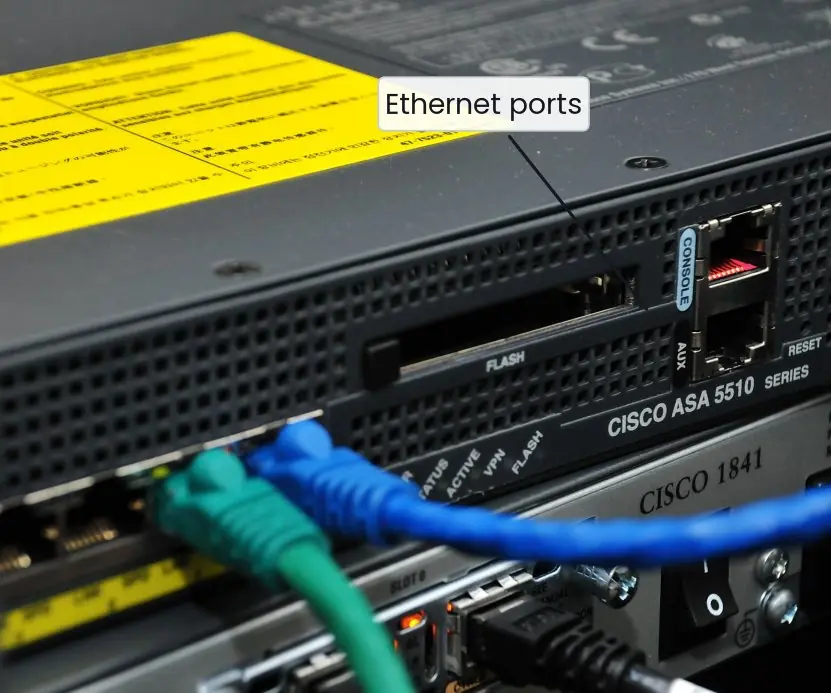
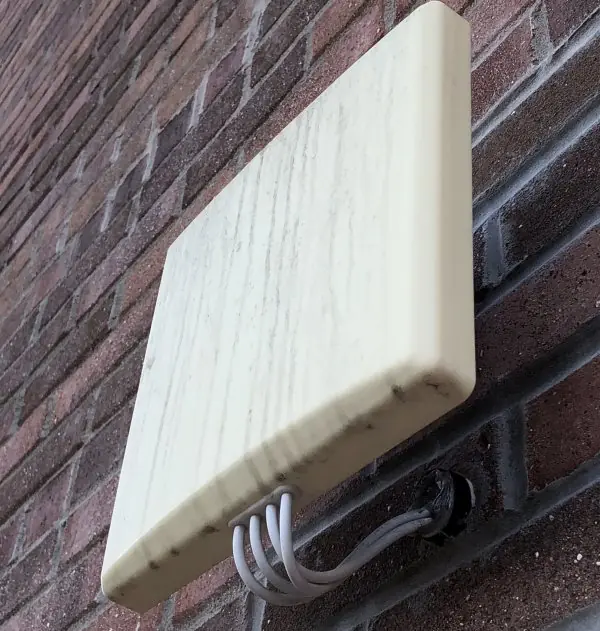
The plates show the real boxes: the brick wall that gave the firewall its name, a commercial firewall appliance, a home router, an outdoor access point and a hardware security module that keeps keys.
The figures draw a network with a demilitarised zone, the rule-matching of a packet filter, the base-rate arithmetic behind IDS alarms, a site-to-site VPN, the history of Wi-Fi security and the life cycle of a key.





7.7.1 Eight practical rules to secure a campus or office network
- Default deny at the firewall. Block every connection first, then allow only the ports that are needed, such as 443 for the web server. A forgotten open port is the most common way in. Review the rules every few months and remove ones nobody can explain.
- Separate zones. Put public servers in a DMZ and keep student records on the internal network behind a second firewall. If the web server is hacked, the attacker still has a wall to climb. Guest Wi-Fi should be in its own network without access to staff systems.
- Patch quickly. Most attacks use a flaw for which a fix already exists. Keep operating systems, routers, firewalls and web software updated, and track a list of what is installed. A forgotten old server is a favourite target.
- Use strong Wi-Fi security. Choose WPA3 or WPA2 with a long random passphrase and change the router's default administrator password. Turn off WPS push-button setup if it is not needed. An open or WEP network lets any neighbour read and change traffic.
- Use VPN or SSH for remote work. Staff working from home should connect through a VPN, and administrators should use SSH with keys rather than telnet. This prevents passwords and data from crossing the internet in plain form. Multi-factor authentication should protect the VPN login.
- Monitor and log. An IDS and central logs show strange traffic and failed logins. Tune the alerts to reduce false alarms, as the base-rate example shows, otherwise real alarms are ignored. Keep logs safe from tampering and long enough for investigation.
- Manage keys and passwords. Keep keys out of source code and shared folders, rotate them, and revoke them when a person leaves. Use a password manager and multi-factor authentication for important accounts. A hardware security module or a protected key store holds the most valuable keys.
- Back up and practise recovery. Keep offline backups so that ransomware cannot encrypt them, and test the restore. Prepare a simple incident plan with names and phone numbers. Fast recovery is part of security, because no defence is perfect.
Chapter summary
- Firewalls enforce ordered, first-match, default-deny rules; types range from packet filters to NGFWs and WAFs; DMZs isolate public servers.
- IDS/IPS use signatures or anomaly detection; with a rare attack (0.1%), a 99%-detecting, 1%-false-alarm IDS gives alerts that are about 91.0% false.
- VPNs tunnel traffic with IPsec, TLS or WireGuard; zero-trust assumes no trusted inside.
- WPA3 (SAE) replaces WPA2-PSK; WEP is broken; enterprise Wi-Fi uses 802.1X.
- Key management (secure generation, storage in HSMs/keystores, rotation, envelope encryption) decides whether the cryptography protects anything.
Practice
- Differentiate a packet-filter, a stateful and an application firewall.
- Why does rule order matter in a firewall? Give an example.
- What is a DMZ?
- Distinguish signature-based and anomaly-based detection with one strength and weakness each.
- An IDS has detection rate 95% and false-alarm rate 2%; attacks are 1% of events. Out of 10,000 events how many alerts are real and how many false?
- What fraction of alerts in question 5 are real?
- Why is WEP insecure and what does WPA3 improve?
- List three defences against phishing.
- State three rules for key storage.
- What does the "least privilege" principle say?
Answers and worked solutions
1. Packet filter: checks headers statelessly. Stateful: tracks connections and permits return traffic only for outbound-initiated flows. Application firewall: understands protocol content (for example HTTP) and filters it.
2. Rules are applied first-match: a rule "deny any" placed first blocks everything, while "allow tcp 80 to server" before it permits web access; the same rules in the opposite order behave differently.
3. A separate network segment for public-facing servers that limits damage if one is compromised.
4. Signature: accurate for known attacks, blind to new ones. Anomaly: can detect new attacks, but gives more false alarms.
5. Attacks: 100, detected 95 (95 real alerts); normal events 9,900, false alarms 2% = 198 false alerts.
6. 95 / (95 + 198) = 95 / 293 = 32.4% real (so 67.6% are false).
7. WEP uses RC4 with a short, reused IV and is crackable in minutes; WPA3 uses SAE (resistant to offline guessing, with forward secrecy) and protects management frames.
8. User training, multi-factor authentication, email authentication (SPF/DKIM/DMARC) and URL filtering.
9. Use an HSM, smartcard or OS keystore; never in source code or repositories; restrict access and rotate keys.
10. Each user or program should have only the access needed for its task and no more.
Model answers: medium (5 marks) and long (10 marks) questions
Q1 (5 marks). Explain the types of firewall and the importance of rule order and default deny.
Introduction. A firewall is a device or program that controls traffic between networks of different trust according to rules (section 7.1, Figure 7.2).
- Packet filter. Decides for each packet from the IP addresses, ports and protocol. It is fast and simple but does not remember connections.
- Stateful firewall. Keeps a table of connections, so replies to an inside request are allowed back automatically and unrelated incoming packets are dropped.
- Application (proxy) firewall. Understands the application protocol, such as HTTP, and can block bad requests or malware. It is slower but gives more control. A next-generation firewall adds user identity and intrusion prevention.
- Rule order. Rules are tried from the top and the first match decides, so a broad allow above a specific deny defeats the deny.
- Default deny. The last rule denies everything not allowed above, so a mistake or a forgotten service fails safe.
| Type | Looks at | Strength | Weakness |
|---|---|---|---|
| Packet filter | Addresses, ports | Fast | No state |
| Stateful | Connection state | Safer replies | No content view |
| Application proxy | Application data | Deep control | Slower |
Q2 (5 marks). Distinguish IDS from IPS and explain the base-rate fallacy with numbers.
Introduction. An intrusion detection system (IDS) watches traffic or hosts and raises alerts; an intrusion prevention system (IPS) sits in the path and can also block (sections 7.2, Figure 7.3).
- IDS. Passive, out of the path, so a failure does not stop traffic, but it only reports.
- IPS. In line, so it can drop packets at once, but a false alarm blocks a legitimate user and the device is a possible point of failure.
- Detection methods. Signature-based systems match known patterns (accurate for known attacks, blind to new ones). Anomaly-based systems learn normal behaviour (can see new attacks but raise more false alarms).
- Base-rate fallacy. Let attacks be 0.1 percent of 100,000 events, detection 99 percent and false alarms 1 percent. There are 99 true alerts and 999 false ones, 1,098 in all, so only 99 / 1,098 = 9.0 percent of alerts are real, although the IDS seems 99 percent accurate.
- Lesson. Reduce the false-alarm rate (tune rules), and rank alerts by risk.
Q3 (5 marks). Compare WEP, WPA2 and WPA3 for Wi-Fi security.
Introduction. Wireless signals can be read by anyone nearby, so encryption and authentication are essential (section 7.4, Figure 7.5).
- WEP. RC4 with a 24-bit IV and a CRC integrity check. Among 2 to the power 24 values a repeat is expected after about 4,800 packets, and the key can be recovered in minutes. Obsolete.
- WPA2. AES-CCMP gives encryption and integrity; a four-way handshake derives session keys from the passphrase. Secure with a long passphrase, but a captured handshake allows offline guessing.
- WPA3. The simultaneous authentication of equals (SAE) handshake blocks offline guessing and gives forward secrecy; open networks can use opportunistic encryption.
- Enterprise mode. 802.1X with a RADIUS server gives each user their own credentials.
- Advice. Use WPA3 or WPA2 with a long random passphrase and change the router's default password.
| Feature | WEP | WPA2 | WPA3 |
|---|---|---|---|
| Cipher | RC4 | AES-CCMP | AES-GCMP or CCMP |
| Key handshake | None (static key) | PSK four-way | SAE |
| Offline guessing | Easy | Possible | Resisted |
| Status | Broken | Acceptable | Recommended |
Q4 (10 marks). Design the network security of a college. Explain the use of firewalls, DMZ, IDS/IPS, VPN, wireless security and key management.
Introduction. A college holds student records, exam results and fee data, and also provides open services such as a website and Wi-Fi.
Good security uses defence in depth: several independent layers, so that the failure of one does not expose everything (section 7.7, Figures 7.1 to 7.6).
- Network zones. Place the web and mail servers in a DMZ between two firewalls, keep the student-records database and staff PCs in an internal network, and give students and guests a separate Wi-Fi network without access to staff systems.
- Firewalls. The outer firewall allows only HTTPS to the web server and mail to the mail server; the inner firewall lets only the web server reach the database on one port. The default rule is deny.
- IDS and IPS. Sensors on the DMZ and the internal links alert on scans, repeated failed logins and malware traffic. An IPS blocks well-known attacks automatically; alerts are tuned to a low false-alarm rate because of the base-rate effect.
- VPN and remote access. Staff who work from home or from a branch use a VPN (IPsec or TLS) with multi-factor authentication. Administrators log in to servers only by SSH with keys.
- Wireless security. Use WPA3 or WPA2-Enterprise with 802.1X so that each user has their own login, not a shared passphrase. Disable WPS and rogue access points are searched for regularly.
- Cryptography and keys. The website uses TLS 1.3 with a certificate from a trusted authority. Disks of servers and laptops are encrypted, keys are rotated and stored in a key store or HSM, and keys of departing staff are revoked.
- People and process. Patch regularly, back up offline, train staff against phishing, keep logs and have a written incident plan.
| Layer | Control | Threat addressed |
|---|---|---|
| Perimeter | Firewalls, DMZ | Unwanted inbound traffic |
| Detection | IDS/IPS, logs | Intruders already inside |
| Remote access | VPN, SSH keys, MFA | Eavesdropping, stolen passwords |
| Wireless | WPA3, 802.1X | Radio eavesdropping |
| Data | TLS, disk encryption, HSM | Theft and tampering |
| Recovery | Offline backup | Ransomware, failure |
Conclusion. No single device makes a network secure. A layered design with default-deny rules, monitoring, strong cryptography, careful key management and trained people limits the harm of every failure, and the whole design must be reviewed and tested regularly.