Unit 20 · Programming · 49 min read
Computer Programming using Python
What the syllabus asks for 8
- Python: features, installing Python, IDLE and the two modes (interactive and script); the first program
- Character set, keywords, identifiers, comments, constants, variables and data types (int, float, str, bool)
- Operators and expressions: arithmetic, relational, logical and assignment; order of operations
- Input and output: print() with sep and end, input(), type conversion and f-strings
- Built-in functions and the math module; string indexing, slicing and methods
- Selection: if, if...else, if...elif...else and nested if
- Loops: for with range(), while, break and nested loops
- Writing, running and debugging simple programs: syntax, run-time and logical errors; trace tables
In Lesson 18 you planned solutions as algorithms and flowcharts, and in Lesson 19 you met the languages that turn plans into programs.
Now you will write real programs in Python: programs that read data from the keyboard, calculate, decide and repeat, and print their results on the screen.
Python reads almost like plain English, it tells you clearly where a mistake is, and it is the language that grades 9 and 10 of the school curriculum carry on with, so what you learn here is the foundation of everything that follows.
Every program in this lesson was run in Python 3.12, and the output shown under each program is exactly what appeared on the screen. Type them in, run them, and then change them: that is how programming is learnt.
Expect definitions and features (Python, IDLE, keyword, identifier, variable, data type, operator, expression), the rules for naming variables, Python expressions from algebra, the output of a short program or of a built-in function (len, round, range, //, %), the syntax and use of statements (print(), input(), if … elif … else, for, while), debugging (find and correct the errors) and, above all, writing complete programs.
A 4-mark program is marked by its parts: correct input with a prompt and the right type conversion, the correct calculation or condition or loop, correct indentation and colons, and correct output.
20.1 Python: features, installing Python and IDLE
Python is a high-level, general-purpose programming language created by the Dutch programmer Guido van Rossum and first released in 1991. Its name comes from the British comedy series Monty Python's Flying Circus, not from the snake.
Python programs are run by an interpreter, one statement at a time.
Features of Python
- Easy to read and learn. Its keywords are plain English words —
print,input,if,else,for,while— and it needs very little punctuation. - Interpreted. A program runs at once, without a separate compiling step, and stops at the first error with a message that names the line, so mistakes are easy to find.
- Indentation is part of the language. The statements that belong inside an
ifor a loop are shown by starting them further to the right. This forces every Python program to be neatly laid out. - Dynamically typed. You do not declare what kind of value a variable will hold; Python works it out from the value you store.
- A large library of ready-made functions for mathematics, text, dates, graphics and much more.
- Free and open source, and it runs on Windows, Linux, macOS and even on a phone.
- Widely used. Python is used to build websites, analyse data, control robots and train artificial intelligence, so it is a language you can keep using for a long time.
- Programs are saved as plain text files with the extension .py.
Installing Python and starting IDLE
Download the latest Python 3 installer for your computer from the official website, python.org/downloads, and run it. On Windows, tick Add python.exe to PATH on the first screen of the installer, then choose Install Now.
On most Linux computers and on macOS a Python 3 is already present. The installer also installs IDLE (Integrated Development and Learning Environment), a simple editor made for beginners. Start it from the Start menu by typing IDLE.
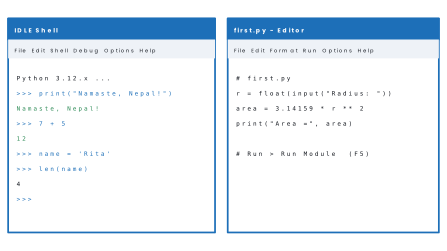
Two ways of working
| Interactive mode | Script mode | |
|---|---|---|
| Where | the Shell window, after the >>> prompt |
the editor window (File → New File) |
| What happens | each line is carried out as soon as you press Enter | the whole program is run when you press F5 |
| Best for | trying one statement; using Python as a calculator | programs of several lines that you want to save and run again |
| Saved? | no | yes, as a .py file |
>>> print("Namaste, Nepal!")
Namaste, Nepal!
>>> 7 + 5
12
>>> 2 ** 10
1024
>>> "Nepal" + " " + "Python"
'Nepal Python'
The lines that begin with >>> are typed by you; the others are Python's answers. In interactive mode the value of an expression is shown at once, which is why 7 + 5 printed 12 without a print.
Problem. Write a program that displays the name and address of a school, a blank line, and the class.
Solution. In IDLE choose File → New File, type the program, save it as school.py and press F5.
# Program 20.1: my first program
print("Shree Janata Secondary School")
print("Biratnagar-7, Morang")
print()
print("Class 8 Computer Science")
Shree Janata Secondary School
Biratnagar-7, Morang

Class 8 Computer Science
The line that starts with # does not appear in the output: it is a comment, a note for people reading the program. print() with nothing inside prints a blank line.
Python is case-sensitive: print works, but Print and PRINT are errors. Name, name and NAME are three different variables. Text inside quotation marks must be closed with the same kind of quotation mark that opened it.
20.2 Character set, keywords, identifiers, variables and data types
Character set
The character set is the set of characters a language understands.
Python uses the letters (A–Z, a–z), the digits (0–9), the special characters (such as + - * / % = < > ( ) [ ] : , . # " ' and the underscore _) and white space (space, tab and the end of a line).
Because Python uses Unicode, text inside quotation marks may also contain Nepali, as in print("नमस्ते").
Keywords
Keywords are the words that have a fixed meaning in Python. They are used for the language's own purposes, so they cannot be used as the name of a variable. Python 3.12 has 35 keywords:
False |
None |
True |
and |
as |
assert |
async |
await |
break |
class |
continue |
def |
del |
elif |
else |
except |
finally |
for |
from |
global |
if |
import |
in |
is |
lambda |
nonlocal |
not |
or |
pass |
raise |
return |
try |
while |
with |
yield |
At this level you will use only a few: if, elif, else, for, while, in, and, or, not, True, False, break and import. Note that True, False and None begin with a capital letter, but all the others are in lower case.
Identifiers
An identifier is the name a programmer gives to a variable (and, later, to a function). The rules are:
- It may contain letters, digits and the underscore
_. - It must not start with a digit.
- It must not contain spaces or special characters such as
- + * $ @ %. - It must not be a keyword.
- It is case-sensitive.
| Identifier | Valid? | Reason |
|---|---|---|
total_marks |
valid | letters and underscore |
rate2 |
valid | digits are allowed after the first character |
_count |
valid | may start with an underscore |
2ndterm |
invalid | starts with a digit |
my name |
invalid | contains a space (write my_name) |
unit-price |
invalid | the - is a minus sign (write unit_price) |
class |
invalid | class is a keyword |
Total and total |
valid, different | Python is case-sensitive |
Choose names that explain themselves: price and area are better than p and a in a long program.
Comments
A comment begins with # and runs to the end of the line. Python ignores it; it is written for the human reader. Use comments to say what a program does and to explain any step that is not obvious.
Variables and constants
A variable is a named place in the computer's memory that holds a value which can change while the program runs. In Python a variable is created by assigning a value to it with the = sign: age = 13.
The = sign in Python is not the equals of mathematics. It means store the value on the right in the name on the left. So age = age + 1 is a perfectly good statement: it takes the old value of age, adds 1, and stores the result back in age.
A constant is a value that does not change while the program runs, such as π = 3.14159 or the VAT rate. Python has no special constant type; by custom, the name of a constant is written in capital letters (PI = 3.14159) to tell the reader do not change this.
Data types
The data type of a value tells Python what kind of data it is and what can be done with it. The four basic types are:
| Type | Name in Python | Holds | Examples |
|---|---|---|---|
| Integer | int |
whole numbers, positive, negative or zero | 25, -7, 0 |
| Floating-point | float |
numbers with a decimal point | 1.52, -0.5, 3.0 |
| String | str |
text: any characters inside quotation marks | "Nepal", 'A', "2025" |
| Boolean | bool |
only True or False |
True, False |
The function type() tells you the type of a value. Notice that "2025" in quotation marks is a string, not a number: you can join it to other text but you cannot do arithmetic with it until it is converted (Section 20.4).
Problem. Store a student's name, age, height and whether she is the class monitor. Display each value with its type, then show her age next year.
Solution.
# Program 20.2: variables and data types
name = "Sunita"
age = 13
height = 1.52
is_monitor = True

print(name, type(name))
print(age, type(age))
print(height, type(height))
print(is_monitor, type(is_monitor))

age = age + 1
print("Next year", name, "will be", age)
Sunita <class 'str'>
13 <class 'int'>
1.52 <class 'float'>
True <class 'bool'>
Next year Sunita will be 14
A variable can be given a new value, and even a value of another type, at any time; Python simply forgets the old one.
Several variables can be given values in one statement. This also gives the neatest way to swap two values, because the right-hand side is worked out completely before anything is stored.
# Program 20.3: several variables at once, and swapping
a, b = 10, 25
print("Before:", a, b)
a, b = b, a
print("After: ", a, b)
Before: 10 25
After:  25 10
- A variable name with a space or a hyphen:
total marks = 90. - Using a variable before giving it a value: Python reports a
NameError. - A spelling or capital-letter difference between two uses of the same variable (
Priceandprice). - Using a keyword as a variable name:
for = 5. - Forgetting the closing quotation mark of a string.
20.3 Operators and expressions
An operator is a symbol that tells Python to do an operation; the values it works on are the operands. An expression is a combination of values, variables and operators that Python works out to a single value, such as a * b + 5.
Arithmetic operators
| Operator | Operation | Example | Result |
|---|---|---|---|
+ |
addition | 17 + 5 |
22 |
- |
subtraction | 17 - 5 |
12 |
* |
multiplication | 17 * 5 |
85 |
/ |
division (always gives a float) | 17 / 5 |
3.4 |
// |
floor division: the whole-number part of the quotient | 17 // 5 |
3 |
% |
modulus: the remainder | 17 % 5 |
2 |
** |
exponent (power) | 17 ** 5 |
1419857 |
# Program 20.4: the arithmetic operators on two numbers
a = 17
b = 5
print("a + b  =", a + b)
print("a - b  =", a - b)
print("a * b  =", a * b)
print("a / b  =", a / b)
print("a // b =", a // b)
print("a % b  =", a % b)
print("a ** b =", a ** b)
a + b  = 22
a - b  = 12
a * b  = 85
a / b  = 3.4
a // b = 3
a % b  = 2
a ** b = 1419857
The % operator is the most useful of these in programs. A number n is even if n % 2 == 0, and a number is divisible by 5 if n % 5 == 0. The last digit of a number is n % 10, and n // 10 removes the last digit.
Relational operators
A relational (comparison) operator compares two values and gives a Boolean result, True or False.
| Operator | Meaning | Example | Result |
|---|---|---|---|
== |
equal to | 5 == 5 |
True |
!= |
not equal to | 5 != 5 |
False |
> |
greater than | 7 > 3 |
True |
< |
less than | 7 < 3 |
False |
>= |
greater than or equal to | 4 >= 4 |
True |
<= |
less than or equal to | 4 <= 3 |
False |
Logical operators
| Operator | Meaning | True when |
|---|---|---|
and |
both conditions | both are True |
or |
either condition | at least one is True |
not |
reverses a condition | the condition is False |
x = 12
print(x > 10, x == 12, x != 12)
print(x > 10 and x < 20)
print(x < 5 or x % 2 == 0)
print(not x > 10)
True True False
True
True
False
Assignment operators
Besides =, Python has short forms that change a variable using its own value:
| Statement | Same as |
|---|---|
x += 5 |
x = x + 5 |
x -= 5 |
x = x - 5 |
x *= 5 |
x = x * 5 |
x /= 5 |
x = x / 5 |
The operator + also joins two strings ("Nepal" + "Python" gives "NepalPython"), and * repeats a string ("ab" * 3 gives "ababab").
Order of operations
When an expression has several operators, Python works them out in this order. Operators in the same row are taken from left to right (except **, which goes from right to left).
| Order | Operators |
|---|---|
| 1 | brackets ( ) |
| 2 | ** |
| 3 | *, /, //, % |
| 4 | +, - |
| 5 | comparisons == != > < >= <= |
| 6 | not |
| 7 | and |
| 8 | or |
Problem.(a) Find the value of 10 + 8 / 2 ** 2 * 3.(b) Write Python expressions for \frac{a+b}{c}, a^2 + 2ab and \sqrt{a^2 + b^2}, and find their values when a = 3, b = 4 and c = 5.
Solution. (a) Exponent first: 2 ** 2 = 4. Then division and multiplication from left to right: 8 / 4 = 2.0 and 2.0 * 3 = 6.0. Last, addition: 10 + 6.0 = 16.0.
(b)
| Algebra | Python expression | Value for a = 3, b = 4, c = 5 |
|---|---|---|
| \frac{a+b}{c} | (a + b) / c |
7 / 5 = 1.4 |
| a^2 + 2ab | a ** 2 + 2 * a * b |
9 + 24 = 33 |
| \sqrt{a^2 + b^2} | (a ** 2 + b ** 2) ** 0.5 |
√25 = 5.0 |
Python printed exactly these values when the four expressions were run:
# Program 20.5: algebra written as Python expressions
a = 3
b = 4
c = 5
print((a + b) / c)
print(a ** 2 + 2 * a * b)
print((a ** 2 + b ** 2) ** 0.5)
print(10 + 8 / 2 ** 2 * 3)
1.4
33
5.0
16.0
In algebra ab means a × b, but in Python the * must always be written: 2ab is an error, 2 * a * b is correct. A square root is a power of one half, ** 0.5; Section 20.5 shows a second way.
= stores a value (x = 5); == asks whether two values are equal (x == 5). And in Python the ^ sign is not the power operator (it is a different operation altogether): 2 ^ 3 does not give 8. Power is always **.
20.4 Input and output
Output: print()
The print() function displays values on the screen. Several items separated by commas are printed with a space between them, and each print() ends by moving to a new line. Two optional settings change this:
sep=sets what goes between the items (a space is the default);end=sets what goes at the end (a new line is the default).
Inside a string, an escape sequence is a backslash followed by a letter: \n starts a new line and \t inserts a tab.
# Program 20.6: print() with sep, end and escape characters
print("Nepal", "India", "Bhutan")
print("Nepal", "India", "Bhutan", sep=", ")
print("Loading", end="...")
print("done")
print("Name\tClass\nRita\t8")
Nepal India Bhutan
Nepal, India, Bhutan
Loading...done
Name    Class
Rita    8
Because the second line ended with ... instead of a new line, the word done followed it on the same line.
Input: input()
The input() function shows a prompt, waits for the user to type something and press Enter, and returns what was typed. It always returns text (a string), even if the user types digits. To use the value as a number it must be converted:
| Function | Converts to | Example | Result |
|---|---|---|---|
int() |
whole number | int("25") |
25 |
float() |
decimal number | float("2.5") |
2.5 |
str() |
text | str(25) |
"25" |
So a number is read with age = int(input("Enter your age: ")), or float(...) if it may have a decimal part, such as a price or a length. If the user types something that is not a number, such as thirteen, the conversion fails with a ValueError (Section 20.8).
x = input("First number: ")
y = input("Second number: ")
print("As text   :", x + y)
print("As numbers:", int(x) + int(y))
First number: 25
Second number: 17
As text   : 2517
As numbers: 42
The first line shows what goes wrong without conversion: "25" + "17" joins the two pieces of text into 2517. After int(), the same + adds.
Formatting output with f-strings
An f-string is a string with the letter f before the opening quotation mark. Anything inside curly brackets { } is replaced by its value. After a colon you can say how the value is to look: {area:.2f} shows a number with exactly two digits after the decimal point.
Problem. Read a principal, a time in years and a rate of interest per year. Display the simple interest and the amount.
Solution. Simple interest is \frac{P \times T \times R}{100} and the amount is principal + interest.
# Program 20.7: simple interest and amount
p = float(input("Enter the principal (Rs): "))
t = float(input("Enter the time (years): "))
r = float(input("Enter the rate (% per year): "))
si = p * t * r / 100
print("Simple interest = Rs", si)
print("Amount          = Rs", p + si)
Enter the principal (Rs): 25000
Enter the time (years): 3
Enter the rate (% per year): 8
Simple interest = Rs 6000.0
Amount          = Rs 31000.0
Solution. The formula is F = C × 9/5 + 32.
# Program 20.8: Celsius to Fahrenheit
c = float(input("Temperature in Celsius: "))
f = c * 9 / 5 + 32
print(c, "degrees C =", f, "degrees F")
Temperature in Celsius: 37
37.0 degrees C = 98.6 degrees F
Problem. Read the radius of a circle and display its area and circumference, each to two decimal places.
Solution. PI is written in capitals because it is a constant. The :.2f inside the f-string rounds the display to two decimal places.
# Program 20.9: area and circumference of a circle
PI = 3.14159
r = float(input("Radius in cm: "))
area = PI * r ** 2
circumference = 2 * PI * r
print(f"Area          = {area:.2f} cm2")
print(f"Circumference = {circumference:.2f} cm")
Radius in cm: 7
Area          = 153.94 cm2
Circumference = 43.98 cm
20.5 Built-in functions and the math module
A function is a ready-made, named set of instructions that does one job: you give it a value (the argument) in brackets and it gives back a result. You have already used print(), input(), int(), float() and type().
Python has many more built in, and more still in modules, collections of extra functions that you bring in with the import statement.
Mathematical functions
| Function | What it does | Example | Result |
|---|---|---|---|
abs(x) |
absolute value (the size of a number, without its sign) | abs(-7.5) |
7.5 |
max(a, b, …) |
the largest value | max(14, 9, 31) |
31 |
min(a, b, …) |
the smallest value | min(14, 9, 31) |
9 |
round(x, n) |
rounds x to n decimal places |
round(3.14159, 2) |
3.14 |
math.sqrt(x) |
square root | math.sqrt(144) |
12.0 |
math.floor(x) |
the whole number just below x |
math.floor(-4.5) |
−5 |
math.ceil(x) |
the whole number just above x |
math.ceil(-4.5) |
−4 |
math.pi |
the constant π | math.pi |
3.141592653589793 |
The functions that begin with math. live in the math module. Write import math once, at the top of the program, before using them.
# Program 20.10: built-in and math functions
import math

print(abs(-7.5))
print(max(14, 9, 31), min(14, 9, 31))
print(round(3.14159, 2))
print(math.sqrt(144))
print(math.floor(-4.5), math.ceil(-4.5))
print(math.pi)
7.5
31 9
3.14
12.0
-5 -4
3.141592653589793
When the digit being dropped is exactly 5, Python's round() chooses the even neighbour: round(2.5) is 2 and round(3.5) is 4.
For ordinary numbers it rounds as you expect, so round(3.14159, 2) is 3.14. math.floor() and math.ceil() always go down and up, as the table shows, and for a negative number "down" means further from zero: math.floor(-4.5) is −5.
String functions
A string is a sequence of characters, and each character has a position called its index, counted from 0 at the left. A negative index counts from the right: -1 is the last character. A slice s[a:b] takes the characters from index a up to, but not including, index b.
| Expression | What it gives | For word = "Bhaktapur" |
|---|---|---|
len(s) |
the number of characters | 9 |
s.upper() |
all capital letters | BHAKTAPUR |
s.lower() |
all small letters | bhaktapur |
s[0] |
the first character | B |
s[0:4] |
characters 0 to 3 | Bhak |
s[-3:] |
the last three characters | pur |
s.count("a") |
how many times "a" occurs |
2 |
# Program 20.11: string functions
word = "Bhaktapur"
print(len(word))
print(word.upper())
print(word.lower())
print(word[0])
print(word[0:4])
print(word[-3:])
print(word.count("a"))
9
BHAKTAPUR
bhaktapur
B
Bhak
pur
2
20.6 Selection: if, if … else and if … elif … else
A program that always does the same thing is not very useful. Selection lets it choose what to do, depending on a condition. In Python the choice is written with if.
if condition:
    statements that run when the condition is True
elif another_condition:
    statements that run when this one is True
else:
    statements that run when none of the above is True
Three rules must never be forgotten:
- The
if,elifandelselines end with a colon (:). - The statements that belong to a branch are indented by the same amount, normally four spaces. The indentation is how Python knows where the branch ends.
elifandelseare optional. Python checks the conditions from the top, runs the first branch whose condition is True and skips all the rest.
| Form | Use it when |
|---|---|
if |
there is one thing to do, and only if the condition is True |
if … else |
there are two ways: one if True, the other if False |
if … elif … else |
there are three or more ways |
nested if |
a second question has to be asked inside one branch |
Problem. Read the marks of a student out of 100. Display Pass if they are 40 or more, otherwise Fail.
# Program 20.12: pass or fail
marks = int(input("Enter the marks (out of 100): "))
if marks >= 40:
    print("Pass")
else:
    print("Fail")
Enter the marks (out of 100): 72
Pass
Enter the marks (out of 100): 28
Fail
Problem. Read a whole number and say whether it is odd or even.
Solution. A number is even when dividing by 2 leaves remainder 0.
# Program 20.13: odd or even
n = int(input("Enter a number: "))
if n % 2 == 0:
    print(n, "is even.")
else:
    print(n, "is odd.")
Enter a number: 14
14 is even.
Enter a number: 35
35 is odd.
Solution. The number a is the greatest if it is at least as large as both of the others. Two conditions are joined with and.
# Program 20.14: the greatest of three numbers
a = int(input("First number: "))
b = int(input("Second number: "))
c = int(input("Third number: "))
if a >= b and a >= c:
    print(a, "is the greatest.")
elif b >= a and b >= c:
    print(b, "is the greatest.")
else:
    print(c, "is the greatest.")
First number: 42
Second number: 17
Third number: 58
58 is the greatest.
Problem. Read a percentage and display the SEE grade: A+ for 90 and above, A for 80, B+ for 70, B for 60, C+ for 50, C for 40, D for 35 and NG for below 35.
Solution. The conditions are tried from the top. A mark of 64 fails p >= 90, p >= 80 and p >= 70, and passes p >= 60, so it gets B; the lower conditions are never looked at. This is why the highest limit must come first. The program was run four times.
# Program 20.15: SEE grade from percentage
p = float(input("Enter the percentage: "))
if p >= 90:
    grade = "A+"
elif p >= 80:
    grade = "A"
elif p >= 70:
    grade = "B+"
elif p >= 60:
    grade = "B"
elif p >= 50:
    grade = "C+"
elif p >= 40:
    grade = "C"
elif p >= 35:
    grade = "D"
else:
    grade = "NG"
print("Grade:", grade)
Enter the percentage: 92.5
Grade: A+
Enter the percentage: 64
Grade: B
Enter the percentage: 38
Grade: D
Enter the percentage: 30
Grade: NG
Problem. A year is a leap year if it is divisible by 4, except that a year divisible by 100 is a leap year only if it is also divisible by 400. Write a program to test a year.
Solution. Brackets keep the and together before the or is applied.
# Program 20.16: leap year
year = int(input("Enter a year: "))
if (year % 4 == 0 and year % 100 != 0) or year % 400 == 0:
    print(year, "is a leap year.")
else:
    print(year, "is not a leap year.")
Enter a year: 2024
2024 is a leap year.
Enter a year: 2100
2100 is not a leap year.
Enter a year: 2000
2000 is a leap year.
Solution. .lower() changes the letter to a small letter, so that both E and e are recognised. The word in asks whether the letter is found inside the string "aeiou".
# Program 20.17: vowel or consonant
ch = input("Enter a letter: ").lower()
if ch in "aeiou":
    print("Vowel")
else:
    print("Consonant")
Enter a letter: E
Vowel
Enter a letter: m
Consonant
Nested if
An if may be placed inside another if. The inner statement is indented one more step, and it is asked only when the outer condition is True.
# Program 20.18: positive, negative or zero (nested if)
n = float(input("Enter a number: "))
if n >= 0:
    if n == 0:
        print("Zero")
    else:
        print("Positive")
else:
    print("Negative")
Enter a number: -3.5
Negative
Enter a number: 0
Zero
- A missing colon after
if,eliforelse: Python reportsSyntaxError: expected ':'. - A missing or uneven indentation: Python reports an
IndentationError. - Writing
=where==is needed. - Writing the
eliflimits in the wrong order, for example testingp >= 40beforep >= 90: every pass mark then gets grade C.
20.7 Loops: for, while and nested loops
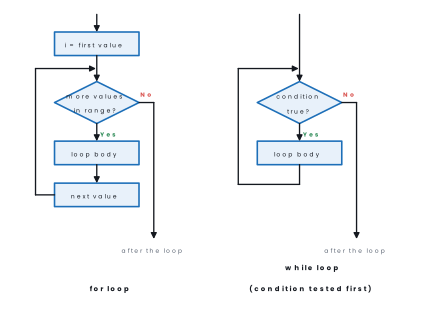
A loop repeats a group of statements. Without loops, printing a table of ten lines would take ten print() statements. Python has two loops. The statements that are repeated are the loop body, and like the body of an if they are indented.
The for loop and range()
A for loop is used when you know how many times to repeat, or when you want to go through a series of values. The function range() makes the series:
| Call | Values produced | Meaning |
|---|---|---|
range(5) |
0, 1, 2, 3, 4 | from 0 up to, but not including, 5 |
range(1, 6) |
1, 2, 3, 4, 5 | from 1 up to, but not including, 6 |
range(1, 11, 2) |
1, 3, 5, 7, 9 | from 1 to below 11, in steps of 2 |
range(10, 0, -3) |
10, 7, 4, 1 | a negative step counts down |
print(list(range(5)))
print(list(range(1, 6)))
print(list(range(1, 11, 2)))
print(list(range(10, 0, -3)))
[0, 1, 2, 3, 4]
[1, 2, 3, 4, 5]
[1, 3, 5, 7, 9]
[10, 7, 4, 1]
for variable in range(start, stop, step):
    statements to repeat
The loop variable takes each value of the series in turn, and the body runs once for each. The stop value is never reached, so to print 1 to 10 you write range(1, 11).
The while loop
A while loop repeats as long as a condition is True. The condition is tested before every pass, so if it is False at the start the body is never run. The body must change something that the condition looks at, or the loop will never end.
while condition:
    statements to repeat
| Point | for loop | while loop |
|---|---|---|
| Use when | the number of passes is known | the loop goes on while a condition holds |
| Where the test is | the series is checked before each pass | the condition is checked before each pass |
| Fewest passes | 0 | 0 |
| The counter is changed by | the loop itself | a statement you write in the body |
Counting loops
# Program 20.19: multiplication table
n = int(input("Which table? "))
for i in range(1, 11):
    print(n, "x", i, "=", n * i)
Which table? 7
7 x 1 = 7
7 x 2 = 14
7 x 3 = 21
7 x 4 = 28
7 x 5 = 35
7 x 6 = 42
7 x 7 = 49
7 x 8 = 56
7 x 9 = 63
7 x 10 = 70
Solution. end=" " keeps the numbers on one line; the empty print() then moves to a new line.
# Program 20.20: counting up with a step, and counting down
for i in range(5, 51, 5):
    print(i, end=" ")
print()
for i in range(5, 0, -1):
    print(i, end=" ")
print("Lift off!")
5 10 15 20 25 30 35 40 45 50
5 4 3 2 1 Lift off!
Problem. The factorial of n, written n!, is 1 × 2 × 3 × … × n, and 0! = 1. Write a program to find it.
Solution. The variable f is an accumulator: it starts at 1 (the neutral value for multiplication) and is multiplied by each number in turn. For 0 the series range(1, 1) is empty, so f stays 1, which is the correct value.
# Program 20.21: factorial
n = int(input("Enter a number: "))
f = 1
for i in range(1, n + 1):
    f = f * i
print(f"{n}! = {f}")
Enter a number: 6
6! = 720
Enter a number: 0
0! = 1
Solution. An accumulator for a sum starts at 0. Starting at any other value gives a wrong total, which is a very common mistake (see Section 20.8).
# Program 20.22: sum and average of n numbers
n = int(input("How many numbers? "))
total = 0
for i in range(n):
    x = float(input("Enter a number: "))
    total = total + x
print("Sum     =", total)
print("Average =", total / n)
How many numbers? 4
Enter a number: 12
Enter a number: 15
Enter a number: 9
Enter a number: 20
Sum     = 56.0
Average = 14.0
Loops that depend on a condition
Problem. Read a whole number. Display the sum of its digits and the number reversed, and say whether it is a palindrome (reads the same both ways).
Solution. The number of digits is not known in advance, so a while loop is used. n % 10 takes the last digit; n // 10 removes it. The loop stops when no digits remain. The original is saved first because n is destroyed by the loop.
# Program 20.23: sum of digits, reverse and palindrome
n = int(input("Enter a number: "))
original = n
total = 0
rev = 0
while n > 0:
    d = n % 10
    total = total + d
    rev = rev * 10 + d
    n = n // 10
print("Sum of digits =", total)
print("Reverse       =", rev)
if rev == original:
    print("It is a palindrome.")
else:
    print("It is not a palindrome.")
Enter a number: 2582
Sum of digits = 17
Reverse       = 2852
It is not a palindrome.
Enter a number: 1331
Sum of digits = 8
Reverse       = 1331
It is a palindrome.
Problem. Display the first n terms of the series 0, 1, 1, 2, 3, 5, 8, … in which each term is the sum of the two before it.
Solution. a and b hold two neighbouring terms. The statement a, b = b, a + b moves both forward at once.
# Program 20.24: Fibonacci series
n = int(input("How many terms? "))
a, b = 0, 1
count = 0
while count < n:
    print(a, end=" ")
    a, b = b, a + b
    count = count + 1
print()
How many terms? 10
0 1 1 2 3 5 8 13 21 34
break
The break statement leaves a loop at once. With while True:, which would otherwise never end, it makes a loop that runs until the user says stop.
# Program 20.25: add numbers until 0 is entered
total = 0
while True:
    x = int(input("Enter a number (0 to stop): "))
    if x == 0:
        break
    total = total + x
print("Total =", total)
Enter a number (0 to stop): 15
Enter a number (0 to stop): 30
Enter a number (0 to stop): 5
Enter a number (0 to stop): 0
Total = 50
Nested loops
A loop inside a loop is a nested loop. For every pass of the outer loop, the inner loop runs completely. Nested loops are used for tables and patterns.
Solution. Row 1 prints one star, row 2 prints two and so on: the inner loop runs row times for each row. The empty print() ends each row.
# Program 20.26: a pattern with nested loops
for row in range(1, 5):
    for col in range(row):
        print("*", end=" ")
    print()
*
* *
* * *
* * * *
Problem. A prime number has exactly two factors, 1 and itself. Write a program to decide whether a number is prime or composite.
Solution. The program counts the factors by testing every number from 1 to n.
# Program 20.27: prime or composite
n = int(input("Enter a number greater than 1: "))
factors = 0
for i in range(1, n + 1):
    if n % i == 0:
        factors = factors + 1
if factors == 2:
    print(n, "is a prime number.")
else:
    print(n, "is a composite number.")
Enter a number greater than 1: 29
29 is a prime number.
Enter a number greater than 1: 21
21 is a composite number.
- An off-by-one error.
range(1, 10)stops at 9. To include 10, writerange(1, 11). - An endless loop. A
whileloop whose condition never becomes False (for example, forgettinga = a + 3) never stops. Press Ctrl + C in the Shell to interrupt it. - Wrong indentation. A statement that should repeat but is not indented under the loop line runs only once, after the loop.
20.8 Writing, running and debugging simple programs
From problem to program
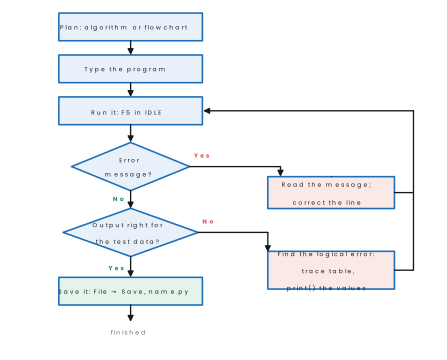
- Plan the solution: write the algorithm or draw the flowchart (Lesson 18) and list the input, process and output.
- Open IDLE and choose File → New File. A blank editor window opens.
- Type the program, one statement per line. Use four spaces for each indentation step; IDLE indents for you after a colon.
- Save it with File → Save, giving a name such as
marks.py. IDLE will ask for a name before it runs an unsaved program. - Run it with F5 (Run → Run Module). The input prompts and the output appear in the Shell window.
- Read any error message, correct the program and run it again.
- Test with data whose answers you know, including unusual values such as 0 or a negative number.
Finding and fixing errors
An error in a program is called a bug, and finding and removing it is debugging. There are three kinds.
1. Syntax errors break the rules of the language. Python finds them before the program starts, shows the line and points to the place with an arrow ^. Nothing runs until they are corrected.
marks = 45
if marks >= 40
    print("Pass")
  File "main.py", line 2
    if marks >= 40
                  ^
SyntaxError: expected ':'
A missing bracket is reported at the place where Python noticed the problem, and a wrongly indented line gives an IndentationError:
print("Welcome to Python"
  File "main.py", line 1
    print("Welcome to Python"
         ^
SyntaxError: '(' was never closed
n = 8
if n > 5:
print("big")
  File "main.py", line 3
    print("big")
    ^^^^^
IndentationError: expected an indented block after 'if' statement on line 2
2. Run-time errors stop a correct-looking program while it is running, and Python prints a traceback that ends with the kind of error and the line where it happened. Three common ones:
price = 120
print(prcie * 2)
Traceback (most recent call last):
  File "main.py", line 2, in <module>
    print(prcie * 2)
          ^^^^^
NameError: name 'prcie' is not defined. Did you mean: 'price'?
a = 10
b = 0
print(a / b)
Traceback (most recent call last):
  File "main.py", line 3, in <module>
    print(a / b)
          ~~^~~
ZeroDivisionError: division by zero
age = int(input("Enter your age: "))
print(age + 1)
Enter your age: thirteen
Traceback (most recent call last):
  File "main.py", line 1, in <module>
    age = int(input("Enter your age: "))
          ^^^^^^^^^^^^^^^^^^^^^^^^^^^^^^
ValueError: invalid literal for int() with base 10: 'thirteen'
The last line of a traceback is the one to read first: NameError (a name that was never given a value, here a misspelling of price), ZeroDivisionError (dividing by 0), ValueError (a value of the right type but wrong content).
A fourth very common one is the TypeError, which Python gives when you add a number to text, as happens if int() is forgotten:
age = input("Enter your age: ")
print(age + 1)
Enter your age: 13
Traceback (most recent call last):
  File "main.py", line 2, in <module>
    print(age + 1)
          ~~~~^~~
TypeError: can only concatenate str (not "int") to str
3. Logical errors give no message at all: the program runs to the end but gives a wrong answer.
They are found by testing with answers you know, by a trace table (writing down the value of each variable after every step) and by adding temporary print() statements to show the values while the program runs.
Problem. This program is meant to find the average of n numbers. It has two errors. Find them and write the correct program.
# Program 20.28 (first attempt): average of n numbers
n = int(input("How many numbers? "))
total = 1
for i in range(n)
    x = float(input("Enter a number: "))
    total = total + x
print("Average =", total / n)
Solution. Running it gives only a syntax error, so nothing else is tested yet:
  File "main.py", line 4
    for i in range(n)
                     ^
SyntaxError: expected ':'
- Syntax error. The
forline has no colon. Python reports it and points just afterrange(n). - Logical error. After adding the colon the program runs, but there is no error message, and the answer is wrong:
How many numbers? 4
Enter a number: 12
Enter a number: 15
Enter a number: 9
Enter a number: 20
Average = 14.25
The numbers 12, 15, 9 and 20 add up to 56, and 56 ÷ 4 = 14, not 14.25. The cause is total = 1: a sum must start at 0, so the extra 1 was divided by 4 and added to the average. A trace table would have shown it:
| After | total |
|---|---|
| start | 1 (should be 0) |
| 12 | 13 |
| 15 | 28 |
| 9 | 37 |
| 20 | 57 |
The corrected program also avoids dividing by zero when the user enters 0 numbers:
# Program 20.28 (corrected)
n = int(input("How many numbers? "))
if n <= 0:
    print("Nothing to average.")
else:
    total = 0
    for i in range(n):
        x = float(input("Enter a number: "))
        total = total + x
    print("Average =", total / n)
How many numbers? 4
Enter a number: 12
Enter a number: 15
Enter a number: 9
Enter a number: 20
Average = 14.0
How many numbers? 0
Nothing to average.
Check: (12 + 15 + 9 + 20) ÷ 4 = 56 ÷ 4 = 14 ✓.
Begin with a # comment saying what the program does; give every input() a clear prompt and convert it with int() or float(); keep the same variable names throughout; end each if, elif, else, for and while line with a colon and indent the body by four spaces; start a sum at 0 and a product at 1; and print the result with a short label.
If you are not sure of a loop's limits, test it on the smallest case.
In pairs, in the computer lab: (1) Type and run Programs 20.4, 20.15 and 20.23 and save them as ops.py, grade.py and digits.py. (2) Change Program 20.19 so that it prints the table up to 20 and asks the user for the number.
(3) Write a program that reads the radius of a circle and prints its area, but only if the radius is positive. (4) Ask your partner to add one deliberate error to your program; find and correct it using the error message.
Chapter summary
- Python (Guido van Rossum, 1991) is an easy, interpreted, case-sensitive language in which indentation matters. Programs are written in IDLE's editor, saved as
.pyand run with F5; the Shell's>>>prompt carries out one line at a time. - Character set: letters, digits, special characters and white space. Keywords have a fixed meaning and cannot be names. Identifiers use letters, digits and
_, do not start with a digit, contain no spaces or special characters and are case-sensitive. A comment starts with#. - A variable is created by assignment (
x = 5) and can change; a constant is written in capitals by custom. The basic data types areint,float,strandbool;type()shows a value's type. - Operators: arithmetic (
+ - * / // % **), relational (== != > < >= <=), logical (and or not) and assignment (= += -= *= /=). Order: brackets,**,* / // %,+ -, comparisons,not,and,or.^is not power. - Output:
print()withsepandend;\nand\t; f-strings with{value:.2f}. Input:input()always returns text, so convert it withint()orfloat(). - Functions:
abs,max,min,round,len; themathmodule (import math):sqrt,floor,ceil,pi; string indexing from 0, slicess[a:b],upper(),lower(),count(). - Selection:
if,if … else,if … elif … elseand nestedif; colon and indentation are essential; the first true branch runs. - Loops:
forwithrange(start, stop, step)(the stop is not reached; a negative step counts down) andwhile(tested before each pass);breakleaves a loop; nested loops make tables and patterns. Start a sum at 0 and a product at 1. - Debugging: syntax errors (found before the program runs), run-time errors (a traceback ends with the error name) and logical errors (no message; found by testing, trace tables and extra
print()s).
Practice questions
Group A — Objective (1 mark each)
- Which function displays output on the screen? [1]ainput()bprint()cshow()ddisplay()
- What is the value of
17 % 5? [1]a3b3.4c2d5 - What is the value of
len("NEPAL")? [1]a4b5c6dNEPAL "COMPUTER"[3:6]gives [1]aCOMbPUTcMPUdTER- Which of these is a valid variable name? [1]a2nd_termbtotal marksctotal_marksdclass
- How many times does
for i in range(1, 11, 3):repeat its body? [1]a3b4c10d30 - What does
input()always return? [1]aan intba floatca stringda Boolean - The value of
math.floor(-4.5)is [1]a−4b−5c4d−4.5 - In Python the expression
2 ** 3 * 2gives [1]a64b12c16d10 - Which of these is a string method? [1]aabs()bmax()cupper()drange()
- The
#symbol is used to [1]aremove a linebwrite a comment that is not executedcrepeat statementsdread input - A
whileloop whose condition is False at the start [1]aruns oncebruns forevercnever runs its bodydgives a syntax error
Answers to Group A
1. (b) — print() displays; input() reads.
2. (c) — 17 ÷ 5 = 3 remainder 2.
3. (b) — N, E, P, A, L: five characters.
4. (b) — indexes 3, 4 and 5 are P, U and T.
5. (c) —(a) starts with a digit,(b) has a space and (d) is a keyword.
6. (b) — i = 1, 4, 7, 10.
7. (c) — input() returns text; use int() or float() to convert.
8. (b) — floor goes down to the next whole number below −4.5.
9. (c) — the power first: 2 ** 3 = 8, then 8 × 2 = 16.
10. (c) — upper() works on a string and returns a string.
11. (b) — a line that starts with # is a comment for people.
12. (c) — the condition is tested before the first pass.
Group B — Short answer (2 marks each)
- Write any four features of Python. [2]
- Write Python expressions for(a) \frac{a+b}{2}(b) \pi r^2(c) \sqrt{b^2-4ac}(d) p \times t \times \frac{r}{100}. [2]
- State any four rules for naming an identifier. [2]
- Write the output of
print(len("BHAKTAPUR")),print("BHAKTAPUR"[:4])andprint("BHAKTAPUR"[-3:]). [2] - Differentiate between the
forloop and thewhileloop. [2] - Write a program to find the area of a triangle from its base and height. [2]
- Write a program to check whether a number is divisible by 5. [2]
- Write a program to display the squares of the numbers from 1 to 5. [2]
- Write the output of this program and say how many times the loop runs. [2]
for i in range(1, 11, 3):
    print(i, end=" ")
- What is the difference between
/,//and%? Give the value of each for 17 and 5. [2]
Answers to Group B
1. Any four: it is easy to read and learn, with English keywords; programs are run by an interpreter, line by line; indentation shows the structure of a program; it is dynamically typed, so variables need no declaration; it has a large library of functions; it is free and open source and runs on many systems.
2.(a) (a + b) / 2(b) 3.14159 * r ** 2 (or math.pi * r ** 2 after import math)(c) (b ** 2 - 4 * a * c) ** 0.5 (or math.sqrt(b ** 2 - 4 * a * c))(d) p * t * r / 100.
3. Any four: it may contain only letters, digits and the underscore; it must not begin with a digit; it must not contain a space or a special character such as - or $; it must not be a keyword; it is case-sensitive, so Total and total are different names.
4. The three statements print 9, BHAK and PUR on three lines.
5. A for loop goes through a series of values (usually made by range()), so it is used when the number of repetitions is known; its loop variable is changed by the loop itself.
A while loop repeats as long as a condition is True, so it is used when the number of repetitions is not known in advance; the program must change a variable in the body or the loop never ends.
6.
b = float(input("Base of the triangle: "))
h = float(input("Height of the triangle: "))
area = 1 / 2 * b * h
print("Area of the triangle =", area)
Base of the triangle: 10
Height of the triangle: 6
Area of the triangle = 30.0
7.
n = int(input("Enter a number: "))
if n % 5 == 0:
    print(n, "is divisible by 5.")
else:
    print(n, "is not divisible by 5.")
Enter a number: 35
35 is divisible by 5.
8.
for i in range(1, 6):
    print(i ** 2, end=" ")
1 4 9 16 25
9. The output is 1 4 7 10, on one line. The loop runs 4 times (i = 1, 4, 7, 10; the next value, 13, is past the stop value).
10. / is ordinary division and always gives a float, // is floor division (the whole-number part of the quotient) and % gives the remainder. For 17 and 5: 17 / 5 = 3.4, 17 // 5 = 3 and 17 % 5 = 2.
Group C — Long answer (4 marks each)
- Write a program that reads the marks of a student in five subjects, then displays the total, the percentage and the SEE grade (A+ 90 and above, A 80, B+ 70, B 60, C+ 50, C 40, D 35, NG below 35). [4]
- Write a program to display the series 5, 10, 15, …, 50 and the sum of its terms. [4]
- Write a program to check whether a number is prime or composite. [4]
- Write a program to display this pattern: [4]
5 4 3 2 1
5 4 3 2
5 4 3
5 4
5
- Dry-run the program below in a trace table and write its output. [4]
n = 5
f = 1
while n > 1:
    f = f * n
    n = n - 2
print(f)
Answers to Group C
1. The program adds the five marks in a loop, divides by 5 and chooses the grade with an elif chain. It was run with the marks 78, 85, 69, 91 and 74.
total = 0
for i in range(1, 6):
    m = float(input(f"Marks in subject {i}: "))
    total = total + m
percentage = total / 5
print("Total      =", total)
print("Percentage =", percentage)
if percentage >= 90:
    grade = "A+"
elif percentage >= 80:
    grade = "A"
elif percentage >= 70:
    grade = "B+"
elif percentage >= 60:
    grade = "B"
elif percentage >= 50:
    grade = "C+"
elif percentage >= 40:
    grade = "C"
elif percentage >= 35:
    grade = "D"
else:
    grade = "NG"
print("Grade      =", grade)
Marks in subject 1: 78
Marks in subject 2: 85
Marks in subject 3: 69
Marks in subject 4: 91
Marks in subject 5: 74
Total      = 397.0
Percentage = 79.4
Grade      = B+
2. The loop starts at 5, stops below 51 and goes up in steps of 5; the accumulator total starts at 0.
total = 0
for i in range(5, 51, 5):
    print(i, end=" ")
    total = total + i
print()
print("Sum =", total)
5 10 15 20 25 30 35 40 45 50
Sum = 275
3. A prime number has exactly two factors, 1 and itself, so the program counts the factors (see Program 20.27, which was run for 29 and 21).
# Program 20.27: prime or composite
n = int(input("Enter a number greater than 1: "))
factors = 0
for i in range(1, n + 1):
    if n % i == 0:
        factors = factors + 1
if factors == 2:
    print(n, "is a prime number.")
else:
    print(n, "is a composite number.")
4. Row i prints the numbers from 5 down to i. The inner loop counts down with a step of −1 and stops below i - 1, so that i is included.
for i in range(1, 6):
    for j in range(5, i - 1, -1):
        print(j, end=" ")
    print()
5 4 3 2 1
5 4 3 2
5 4 3
5 4
5
5.
| Step | n before |
n > 1? |
f after |
n after |
|---|---|---|---|---|
| start | 5 | — | 1 | — |
| 1 | 5 | True | 5 | 3 |
| 2 | 3 | True | 15 | 1 |
| 3 | 1 | False — the loop ends | 15 | 1 |
The output is 15: the program multiplies the numbers 5 and 3 (every second number down from 5).
15
Practise more: Computer Science question bank