Unit 1 · Computer Fundamentals · 32 min read
Fundamentals of Computer
What the syllabus asks for 5
- Computer: definition; data, information and program; hardware and software
- Working principle of a computer: input, process, output and storage (the IPOS cycle)
- Characteristics of a computer: speed, accuracy, diligence, versatility, storage and automation
- Limitations of a computer and its effects on society
- Uses of computers in Nepal: education, banking, health, communication, agriculture and government
Your SEE result will appear on a website the moment it is published.
Your family pays the electricity bill with eSewa or Khalti, your bank balance changes the second cash comes out of an ATM, and a doctor in Kathmandu can read an X-ray taken in Dolakha. Behind every one of these is a computer.
This lesson builds the words that all the later lessons use: what a computer is, how data differs from information, the four steps by which every computer works, what computers do very well, what they cannot do, and how they are used in Nepal.
Most questions here are definitions and differences.
Learn to define computer, data, information, program, hardware and software in one or two sentences each, and to give two clear differences between data and information, and between hardware and software.
The long question is usually the block diagram of a computer (the IPOS cycle) explained unit by unit, four characteristics with examples, or uses of computers in named fields.
A definition that carries an example earns more than one without.
1.1 Computer: definition; data, information and program; hardware and software
The word computer comes from the Latin word computare, which means "to calculate". The first computers really were giant calculators.
A modern computer still calculates, but it also writes letters, shows films, plays music, guides aeroplanes and connects people across the world.
A computer is an electronic machine that accepts data (input), processes it according to a set of instructions (a program), stores data and results, and gives meaningful information (output).
It works automatically and at very high speed once it has been given its instructions.
Every word in that definition matters. Electronic means it works with electric signals. Accepts data means it needs something to work on. Instructions means it does nothing by itself: a person must tell it what to do.
Stores means it keeps its work for later. Information is what we want from it in the end.
Data and information
Data are raw facts and figures — numbers, letters, words, pictures or sounds — collected but not yet organised, so they have no clear meaning by themselves.
Information is data that has been processed (organised, calculated, sorted or compared) so that it is meaningful and helps someone understand something or make a decision.
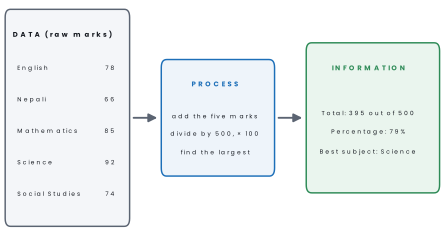
The marks a student gets in five subjects are data. Add them, work out the percentage and pick out the best subject, and you have information that a student, a parent or a teacher can act on.
| Data | Information |
|---|---|
| raw, unprocessed facts and figures | processed, organised data |
| usually has no clear meaning by itself | has meaning and is useful |
| is the input of processing | is the output of processing |
| cannot be used directly to make a decision | helps in making decisions |
| example: 78, 66, 85, 92, 74 | example: "Percentage 79%, best subject Science" |
Problem. Sita's marks out of 100 are: English 78, Nepali 66, Mathematics 85, Science 92 and Social Studies 74. Show how a computer turns these data into information, and state the information it produces.
Solution.
Input (data) the five marks.
Processing total = 78 + 66 + 85 + 92 + 74 = 395; percentage = 395 ÷ 500 × 100 = 79%; the largest mark is 92, in Science.
Output (information) "Total 395 out of 500, percentage 79%, best subject Science." A teacher can use this to rank students; Sita can use it to choose which subject needs more practice.
Sita's percentage is information for Sita. For the school, which collects the percentages of all 120 students to rank them, those percentages are data again.
Whether something is data or information depends on whether it still has to be processed for the job in hand, so always say for whom.
Program and software
A computer understands only exact, step-by-step instructions. An instruction is a single command such as "add these two numbers" or "print this line".
A program is a set of step-by-step instructions, written in a programming language, that tells a computer what to do and how to do it. A person who writes programs is a programmer.
Software is a collection of programs (with the data and help files they need) that makes the computer do useful work — for example Windows, Android, Microsoft Word or a game.
Software is of two broad kinds, which Lesson 5 studies in detail:
- System software runs the computer itself: the operating system (Windows, Linux, Android), device drivers and utility programs.
- Application software does a job for the user: a word processor, a web browser, a photo editor, a school's result program, a game.
Software can be obtained in two ways. Some is free: LibreOffice, Mozilla Firefox and VLC can be downloaded legally from their own websites. Other software must be bought with a licence, such as Microsoft 365.
Copying or using paid software without a licence is software piracy, an offence under Nepal's Copyright Act, 2059.
Hardware
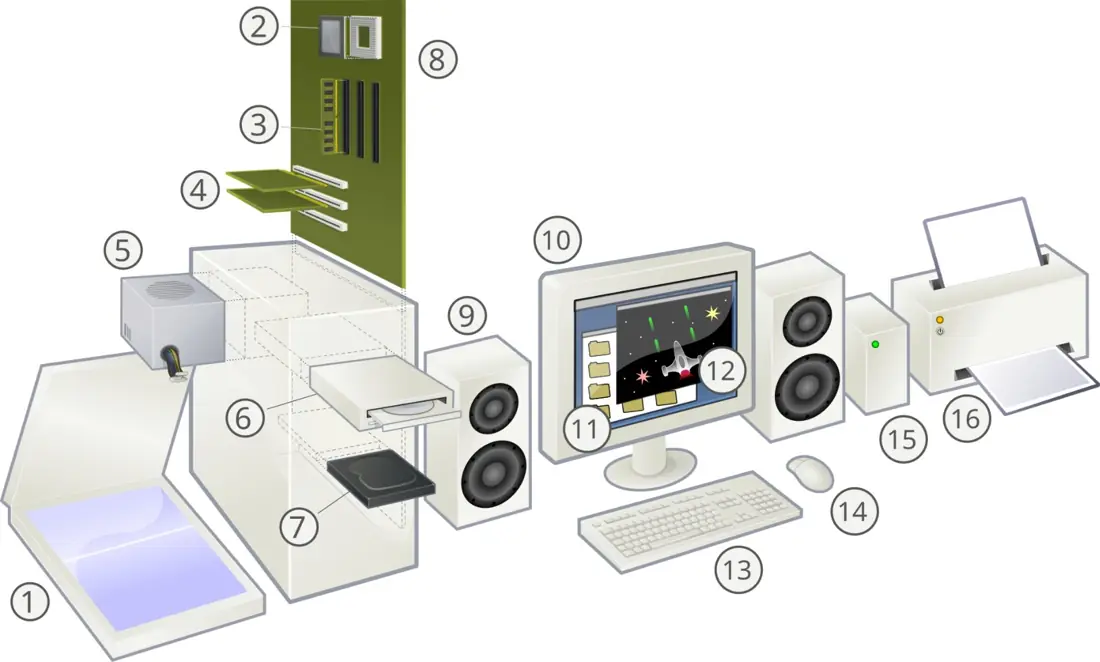
Hardware is the physical part of a computer system — every part that we can see and touch, such as the keyboard, mouse, monitor, processor, memory chips, hard disk and printer.
| Hardware | Software |
|---|---|
| physical parts of the computer | programs that tell the hardware what to do |
| can be seen and touched | can be seen working, but cannot be touched |
| made in factories from metal, plastic and silicon | written by programmers in programming languages |
| wears out with use and is damaged by heat, dust or a fall | does not wear out, but can be damaged by viruses or bugs |
| a broken part is repaired or replaced | a fault is fixed by updating or reinstalling |
| examples: keyboard, RAM, hard disk, printer | examples: Windows 11, Android, MS Word, Chrome |
Hardware and software depend on each other. Hardware without software is like a new guitar that nobody can play: everything is there, but nothing happens. Software without hardware has nowhere to run.
A third part is the user, the person who gives instructions and uses the results; some books call users liveware or humanware.
Many people call the whole cabinet (the system unit or casing) the "CPU". The CPU is only the processor chip inside it (number 2 in the photograph). The cabinet also holds the motherboard, RAM, hard disk, power supply and much more.
1.2 Working principle of a computer: the IPOS cycle
Every computer, from a calculator to a supercomputer, works in the same four steps: Input, Process, Output and Storage. This is called the IPOS cycle (some books say IPO cycle and treat storage separately).
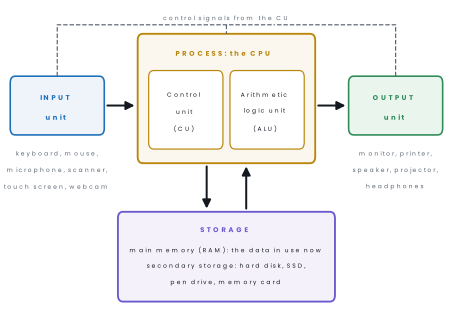
1. Input. Giving data and instructions to the computer is input. The devices used for it are input devices: keyboard, mouse, microphone, scanner, webcam, touch screen, barcode reader, fingerprint reader.
Input devices change what we type, say or show into electric signals that the computer can use.
2. Process. Working on the data — calculating, comparing, sorting — is processing. It is done by the CPU (Central Processing Unit), often called the brain of the computer. The CPU has two main parts:
- the Control Unit (CU), which controls and coordinates all the other parts: it fetches each instruction, works out what it means and tells the right unit to carry it out, like a traffic police officer directing traffic;
- the Arithmetic Logic Unit (ALU), which does arithmetic (adding, subtracting, multiplying, dividing) and logic (comparing: is 92 greater than 85? are two passwords equal?).
The CPU also has tiny, very fast memory cells called registers that hold the numbers it is working on at that instant.
3. Output. Giving the results to the user is output. Output devices include the monitor, printer, speaker, headphones and projector. Output on a screen is called a soft copy; output printed on paper is a hard copy.
4. Storage. Keeping data, programs and results is storage.
- Primary memory (main memory) works directly with the CPU. RAM (Random Access Memory) holds the programs and data in use right now; it is fast but temporary — everything in it is lost when the power goes off. ROM (Read Only Memory) holds the permanent start-up instructions.
- Secondary storage keeps work permanently, even with the power off: hard disk, SSD (solid-state drive), pen drive, memory card, CD/DVD, and online (cloud) storage such as Google Drive.
Problem. Ramesh withdraws Rs 5,000 from an ATM in Pokhara. Identify the input, process, output and storage in this task.
Solution.
Input he inserts his debit card (its chip is read), types his PIN and the amount Rs 5,000 on the keypad or touch screen.
Process the bank's computer checks that the PIN matches the card, checks that the balance is at least Rs 5,000, and subtracts 5,000 from the balance.
Output the machine pays out the notes, shows a message on the screen and prints a receipt; an SMS is sent to his phone.
Storage the new balance and a record of the withdrawal are saved in the bank's database, so the next ATM or the bank branch sees the same balance.
Problem. Classify each device as input, output, processing or storage:(a) microphone,(b) printer,(c) pen drive,(d) CPU,(e) touch screen of a phone, (f) webcam, (g) projector, (h) SSD.
Solution. Input:(a) microphone, (f) webcam. Output:(b) printer, (g) projector. Processing: (d) CPU. Storage:(c) pen drive, (h) SSD. (e) A touch screen is both an input device (it senses your finger) and an output device (it displays the picture).
Draw five boxes — Input, CPU (with CU and ALU inside), Output and Storage — with arrows from input to the CPU, from the CPU to output, and both ways between the CPU and storage. Write two example devices under input and output.
Then explain each unit in one or two lines. A diagram with unlabelled arrows loses marks.
1.3 Characteristics of a computer
The characteristics (features) of a computer are the qualities that make it so useful. Six are named in the syllabus.
1. Speed. A computer works with electric signals that travel through its circuits almost at the speed of light, so it does in seconds what would take a person months. Its speed is measured in tiny fractions of a second.
| Unit | Symbol | Part of a second | Power of 10 |
|---|---|---|---|
| millisecond | ms | one thousandth | 10^{-3} s |
| microsecond | μs | one millionth | 10^{-6} s |
| nanosecond | ns | one billionth | 10^{-9} s |
| picosecond | ps | one trillionth | 10^{-12} s |
| femtosecond | fs | one quadrillionth | 10^{-15} s |
A processor's speed is given by its clock speed in gigahertz (GHz). A 3 GHz processor's clock ticks three thousand million times every second, and the processor can take at least one step on every tick.
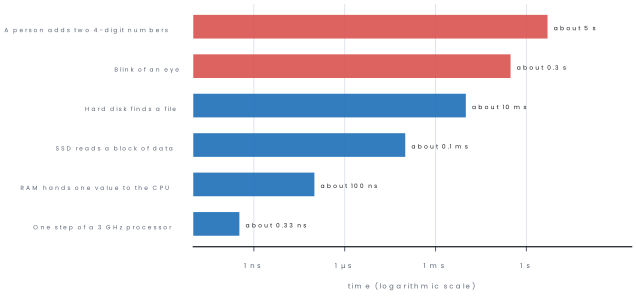
Problem. A laptop has a 3 GHz processor. How many clock steps does it complete in the time you take to blink (0.3 s)? How long does one step take?
Solution. 3 GHz = 3,000,000,000 steps per second. Steps in 0.3 s = 3,000,000,000 × 0.3 = 900,000,000 (nine hundred million). One step takes 1 ÷ 3,000,000,000 s ≈ 0.000 000 000 33 s = 0.33 ns.
2. Accuracy. A computer does not make mistakes in calculation. If it is given correct data and a correct program, its result is correct every time.
Wrong results come from wrong input or a wrong program, never from the computer "getting tired". This is summed up as GIGO — Garbage In, Garbage Out. A mistake in a program is called a bug.
3. Diligence. A computer can do the same work again and again for hours without becoming tired, bored or careless, and its speed and accuracy stay the same.
Printing 10,000 admit cards or checking every student's marks in a district examination is the same to it as doing the first one.
4. Versatility. One computer can do many different kinds of work: write a letter, calculate a budget, edit a photo, play a film, run a video class and help you learn programming. It changes its job simply by running different software.
5. Storage. A computer can store a huge amount of data — books, songs,
photos, films, records of millions of people — and find any item in a moment.
Storage is measured in bytes; one byte holds one character such as A.
| Unit | Equal to |
|---|---|
| 1 bit | a single 0 or 1 |
| 1 nibble | 4 bits |
| 1 byte (B) | 8 bits |
| 1 kilobyte (KB) | 1024 bytes |
| 1 megabyte (MB) | 1024 KB |
| 1 gigabyte (GB) | 1024 MB |
| 1 terabyte (TB) | 1024 GB |
Problem.(a) A phone has 64 GB of storage. How many photos of 4 MB each can it hold?(b) How many 4 MB songs fit on a 16 GB memory card?
Solution.(a) 64 GB = 64 × 1024 MB = 65,536 MB. Photos = 65,536 ÷ 4 = 16,384.(b) 16 GB = 16 × 1024 = 16,384 MB. Songs = 16,384 ÷ 4 = 4,096. In practice a little less fits, because the operating system and apps also use space and makers count 1 GB as 1000 MB.
6. Automation. Once a program is started, the computer carries out the whole task by itself, step after step, without a person giving each command.
A phone backs up photos every night, a bank adds interest to every account at the end of the month, and a washing machine runs its whole wash cycle on its own.
| Characteristic | Meaning in one line | Example in Nepal |
|---|---|---|
| Speed | works in milliseconds and nanoseconds | NEB results for lakhs of students are ready in days |
| Accuracy | correct result for correct input (GIGO) | a supermarket bill adds up 40 items with no error |
| Diligence | works for hours without tiring or slowing | a bank's server runs all day and all night |
| Versatility | does many kinds of work | one school computer for typing, accounts and classes |
| Storage | keeps huge amounts of data for a long time | the National ID card database of crores of citizens |
| Automation | finishes a task by itself once started | eSewa sends a receipt automatically after payment |
Do not write only "a computer is 100% accurate". Write that its calculations are accurate if the data and program are correct, and give GIGO as the reason why computers sometimes produce wrong results.
Eight advantages of using computers, explained
- High speed. A computer does millions of calculations in one second. A school can prepare the results of 800 students in minutes instead of days. This saves time for teachers.
- Accuracy. A computer makes no mistake in calculation if the program and the data are correct. Bank balances and electricity bills are calculated exactly. Errors come only from wrong input.
- Large storage. A small pen drive can hold thousands of books. Old records of the whole school can be kept in one place and found quickly. This saves paper and space.
- Diligence. A computer does not get tired or bored, so it can repeat the same job millions of times with the same care. ATMs work all day and night.
- Versatility. The same computer can write letters, play music, show films and run games just by changing the program. This is why one device can be used by a doctor, a farmer and a student.
- Communication. Email, video calls and social media connect people in seconds. A student in Nepal can talk to a relative abroad. Online classes became possible.
- Automation. A computer can do a whole job by itself once it is given the instructions. The traffic lights of Kathmandu and the machines in a factory are controlled automatically.
- Easy access to information. The internet gives answers on every subject. Students use it for projects, and farmers see the price of vegetables in the market. We must still check that the information is true.
1.4 Limitations of a computer and its effects on society
Limitations
For all its power, a computer has clear limits.
- No IQ of its own. It cannot think or decide by itself. It does only what its program tells it. Even artificial intelligence tools such as chatbots follow patterns learned from data; they can give confident but wrong answers and do not understand the world as people do.
- No feelings. It has no emotions, common sense or sense of right and wrong. It cannot judge whether a task is kind or harmful.
- Needs instructions. Without a program it can do nothing at all, and it cannot correct a wrong program by itself.
- Depends on correct input (GIGO). Wrong data gives wrong results.
- Needs electricity. It stops when the power goes off (unless it has a battery or UPS), and unsaved work in RAM is lost.
- Can fail or be attacked. A broken hard disk, a virus or a hacker can destroy data, so backups are needed.
Effects on society
Computers have changed how people in Nepal study, work, shop and talk to each other. The effects are both good and bad.
| Positive effects | Negative effects |
|---|---|
| services become fast: bills, forms, results and tickets online | some jobs, such as manual typing and data entry, disappear |
| new jobs in IT, software, design and online business | eye strain, back and neck pain, poor sleep from long screen time |
| learning from anywhere: online classes, digital libraries | addiction to games, videos and social media |
| families keep in touch with relatives working abroad by video call | cyber crime: online fraud, hacking, cyber bullying |
| better health care: digital X-rays, hospital records | loss of privacy when personal data leak |
| records are kept safely and found in seconds | electronic waste (e-waste) that pollutes soil and water |
| businesses reach customers across the country | the digital divide: people without devices or internet fall behind |
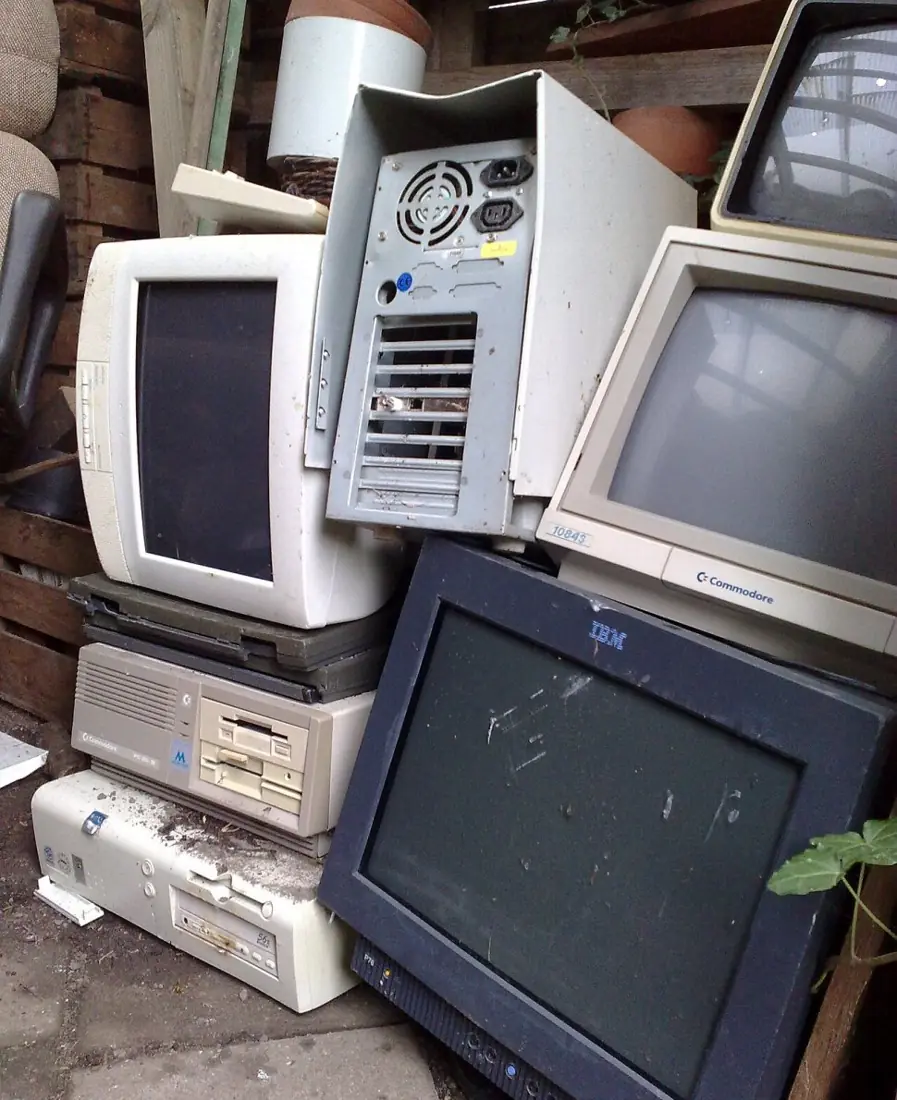
For one week, write down how many hours you spend on a phone, tablet or computer each day and what you used it for (study, games, videos, chatting).
At the end, make a table, find your daily average and discuss in class: which uses helped you and which wasted time? Try the 20-20-20 rule for your eyes: every 20 minutes, look at something 20 feet (about 6 m) away for 20 seconds.
1.5 Uses of computers in Nepal
Because a computer is fast, accurate and versatile, it is used in almost every field. These are the fields named in the syllabus, with examples you can see around you.
| Field | What computers do | Examples in Nepal |
|---|---|---|
| Education | teaching with multimedia, online classes, keeping student records, preparing results | school computer labs; OLE Nepal's free E-Pustakalaya digital library and E-Paath lessons; SEE and NEB results published online |
| Banking | keeping every account, ATMs, mobile and internet banking, digital payments | ATM cash withdrawal; mobile banking apps; eSewa, Khalti and FonePay QR payments |
| Health | diagnosis with CT scan, ultrasound, ECG and digital X-ray; patient records and billing; online appointments | hospital management software; telemedicine linking district hospitals to specialists in Kathmandu |
| Communication | email, video calls, social media, sending news | Viber and WhatsApp calls to relatives abroad; Nepal Telecom and Ncell use computers to connect every call |
| Agriculture | weather forecasts, market prices, farming advice, record keeping | the Department of Hydrology and Meteorology's forecasts; Kalimati market's daily wholesale prices read on a phone |
| Government | citizen records, online services, identity cards, taxes, census | the Nagarik App (2021); e-passports (since 2021); the biometric National Identity Card; online tax filing |
Government (e-governance). The Nagarik App, launched in 2021, lets a citizen keep records such as citizenship, PAN number and voter ID on a phone and use some government services from home.
Nepal began issuing e-passports on 17 November 2021; each has a chip holding the holder's details and photograph. The National Identity Card stores a photograph, fingerprints and an iris scan, so a person can be identified by computer.
Computers are used in many more fields: in business for billing, stock and VAT records; in transport for bus and flight tickets and traffic signals; in science for weather forecasting and space research; in entertainment for films, music and games; and in security for CCTV and fingerprint attendance.
Problem. Kamala grows tomatoes in Dhading and sells them in Kathmandu. Give three ways in which a computer or smartphone can help her.
Solution. (1) She checks the weather forecast before spraying or harvesting, so rain does not ruin her work. (2) She looks at Kalimati market's daily price list to decide when to send her tomatoes and what price to ask.
(3) She receives payment from traders by mobile banking or a digital wallet and keeps her expenses and sales in a simple spreadsheet, so she knows her profit.
(She could also watch farming videos or ask an agriculture office for advice online.)
Work in groups of four. (a) Make a large poster of the IPOS block diagram and put it up in the computer lab. (b) List ten hardware items and ten software programs in your school's lab, in two columns.
(c) Visit your school office, a nearby bank branch or health post and ask how they use computers; write a half-page report with the IPOS steps of one task you saw.
Chapter summary
- A computer (Latin computare, to calculate) is an electronic machine that accepts data, processes it under a program, stores it and gives information.
- Data are raw facts; information is processed, meaningful data. A program is a set of instructions; software is a collection of programs.
- Hardware is the physical, touchable part; software tells it what to do. Neither works without the other.
- IPOS: input devices → CPU (control unit + arithmetic logic unit) → output devices, with storage (RAM temporary, secondary storage permanent) joined to the CPU.
- Characteristics: speed (ms, μs, ns), accuracy (GIGO), diligence, versatility, storage (8 bits = 1 byte, 1024 bytes = 1 KB) and automation.
- Limitations: no IQ, no feelings, needs a program, correct input and electricity. Effects on society are both positive and negative.
- Uses in Nepal: education, banking, health, communication, agriculture and government (Nagarik App, e-passport, National ID).
Practice questions
Group A — Objective (1 mark each)
- The word "computer" comes from the Latin word computare, which means [1]ato storebto calculatecto typedto print
- Raw facts and figures that have not been processed are called [1]ainformationbdatacsoftwaredoutput
- A set of step-by-step instructions given to a computer is a [1]aprogrambdatumchardwaredresult
- Which of these is hardware? [1]aWindows 11bMicrosoft WordcRAMdAndroid
- Which part of the CPU decides whether 92 is greater than 85? [1]acontrol unitbarithmetic logic unitcRAMdinput unit
- The ability of a computer to work for hours without tiring or losing accuracy is [1]aversatilitybdiligencecautomationdstorage
- GIGO stands for [1]aGarbage In, Garbage OutbGood Input, Good OutputcGeneral Input, General OutputdGo In, Go Out
- A touch screen is [1]aonly an input devicebonly an output devicecboth an input and an output deviceda storage device
- Which of these is not a limitation of a computer? [1]ait needs electricitybit has no feelingscit cannot work without a programdit works at high speed
- One nanosecond is [1]a10^{-3} sb10^{-6} sc10^{-9} sd10^{-12} s
- The app in which Nepali citizens keep their citizenship, PAN and voter ID records is [1]aeSewabNagarik AppcViberdDaraz
- Which of these keeps data even when the power is switched off? [1]aRAMbhard diskccontrol unitdregister
- One kilobyte is equal to [1]a1000 bitsb1024 bytesc1024 bitsd8 bytes
Answers to Group A
1. (b) — computare means to calculate.
2. (b) — information is data after processing.
3. (a) — a program is a set of instructions.
4. (c) — RAM is a chip you can touch; the others are software.
5. (b) — comparing is a logical operation, done by the ALU.
6. (b) — diligence means working without tiredness or loss of accuracy.
7. (a) — wrong input gives wrong output.
8. (c) — it senses touch (input) and shows pictures (output).
9. (d) — high speed is a characteristic, not a limitation.
10. (c) — nano means one billionth.
11. (b) — the government's Nagarik App, launched in 2021.
12. (b) — RAM is temporary; the hard disk is secondary storage.
13. (b) — 1 KB = 1024 bytes.
Group B — Short answer (2 marks each)
- Define computer. Write any two of its characteristics. [2]
- Differentiate between data and information with one example of each. [2]
- What is software? Name one system software and one application software. [2]
- Write any two differences between hardware and software. [2]
- What is GIGO? Explain with an example. [2]
- Why is a computer called a diligent machine? [2]
- Write any four limitations of a computer. [2]
- Write the functions of the control unit and the arithmetic logic unit. [2]
- A memory card holds 32 GB. How many 8 MB videos can it store? [2]
- Write two uses of computers in banking in Nepal. [2]
Answers to Group B
1. A computer is an electronic machine that accepts data, processes it according to a program, stores it and gives meaningful information. Any two characteristics: speed, accuracy, diligence, versatility, storage, automation.
2. Data are raw, unprocessed facts with no clear meaning, e.g. the marks 78, 66, 85. Information is processed data that is meaningful and helps decisions, e.g. "percentage 79%, passed in first division".
3. Software is a collection of programs that tells the hardware what to do. System software: Windows 11 (or Android, Linux). Application software: Microsoft Word (or Chrome, VLC).
4. Hardware is the physical part that can be touched; software is a set of programs that cannot be touched. Hardware wears out and is replaced; software does not wear out and is fixed by updating or reinstalling.
(Also: hardware is made in factories, software is written by programmers.)
5. GIGO means Garbage In, Garbage Out: if wrong data or a wrong program goes in, a wrong result comes out.
Example if a teacher types 29 instead of 92 for a Science mark, the computer correctly calculates a wrong percentage.
6. A computer can do the same task again and again for hours without becoming tired, bored or careless, and its speed and accuracy stay the same. This quality is diligence, so it is called a diligent machine.
7. It has no IQ and cannot think by itself; it has no feelings or common sense; it cannot work without a program and correct input (GIGO); it needs electricity. (It can also fail or be attacked by viruses.)
8. The control unit controls and coordinates all parts of the computer: it fetches and interprets instructions and tells each unit what to do. The ALU performs arithmetic operations (+, −, ×, ÷) and logical operations (comparisons such as greater than or equal to).
9. 32 GB = 32 × 1024 = 32,768 MB. Number of videos = 32,768 ÷ 8 = 4,096.
10. Any two: ATMs let customers withdraw cash at any time; every account and transaction is kept and updated by the bank's computers; mobile and internet banking let people transfer money from a phone; digital wallets and QR codes (eSewa, Khalti, FonePay) are used for payments.
Group C — Long answer (4 marks each)
- Explain the working principle of a computer with a labelled block diagram. [4]
- Explain any four characteristics of a computer with an example of each. [4]
- Describe two positive and two negative effects of computers on society. [4]
- Describe the use of computers in any four fields in Nepal, with an example for each. [4]
- Anita pays her school fee through a mobile wallet. Identify the input, process, output and storage in this task. [4]
Answers to Group C
1. Draw the block diagram of Figure 2: Input → CPU (CU and ALU) → Output, with Storage joined both ways to the CPU.
Input unit accepts data and instructions from the user through devices such as the keyboard, mouse and microphone.
Processing unit (CPU) the control unit directs every part and interprets instructions; the ALU does the calculations and comparisons.
Output unit gives the results through the monitor (soft copy), printer (hard copy) or speaker.
Storage unit RAM holds data being processed; secondary storage such as a hard disk or pen drive keeps data permanently. Together these steps form the IPOS cycle.
2. Any four, each with an example.
Speed a computer works in nanoseconds; a 3 GHz processor takes 3 billion steps per second.
Accuracy its calculations are correct when the input and program are correct (GIGO); a shop's bill of 40 items has no adding error.
Diligence it works for hours without tiring; it can print 10,000 admit cards with the same quality.
Versatility the same computer types letters, plays films and runs online classes.
Storage it keeps huge data, such as the records of every citizen with a National ID card.
Automation once started it finishes a task by itself, such as a phone backing up photos every night.
3.
Positive (i) services are faster and easier — bills, forms, results and tickets online save time and travel; (ii) learning and communication improve — online classes, digital libraries and video calls with relatives working abroad.
Negative (i) health problems such as eye strain and back pain, and addiction to games and social media; (ii) cyber crime and loss of privacy, such as online fraud and hacking. (Other valid points: new jobs, loss of some manual jobs, e-waste, the digital divide.)
4. Any four.
Education teaching with multimedia, online classes, student records and results — e.g. OLE Nepal's E-Pustakalaya, SEE results online.
Banking accounts, ATMs, mobile banking — e.g. QR payments with FonePay.
Health CT scan, ultrasound, ECG, hospital records — e.g. hospital billing software.
Communication email, video calls, social media — e.g. Viber calls to family abroad.
Agriculture weather forecasts and market prices — e.g. Kalimati's daily price list.
Government online services and identity records — e.g. the Nagarik App and e-passports.
5.
Input Anita opens the wallet app, enters or scans the school's details, types the amount and enters her PIN.
Process the wallet's computer checks the PIN, checks that her balance is enough, subtracts the amount from her account and adds it to the school's account.
Output a "payment successful" message and an e-receipt on her screen, and an SMS or notification to the school.
Storage the transaction, her new balance and the receipt are saved in the wallet company's database for future reference.
Group D — Extended answers (10 marks each, for deeper revision)
- Define a computer. Explain its characteristics with examples. [10]
- Explain the IPOS cycle with a diagram and example. State the limitations of a computer. [10]
Model answer D1: computer and its characteristics (10 marks)
Introduction. A computer is an electronic machine that accepts data as input, processes it by following a set of instructions called a program, stores the result and gives it back as output.
It works under the control of a program, and its parts are the hardware (the parts we can touch) and the software (the programs).
Characteristics.
- Speed: it works with electric signals, so it finishes a job in seconds that a person needs months to do. Speed is measured in milliseconds, microseconds and nanoseconds.
- Accuracy: it gives correct results every time if the data and program are correct, so we say "garbage in, garbage out".
- Diligence: it does not feel tired, bored or sleepy and can work for hours with the same quality.
- Storage: it keeps a very large amount of data in memory and disks, which can be found again in a moment.
- Versatility: one computer can be used for typing, drawing, calculating, music and games.
- Automation: after the instructions are given, it does the job by itself without help.
| Characteristic | Example from Nepal |
|---|---|
| Speed | Results of the SEE are prepared by computer |
| Accuracy | Bank interest and electricity bills |
| Diligence | An ATM that works all night |
| Storage | The census record of the country |
| Versatility | A phone used as camera, radio and calculator |
| Automation | Machine control in a factory |
Conclusion. Because of these characteristics, computers are used in schools, banks, hospitals and offices, but they cannot think for themselves.
Model answer D2: IPOS cycle and limitations (10 marks)
Introduction. Every computer works in four steps called the IPOS cycle: Input, Process, Output and Storage.
- Input: data and instructions are given with an input device such as a keyboard, mouse, scanner or microphone.
- Process: the CPU (central processing unit) carries out calculations and comparisons on the data.
- Output: the result is shown on an output device, such as a monitor, printer or speaker.
- Storage: data and results are saved in memory or on a disk to be used again.
Example. A teacher types the marks of a student (input). The computer adds them and finds the percentage (process). The report card is printed (output). The marks are saved on the disk (storage).
Limitations of a computer.
- It has no intelligence of its own and does only what the program says.
- It cannot think or decide by feeling, as a person can.
- It depends on electricity, so a power cut stops it.
- It needs correct input; wrong data gives wrong results.
- It can be damaged by viruses and hackers.
- It is costly to buy and to repair.
- Overuse may harm eyes, posture and social life; e-waste harms the environment.
| Point | Human being | Computer |
|---|---|---|
| Speed | Slow | Very fast |
| Tiredness | Gets tired | Does not |
| Thinking | Thinks and feels | Follows instructions only |
| Mistakes | May make them | Only if input is wrong |
Conclusion. The IPOS cycle shows how a computer works, and knowing its limits teaches us to use it carefully.
Practise more: Computer Science question bank