Unit 19 · Programming · 35 min read
Fundamentals of Computer Programming
What the syllabus asks for 5
- Programming languages: low-level (machine and assembly) and high-level languages
- Language processors: compiler, interpreter and assembler
- Syntax errors, logical errors and run-time errors; testing and debugging
- Common high-level languages: Python, C and Java
- Constants, variables and data types
A computer's processor understands only one thing: patterns of 0s and 1s. People, on the other hand, think in words and numbers. A programming language is the bridge between the two.
This lesson explains the kinds of programming language, the translator programs that turn what we write into what the machine runs, the three kinds of mistake every programmer makes and how to find them, three languages you will meet in school and beyond, and the basic building blocks of every program: constants, variables and data types.
Lesson 20 then puts all of it to work in Python.
Expect definitions (programming language, machine language, assembly language, high-level language, compiler, interpreter, assembler, source code, object code, bug, debugging, constant, variable), two-point differences (low-level and high-level language, compiler and interpreter, syntax and logical error, constant and variable), lists (rules for naming variables, Python data types) and a 4-mark question that explains the three levels of language or the three types of error with examples.
A favourite short question gives a few variable names and asks which are valid.
19.1 Programming languages: low-level (machine and assembly) and high-level languages
A programming language is a set of words, symbols and rules (its syntax) used to write instructions that a computer can carry out. A program written in a programming language is called code, and writing it is called coding.
Programming languages are divided into two groups according to how close they are to the machine.
Low-level languages
A low-level language is close to the hardware: each instruction does one tiny job inside the processor, and a program written for one type of processor does not work on another. There are two low-level languages.
Machine language (first generation, 1GL) is written entirely in binary — 0s and 1s. It is the only language the processor understands directly, so it needs no translation and runs fastest.
But it is almost impossible for people to read, very easy to get wrong, and different for every family of processors (it is machine-dependent).
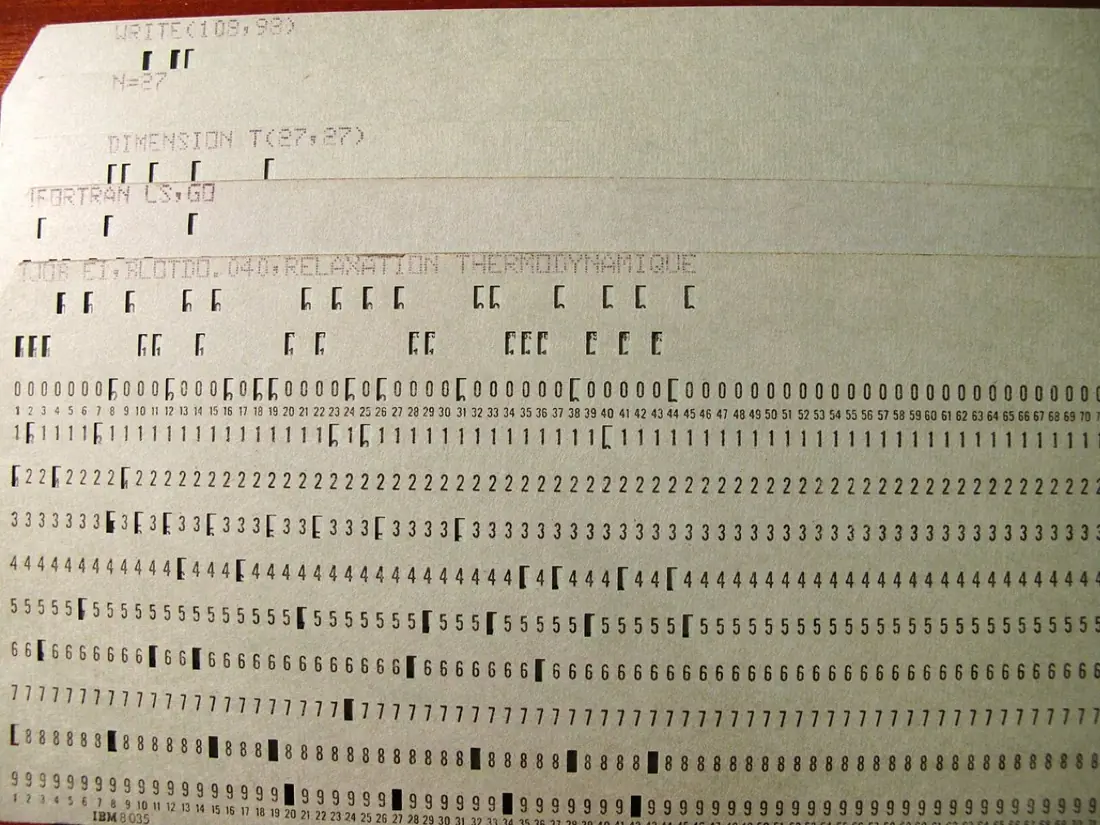
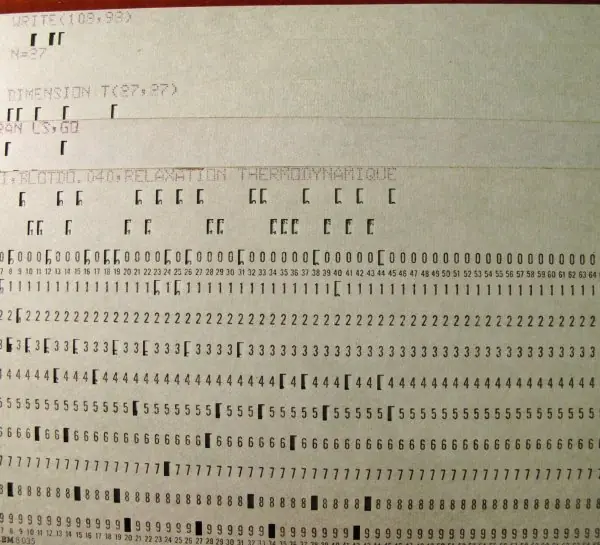
The first computers were programmed this way, by setting switches or punching holes in cards.
Assembly language (second generation, 2GL) replaces each binary instruction with a short word called a mnemonic: MOV (move), ADD, SUB (subtract), JMP (jump).
It is easier to read than binary, but it is still machine-dependent and needs one instruction for each tiny step. A program called an assembler translates it into machine language.
Assembly language is still used where speed and size matter most, as in parts of device drivers and the tiny chips inside washing machines and remote controls.
High-level languages
A high-level language (third generation, 3GL, and later) uses English words and ordinary mathematical signs, such as print, if, input and c = a + b. One high-level statement may stand for many machine instructions.
High-level programs are easy to read, write and correct, and the same program works on many kinds of computer (it is portable, or machine-independent).
They must be translated into machine language by a compiler or an interpreter before they run. Python, C, C++ and Java are high-level languages.
Some books also name fourth-generation languages (4GL) such as SQL, used to ask a database for information, and fifth-generation languages (5GL) such as Prolog, used in artificial intelligence.
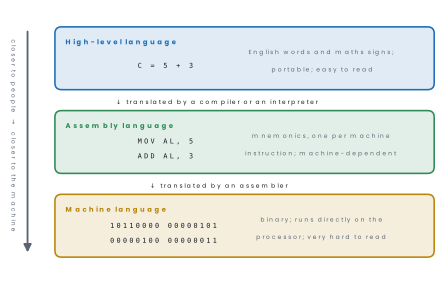
| Point | Low-level language | High-level language |
|---|---|---|
| Form | binary (machine) or mnemonics (assembly) | English-like words and mathematical signs |
| Closeness | close to the machine | close to the programmer |
| Ease | hard to write, read and correct | easy to write, read and correct |
| Portability | machine-dependent | machine-independent (portable) |
| Translation | none (machine) or an assembler | a compiler or an interpreter |
| Speed of the program | very fast, small | a little slower and larger |
| Examples | machine code, assembly language | Python, C, Java |
Problem. For each piece of code, name the level of language and the translator (if any) needed before it can run:(a) 10110000 00000101(b) ADD AL, 3(c) System.out.println("Namaste"); (Java)(d) print("Namaste") (Python)(e) printf("Namaste"); (C).
Solution.
| Code | Level | Translator needed |
|---|---|---|
| (a) | machine language (low-level) | none |
| (b) | assembly language (low-level) | assembler |
| (c) | high-level (Java) | compiler (javac) |
| (d) | high-level (Python) | interpreter (Python) |
| (e) | high-level (C) | compiler (for example GCC) |


19.2 Language processors: compiler, interpreter and assembler
A language processor, or translator, is a program that converts a program written in assembly or a high-level language into machine language.
The program the programmer writes is the source code (source program); the machine-language result is the object code (object program). There are three kinds: the compiler, the interpreter and the assembler.
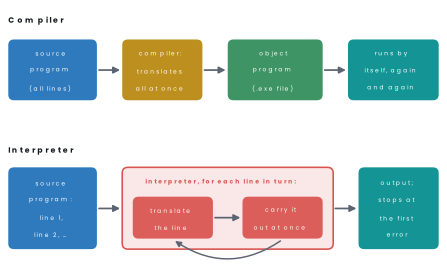
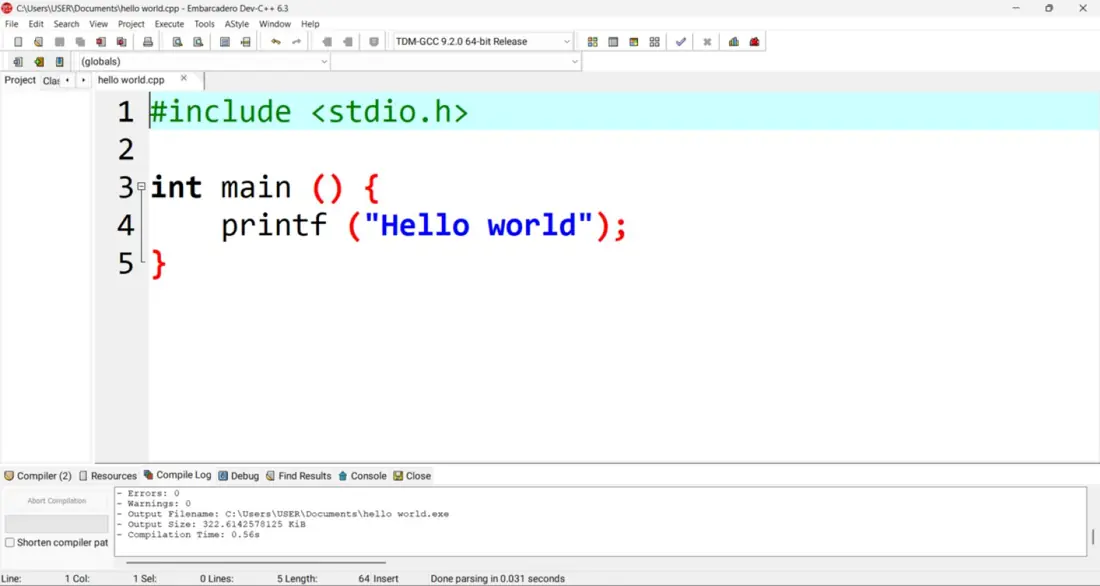
Compiler. A compiler reads the whole source program, checks all of it, and translates it at once into an object program — on Windows, usually an .exe file.
If there are errors, it lists them all after it has finished reading, and no object program is made until they are corrected. Once compiled, the program runs on its own, without the compiler, as often as you like, and it runs fast.
C, C++ and FORTRAN programs are compiled; GCC (the GNU Compiler Collection) and the compiler in Microsoft Visual Studio are examples.
Interpreter. An interpreter takes the source program one line (statement) at a time: it translates that line, carries it out at once, and only then moves to the next line.
It stops at the first error it meets and reports it, which makes errors easy to find and fix — ideal for learning.
But no separate object program is made, so the interpreter is needed every time the program runs, and the program runs more slowly. Python programs are run by an interpreter.
Assembler. An assembler translates a program in assembly language into machine language, one mnemonic at a time into the matching binary instruction.
| Point | Compiler | Interpreter |
|---|---|---|
| How it translates | the whole program at once | one line at a time, running each line straight away |
| Errors | listed together after the whole program is checked | shown one at a time; stops at the first error |
| Object program | made and saved (for example an .exe file) |
not made |
| Needed to run the program again | no | yes, every time |
| Speed of running | fast | slower |
| Finding mistakes | harder for a beginner | easier, so good for learning |
| Examples | C, C++, FORTRAN compilers; GCC | Python, JavaScript |
"Python is an interpreter" and "C is a compiler" are common slips, and one textbook even lists COBOL among compilers. Python, C and COBOL are languages.
The Python interpreter is the program that runs Python code; GCC is a program that compiles C code. Write "Python programs are run by an interpreter", not "Python is a compiler".
Problem. Which translator suits each situation, and why?(a) A grade 8 student is learning to program and wants to see the effect of each line at once.(b) A software company in Lalitpur wants to sell a fast billing program without giving customers its source code.(c) A teacher wants to test a short program again and again after each small change.
Solution.(a) Interpreter — it runs one line at a time and stops at the first error, so the student sees exactly where things go wrong.(b) Compiler — it makes a fast object program (.exe) that runs without the compiler, so only the object program need be given to customers.(c) Interpreter — there is no separate compiling step, so each change can be run at once.
19.3 Syntax errors, logical errors and run-time errors; testing and debugging
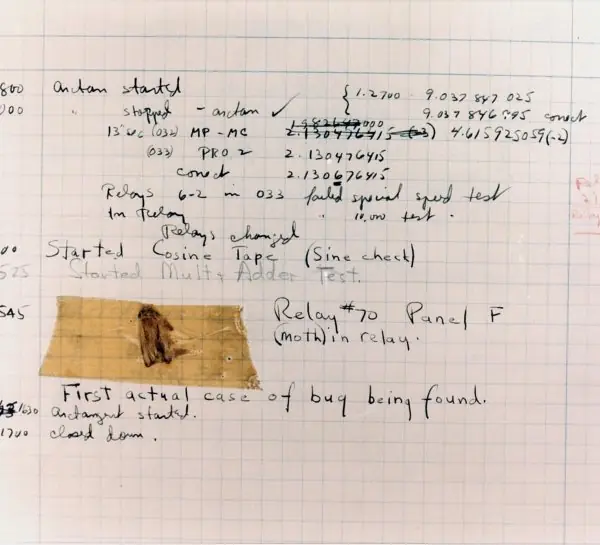
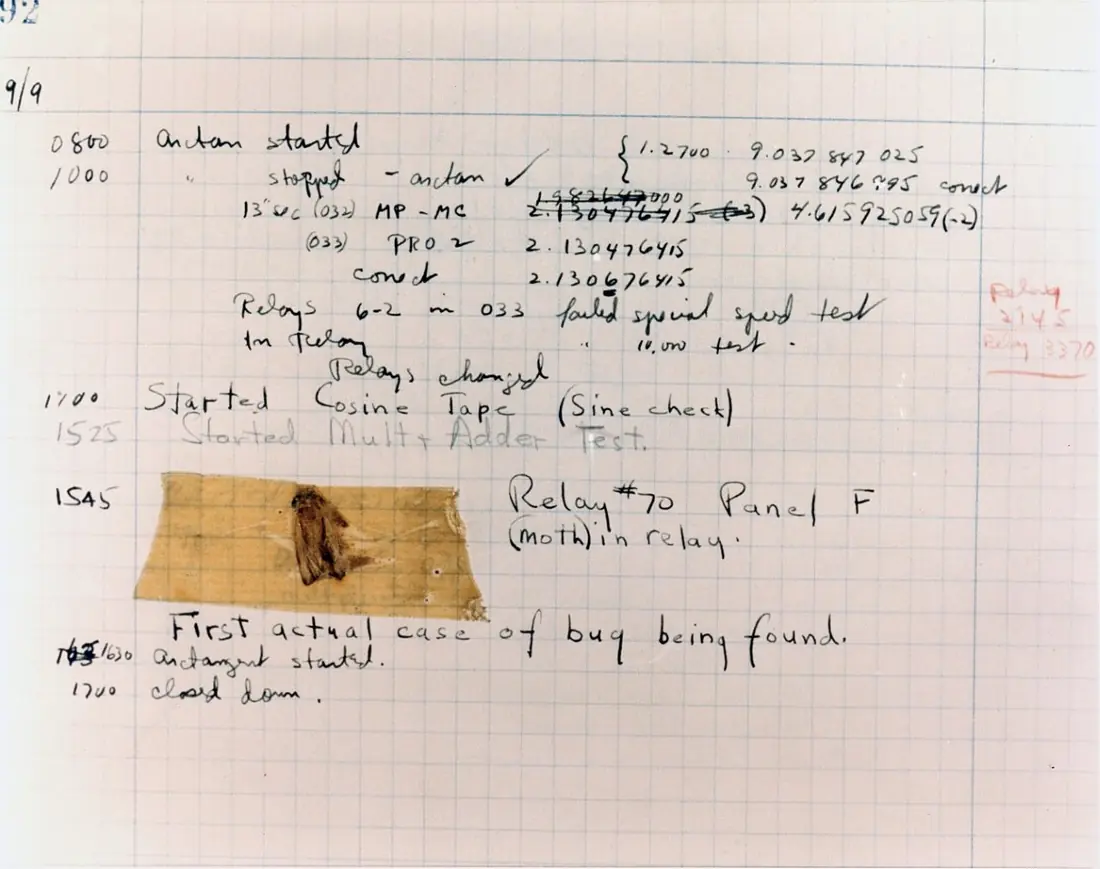
An error in a program is called a bug.
The word was used by engineers long before computers, but it became famous on 9 September 1947, when operators of the Harvard Mark II computer found a moth stuck in one of its relays, taped it into their log book and wrote "First actual case of bug being found."
Program errors are of three kinds.
A syntax error is a mistake in the grammar of the language: a misspelt keyword, a missing bracket or quotation mark, a wrong symbol. The translator cannot understand the line, so it reports the error and the program does not run.
Example print("Namaste" (closing bracket missing), or if marks >= 40 without the colon.
A run-time error (execution error) happens while the program is running: the program is grammatically correct, but it is asked to do something impossible, and it stops with an error message.
Examples: dividing by zero (Python shows ZeroDivisionError: division by zero), using a variable that has not been given a value (NameError), converting text such as "abc" to a number (ValueError), or opening a file that does not exist (FileNotFoundError).
A misspelt function name is also a run-time error in Python: it is noticed only when that line is reached.
A logical error is a mistake in the method of the program.
The program runs to the end without any message, but its output is wrong: a wrong formula, a wrong operator, a wrong condition such as > where >= was meant, or steps in the wrong order.
The computer cannot detect a logical error; only testing with known answers can.
| Point | Syntax error | Run-time error | Logical error |
|---|---|---|---|
| What it is | breaking the rules of the language | an impossible operation while running | a mistake in the method |
| When it is found | when the program is translated | while the program runs | when the output is checked |
| Who finds it | the compiler or interpreter | the computer, which stops the program | the programmer, by testing |
| Message shown | yes | yes | none |
| Example | print("Namaste" with the bracket missing |
dividing by zero | avg = a + b / 2 for the average |
These messages were produced by Python 3.12:
print("Namaste"
SyntaxError: '(' was never closed
total = 500
students = 0
print("Share =", total / students)
ZeroDivisionError: division by zero
Testing and debugging
Testing means running a program with chosen test data — inputs whose correct outputs you have worked out beforehand — and comparing the program's output with them.
Good test data includes normal values (a mark of 65), boundary values (0, 100, and exactly the pass mark), and wrong values (a negative mark, or a word where a number is expected), to see whether the program copes.
Debugging means finding where an error is and correcting it. Useful ways are:
- Read the error message: it names the error and usually the line.
- Dry run (trace) the program on paper with a trace table, as in Lesson 18.
- Print the values of variables at different points to see where they first go wrong.
- Step through the program one line at a time and watch the variables. IDLE has a debugger (Debug → Debugger) that runs one line at a time, and a breakpoint is a line where the program pauses.
- Check one part at a time, and test again after every correction.
Problem. This Python program should print the average of the marks in English and Maths. Find the errors, name the type of each, and write the corrected program with its output for marks 60 and 80.
# average of the marks in English and Maths
e = float(input("Enter marks in English: "))
m = float(input("Enter marks in Maths: "))
avg = e + m / 2
print("Average =", avg
Solution. Line 4: the closing bracket of print( is missing — a syntax error; Python will not run the program at all and reports:
File "marks.py", line 5
    print("Average =", avg
         ^
SyntaxError: '(' was never closed
Line 3: the computer divides before it adds, so it works out 60 + 80 ÷ 2 = 60 + 40 = 100 instead of the average 70 — a logical error. With only the bracket corrected, the program runs and prints the wrong answer without any warning:
Enter marks in English: 60
Enter marks in Maths: 80
Average = 100.0
The corrected program puts brackets round the sum:
# average of the marks in English and Maths
e = float(input("Enter marks in English: "))
m = float(input("Enter marks in Maths: "))
avg = (e + m) / 2
print("Average =", avg)
Enter marks in English: 60
Enter marks in Maths: 80
Average = 70.0
Check: (60 + 80) ÷ 2 = 140 ÷ 2 = 70 ✓. Only the test with known marks revealed the logical error.
In "identify the error" questions, ask yourself two things. Does the program run at all? If not, it is a syntax error. If it runs, does it stop with a message? Then it is a run-time error.
If it finishes but the answer is wrong, it is a logical error. Always write the corrected line too: the correction usually carries a mark of its own.
19.4 Common high-level languages: Python, C and Java
Thousands of programming languages exist. Three are worth knowing by name at this level, and you will meet them again in later classes.
Python. Created by Guido van Rossum and first released in 1991.
It is run by an interpreter, its programs are short and easy to read, and it needs no declarations, so it is the language that schools around the world, and the grade 8 to 10 courses here, use to teach programming.
It is also used in professional work: websites, data analysis, science and artificial intelligence. Lesson 20 teaches it.
C. Created by Dennis Ritchie at Bell Laboratories, USA, in 1972. It is a compiled language that gives the programmer close control over the computer, so operating systems, device drivers and many other fast programs are written in it.
It is more demanding than Python: every variable must be declared with its type and every statement ends with a semicolon.
Java. Created by James Gosling and his team at Sun Microsystems and released in 1995.
It is compiled into an intermediate code that runs on any computer with a Java Virtual Machine, which is why it is called a "write once, run anywhere" language. It is used in Android apps, banking software and large business systems.
| Language | First released | Created by | Translator | Typical use |
|---|---|---|---|---|
| Python | 1991 | Guido van Rossum | interpreter | learning, websites, data and AI |
| C | 1972 | Dennis Ritchie | compiler | operating systems, fast programs |
| Java | 1995 | James Gosling (Sun) | compiler to bytecode, then the JVM | Android apps, business systems |
Problem. Write a program in Python, C and Java that stores 25 and 17 in two variables and prints their sum.
Solution.
a = 25
b = 17
print("Sum =", a + b)
#include <stdio.h>

int main(void) {
    int a = 25;
    int b = 17;
    printf("Sum = %d\n", a + b);
    return 0;
}
public class Sum {
    public static void main(String[] args) {
        int a = 25;
        int b = 17;
        System.out.println("Sum = " + (a + b));
    }
}
All three print Sum = 42.
The Python version is the shortest. C and Java need more lines because the program must be placed inside a main function and each variable's type (int) must be declared first.
19.5 Constants, variables and data types
A constant is a value that does not change while the program runs. A numeric constant is a number, such as 45, -7.5 or 3.2e4 (which means 3.2 × 10⁴ = 32,000).
A string constant is any group of characters inside quotation marks, such as "Kathmandu", "9841234567" or "2081". The two Boolean constants are True and False.
A constant can also be given a name: Python has no special constant type, so by custom the name is written in capitals, PI = 3.14159, to tell the reader do not change this.
A variable is a name given to a location in the computer's memory, where a value is stored. The value can change while the program runs, but the variable holds only one value at a time: storing a new value replaces the old one.
In Python, a = 5 stores 5 in the variable a.
In mathematics a = a + 1 could never be true. In a program the = sign means store: the right side is worked out first (the old value of a, plus 1) and the result is stored back in a. If a was 5, it is 6 afterwards.
Rules for naming variables in Python
- A name may contain letters, digits and the underscore
_. - It must begin with a letter or an underscore, never with a digit.
- It must not contain spaces or special characters such as
-,$,%or.. - It must not be a keyword (
if,for,class, …). - Capital and small letters are different:
age,AgeandAGEare three different variables.
Problem. Which of these are valid Python variable names? Give a reason for each invalid one: age, 2nd_name, first name, name_1, print_, total.marks, roll-no, class.
Solution. Valid: age, name_1 (digits are allowed after the first character) and print_ (it is not the same as the function name print).
Invalid: 2nd_name begins with a digit; first name contains a space; total.marks contains a full stop, which Python reads as something else; roll-no contains a hyphen, which Python reads as a minus sign; class is a keyword.
Data types
The data type of a value tells the computer what kind of data it is, how much memory to give it and what can be done with it.
The two basic kinds are numeric data, used in calculations, and string (character) data, which is text: letters, digits and symbols treated as characters, not as amounts.
Python works out the type from the value, so you never declare it.
| Python type | Holds | Example |
|---|---|---|
int |
whole numbers of any size | 25, -7, 29164578 |
float |
numbers with a decimal point | 1.52, -0.5 |
str |
text | "Anita", "9841234567" |
bool |
True or False only |
True |
Problem. Write a Python program that stores a student's name, age and height, whether she is the class monitor, and the population of Nepal from the 2021 census (29,164,578), in variables of suitable types, and prints them.
Solution.
name = "Anita Rai"
age = 14
height = 1.52
population = 29164578
is_monitor = True

print(name, "is", age, "years old and", height, "m tall.")
print("Population of Nepal (2021 census):", population)
print("Class monitor:", is_monitor)
print(type(age), type(height), type(name), type(is_monitor))
Anita Rai is 14 years old and 1.52 m tall.
Population of Nepal (2021 census): 29164578
Class monitor: True
<class 'int'> <class 'float'> <class 'str'> <class 'bool'>
Python's int has no fixed size limit, so the population needs no special type. Notice that print() puts a space between the items it is given, so the sentence in the first line comes out correctly spaced.
Problem. Choose a Python data type for each:(a) the number of students in a class;(b) the price of 1 kg of rice, Rs 85.50;(c) the name of a district;(d) a mobile number, 9841234567;(e) whether a student has passed.
Solution.(a) int — a count is a whole number.(b) float — it has a decimal part.(c) str — it is text.(d) str — you never add or multiply phone numbers, and a number such as 0123 would lose its leading zero as an int, so identifiers like these are stored as text.(e) bool — only True or False.
In the computer lab, open Python's IDLE. (1) Type print(7 * 6) at the >>> prompt and press Enter.
(2) Misspell the function (prnit(7 * 6)) and note the exact error message; then leave a bracket open (print(7 * 6) and note that message too. (3) Make a program divide by zero and note the message.
(4) Make a three-column table — kind of error, message, line reported — for your notebook, and label each message a syntax, run-time or logical error.
Chapter summary
- A programming language is a set of words, symbols and rules (syntax) for writing instructions for a computer.
- Low-level languages: machine language (binary; runs directly; machine-dependent) and assembly language (mnemonics such as MOV and ADD; needs an assembler). High-level languages (Python, C, Java) are English-like and portable.
- Language processors turn source code into object code: a compiler translates the whole program at once and makes an object program; an interpreter translates and runs one line at a time; an assembler translates assembly language.
- Syntax error: breaking the rules of the language. Run-time error: an impossible operation while running, such as division by zero. Logical error: wrong method, wrong output, no message.
- Testing runs a program with test data of known answers; debugging finds and corrects errors (error messages, dry runs, printing values, stepping with IDLE's debugger, breakpoints).
- Python (Guido van Rossum, 1991), C (Dennis Ritchie, 1972), Java (James Gosling, Sun, 1995).
- A constant never changes (numeric or string); a variable is a named memory location whose value can change; Python names use letters, digits and
_, do not start with a digit, contain no spaces and are not keywords. - Python data types:
int(whole numbers),float(decimals),str(text) andbool(TrueorFalse).
Practice questions
Group A — Objective (1 mark each)
- Machine language is written using [1]aEnglish wordsbmnemonicsc0s and 1sdflowchart symbols
- The translator that converts assembly language into machine language is [1]aa compilerban interpretercan assemblerdan editor
- Which translator converts the whole program at once and makes an object program? [1]ainterpreterbcompilercassemblerddebugger
- Python programs are run by [1]aan assemblerban interpretercan operating systemda modem
- Which of these is a low-level language? [1]aPythonbJavacassembly languagedJavaScript
- Dividing a number by zero while a program is running causes [1]aa syntax errorba logical errorca run-time errordno error
- A program runs to the end but prints a wrong answer because of a wrong formula. This is [1]aa syntax errorba logical errorca run-time errorda hardware fault
- Python was created by [1]aDennis RitchiebJames GoslingcGuido van RossumdJohn Kemeny
- In Python, the value "25" written inside quotation marks has the data type [1]aintbfloatcstrdbool
- Which of these is a valid Python variable name? [1]a2nd_markbfirst namectotal_marksdfor
- What is the value of
17 // 5in Python? [1]a3.4b3c2d4 - A program written by a programmer in a high-level language is called [1]aobject codebsource codecmachine codedbytecode
Answers to Group A
1. (c) — machine language is binary.
2. (c) — an assembler translates mnemonics into machine code.
3. (b) — a compiler translates everything at once.
4. (b) — Python programs are run by an interpreter, one line at a time.
5. (c) — assembly language is close to the machine; the others are high-level.
6. (c) — the error appears only while the program runs.
7. (b) — the program runs, but the method is wrong.
8. (c) — Guido van Rossum, 1991.
9. (c) — anything inside quotation marks is a string (str), even if it looks like a number.
10. (c) —(a) starts with a digit,(b) has a space and (d) is a keyword.
11. (b) — // gives the whole-number part of the quotient: 17 ÷ 5 = 3 remainder 2.
12. (b) — the translator turns source code into object code.
Group B — Short answer (2 marks each)
- Write any two differences between a low-level and a high-level language. [2]
- What is a language processor? Name its three types. [2]
- Write any two differences between a compiler and an interpreter. [2]
- What is assembly language? Why does it need an assembler? [2]
- Define syntax error and logical error with one example each. [2]
- What is a run-time error? Give two examples. [2]
- What is debugging? Write any two ways of debugging a program. [2]
- Define constant and variable with one example of each. [2]
- Write any four rules for naming a variable in Python. [2]
- Name the four basic data types of Python with an example of each. [2]
Answers to Group B
1. A low-level language (machine or assembly) is close to the hardware and machine-dependent, while a high-level language uses English-like words and is portable.
Low-level programs are hard to write and correct but run very fast; high-level programs are easy to write and correct but must be translated by a compiler or interpreter.
2. A language processor (translator) is a program that converts a program written in assembly or a high-level language into machine language. Its three types are the compiler, the interpreter and the assembler.
3. A compiler translates the whole program at once, while an interpreter translates and runs one line at a time.
A compiler makes an object program that runs without it, while an interpreter makes no object program and is needed every time.
(Also: a compiler lists all errors after checking the whole program; an interpreter stops at the first error.)
4. Assembly language is a low-level language that uses short words called mnemonics (such as MOV, ADD, SUB) in place of binary instructions.
The processor understands only machine language, so an assembler must translate the mnemonics into binary before the program can run.
5. A syntax error breaks the grammar rules of the language, for example PRIMT "Hello" instead of PRINT "Hello". A logical error is a mistake in the method, so the program runs but gives a wrong result, for example AVG = A + B / 2 instead of AVG = (A + B) / 2.
6. A run-time error is an error that occurs while the program is running, when it is asked to do something impossible, and it stops the program with a message.
Examples: dividing a number by zero; the square root of a negative number; storing a number too large for its variable (overflow).
7. Debugging is the process of finding and correcting the errors (bugs) in a program.
Any two ways: reading the error messages; dry running the program with a trace table; printing the values of variables at different points; stepping through it line by line with IDLE's debugger or using breakpoints.
8. A constant is a value that does not change while the program runs, for example 25 or "Nepal". A variable is a named memory location whose value can change while the program runs, for example AGE in AGE = 14.
9. Any four: it may contain only letters, digits and the underscore; it must not begin with a digit; it must not contain a space or a special character such as - or $; it must not be a keyword such as if or for; it is case-sensitive, so Age and age are different variables.
10. int (whole numbers, e.g. 25), float (decimal numbers, e.g. 1.52), str (text, e.g. "Nepal") and bool (True or False).
Group C — Long answer (4 marks each)
- What is a programming language? Explain machine language, assembly language and high-level language, giving one advantage and one disadvantage of each. [1+3]
- Explain compiler, interpreter and assembler. Which translator is used for Python programs and which for C programs? [3+1]
- What are testing and debugging? Explain the three types of programming error with one example each. [1+3]
- Write short notes on any two of these languages: Python, C, Java. [2+2]
- Study the program below. Find the errors, name the type of each, and write the correct program and its output when the length is 12 and the breadth is 5. [4]
CLS
INPUT "Enter length and breadth: ", L, B
A = L + B
PRINT "Area ="; A
P = 2 * L + B
PRNT "Perimeter ="; P
END
Answers to Group C
1. A programming language is a set of words, symbols and rules used to write instructions for a computer (1 mark).
Machine language written in 0s and 1s; advantage — runs directly and fastest, needs no translation; disadvantage — very hard to write and correct, and machine-dependent.
Assembly language uses mnemonics such as MOV and ADD; advantage — easier than binary while still fast; disadvantage — machine-dependent and needs an assembler.
High-level language English-like statements, such as Python and Java; advantage — easy to write, read and correct, and portable; disadvantage — must be translated by a compiler or interpreter and runs a little slower.
2. A compiler translates the whole high-level program at once into an object program (such as an .exe file), lists all errors after checking, and the object program then runs fast without the compiler.
An interpreter translates and carries out one line at a time, stops at the first error, makes no object program and is needed every time the program runs. An assembler translates assembly-language mnemonics into machine code (3 marks).
Python programs are run by an interpreter; C programs are translated by a compiler such as GCC (1 mark).
3. Testing is running a program with test data whose correct results are known and comparing the outputs; debugging is finding and correcting the errors (1 mark).
Syntax error breaking the rules of the language, found by the translator, e.g. PRIMT for PRINT.
Run-time error an impossible operation while the program runs, which stops it with a message, e.g. dividing by zero.
Logical error a wrong method; the program runs but gives wrong output and no message, e.g. AVG = A + B / 2 (3 marks).
4. Any two, about four points each.
Python Guido van Rossum, 1991; very readable, uses indentation; interpreted; large libraries; used in AI, data science and the web, and in the CDC grade 9–10 course.
C: Dennis Ritchie, Bell Labs, 1972; compiled, fast, close to the hardware; used for operating systems and device programs.
Java James Gosling, Sun Microsystems, 1995; compiled to bytecode run by the Java Virtual Machine, so programs run on any computer; used for Android apps and business software.
5. Line 3 A = L + B is a logical error — area is length × breadth. Line 5 P = 2 * L + B is a logical error — perimeter is 2 × (length + breadth), so brackets are needed. Line 6 PRNT is a syntax error — the keyword is PRINT. Corrected program:
CLS
INPUT "Enter length and breadth: ", L, B
A = L * B
PRINT "Area ="; A
P = 2 * (L + B)
PRINT "Perimeter ="; P
END
Enter length and breadth: 12, 5
Area = 60
Perimeter = 34
Check: 12 × 5 = 60 and 2 × (12 + 5) = 34 ✓.
Group D — Extended answers (10 marks each, for deeper revision)
- Differentiate between low-level and high-level languages, and explain the language processors. [10]
- Explain the types of programming errors and the testing and debugging of a program. [10]
- Explain constants, variables and data types with examples. [10]
Model answer D1: programming languages and language processors (10 marks)
Introduction. A programming language is a set of words and rules used to write instructions for a computer. Languages are of two levels, low-level and high-level (Plate 19.H).
Low-level languages. Machine language is written only in 0s and 1s, the only language the CPU understands directly. It is very fast but hard to write and different for each computer.
Assembly language uses short codes (mnemonics) such as ADD and MOV instead of 0s and 1s. It is easier than machine language but still depends on the machine.
High-level languages. They use English-like words and are easy to learn and write, and the same program can be used on different computers. Python, C and Java are examples.
| Point | Low-level | High-level |
|---|---|---|
| Closeness | Near the machine | Near the human language |
| Ease | Hard to learn and write | Easy |
| Speed of running | Fast | Slower, usually |
| Portability | Machine dependent | Can run on different machines |
| Translation | Machine: none; assembly: assembler | Compiler or interpreter |
| Examples | Machine code, assembly | Python, C, Java |
Language processors. A computer understands only machine language, so a program in any other language must be translated by a language processor.
- Assembler: translates assembly language into machine language.
- Compiler: translates the whole high-level program into machine code at once, and shows all errors together. The compiled program runs fast and can run without the compiler. C is compiled.
- Interpreter: translates and runs the program line by line. It stops at the first error and is slow, but easy for testing. Python is interpreted.
| Point | Compiler | Interpreter |
|---|---|---|
| Translates | The whole program at once | One line at a time |
| Errors | Shown after the whole program | Shown line by line, stops at the first |
| Speed | Faster execution | Slower execution |
| Object code | Created and saved | Not saved |
| Example | C compiler | Python |
Conclusion. Humans write in high-level languages, and processors translate them into the machine language of the computer.
Model answer D2: errors, testing and debugging (10 marks)
Introduction. A mistake in a program is called an error or a bug. The word came from 1947, when a real moth was found inside the Harvard Mark II computer (Plate 19.H). Debugging is finding and removing errors.
Types of errors.
- Syntax error. A violation of the rules (grammar) of the language, such as a missing bracket or a misspelt keyword. The translator finds it and the program does not run. Example in Python:
pront("Hello")instead ofprint("Hello"). - Logical error. The program runs but gives a wrong answer because the logic is wrong. No error message is shown, so it is the hardest to find. Example: writing
AVG = A + B + C / 3instead ofAVG = (A + B + C) / 3; with 6, 9 and 12 the correct answer is 9, but the first gives 6 + 9 + 4 = 19. - Run-time error. An error that appears while the program is running, such as dividing by zero or opening a file that is not there. The program stops with a message. Example:
PRINT 10 / 0.
| Point | Syntax | Logical | Run-time |
|---|---|---|---|
| Cause | Wrong grammar | Wrong logic | Impossible operation |
| Found | Before running, by the translator | After running, by checking the output | While running |
| Message | Yes | No | Yes |
| Example | PRNT | Missing brackets | Division by zero |
Testing and debugging.
- Testing: run the program with sample data whose answer is already known, including a very small, a very large and a wrong input.
- Dry run: follow the program by hand with a table of variables to see the values at each step.
- Debugging: read the error message, locate the line, correct it and run again; print the values of the variables to see where they go wrong.
Conclusion. Errors are natural in programming; careful planning, testing with known data and patient debugging produce correct programs.
Model answer D3: constants, variables and data types (10 marks)
Introduction. A program works with data. The data are held in constants and variables, and each has a data type.
Constant. A value that does not change while the program runs. A numeric constant is a number such as 25 or 3.14. A string constant is text in quotation marks, such as "Nepal".
Variable. A named place in the memory whose value can change. Rules for a name: it must begin with a letter, may contain letters and digits, has no spaces, and cannot be a reserved word such as print.
Example marks, name.
Data types in Python.
| Type | Name | Holds | Example |
|---|---|---|---|
| Text | str |
Letters and words | name = "Asha" |
| Whole number | int |
Whole numbers of any size | age = 13 |
| Decimal number | float |
Numbers with a decimal point | pi = 3.14159 |
| Truth value | bool |
True or False |
passed = True |
Example.
name = "Asha"
age = 13
print(name, age)
The output is Asha 13 (print separates the items with one space).
| Point | Constant | Variable |
|---|---|---|
| Value | Fixed | Can change |
| Example | 100, "Nepal" | marks, name |
| Memory | Not a named location | Named memory location |
Conclusion. Constants give fixed values, variables store changing values, and the data type tells the computer how much memory to use and what operations are allowed.
Practise more: Computer Science question bank