Unit 6 · 16 min read
Multithreading, GUI Event Handling and Database Access
What the syllabus asks for 6
- Threads
- GUI programming with Swing
- Database access with JDBC
- Putting it together: a small project design
- Threads, servers and databases in pictures
- Eight uses of threads, GUI and JDBC
Modern programs do several things at once, respond to users through graphical interfaces and keep data in databases.
This final unit introduces threads and synchronisation, event-driven GUI programming with Swing, and JDBC for relational databases, and ends with a mini project that combines the whole course.
- Creating threads, the thread life cycle, race conditions,
synchronized,ExecutorService. - Swing components, layout, and the event-listener model.
- JDBC: connect, query, update with prepared statements, transactions.
- A design for a small project using all the pillars.
6.1 Threads
A thread is an independent path of execution inside a process; threads share the process's heap but each has its own stack. Multithreading keeps a GUI responsive, uses multiple cores and overlaps waiting for I/O.
Creating threads: implement Runnable (preferred; new Thread(runnable).start()) or extend Thread. Call start() (runs run() on a new thread), not run() (which runs in the caller's thread).
Life cycle: New → start() → Runnable (ready or running) → Blocked/Waiting/Timed-waiting (lock, wait, sleep, join) → Terminated.
Useful: Thread.sleep(ms), join() (wait for another thread to finish), interrupt(), setDaemon(true) (a background thread that does not keep the JVM alive), Thread.currentThread().getName(), priorities (hints only).
Race condition. counter++ is three steps (read, add, write); two threads can interleave and lose updates. synchronized makes a block or method hold the object's monitor lock, so only one thread at a time runs it (mutual exclusion).
import java.util.concurrent.*;
import java.util.concurrent.atomic.AtomicInteger;
public class Threads {
    static int counter = 0;
    static final Object lock = new Object();
    public static void main(String[] a) throws Exception {
        Runnable r = () -> { for (int i = 0; i < 100000; i++) synchronized (lock) { counter++; } };
        Thread t1 = new Thread(r), t2 = new Thread(r);
        t1.start(); t2.start(); t1.join(); t2.join();
        System.out.println(counter);
        ExecutorService ex = Executors.newFixedThreadPool(2);
        Future<Integer> f = ex.submit(() -> { int s = 0; for (int i = 1; i <= 100; i++) s += i; return s; });
        System.out.println(f.get());
        AtomicInteger at = new AtomicInteger();
        Runnable r2 = () -> { for (int i = 0; i < 50000; i++) at.incrementAndGet(); };
        Future<?> g1 = ex.submit(r2), g2 = ex.submit(r2);
        g1.get(); g2.get();
        System.out.println(at.get());
        ex.shutdown();
    }
}
200000
5050
100000
Without synchronized, the first total would usually be less than 200000 and would change from run to run, the signature of a race. Alternatives to locking: AtomicInteger (lock-free), ConcurrentHashMap, volatile (visibility only, not atomicity), immutable objects.
Thread pools and ExecutorService reuse threads (creating one per task is costly): submit(Callable) returns a Future whose get() blocks for the result; always shutdown(). CompletableFuture chains asynchronous steps.
Coordination: wait()/notify() inside synchronized for producer–consumer; better, a BlockingQueue (put blocks when full, take blocks when empty).
Deadlock needs mutual exclusion, hold-and-wait, no pre-emption and circular wait; prevent it by acquiring locks in one global order.
Thread-safety checklist: share nothing if you can; make shared data immutable; otherwise guard all access with the same lock.
6.2 GUI programming with Swing
Swing (javax.swing) is Java's classic desktop GUI toolkit (JavaFX is the newer one; the ideas are identical). A GUI is a tree of components inside a container:
- Top level:
JFrame. Containers:JPanel. Components:JLabel,JButton,JTextField,JTextArea,JCheckBox,JRadioButton,JComboBox,JList,JTable,JMenuBar. - Layout managers place components:
FlowLayout(left to right),BorderLayout(north, south, east, west, centre),GridLayout(grid),BoxLayout,GridBagLayout. - Event model: a source (a button) fires an event object (
ActionEvent,MouseEvent,KeyEvent,WindowEvent) to registered listeners (ActionListener,MouseListener…); you write the handler. In modern code the listener is a lambda. - Swing is single-threaded: build and update the GUI on the Event Dispatch Thread via
SwingUtilities.invokeLater(...); run long tasks in a worker thread (SwingWorker) so the window does not freeze.
import javax.swing.*;
import java.awt.*;
public class Adder extends JFrame {
    public Adder() {
        super("Adder");
        JTextField a = new JTextField(5), b = new JTextField(5);
        JLabel out = new JLabel("Result: ");
        JButton add = new JButton("Add");
        add.addActionListener(e -> {
            try { out.setText("Result: " + (Integer.parseInt(a.getText().trim()) + Integer.parseInt(b.getText().trim()))); }
            catch (NumberFormatException ex) { out.setText("Enter whole numbers"); }
        });
        setLayout(new FlowLayout());
        add(a); add(new JLabel("+")); add(b); add(add); add(out);
        setDefaultCloseOperation(EXIT_ON_CLOSE);
        pack();
    }
    public static void main(String[] args) {
        SwingUtilities.invokeLater(() -> new Adder().setVisible(true));
    }
}
Exception in thread "AWT-EventQueue-0" java.awt.HeadlessException
    at java.desktop/java.awt.GraphicsEnvironment.checkHeadless(GraphicsEnvironment.java:164)
    at java.desktop/java.awt.Window.<init>(Window.java:553)
    at java.desktop/java.awt.Frame.<init>(Frame.java:428)
    at java.desktop/javax.swing.JFrame.<init>(JFrame.java:224)
    at Adder.<init>(Adder.java:5)
    at Adder.lambda$main$1(Adder.java:19)
    at java.desktop/java.awt.event.InvocationEvent.dispatch(InvocationEvent.java:318)
    at java.desktop/java.awt.EventQueue.dispatchEventImpl(EventQueue.java:773)
    at java.desktop/java.awt.EventQueue$4.run(EventQueue.java:720)
    at java.desktop/java.awt.EventQueue$4.run(EventQueue.java:714)
    at java.base/java.security.AccessController.doPrivileged(AccessController.java:399)
    at java.base/java.security.ProtectionDomain$JavaSecurityAccessImpl.doIntersectionPrivilege(ProtectionDomain.java:86)
    at java.desktop/java.awt.EventQueue.dispatchEvent(EventQueue.java:742)
    at java.desktop/java.awt.EventDispatchThread.pumpOneEventForFilters(EventDispatchThread.java:203)
    at java.desktop/java.awt.EventDispatchThread.pumpEventsForFilter(EventDispatchThread.java:124)
    at java.desktop/java.awt.EventDispatchThread.pumpEventsForHierarchy(EventDispatchThread.java:113)
    at java.desktop/java.awt.EventDispatchThread.pumpEvents(EventDispatchThread.java:109)
    at java.desktop/java.awt.EventDispatchThread.pumpEvents(EventDispatchThread.java:101)
    at java.desktop/java.awt.EventDispatchThread.run(EventDispatchThread.java:90)
This program needs a display, so it is compiled by the checker but not run there. Run it on a desktop with java Adder. The pattern to remember: create components → add listeners → add to a layout → pack → show.
Handling keyboard and mouse events uses KeyAdapter or MouseAdapter (empty implementations of the listener interfaces, so you override only what you need).
6.3 Database access with JDBC
JDBC (java.sql) is the standard API to relational databases.
Steps obtain a Connection (URL, user, password) → create a PreparedStatement → execute → read a ResultSet → close everything (try-with-resources). A driver JAR for the database (MySQL, PostgreSQL, SQLite) must be on the class path.
import java.sql.*;
public class Jdbc {
    static void demo(String url, String user, String pass) throws SQLException {
        try (Connection con = DriverManager.getConnection(url, user, pass)) {
            con.setAutoCommit(false);
            try (PreparedStatement ins = con.prepareStatement("INSERT INTO student(name, marks) VALUES (?, ?)")) {
                ins.setString(1, "Sita");
                ins.setInt(2, 82);
                ins.executeUpdate();
            }
            try (PreparedStatement q = con.prepareStatement("SELECT name, marks FROM student WHERE marks >= ? ORDER BY marks DESC")) {
                q.setInt(1, 70);
                try (ResultSet rs = q.executeQuery()) {
                    while (rs.next()) System.out.println(rs.getString("name") + " " + rs.getInt("marks"));
                }
            }
            con.commit();
        }
    }
    public static void main(String[] args) { System.out.println("needs a database driver and a running server"); }
}
needs a database driver and a running server
Points: use PreparedStatement with ? placeholders, never string concatenation, to prevent SQL injection (an input of ' OR '1'='1 would otherwise change the query's meaning).
Turn off auto-commit and commit()/rollback() for multi-step changes (the ACID transaction from the Computer Fundamentals database unit). A connection pool (HikariCP) reuses connections.
A DAO (data access object) class hides the SQL behind methods such as findById; this keeps the rest of the program independent of the database.
6.4 Putting it together: a small project design
Library Management System (a typical BCA mini project):
| Layer | Classes | Concepts used |
|---|---|---|
| Model | abstract class Item (id, title); Book, Magazine extend it; Member; Loan (member, item, dates) |
encapsulation, inheritance, equals/hashCode |
| Interfaces | Borrowable with loanDays(); Repository<T> generic CRUD |
interfaces, generics |
| Logic | LibraryService with borrow(), giveBack(), fine(); throws ItemNotAvailableException |
exceptions, collections, streams |
| Persistence | JdbcLoanRepository or file store using Files |
JDBC / file I/O |
| UI | Swing screens or a console menu | event handling, threads for long tasks |
Fine rule example (to make it concrete): Rs 5 per day after 14 days; a book returned after 20 days owes (20 − 14) × 5 = Rs 30. Write unit tests (JUnit) for it first, then the code.
Document with Javadoc (/** … */, generated by javadoc), use Git, and package the result as a jar.
6.5 Threads, servers and databases in pictures
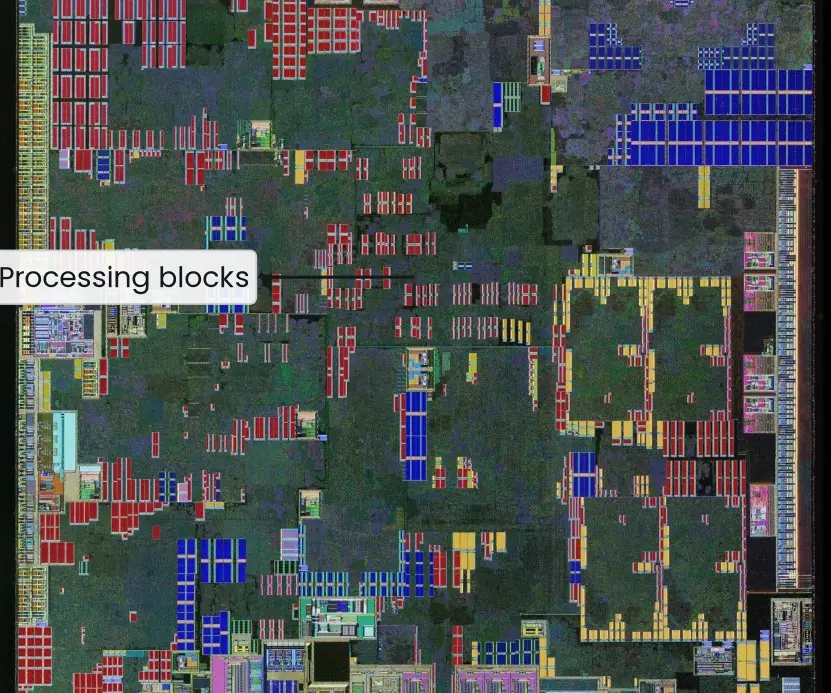
A thread is a path of execution inside a program. Modern processors contain several cores (Plate 6.1a), and each core can run a different thread at the same instant, so a program that uses threads can really do several jobs together.
A thread passes through the states of Figure 6.1: it is runnable until the scheduler gives it a core, can wait for a lock or for a timer, and ends when run() finishes.
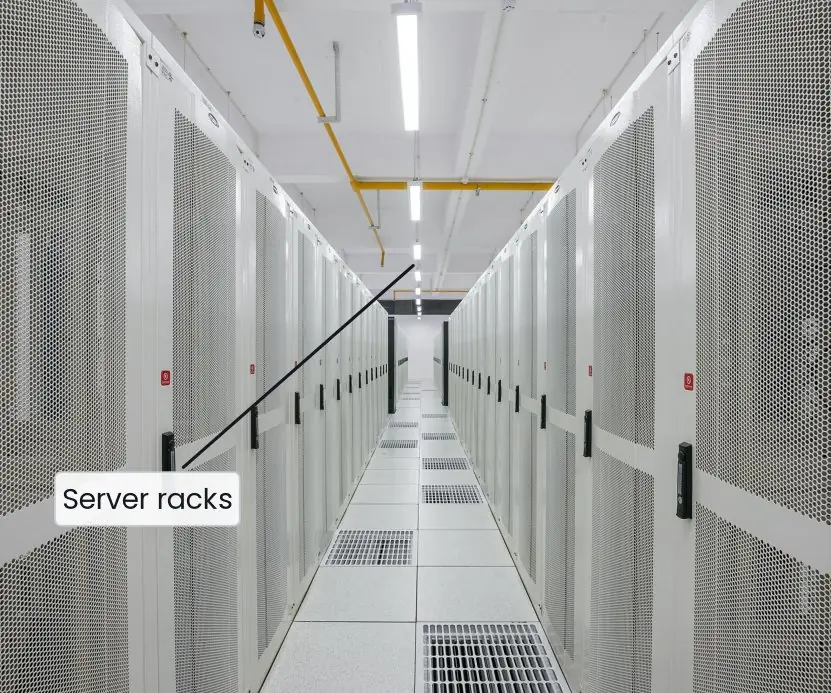
Real applications usually keep their data on a database server (Plate 6.1b) and reach it through JDBC.
Figure 6.2 shows why the same Java code can talk to different databases: the program uses only the standard java.sql interfaces, and a driver translates the calls into the protocol of the particular database.


6.6 Eight uses of threads, GUI and JDBC
- Responsive programs. A background thread can download a file or save data while the window stays usable. If everything ran on the user-interface thread, the screen would freeze. Swing programs use
SwingWorkerfor exactly this reason. - Serving many users. A web or chat server gives each request its own thread, or takes one from a pool. A server for an online exam can accept hundreds of students together instead of one by one.
- Using many cores. Splitting a big job into parts that run on different cores finishes it sooner. Adding up a million marks, resizing images or searching log files can all be divided among threads.
- Safe sharing.
synchronized, locks and atomic classes make sure two threads do not update the same variable at once. Without them the total of two counters can come out wrong, as the race demonstration shows. - Desktop and tool interfaces. Swing builds windows from components such as
JFrame,JButtonandJTable, and responds to events. Small administration tools for a school or a shop are quickly built with it. - Persistent data. JDBC lets a program store records in a database that survives restarts. Student results, bills and attendance are kept safely and can be searched with SQL.
- Database independence. The program uses standard
java.sqlinterfaces, so changing from H2 to PostgreSQL mostly means changing a driver and a URL. This protects an application when the organisation changes its database. - Safe queries and transactions. Prepared statements stop SQL injection, and commit and rollback keep related changes together. A fund transfer either completes both the debit and the credit or neither, which matters for any payment system.
Formula and fact sheet
start()creates a thread,run()does not;join()waits.counter++is not atomic; fix withsynchronized,AtomicIntegeror a lock.- Executors reuse threads;
Future.get()blocks;shutdown()at the end. - Deadlock = mutual exclusion + hold-and-wait + no pre-emption + circular wait; break by lock ordering.
- Swing: source → event → listener; update the GUI on the EDT.
- JDBC:
PreparedStatementwith?, try-with-resources, transactions viacommit/rollback.
Chapter summary
- Threads give concurrency, but shared mutable state needs synchronisation to avoid races and deadlocks.
- Executors, atomics and concurrent collections are safer than raw threads and locks.
- GUI programs are event driven: components register listeners and long work moves off the UI thread.
- JDBC connects Java to SQL databases; prepared statements and transactions make it safe.
- A real project combines classes, interfaces, generics, collections, exceptions, I/O, threads and a database.
Practice
- Differentiate a process and a thread. List the states of a thread.
- Why can two threads incrementing a shared
intlose updates? Fix with two different techniques. - Differentiate
run()andstart(). Differentiatesynchronizedmethod and block. - Write a producer–consumer using
BlockingQueue<Integer>(describe the steps). - What is a deadlock? Give an example with two locks and a fix.
- Explain the event-delegation model with a
JButtonexample. - Differentiate
FlowLayout,BorderLayoutandGridLayout. - Why is it dangerous to build a SQL query with string concatenation? Show the fix.
- Write JDBC steps to transfer Rs 500 between two accounts atomically.
- Design the class diagram (in words) for a Student Result System and list the exceptions you would define.
Answers and worked solutions
1. A process has its own memory space; threads in a process share memory. States: new, runnable, running, blocked/waiting, timed waiting, terminated.
2. x++ is read–modify–write; interleaving loses an update. Fix with a synchronized block around the increment, or use AtomicInteger.incrementAndGet().
3. start() creates a new thread that calls run(); calling run() directly executes in the current thread. A synchronized method locks this for the whole method; a block locks the named object for only the critical section (finer-grained).
4. Create BlockingQueue<Integer> q = new ArrayBlockingQueue<>(10); the producer thread loops q.put(i); the consumer loops q.take() and processes; put blocks when full and take blocks when empty, so no explicit wait/notify is needed.
5. Thread 1 holds lock A and waits for B while thread 2 holds B and waits for A. Fix: make every thread acquire the locks in the same order (A then B), or use tryLock with a timeout.
6. The button is the event source; button.addActionListener(e -> label.setText("Clicked")) registers a listener; on click, Swing creates an ActionEvent and calls the listener on the event-dispatch thread.
7. FlowLayout: left to right, wrapping; BorderLayout: five regions; GridLayout: equal cells in rows and columns.
8. Input such as x' OR '1'='1 changes the query logic (SQL injection). Use prepareStatement("… WHERE name = ?") and setString(1, name), so the input is always treated as data.
9. setAutoCommit(false); UPDATE account SET bal = bal - 500 WHERE id = ? AND bal >= 500; check the update count is 1; UPDATE account SET bal = bal + 500 WHERE id = ?; commit(); on any exception rollback().
10. Classes Student, Course, Result (student, course, marks), ResultService; interface GradingPolicy with implementations; exceptions InvalidMarksException (checked) and StudentNotFoundException.
Model answers: medium (5 marks) and long (10 marks) questions
Q1 (5 marks). What is a thread? Explain how threads are created and why synchronisation is needed, with a program.
Introduction. A thread is a lightweight path of execution within a process. Threads of one program share memory, so they communicate easily but can interfere with each other.
Creating threads.
- Implement
Runnable(preferred): pass the object tonew Thread(r)and callstart(). - Extend
Threadand overriderun(); this uses up the single inheritance slot. - Executor framework:
ExecutorServicekeeps a pool of threads and returnsFutureresults. start()creates the new thread; callingrun()directly would run in the current thread.
Why synchronisation. count++ is three steps (read, add, write). If two threads interleave, one update is lost: a race condition (Figure 6.1 shows the states a waiting thread passes through).
A synchronized block lets one thread at a time enter, so the steps cannot interleave.
import java.util.*;
import java.util.concurrent.*;

public class RaceDemo {
    static int unsafe = 0, safe = 0;
    static final Object lock = new Object();
    public static void main(String[] args) throws Exception {
        Runnable job = () -> {
            for (int i = 0; i < 100000; i++) {
                unsafe++;
                synchronized (lock) { safe++; }
            }
        };
        Thread t1 = new Thread(job), t2 = new Thread(job);
        t1.start(); t2.start(); t1.join(); t2.join();
        System.out.println("synchronised counter = " + safe);
        System.out.println("unsynchronised never exceeds it: " + (unsafe <= 200000));
        ExecutorService pool = Executors.newFixedThreadPool(4);
        List<Future<Long>> parts = new ArrayList<>();
        for (int p = 0; p < 4; p++) {
            final int lo = p * 250 + 1, hi = lo + 249;
            parts.add(pool.submit(() -> { long s = 0; for (int i = lo; i <= hi; i++) s += (long) i * i; return s; }));
        }
        long total = 0;
        for (Future<Long> f : parts) total += f.get();
        pool.shutdown();
        System.out.println("sum of squares 1..1000 = " + total);
    }
}
synchronised counter = 200000
unsynchronised never exceeds it: true
sum of squares 1..1000 = 333833500
Conclusion. The synchronised counter is always exactly 200000, while the unsynchronised one is usually smaller. Use threads for responsiveness and speed, and protect shared data with locks or atomic classes.
Q2 (10 marks). Explain the steps of JDBC with a program, the role of PreparedStatement, and transactions.
Introduction. JDBC (Java Database Connectivity) is the standard API for relational databases. It hides each database's protocol behind common interfaces and a driver (Figure 6.2).
Steps.
- Driver. Put the driver JAR on the classpath; modern JDBC loads it automatically from the URL.
- Connection.
DriverManager.getConnection(url, user, password). - Statement. Create a
Statementfor fixed SQL or aPreparedStatementwith?placeholders. - Execute.
executeUpdatefor INSERT/UPDATE/DELETE;executeQueryreturns aResultSet. - Process. Loop
while (rs.next())and read columns withgetString,getInt. - Close. try-with-resources closes the connection, statement and result set.
- Prepared statements are precompiled and treat input as data, which prevents SQL injection.
- Transactions.
setAutoCommit(false), thencommit()on success orrollback()on failure.
import java.sql.*;

public class JdbcDemo {
    public static void main(String[] args) throws Exception {
        try (Connection con = DriverManager.getConnection("jdbc:h2:mem:college")) {
            try (Statement st = con.createStatement()) {
                st.execute("CREATE TABLE student(id INT PRIMARY KEY AUTO_INCREMENT, name VARCHAR(30), marks INT)");
            }
            con.setAutoCommit(false);
            try (PreparedStatement ins = con.prepareStatement("INSERT INTO student(name, marks) VALUES (?, ?)")) {
                String[] n = {"Sita", "Ram", "Hari"}; int[] m = {88, 72, 45};
                for (int i = 0; i < 3; i++) { ins.setString(1, n[i]); ins.setInt(2, m[i]); ins.addBatch(); }
                ins.executeBatch();
            }
            con.commit();
            try (PreparedStatement q = con.prepareStatement("SELECT name, marks FROM student WHERE marks >= ? ORDER BY marks DESC")) {
                q.setInt(1, 60);
                try (ResultSet rs = q.executeQuery()) {
                    while (rs.next()) System.out.println(rs.getString("name") + " " + rs.getInt("marks"));
                }
            }
            try (PreparedStatement q = con.prepareStatement("SELECT COUNT(*) FROM student WHERE name = ?")) {
                q.setString(1, "x' OR '1'='1");
                try (ResultSet rs = q.executeQuery()) { rs.next(); System.out.println("injection attempt matches " + rs.getInt(1) + " rows"); }
            }
            try (Statement st = con.createStatement()) {
                st.executeUpdate("INSERT INTO student(name, marks) VALUES ('Temp', 1)");
                con.rollback();
                ResultSet rs = st.executeQuery("SELECT COUNT(*), AVG(marks) FROM student");
                rs.next(); System.out.println("after rollback: " + rs.getInt(1) + " rows, average " + rs.getInt(2));
            }
        }
    }
}
Sita 88
Ram 72
injection attempt matches 0 rows
after rollback: 3 rows, average 68
| Feature | Statement |
PreparedStatement |
|---|---|---|
| SQL | text built by concatenation | ? placeholders |
| Injection | vulnerable | safe |
| Reuse | parsed each time | precompiled, batchable |
Conclusion. JDBC connects Java to any relational database through one API. Use prepared statements for safety and transactions to keep related changes all-or-nothing.