Unit 1 · 6 teaching hours · 20 min read
Mobile Platforms and Application Architecture
What the syllabus asks for 7
- The mobile landscape
- Android architecture
- iOS architecture in outline
- Constraints that shape mobile design
- Screen density arithmetic
- Setting up an Android project
- The platform you can see: hardware, pixels and screens
A phone in a Humla village and a phone in a Kathmandu office run the same app, yet one has a cracked 720-pixel screen, 2 GB of memory and a connection that drops every few minutes, while the other has a 1080-pixel OLED display, 8 GB and fibre Wi-Fi.
A mobile programmer writes for both, on a device that is small, battery-powered, always moving and shared among dozens of apps competing for the same memory.
This unit surveys the platforms (Android and iOS), their layered architectures, the constraints that shape mobile design, and the arithmetic of screen density and image memory that every layout decision rests on.
- The mobile ecosystem: devices, operating systems, app types (native, web, hybrid, cross-platform).
- Android and iOS architecture layers; the Android runtime and the app sandbox.
- Mobile constraints and the density arithmetic (dp, sp, px), with image-memory calculations.
- Setting up an Android project and reading its structure.
Code in this book is labelled. Python and Java programs were executed and their output pasted by a tool. Kotlin, XML and Gradle snippets need the Android SDK, are not executed here, and are marked "not executed".
1.1 The mobile landscape
A mobile application is software designed for handheld devices (phones, tablets, wearables) that uses their sensors, touch input and connectivity.
The platform market is dominated by two systems: Android (an open-source operating system led by Google, running on devices from many manufacturers, the majority platform in Nepal) and iOS (Apple's closed system for iPhone and iPad).
Others (HarmonyOS, KaiOS feature phones) exist but are smaller. Apps are distributed through stores (Google Play, Apple App Store) and, on Android, also by direct installation of an APK file.
| Approach | How it is built | Strengths | Weaknesses |
|---|---|---|---|
| Native | Kotlin/Java for Android; Swift for iOS; platform SDKs | Best performance, full access to features, platform look | Two code bases |
| Mobile web | HTML/CSS/JS in the browser, responsive design | One code base, no install | Limited device access, needs network |
| Progressive web app (PWA) | Web app with service worker, installable | Offline, push notifications on some platforms | Restricted on iOS, less integration |
| Hybrid | Web UI inside a native shell (Cordova, Ionic, Capacitor) | Reuse web skills | Slower UI, plugin dependence |
| Cross-platform native-UI | One code base compiled to native widgets or custom renderer (Flutter, React Native, Kotlin Multiplatform) | One team, near-native speed | Larger runtime, occasional platform gaps |
The choice is an engineering trade-off between cost, speed and fidelity; Unit 7 returns to it.
1.2 Android architecture
Android is a stack of layers, each using the one below:
- Linux kernel: process and memory management, drivers (display, camera, Wi-Fi, Binder IPC), and security through Linux users and permissions.
- Hardware abstraction layer (HAL): standard interfaces so that the framework talks to camera, audio and sensors regardless of the chip.
- Native libraries and Android Runtime (ART): C/C++ libraries (SQLite, OpenGL ES, libc, media codecs) and ART, which runs app code. Apps are compiled to DEX bytecode; ART compiles it ahead of time and just in time to machine code (earlier versions used the Dalvik VM).
- Java API framework: the services apps call: Activity Manager (lifecycle), Package Manager, Window Manager, Content Providers, Notification Manager, Location Manager, Resource Manager and the View system.
- System apps and your app: the dialler, contacts and browser are ordinary apps built on the same APIs.
The sandbox. Each app runs as its own Linux user in its own process with a private data directory, so one app cannot read another's files; sharing needs explicit mechanisms (Intents, content providers, permissions).
Binder is the inter-process communication system that connects apps to system services.
Memory is managed aggressively: when memory is short the system kills background processes (least recently used first) without warning, so an app must save its state when it leaves the screen, a point that dominates Unit 2.
1.3 iOS architecture in outline
iOS has four layers: Core OS (kernel based on Darwin, security, drivers), Core Services (Foundation, Core Data, networking, location), Media (graphics, Metal, audio, video) and Cocoa Touch (UIKit or SwiftUI for the interface, notifications, multitasking).
Apps are written in Swift (or Objective-C) in Xcode, run in a sandbox, and must be signed and distributed through Apple's programs.
Concepts map closely: an Android Activity corresponds to a UIViewController, a Fragment to a child view controller, RecyclerView to UITableView/UICollectionView, Intent to URL schemes and app extensions, Room to Core Data or SwiftData, Jetpack Compose to SwiftUI.
Learning one platform's lifecycle and layout model makes the other easy.
1.4 Constraints that shape mobile design
| Constraint | Consequence for the programmer |
|---|---|
| Battery | Avoid polling, wake locks and constant GPS; batch network and background work |
| Memory | Load scaled images, recycle views, release resources when hidden; the OS may kill the process |
| Small, varied screens | Density-independent units, responsive layouts, many sizes and orientations |
| Touch input | Targets of at least 48 dp, gestures, on-screen keyboard changes the layout |
| Intermittent networks | Cache, retry, work offline, show progress; expect failure |
| Interruptions | A call or notification can pause the app at any moment |
| Fragmentation | Many OS versions and manufacturers; test on low-end devices; declare minimum and target API levels |
| Security and privacy | Runtime permissions, secure storage, minimal data collection |
Context for Nepal: many users have low-end Android phones with limited storage and memory, prepaid mobile data, uneven connectivity outside cities and a need for Nepali-language interfaces and Devanagari text input, so small download size, offline behaviour and language support are core requirements, not extras.
1.5 Screen density arithmetic
Android measures size in dp (density-independent pixels): 1 dp is one pixel on a 160 dpi screen (mdpi, the baseline), so px = dp × (dpi ÷ 160).
Text uses sp (scale-independent pixels), which are dp scaled by the user's font-size setting. Using dp makes a 48 dp button about the same physical size (roughly 9 mm) on every device.
| Bucket | dpi | Scale (dpi ÷ 160) | 48 dp in px | 16 sp in px (font scale 1.0) |
|---|---|---|---|---|
| ldpi | 120 | 0.75 | 36 | 12 |
| mdpi | 160 | 1 | 48 | 16 |
| hdpi | 240 | 1.5 | 72 | 24 |
| xhdpi | 320 | 2 | 96 | 32 |
| xxhdpi | 480 | 3 | 144 | 48 |
| xxxhdpi | 640 | 4 | 192 | 64 |
A phone with a 1080 × 2400 pixel screen at 420 dpi has density 420 ÷ 160 = 2.625, so its size in dp is 1080 ÷ 2.625 = 411.43 dp wide and 2400 ÷ 2.625 = 914.29 dp tall.
Layouts are designed in dp, so this phone behaves like a 411 × 914 dp screen; the smallest-width qualifier (sw360dp, sw600dp for tablets) selects resource folders accordingly.
Provide images for several density buckets (or use vector drawables) so that the system does not scale a small bitmap up and make it blurry.
Image memory
An image decoded into memory takes width × height × bytes per pixel, regardless of its file size (JPEG compression is gone once it is decoded).
A 12-megapixel photo (4000 × 3000) as ARGB_8888 (4 bytes a pixel) needs 4000 × 3000 × 4 = 4,80,00,000 bytes (45.78 MiB). Loading it into a list of thumbnails would exhaust the memory of a 2 GB phone quickly.
Decoding with inSampleSize = 4 (every fourth pixel in each direction) gives 1000 × 750 and 30,00,000 bytes, which is 16 times smaller, ample for a screen thumbnail.
Libraries (Coil, Glide, Picasso) do this sampling, caching and background loading for you.
1.6 Setting up an Android project
Development uses Android Studio (the official IDE based on IntelliJ), the Android SDK (platform libraries, build tools, emulator), and the Gradle build system. A project contains:
| Item | Purpose |
|---|---|
app/src/main/AndroidManifest.xml |
Declares the package, components, permissions, minimum API level |
app/src/main/java/... (or kotlin/) |
Source code |
app/src/main/res/ |
Resources: layout/, values/ (strings, colours, styles), drawable/, mipmap/ (launcher icons), values-ne/ (Nepali strings) |
app/build.gradle(.kts) |
Module build settings: compileSdk, minSdk, targetSdk, dependencies |
build/ |
Generated output, including the APK |
Not executed (needs the Android SDK): a minimal module build file in Kotlin DSL.
android {
    namespace = "np.edu.demo.notes"
    compileSdk = 34
    defaultConfig {
        applicationId = "np.edu.demo.notes"
        minSdk = 24
        targetSdk = 34
        versionCode = 20307
        versionName = "2.3.7"
    }
}
dependencies {
    implementation("androidx.core:core-ktx:1.12.0")
    implementation("androidx.recyclerview:recyclerview:1.3.2")
}
minSdk is the oldest Android version supported (lower reaches more users, higher gives newer APIs); targetSdk declares the version the app was tested against and enables newer behaviour, and Google Play requires a recent value.
The build turns sources and resources into DEX code and a compiled resource table, packages them into an APK, and signs it (Unit 7).
The emulator (Android Virtual Device) and a real phone connected over USB debugging run the app, and Logcat shows logs.
1.7 The platform you can see: hardware, pixels and screens
The sections above describe the platform in words and formulas. This section lets you see it.
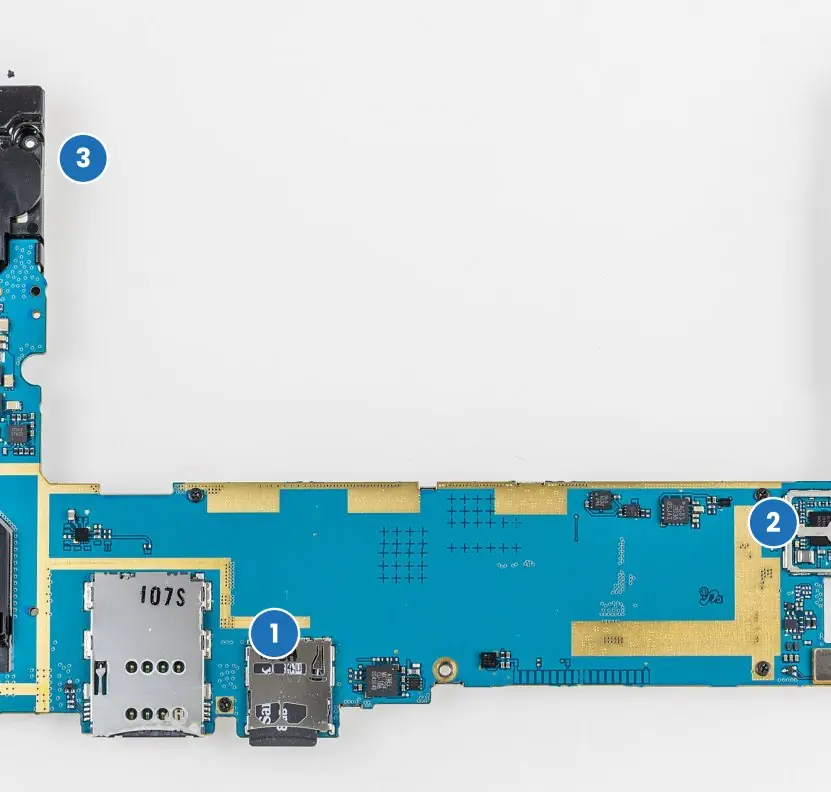
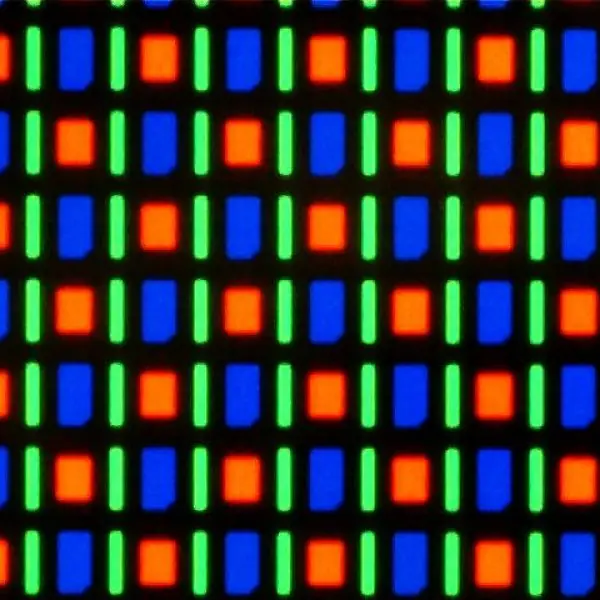
A phone is a small computer with a processor, memory, radios and sensors on one board, its operating system is a stack of layers, and its screen is a grid of coloured dots whose density decides how large every button really is.
The first plate pairs a real photograph of an Android device's circuit board with the layer diagram of the software that runs on it.



1.7.1 Eight constraints that shape every mobile app
- Limited battery. A phone cannot be plugged in during use, so every wake-up of the radio, screen or processor costs charge. An app that polls a server every few seconds can flatten a battery in a day. Good apps batch their network calls and let the system schedule background work, a habit that matters for users of eSewa and Khalti who also depend on their phone to receive an OTP.
- Limited memory. Many phones in Nepal have 2 GB or 3 GB of RAM shared by dozens of apps, and a decoded photo can take tens of megabytes (Figure 1.2). When memory is short the system kills the background app that was used least recently. An app must therefore keep its large objects small and be ready to restart cleanly.
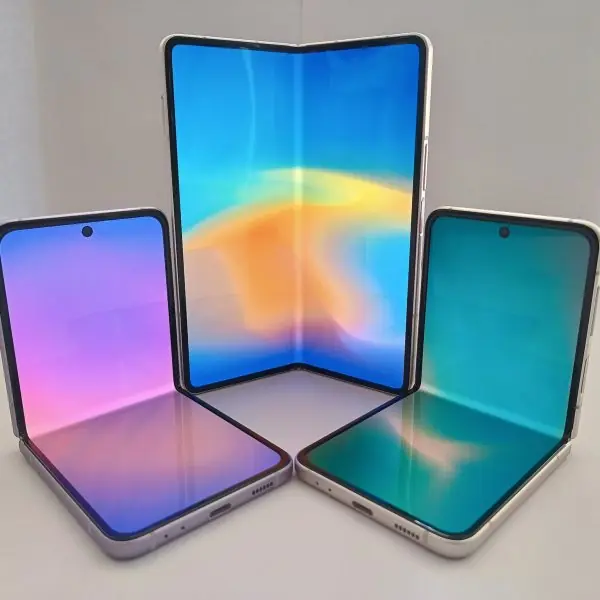
- Small and varied screens. Screens range from 4.5-inch 720-pixel phones to 10-inch tablets and foldables (Plate 1.2). Using dp and flexible layouts lets one design fit all of them. Fixed pixel sizes make buttons too small on dense screens and too large on cheap ones.
- Touch input. A fingertip is far less precise than a mouse pointer, so tap targets must be at least 48 dp (about 9 mm, Figure 1.1). Gestures such as swipe and pinch replace hovering and right-clicking. The Nagarik App and Hamro Patro use large buttons and simple lists for this reason.
- Unreliable network. A user on the road from Pokhara to Jomsom loses signal many times in a day, and prepaid data is limited and costly. Apps should cache data, show what they have while loading, and retry quietly. An app that shows a blank screen without internet is usually uninstalled.
- Interruptions. A call, a notification or the Back button can pause the app at any moment, and the user may return an hour later or never. Therefore state is saved when the app leaves the screen and restored when it returns. This single rule explains the Activity lifecycle of Unit 2.
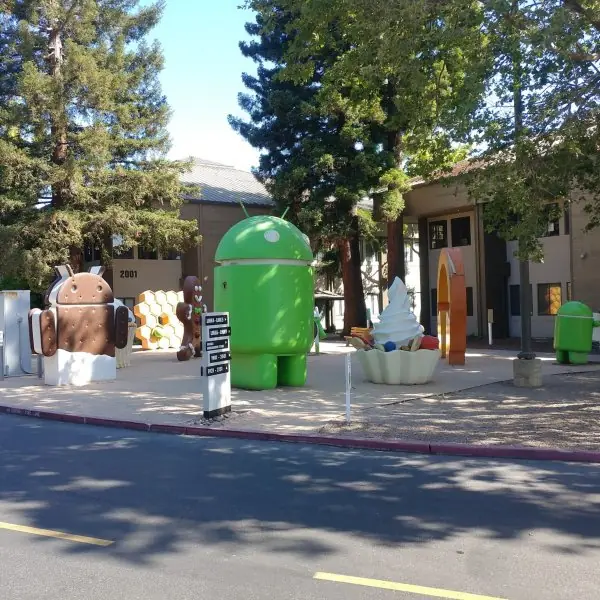
- Fragmentation. Thousands of device models run versions of Android from the old to the newest (Plate 1.2c), each with its own maker's changes. Developers choose a sensible minSdk, test on a low-end phone and use the support libraries. Ignoring old versions would lock out many students and shopkeepers who cannot afford new phones.
- Security and privacy. A phone holds contacts, photos, messages and bank apps, and it is easily lost. Android therefore uses a sandbox for each app, asks the user for dangerous permissions at run time and encourages encrypted storage. An app that asks for more data than it needs, for example a torch app asking for contacts, breaks the user's trust and is flagged by the store.
Chapter summary
- Android and iOS dominate; native, web, PWA, hybrid and cross-platform approaches trade cost against fidelity.
- Android layers: Linux kernel, HAL, native libraries and ART, Java API framework, apps; each app is sandboxed in its own process and can be killed in the background.
- iOS layers: Core OS, Core Services, Media, Cocoa Touch; concepts map one-to-one to Android.
- Mobile constraints (battery, memory, screens, intermittent network, interruptions) shape design; in Nepal, low-end devices, offline use and Nepali support matter most.
- px = dp × dpi/160; image memory = width × height × bytes per pixel; sample down large images.
Practice
- Compare native, hybrid and cross-platform development in three points each.
- Name the five layers of the Android stack and give one component of each.
- What is the Android sandbox and what mechanism lets apps cooperate?
- How many pixels is a 48 dp target on an xhdpi (320 dpi) screen and on an xxhdpi (480 dpi) screen?
- A 720 × 1600 screen has density 2.0. What is its size in dp?
- How much memory does a 2000 × 1500 ARGB_8888 bitmap need?
- How much does inSampleSize = 2 reduce the memory of a bitmap?
- Distinguish dp and sp.
- Why must an app save its state when it leaves the screen?
- Explain minSdk and targetSdk.
Answers and worked solutions
1. Native: best performance, full feature access, two code bases. Hybrid: web skills reused, one code base, slower UI. Cross-platform: one team and near-native speed, bigger runtime and occasional gaps.
2. Linux kernel (drivers, Binder), HAL (camera interface), native libraries/ART (SQLite, DEX runtime), Java API framework (Activity Manager), apps (dialler).
3. Each app runs in its own process as its own Linux user with private storage; apps cooperate through Intents, content providers and permissions (via Binder IPC).
4. xhdpi: 48 × 2 = 96 px. xxhdpi: 48 × 3 = 144 px.
5. 720/2 = 360 dp wide and 1600/2 = 800 dp tall: 360 × 800 dp.
6. 2000 × 1500 × 4 = 12,000,000 bytes (11.44 MiB).
7. Each dimension halves, so the area is a quarter: a 4× reduction.
8. dp scales with screen density only; sp also scales with the user's font-size preference (used for text).
9. The system can kill a background process at any time to free memory, losing unsaved in-memory state.
10. minSdk is the oldest API level the app runs on; targetSdk is the level the app was tested for, enabling that version's behaviour and store requirements.
Model answers: medium (5 marks) and long (10 marks) questions
Q1 (5 marks). Compare native, hybrid and cross-platform mobile development.
Introduction. The choice between the three approaches is a trade-off between cost, speed and fidelity (section 1.1, Figure 1.3).
- Native. The app is written in Kotlin or Java for Android and Swift for iOS using the platform SDK. It has the best performance and full access to sensors, camera and new features, and it follows the platform look. The cost is two code bases and two teams.
- Hybrid. The user interface is HTML, CSS and JavaScript running in a WebView inside a native shell (Cordova, Ionic, Capacitor). Web developers can reuse their skills and one code base serves both stores. The interface is slower, and access to the device depends on plugins.
- Cross-platform with native UI. One code base (Flutter, React Native, Kotlin Multiplatform) is compiled to native widgets or drawn by its own engine. It gives near-native speed with one team, but it adds a larger runtime and occasional gaps when a new platform feature appears.
| Point | Native | Hybrid | Cross-platform |
|---|---|---|---|
| Code bases | 2 | 1 | 1 |
| Speed | Best | Slowest | Near native |
| Device access | Complete | Through plugins | Mostly complete |
Example. A bank app with biometrics and heavy animation (a ConnectIPS-type app) suits native or Flutter, while a simple notice-board app for a college can be hybrid.
Conclusion. Choose native for performance and platform features, hybrid for the cheapest reuse of web skills, and cross-platform when one team must reach both stores with a near-native feel.
Q2 (5 marks). A phone has a 1080 × 2340 screen at 440 dpi. Find its size in dp, the pixel size of a 48 dp button, and the memory of a 4000 × 3000 ARGB_8888 photo before and after inSampleSize = 8.
Introduction. Android measures layout in dp, where px = dp × dpi ÷ 160 (section 1.5, Figures 1.1 and 1.2).
- Density factor. 440 ÷ 160 = 2.75.
- Screen size in dp. Width = 1080 ÷ 2.75 = 392.73 dp; height = 2340 ÷ 2.75 = 850.91 dp. The phone therefore behaves like a 393 × 851 dp screen and uses the default (sw360dp) phone layout.
- Button size. 48 dp × 2.75 = 132 px, which is about 9 mm on this screen.
- Photo memory. Decoded memory = width × height × bytes per pixel = 4000 × 3000 × 4 = 4,80,00,000 bytes (45.78 MiB), whatever the JPEG file size.
- After sampling. inSampleSize = 8 keeps every eighth pixel in each direction: 500 × 375 × 4 = 7,50,000 bytes, which is 64 times smaller.
Check. 48,000,000 ÷ 750,000 = 64 = 8², because both dimensions shrink by 8.
Conclusion. The screen is 392.73 × 850.91 dp, the button is 132 px, and sampling cuts the photo from 4,80,00,000 to 7,50,000 bytes.
Q3 (10 marks). Describe the architecture of the Android platform and explain the application sandbox. How does it differ from iOS?
Introduction. Android is an open-source operating system led by Google. It is built as a stack of five layers, each using only the layer below (section 1.2, Plate 1.1b), and it runs on the main board of the phone (Plate 1.1a).
- Linux kernel. It manages processes and memory, contains the drivers for display, camera, Wi-Fi and Binder, and enforces security through Linux users and permissions.
- Hardware abstraction layer (HAL). Standard interfaces let the framework use any camera, sensor or audio chip without knowing the manufacturer.
- Native libraries and ART. C and C++ libraries (SQLite, OpenGL ES, libc, media codecs) sit beside the Android Runtime, which runs DEX bytecode compiled ahead of time and just in time.
- Java API framework. Activity Manager, Package Manager, Window Manager, Content Providers, Notification Manager and the View system are the services that apps call.
- Applications. The dialler, browser and your own app are all ordinary apps built on the same framework.
- Sandbox. Each app runs as its own Linux user in its own process with a private data directory, so one app cannot read another's files. Cooperation needs explicit tools: Intents, content providers and permissions, with Binder as the inter-process channel to system services.
- Memory management. When memory is short, background processes are killed least recently used first, so apps must save their state when they leave the screen.
- Signing. Every APK is signed, and an update must carry the same key as the installed version.
| Point | Android | iOS |
|---|---|---|
| Kernel | Linux | Darwin (XNU) |
| Layers | Kernel, HAL, libraries + ART, framework, apps | Core OS, Core Services, Media, Cocoa Touch |
| Language | Kotlin, Java | Swift, Objective-C |
| Screen unit | Activity, Fragment | UIViewController |
| Distribution | Play Store and APK files | App Store only |
| Devices | Many makers | Apple only |
Conclusion. Android's layered design and per-app sandbox give security and portability across thousands of devices; the price is fragmentation, which the developer meets with minSdk choices and testing on low-end phones.