Unit 7 · 9 teaching hours · 42 min read
Recent Trends in Technology
What the syllabus asks for 7
- Artificial Intelligence (AI) and Robotics
- Cloud Computing
- Big Data
- Virtual Reality
- e-commerce, e-medicine, e-governance
- Mobile Computing
- Internet of Things (IoT)
This unit is the one that dates fastest.
The machines are the same as in Unit 2; what has changed is where the computing happens (someone else's data centre), how much data it chews (petabytes), how it is programmed (learned from data rather than coded by hand) and what it is attached to (your watch, a tractor, a hospital).
The figures quoted below are stated as of 2025–26 — quote the year whenever you quote a number in the exam, because the number will be wrong by the time you are in college.
Group A picks single facts: who coined "IoT", what does SaaS stand for, which V is not one of the Vs of big data.
Group B asks define X and state any four advantages/applications, or differentiate between A and B — so learn one crisp definition and four uses for each of the seven topics. Group C combines two: "Define cloud computing.
Explain its service models with examples and state its advantages and disadvantages."
7.1 Artificial Intelligence (AI) and Robotics
Artificial intelligence is the branch of computer science concerned with building machines and programs that perform tasks which would need human intelligence — learning, reasoning, understanding language, recognising patterns, planning and decision-making.
The term was coined at the Dartmouth conference of 1956 (John McCarthy).
Milestones since: Deep Blue beat the world chess champion Kasparov (1997), AlphaGo beat the Go champion Lee Sedol (2016), the transformer architecture was published (2017), and ChatGPT put generative AI into ordinary hands (November 2022).
Today's headline systems are large language models (LLMs) — networks with billions of parameters trained on enormous text and image collections, which generate new text, code or pictures rather than only classifying old ones.
Since 2024 the industry has moved on to multimodal models (text + image + audio in one model) and agentic AI, where a model is allowed to use tools and take multi-step actions on a user's behalf.
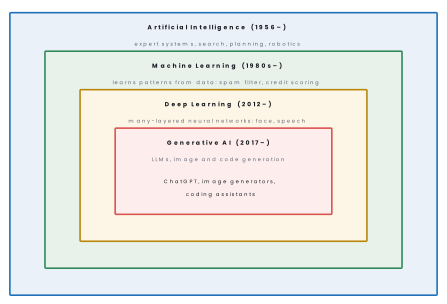
AI is classified by capability into narrow AI (ANI — good at one task; every system in use today, from Google Translate to a face unlock), general AI (AGI — human-level across all tasks; does not yet exist) and super AI (beyond human ability; hypothetical).
Its working branches are machine learning (supervised, unsupervised and reinforcement learning), natural language processing, computer vision, expert systems, speech recognition and robotics.
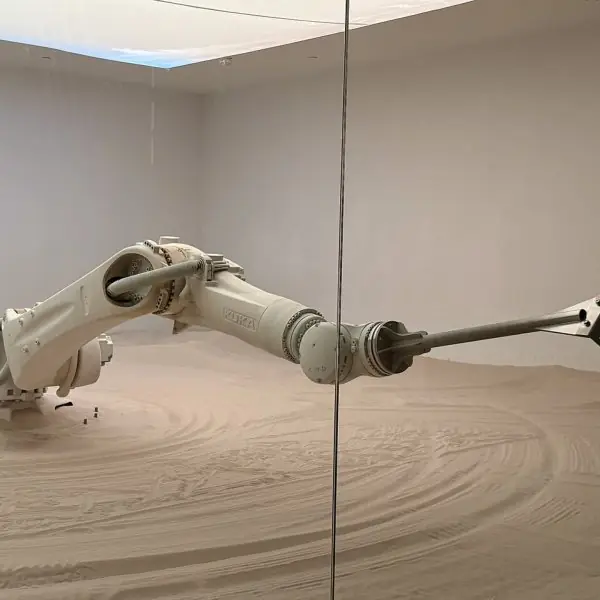
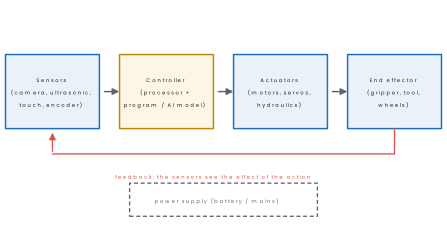
Robotics is the branch of engineering and computer science that designs, builds and programs robots. A robot is a programmable machine that senses its environment, processes what it senses and acts on the physical world.
The word comes from Karel Čapek's 1920 play R.U.R. (Czech robota, forced labour); Asimov's three laws of robotics date from 1942; the first industrial robot, Unimate, went to work at General Motors in 1961.
| Robot type | Where used | Example |
|---|---|---|
| Industrial arm | welding, painting, assembly lines | car factories |
| Mobile / AGV | moving goods in a warehouse | Amazon warehouse robots |
| Humanoid / service | reception, teaching, hospitality | the robot waiter built by Paaila Technology for a Kathmandu restaurant (2018) |
| Medical | minimally invasive surgery | da Vinci surgical system |
| Aerial (drone/UAV) | survey, mapping, agriculture, delivery | drone mapping after the 2015 Gorkha earthquake |
| Exploration | places humans cannot go | Mars rovers, mine and reactor inspection |
Eight applications of AI explained.
1. Healthcare. AI programs can study X-rays, CT scans and skin photographs and point out signs of disease, often in seconds. A doctor in a district hospital can use such a tool as a second opinion when no specialist is available.
It does not replace the doctor, but it helps to find illness earlier and to reduce missed cases.
2. Weather and flood forecasting. Machine-learning models learn from past rainfall, river-level and satellite data to predict floods and storms.
Agencies such as the Department of Hydrology and Meteorology can use them to send earlier warnings to villages along the rivers. A few extra hours of warning can save lives and livestock.
3. Speech and language. Voice assistants, speech-to-text, and translation between languages are all AI applications. A student can dictate an essay or translate a notice from English into Nepali on a phone.
These tools make computers easier for people who cannot type well.
4. Recommendation systems. Video and shopping sites study what you watched or bought and suggest similar items. This saves time for the user and increases sales for the seller. Online shops and music apps used in Nepal work this way.
5. Fraud detection in banking and payments. AI learns the normal pattern of a customer's spending and raises an alarm when a payment looks strange. A card used in two countries within an hour, for example, will be flagged.
This protects customers of banks and wallets such as ConnectIPS, eSewa and Fonepay-linked cards.
6. Self-driving and driver-assistance systems. Cameras and sensors with AI recognise lanes, signs and pedestrians, and brake or steer automatically.
Full self-driving is still developing, but lane warning and automatic braking are already common in modern cars. The aim is fewer accidents caused by tiredness or distraction.
7. Agriculture. A farmer can photograph a diseased leaf and an AI app can name the pest or disease and suggest a treatment. Drones with AI can also count plants or find dry patches in a field. This is useful for small farms in Nepal where an expert is far away.
8. Customer service chatbots. A chatbot answers common questions about bills, forms and services at any hour. Banks and telecom companies use them to reduce waiting time at help desks. Difficult cases are passed to a human officer.
Advantages: works 24 hours without fatigue, handles jobs that are dangerous or repetitive, very fast on large data, fewer human errors, consistent decisions.
Disadvantages: high cost of setup and training, job displacement, no common sense or emotion, results can be biased because the training data was biased, poor accountability when it gets things wrong, and a real privacy cost.
7.2 Cloud Computing
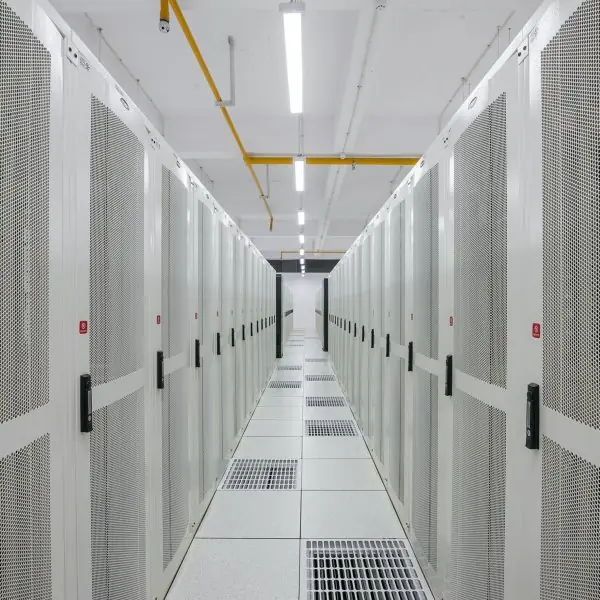
Cloud computing is the delivery of computing services — servers, storage, databases, networking, software and analytics — over the internet ("the cloud"), on demand, with payment only for what is used.
The provider owns and maintains the hardware; the customer rents capacity.
The NIST definition lists five essential characteristics: on-demand self-service, broad network access, resource pooling (multi-tenancy), rapid elasticity, and measured service (pay-per-use metering).
The enabling technology underneath is virtualisation — one physical server split into many virtual machines or containers.
| Service model | What you rent | You manage | Examples |
|---|---|---|---|
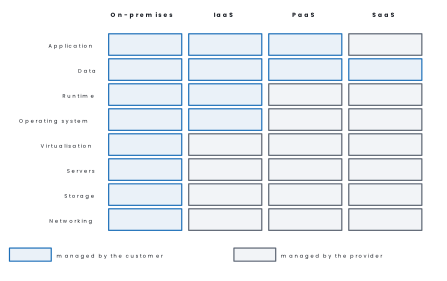
| IaaS — Infrastructure as a Service | virtual machines, storage, network | OS, runtime, application, data | AWS EC2, Google Compute Engine, Azure VMs |
| PaaS — Platform as a Service | a ready platform to deploy code on | application and data only | Google App Engine, Heroku, Azure App Service |
| SaaS — Software as a Service | finished software in a browser | your data only | Gmail, Google Docs, Zoom, Microsoft 365 |
Advantages. No capital cost for servers; scale up or down in minutes; access from anywhere; automatic backup and disaster recovery; the provider patches and secures the hardware; a small Nepali startup can rent the same infrastructure as a multinational.
Disadvantages. Useless without a reliable internet connection; recurring cost that never ends; data is physically in someone else's country, which raises legal and privacy questions; vendor lock-in makes moving away expensive; a provider outage takes your service down with it.
Industry trackers put the 2025 global cloud-infrastructure market at roughly AWS 30 %, Microsoft Azure 22 %, Google Cloud 12 %, with the rest split among Alibaba, Oracle, IBM and others.
In Nepal, government systems are hosted in the Government Integrated Data Centre run by the National Information Technology Centre, and local providers now sell cloud servers hosted inside Nepal, which keeps data under Nepali law.
Problem. A college can either (i) buy a server for Rs 4,50,000, useful life 5 years, drawing 300 W continuously with electricity at Rs 11 per unit (kWh), plus Rs 2,000 per month for an administrator's time, or (ii) rent an equivalent cloud server for Rs 9,000 per month.
Compare the monthly cost. Take a month as 30 days.
Solution.
Hardware, spread over 5 years = 60 months:
Electricity: energy = 0.3\ \text{kW} \times 24 \times 30 = 216\ \text{kWh}, so cost = 216 \times 11 = \text{Rs } 2{,}376 per month.
On-premises total = 7{,}500 + 2{,}376 + 2{,}000 = \text{Rs } 11{,}876 per month.
Cloud = \text{Rs } 9{,}000 per month, so the cloud saves 11{,}876 - 9{,}000 = \text{Rs } 2{,}876 per month, about Rs 34,512 a year — before counting the cooling, the UPS, the load-shedding risk and the fact that the cloud server can be resized next month.
7.3 Big Data
Big data is data whose volume, speed of arrival or variety of form is so great that traditional database tools cannot capture, store, manage and analyse it within an acceptable time.
The standard answer is the five Vs (the first three are Doug Laney's 2001 list; veracity and value were added later):
| V | Meaning | Example |
|---|---|---|
| Volume | the sheer quantity — terabytes to zettabytes | a telecom's call detail records for a year |
| Velocity | the speed at which data arrives and must be processed | Fonepay transactions, sensor streams, tweets |
| Variety | structured, semi-structured and unstructured together | tables + JSON logs + photos + voice |
| Veracity | uncertainty — how much of it is noisy, biased or wrong | user-entered addresses, GPS drift |
| Value | the usable insight extracted from all of it | which route to add buses to |
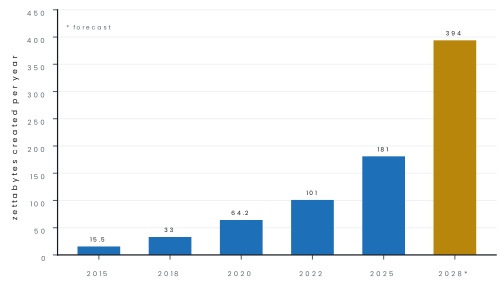
One zettabyte is 10^{21} bytes. Estimates put the data created worldwide at around 180 ZB for 2025, up from about 64 ZB in 2020 — roughly a doubling every two to three years.
Big data is handled by distributed tools instead of one big machine: Hadoop (the HDFS file system plus MapReduce processing), Apache Spark (in-memory, much faster), and NoSQL databases such as MongoDB and Cassandra that drop the strict relational schema in exchange for scale.
Applications: telecom network planning and churn prediction, bank fraud detection, retail recommendation, disease outbreak tracking, weather and landslide prediction from satellite data, traffic management, and analysing remittance flows — for a country where remittance is a huge share of GDP, that last one matters.
Problem. The Department of Hydrology and Meteorology plans a flood-warning network of 2,000 sensors across Nepal. Each sensor sends one 80-byte reading every 5 seconds. How much raw data is produced per day and per year? Which of the five Vs are present?
Solution.
Readings per sensor per day = \dfrac{24 \times 60 \times 60}{5} = 17{,}280.
Total readings per day = 2{,}000 \times 17{,}280 = 3.456 \times 10^{7}.
Bytes per day = 3.456 \times 10^{7} \times 80 = 2.7648 \times 10^{9} bytes = 2.76\ \text{GB}.
Per year = 2.7648 \times 10^{9} \times 365 = 1.009 \times 10^{12} bytes \approx 1.01\ \text{TB}.
Volume alone (1 TB a year) would not defeat an ordinary database, but velocity does — 400 readings arrive every second and a flood warning is useless if it is computed tomorrow.
Add variety (rainfall numbers, radar images, river photographs) and veracity (a silted sensor reporting nonsense) and this is a genuine big-data problem; its value is the hours of warning it gives a village downstream.
7.4 Virtual Reality
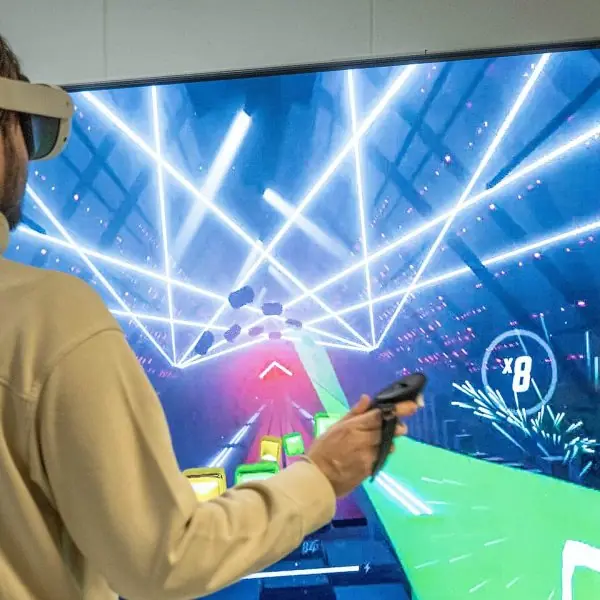
Virtual reality is a computer-generated, three-dimensional environment that a user can enter and interact with, using devices that replace real sensory input (sight, sound, sometimes touch) with simulated input, producing a feeling of presence — of being inside the scene.
A VR system needs four things: a display worn on the head (HMD) with one image per eye to create stereo depth; tracking of the head and hands so the view updates as you move; an interaction device (controllers, gloves, treadmill); and a graphics engine fast enough to redraw both eyes 90 times a second — if the picture lags behind the head, the user feels sick within minutes.
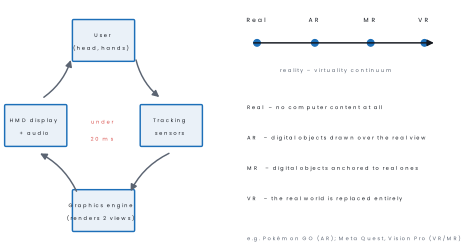
VR is classified as non-immersive (a 3-D world on an ordinary screen, such as a flight-simulator game), semi-immersive (a large projected screen or CAVE, used in driving and flight training) and fully immersive (head-mounted display with tracking).
The current consumer devices are Meta Quest 3 (2023) and Apple Vision Pro (2024); in the browser, the WebXR standard lets a web page open a VR view without installing anything.
| Field | Use of VR |
|---|---|
| Education | virtual laboratories and field trips; dissect a frog without a frog |
| Medicine | surgical training, therapy for phobias and PTSD, rehabilitation |
| Engineering and architecture | walk through a building before it is built |
| Military and aviation | flight and combat simulators — cheap failure |
| Entertainment | games, 360° films, virtual concerts |
| Heritage and tourism | a virtual walk through Pashupatinath or a reconstructed Kathmandu Durbar Square before 2015 |
Advantages: learning by doing without danger or cost; mistakes are free; distance disappears. Disadvantages: expensive hardware; motion sickness; eye strain and isolation with long use; content is costly to produce.
Problem. A headset renders 2160 × 2160 pixels per eye, two eyes, 24 bits of colour per pixel, at 90 frames per second. What is the uncompressed data rate?
Solution.
Bits per frame (both eyes) = 2 \times 2160 \times 2160 \times 24 = 2.2394 \times 10^{8} bits.
Rate = 2.2394 \times 10^{8} \times 90 = 2.0155 \times 10^{10} bit s⁻¹ \approx 20.2\ \text{Gbit s}^{-1}.
No home network carries 20 Gbit s⁻¹, which is why the picture is generated inside the headset or heavily compressed before being streamed — and why wireless VR needs Wi-Fi 6/7 or 5G rather than an ordinary connection.
7.5 e-commerce, e-medicine and e-governance
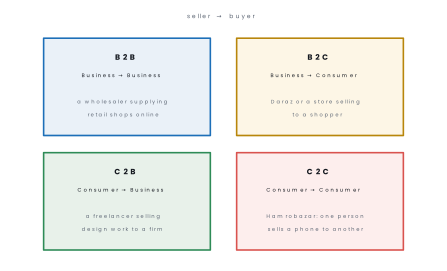
e-commerce is the buying and selling of goods and services, and the transfer of money and data, over electronic networks. Its models are named by who is at each end:
An e-commerce system needs a product catalogue, a shopping cart, a payment gateway and a delivery chain.
In Nepal payment runs through eSewa, Khalti, IME Pay, connectIPS and Fonepay QR, and the legal basis for digital signatures and electronic records is the Electronic Transactions Act, 2063 BS (2008).
Advantages open 24 × 7, no shop rent, national reach from a Jhapa village, easy price comparison.
Disadvantages you cannot touch the goods, delivery in the hills is slow and costly, online fraud and card theft, and disputes are hard to settle.
e-medicine (telemedicine) is the delivery of health care at a distance using information and communication technology: teleconsultation by video, transmission of X-rays and ECGs to a specialist (tele-radiology), remote monitoring of patients with wearable sensors, electronic health records, and online pharmacy.
For Nepal the argument is geography — a specialist in Kathmandu can advise a health post in Humla in minutes instead of a two-day walk plus a flight, and Nepal's government telemedicine programme has linked district hospitals to central hospitals for over a decade.
Limits no physical examination, needs reliable bandwidth and power, patient-privacy risk, and legal uncertainty about who is responsible for a remote diagnosis.
e-governance is the use of ICT by government to deliver services and information to citizens, businesses and its own offices.
Its four interaction types are G2C (government to citizen — online passport application, vehicle-tax payment, the Nagarik App), G2B (government to business — online company registration, PAN/VAT filing with the Inland Revenue Department), G2G (between offices — the national ID database shared across ministries) and G2E (government to employee — payroll, transfers, records).
Nepal's programme is set out in the Digital Nepal Framework (2019), and the Government Integrated Data Centre hosts the systems.
Benefits transparency and less corruption, fewer visits to offices, faster service, records that cannot quietly disappear.
Barriers the digital divide (electricity, internet and literacy), cyber-security, resistance inside offices, and the cost of keeping systems running after the donor project ends.
7.6 Mobile Computing
Mobile computing is computing in which the user, the computing device and the network connection can all move — data, voice and video are transmitted to and from a portable device over a wireless link, without a physical connection to a fixed network.
It has three parts: mobile hardware (smartphone, tablet, laptop, wearable), mobile software (Android, iOS, apps, mobile browsers) and mobile communication (the cellular network, Wi-Fi, Bluetooth, satellite, and the protocols and handover rules that keep a call alive as you move between cells).
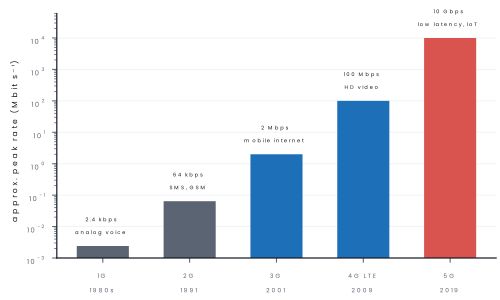
In Nepal, 4G reaches most district headquarters, Nepal Telecom began 5G trials in 2023, and the number of active mobile SIMs has for some years exceeded the population — the Nepal Telecommunications Authority reports mobile penetration above 100 %, which means many people carry two SIMs, not that everyone has a phone.
Advantages: work from anywhere, instant communication, location-based services, cheap for a country that never built copper telephone lines.
Limitations battery life, small screen and keyboard, patchy coverage in the mountains, lower bandwidth and higher interference than cable, and security — an open Wi-Fi is trivially easy to eavesdrop on.
Problem. A 3.5 GB training video is downloaded(a) on a 4G connection giving 20 Mbit s⁻¹ and(b) on a 5G connection giving 200 Mbit s⁻¹. Find both download times. (Take 1 GB = 1000 MB and 1 byte = 8 bits.)
Solution.
File size = 3.5 \times 1000 \times 8 = 28{,}000 megabits.
(a) t = \dfrac{28{,}000}{20} = 1{,}400\ \text{s} = 23\ \text{minutes } 20\ \text{s}.
(b) t = \dfrac{28{,}000}{200} = 140\ \text{s} = 2\ \text{minutes } 20\ \text{s} — ten times faster, exactly the ratio of the rates.
For a live application the more important number is latency: about 50 ms on 4G against about 5 ms on 5G, which is what makes remote surgery or a self-driving vehicle possible at all.
7.7 Internet of Things (IoT)
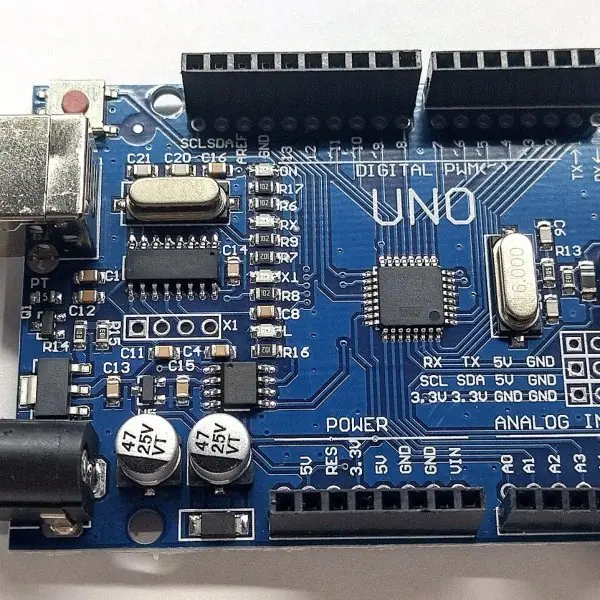
The Internet of Things is a network of physical objects — devices, vehicles, appliances, machines — embedded with sensors, software and network connectivity, which collect data and exchange it over the internet, and can be monitored or controlled remotely with little or no human involvement.
The term was coined by Kevin Ashton in 1999. An IoT system is usually drawn as four layers:
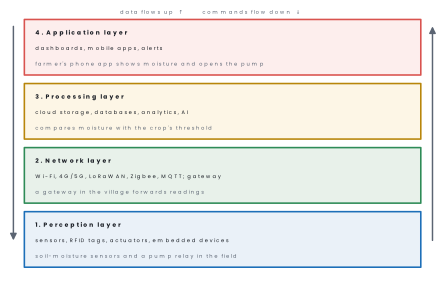
Common IoT protocols are MQTT and CoAP (light messaging for small devices), Zigbee, Bluetooth Low Energy and LoRaWAN (long range, tiny power), and NB-IoT over the cellular network. Because every thing needs its own address, IoT is a major reason for moving to IPv6.
Eight applications of IoT explained.
1. Smart homes. Lights, locks, fans and cameras are connected to a phone, so they can be switched on, off or checked from anywhere. This saves electricity and adds safety when the family is away.
2. Smart agriculture. Soil-moisture and weather sensors send readings to the cloud, which decides when to water. Drip irrigation then opens only when the soil is dry. This saves water and increases the crop of a small farm.
3. Health wearables. Watches and bands measure pulse, steps and sleep and send the data to a phone. A doctor can review the record, and an alarm can be sent if the pulse becomes dangerous.
4. Smart meters. An electricity meter reports its reading automatically, so a person does not have to visit every house. The utility can also see where power is lost and bill accurately.
5. Vehicle tracking. A GPS unit and a mobile connection let an owner or a bus company see where a vehicle is. Buses and delivery vans use this to plan routes and to find a stolen vehicle.
6. Air-quality monitoring. Low-cost sensors in the Kathmandu valley measure dust and gases and publish the data online. People can then decide when to wear a mask or to avoid exercise outdoors.
7. Glacial-lake and river-level monitoring. Sensors at lakes and rivers send water-level data by radio or mobile link. When the level rises quickly, an alert goes to the villages downstream, giving time to move to safety.
8. Industrial machine monitoring. Sensors on motors and pumps report heat and vibration. The factory can repair a machine before it breaks, which avoids long and costly stoppages.
Advantages: automation, real-time monitoring, energy and water saved, early warning, better data for decisions.
Challenges weak security (cheap devices shipped with default passwords have been hijacked into botnets), privacy, no single standard, power supply in the field, and the cost of maintaining thousands of scattered devices.
Problem. IPv4 uses 32-bit addresses and IPv6 uses 128-bit addresses. How many addresses does each provide? If about 20 billion IoT devices were connected in 2025, what fraction of the IPv4 space would they need, and comment.
Solution.
IPv4: 2^{32} = 4{,}294{,}967{,}296 \approx 4.29 \times 10^{9} addresses.
IPv6: 2^{128} \approx 3.4 \times 10^{38} addresses.
Devices needed \div IPv4 space = \dfrac{2.0 \times 10^{10}}{4.29 \times 10^{9}} \approx 4.7.
IoT devices alone would need about 4.7 times the entire IPv4 address space, and that is before counting phones, servers and laptops. IPv6 provides roughly 8 \times 10^{28} addresses for every one of the world's 8 billion people, so the shortage disappears.
e-commerce is trade; e-business is broader (all business processes online, including supply chain and HR); e-governance is government service; e-government is the machinery that delivers it.
In the exam, define the exact word in the question and give one Nepali example.

Chapter summary
- AI builds machines that do jobs needing intelligence (coined 1956); machine learning ⊂ AI, deep learning ⊂ ML, generative AI/LLMs ⊂ deep learning. Types: narrow (all real systems today), general, super.
- A robot senses, decides and acts: sensors → controller → actuators → end effector, with feedback. Types: industrial, mobile, humanoid, medical, drone, exploration.
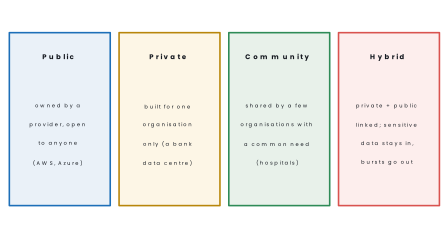
- Cloud computing rents computing over the internet, pay-per-use. Service models IaaS, PaaS, SaaS; deployment models public, private, community, hybrid; five NIST characteristics; it trades capital cost for dependence on a provider and a link.
- Big data = volume, velocity, variety, veracity, value; handled by Hadoop, Spark and NoSQL rather than one server. World data creation was about 181 ZB in 2025.
- VR replaces sensory input with a computer-generated 3-D world; needs an HMD, tracking, interaction devices and a fast engine; classified non-immersive, semi-immersive, fully immersive; AR adds to the real world, MR anchors to it.
- e-commerce models: B2B, B2C, C2B, C2C, supported by payment gateways and, in Nepal, the Electronic Transactions Act 2063. e-medicine delivers care at a distance. e-governance interacts as G2C, G2B, G2G, G2E.
- Mobile computing = mobile hardware + software + wireless communication; generations 1G to 5G, peak rates from 2.4 kbps to about 10 Gbps, latency falling from ~50 ms (4G) to ~5 ms (5G).
- IoT (Kevin Ashton, 1999) connects physical things through four layers — perception, network, processing, application — using MQTT, Zigbee, LoRaWAN and IPv6; its biggest weakness is security.
Practice questions
Group A — Multiple choice (1 mark each)
- Gmail is an example of which cloud service model? [1]aIaaSbPaaScSaaSdDaaS
- Which of the following is not one of the five Vs of big data? [1]avolumebvelocitycvirtualisationdveracity
- The term "Internet of Things" was coined by [1]aKevin AshtonbTim Berners-LeecJohn McCarthydDoug Laney
- Selling a used bicycle to another person through Hamrobazar is an example of [1]aB2BbB2CcC2CdG2C
- A technology that adds computer-generated objects to a view of the real world is called [1]avirtual realitybaugmented realitycartificial intelligencedcloud computing
- Paying vehicle tax through a government website is an example of [1]aG2GbG2BcG2CdG2E
Answers to Group A
1. (c) — finished software used in a browser; you manage only your data.
2. (c) — virtualisation is a cloud technology, not a V of big data.
3. (a) — Kevin Ashton used the phrase in 1999 while working on RFID.
4. (c) — consumer to consumer, through a marketplace.
5. (b) — AR adds to reality; VR replaces it.
6. (c) — a government service delivered to a citizen.
Group B — Short answer (5 marks each)
- Define cloud computing. Explain its three service models with one example of each. [5]
- What is big data? Explain the five Vs with one example of each. [5]
- Define IoT and explain its four-layer architecture with a suitable example. [5]
- What is e-governance? Explain its four types with a Nepali example of each. [5]
- Differentiate between virtual reality and augmented reality, and state any three applications of VR. [5]
- A college server costs Rs 6,00,000 and lasts 5 years; running it costs Rs 3,500 per month in electricity and Rs 2,500 per month in administration. An equivalent cloud server costs Rs 12,000 per month. Which is cheaper, and by how much per year? [5]
Answers to Group B
1. Cloud computing is the delivery of computing services (servers, storage, databases, software) over the Internet on demand, with payment only for what is used. It has three service models.
IaaS (Infrastructure as a Service) rents virtual servers, storage and networks; the customer installs and manages the operating system and programs; example: Amazon EC2.
PaaS (Platform as a Service) gives a ready platform to develop and run applications, and the provider manages the servers and the system software; example: Google App Engine.
SaaS (Software as a Service) gives a complete application through a browser, with nothing to install; examples: Gmail and Google Docs. From IaaS to SaaS the provider manages more and the customer less.
A college can move its email to SaaS, keep its student database on an IaaS server, and need no hardware room of its own.
The benefits are no capital cost, quick scaling and easy access from anywhere; the risks are dependence on the Internet and the provider.
2. Big data means data so large, fast and varied that ordinary tools cannot store or process it. It is described by the five Vs. Volume is the amount of data, such as the billions of messages and payments handled every day.
Velocity is the speed at which data arrive and must be processed, such as live traffic or stock prices. Variety is the mixture of forms: text, images, video, sensor readings and logs.
Veracity is the trust we can place in the data, because real data contain errors and bias, for example GPS drift or wrongly typed addresses.
Value is the useful knowledge that can be drawn out of the data; data that produce no decision are worth nothing.
A telecom company in Nepal collects call and data records of millions of users (volume, variety, velocity); after cleaning (veracity) it can plan towers and predict customers who may leave (value).
Tools such as Hadoop and Spark process big data on many computers in parallel.
3. The Internet of Things (IoT) is a network of physical objects fitted with sensors, software and connectivity so that they can collect and exchange data without human help. Its four-layer architecture is as follows.
The perception layer has sensors, RFID tags and actuators that sense or act on the world. The network layer carries the data using Wi-Fi, 4G/5G, LoRaWAN, Zigbee or MQTT through a gateway.
The processing layer stores and analyses the data in the cloud with databases, analytics and AI. The application layer gives the user dashboards, mobile apps and alerts.
In a smart-irrigation example, soil sensors in the field read moisture (perception), a gateway sends the reading over LoRaWAN (network), the cloud decides the field is dry (processing), and the farmer's phone shows an alert while the valve opens (application).
IoT saves water and labour, but needs secure devices and IPv6 addresses for the huge number of things.
4. E-governance is the use of ICT by the government to deliver services and information to citizens and businesses in a fast, open and efficient way. It has four types.
G2C (government to citizen): a citizen applies for a passport, pays tax or reads notices online through portals and the Nagarik App. G2B (government to business): a company registers, pays customs duty or submits a tender online.
G2G (government to government): offices share data, for example the national ID database used by several ministries. G2E (government to employee): staff use systems for attendance, salary and leave.
The advantages are less paperwork and corruption, saved time and travel, and transparency; the challenges are the digital divide, the security of citizen data and the need for trained staff.
5. Virtual reality (VR) creates a fully computer-generated world that the user enters with a headset and controllers, so the real world is shut out.
Augmented reality (AR) adds computer images on top of the real world seen through a phone or glasses, and the real world stays visible.
VR needs a headset and gives full immersion, while AR works on an ordinary smartphone and gives a mixed view; a game such as a flight simulator is VR, and a phone app that shows furniture in your room is AR.
Three applications of VR are: training (pilots, surgeons and drivers practise without danger or cost), education (students visit a historic site or the inside of a cell), and entertainment and tourism (games and virtual tours of trekking routes).
The drawbacks are the high cost of the equipment and motion sickness.
6. Hardware per month = 6{,}00{,}000 / 60 = \text{Rs }10{,}000. On-premises total = 10{,}000 + 3{,}500 + 2{,}500 = \text{Rs }16{,}000 per month.
The cloud at Rs 12,000 is cheaper by Rs 4,000 per month, i.e. 4{,}000 \times 12 = \textbf{Rs } 48{,}000 per year. (Mention also the non-monetary factors: no load-shedding risk, but a permanent dependence on the internet link.)
Group C — Long answer (8 marks each)
- Define artificial intelligence and robotics. Draw the block diagram of a robot and explain its components. State any four applications and any three disadvantages of AI. [8]
- Define cloud computing and explain its service and deployment models. Compare cloud computing with maintaining your own server on cost, scalability, security and reliability, using a numerical example. [8]
Answers to Group C
1. Definitions (2), block diagram sensors → controller → actuators → end effector with the feedback loop and power supply (2), explanation of each component (2), four applications (1), three disadvantages (1) — all from §7.1.
2. Definition with the five NIST characteristics (2), IaaS/PaaS/SaaS with examples (2), public/private/community/hybrid (2), comparison (2): cost — on-premises is a large capital cost plus running cost while cloud is operational only, as computed in Worked example 7.1 where the cloud saved Rs 2,876 a month; scalability — minutes in the cloud against weeks to buy hardware; security — the provider has better physical security and patching, but your data sits under another country's law; reliability — providers publish 99.9 %+ availability, better than a single office server on an unreliable supply, but an outage or a cut internet link stops everything at once.
Full model answer C1: AI and robotics (10 marks)
Introduction. Artificial intelligence (AI) is the branch of computer science that builds machines and programs able to do tasks that need human intelligence, such as learning, reasoning, understanding language and recognising patterns.
Robotics is the branch that designs, builds and uses robots, machines that sense the world and act on it automatically. (Draw the block diagram of the robot of section 7.1.)
Block diagram and components. Sensors (camera, ultrasonic, touch, temperature) collect information about the surroundings.
The controller (a microcontroller or computer with the program, and often AI software) processes the information and decides what to do. Actuators (electric motors, hydraulic or pneumatic cylinders) produce the movement.
The end effector (gripper, welding torch, spray gun, tool) is the part that touches and works on the object.
The power supply (battery or mains) drives everything, and a feedback loop returns the position or force to the controller so that it can correct errors.
Applications.
- Medical diagnosis from X-rays and surgery with robot arms.
- Weather and flood forecasting.
- Speech recognition, translation and chatbots.
- Fraud detection in banking.
- Industrial robots for welding, painting and assembly.
- Agriculture: pest detection and drone survey after the 2015 Gorkha earthquake.
Advantages and disadvantages.
| Advantages | Disadvantages |
|---|---|
| Works 24 hours without tiredness | High cost of setup and training |
| Does dangerous and repetitive jobs | Job displacement |
| Very fast on large data | No common sense or emotion |
| Fewer human errors | Bias if the training data are biased |
| Consistent decisions | Poor accountability and privacy risk |
Conclusion. AI and robotics extend what people can do in health, industry and farming. They must be used with human supervision, fair data and clear rules.
Full model answer C2: cloud computing against an own server (10 marks)
Introduction. Cloud computing is the on-demand delivery of computing resources over the Internet, with pay-as-you-use billing.
The NIST definition lists five characteristics: on-demand self-service, broad network access, resource pooling, rapid elasticity and measured service.
Service models. IaaS gives virtual servers and storage (Amazon EC2), PaaS gives a platform to build and run applications (Google App Engine), and SaaS gives finished software through a browser (Gmail, Google Docs).
Deployment models. A public cloud is shared by many customers and run by a provider. A private cloud is used by one organisation, for example a bank.
A community cloud is shared by organisations with the same needs, such as universities. A hybrid cloud joins private and public clouds, keeping sensitive data inside and using the public cloud for extra capacity.
Comparison with an own server, with numbers. A college server costs Rs 6,00,000 and lasts 5 years, which is Rs 10,000 a month. Electricity (Rs 3,500) and administration (Rs 2,500) bring the on-premises cost to Rs 16,000 a month.
An equivalent cloud server at Rs 12,000 a month is cheaper by Rs 4,000 a month, or Rs 48,000 a year.
| Basis | Own server | Cloud |
|---|---|---|
| Cost | Large capital cost plus running cost | Operating cost only, Rs 12,000 a month |
| Scalability | Weeks to buy new hardware | Minutes |
| Security | Under your own control, but patching is your job | Strong physical security and patching; data under another country's law |
| Reliability | One server, load-shedding risk | 99.9 % or better availability, but an outage or a cut link stops everything |
Conclusion. For most colleges the cloud is cheaper and easier to scale, but a reliable Internet link and a clear data policy are essential.
Group D — Model answers for long questions (10 marks each, for deeper revision)
- What is artificial intelligence? Explain eight applications of AI and robotics with examples, and write their limitations. [10]
- What is cloud computing? Explain the service models (IaaS, PaaS, SaaS) and deployment models, with advantages and disadvantages. [10]
- Define the Internet of Things (IoT). Explain its architecture and eight applications, with a note on security. [10]
Model answer D1: AI and robotics (10 marks)
Introduction. Artificial Intelligence (AI) is the branch of computer science that makes machines do tasks which normally need human intelligence, such as learning, reasoning, understanding language and recognising images.
Machine learning is the part of AI in which a program learns patterns from data instead of being given fixed rules. A robot is a programmable machine that senses its surroundings and acts on them; AI gives the robot its "brain".
Applications of AI and robotics.
- Healthcare. AI programs read X-rays and scans to spot signs of pneumonia or tuberculosis, and they help doctors to choose treatment. In remote districts, where a radiologist is not available, a scan can be sent for an AI-aided opinion. Surgical robots hold instruments with a very steady hand.
- Education. AI tutors check answers, suggest practice questions and adapt to the speed of each learner. Language tools translate between Nepali and English, and speech tools read text aloud for visually impaired students. Teachers save time in grading.
- Agriculture. Drones with cameras and AI find diseased plants and dry patches in a field of rice or tea. Farmers receive advice by phone on when to sow and irrigate, and prices in the market. This raises the yield and reduces the use of chemicals.
- Banking and finance. Banks use AI to find fraud in card and mobile-wallet payments such as Fonepay and eSewa by noticing unusual behaviour. Chatbots answer customers' questions at any hour. Loan decisions are made faster with credit scoring.
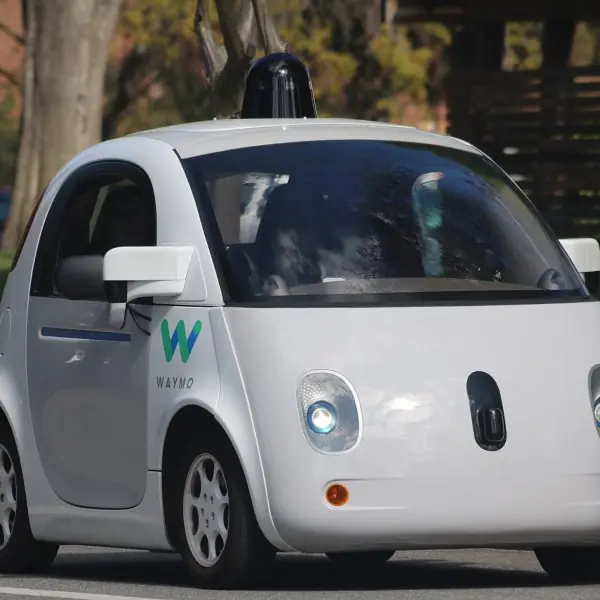
- Transport. Navigation apps predict traffic in Kathmandu and find the quickest route. Self-driving cars, as tested by Waymo, use cameras and sensors to drive without a driver. Railway and airline companies plan timetables with AI.
- Manufacturing. Industrial robots weld, paint and assemble cars and electronic goods tirelessly and exactly. They work in places dangerous to people, such as hot furnaces and chemical areas. Quality is checked by cameras that find faults in products.
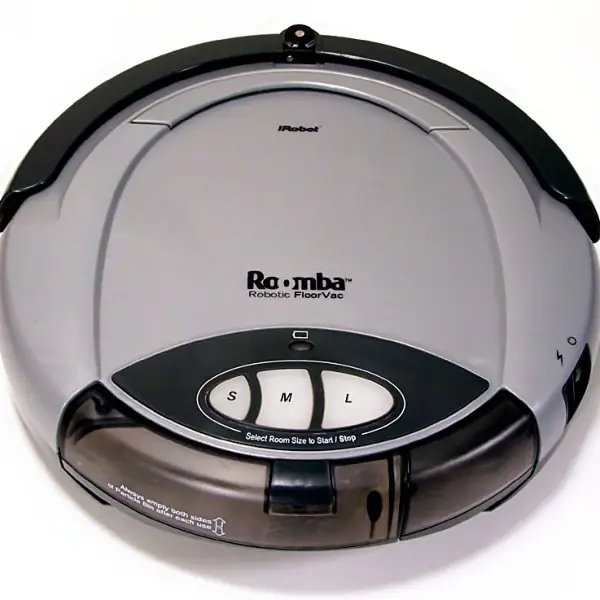
- Home and daily life. Robot vacuum cleaners such as Roomba map a room and clean it by themselves. Voice assistants answer questions, set alarms and play music. Streaming sites suggest films using AI.
- Disaster management and security. Drones search flooded or landslide-hit areas of Nepal to find survivors. Cameras with face and number-plate recognition help traffic police. Weather models predict floods and cloud bursts earlier.
Limitations.
| Limitation | Explanation |
|---|---|
| Cost | Hardware, data and trained experts are expensive |
| Job loss | Routine jobs may be replaced |
| Bias | An AI trained on poor data gives unfair results |
| No feelings or ethics | It cannot judge right and wrong as a human can |
| Privacy | Faces and habits can be tracked |
| Dependence | Over-reliance weakens human skills |
Conclusion. AI and robotics improve health, farming, industry and safety. They must be used with human supervision, fair data and clear laws.
Model answer D2: cloud computing (10 marks)
Introduction. Cloud computing means using computing services such as servers, storage, databases, software and networking over the Internet, on a pay-as-you-use basis, instead of buying and running them in one's own office.
Gmail, Google Drive, Microsoft 365 and Zoom are everyday examples. The services run in large data centres.
Essential features. On-demand self-service; access from anywhere through the network; pooling of resources among many users; rapid elasticity (to scale up and down); measured service (pay for what is used).
Service models.
| Model | Meaning | User manages | Example |
|---|---|---|---|
| IaaS (Infrastructure as a Service) | Virtual servers, storage and network are rented | Operating system, software, data | Amazon EC2, Google Compute Engine |
| PaaS (Platform as a Service) | A ready platform to build and run applications | Own application and data | Google App Engine, Heroku |
| SaaS (Software as a Service) | A finished application used through a browser | Only own data and settings | Gmail, Google Docs, Zoom |
A simple example: IaaS is like renting an empty room; PaaS is like renting a furnished kitchen to cook your own food; SaaS is like eating at a restaurant.
Deployment models.
| Model | Owned and used by | Example of use |
|---|---|---|
| Public cloud | A provider, open to all | Startup using AWS |
| Private cloud | One organisation only | A bank's own data centre |
| Hybrid cloud | Mix of public and private | Bank keeps customer data private and uses public cloud for its website |
| Community cloud | Several organisations with the same needs | Government offices sharing a service |
Advantages.
- Low cost: no need to buy costly servers; pay only for use.
- Scalability: more power can be added in minutes at festival or exam-result time.
- Access from anywhere on any device, which suits teams working from different places.
- Automatic backup and updates are provided by the supplier.
- Disaster recovery: data copies are kept in many places.
Disadvantages.
- It needs a steady internet connection, which can be a problem in remote areas.
- Security and privacy concerns arise because the data stays with a third party.
- Dependence on the supplier (vendor lock-in) and possible service outages.
- Data laws may require some data to stay inside the country.
Conclusion. Cloud computing gives flexible, low-cost computing through the Internet, and its models (IaaS, PaaS, SaaS) allow users to choose the level of control they need.
Model answer D3: Internet of Things (10 marks)
Introduction. The Internet of Things (IoT) is a network of physical objects ("things") fitted with sensors, software and network connection so that they can collect data and exchange it over the Internet with little or no human help.
A smart bulb that you control with a phone and a soil sensor that warns a farmer are IoT devices.
Architecture (four layers).
- Perception (sensing) layer: sensors and actuators such as temperature, moisture, motion and GPS sensors collect data and perform actions.
- Network layer: carries the data by Wi-Fi, Bluetooth, Zigbee, LoRa or mobile network to the processing point.
- Processing (cloud) layer: servers and cloud platforms store and analyse the data.
- Application layer: the dashboard or mobile app through which the user sees the result and gives commands.
Applications of IoT.
- Smart home. Lights, fans, door locks and cameras are controlled by phone and can switch off when nobody is at home, thus saving electricity.
- Agriculture. Soil-moisture sensors start a drip pump only when the soil is dry. This saves water and raises the yield, and it helps farmers in the dry hills.
- Healthcare. Wearable bands measure the pulse and oxygen level and send an alert to a doctor if a reading is dangerous. Elderly people can be monitored from far away.
- Smart city and traffic. Sensors count cars, adjust traffic signals and show free parking spaces. Street lights dim when there are no people.
- Industry. Sensors on machines detect heat or vibration before a failure and call for maintenance, which prevents costly stoppage.
- Energy. Smart meters record electricity use and let the supplier and the customer see it, and they help to find leakage and theft.
- Disaster warning. River-level sensors on a river such as the Koshi send an alarm to villages downstream, giving time to move to safety.
- Logistics and retail. GPS and RFID tags track parcels and vehicles. Shops follow stock on shelves and fill them in time.
Security and privacy. Many cheap devices have weak passwords and are not updated, so hackers can take them over. Rules: change default passwords, keep firmware updated, use encryption, and put IoT devices on a separate network.
| Advantage | Disadvantage |
|---|---|
| Saves time, water and energy | Security risk |
| Remote monitoring and control | Needs internet and power |
| Early warning and better decisions | Privacy concern, initial cost |
Conclusion. IoT links the physical and digital worlds, and with proper security it can improve farming, health, industry and safety in Nepal.
Practise more: Computer Science question bank