Unit 2 · 15 teaching hours · 42 min read
Data Communication and Networking
What the syllabus asks for 14
- Basic elements of Communication System
- Concept of Communication System; Block Diagram of communication model
- Elements of Data Communication/Transmission
- Simplex, Half duplex and Full duplex communication mode
- Concept of LAN and WAN
- Transmission Medium: Guided and Unguided
- Transmission impairments: Jitter, Singing, Echo, Crosstalk, Distortion, Noise, Bandwidth, Number of receivers
- Network Architecture: Client-Server and Peer-to-peer
- Basic Terms and Tools: IP Address, Subnet Mask, Gateway, MAC address, Internet, Intranet, Extranet
- Network Tool: Packet tracer, Remote Login
- Network Connecting Devices: NIC, Modem, Router, Switch
- Network Topologies: Bus, Ring and Star topology
- Basic Concept of OSI Reference Model
- Internet Protocol Addressing
A computer on its own is a calculator; connected to others it becomes a communication system.
This unit explains how a message gets from one machine to another — what the pieces of a communication system are, what carries the signal, what damages it on the way, how machines are addressed, and how the whole job is divided into layers.
At 15 teaching hours this is the largest unit in the course and it supplies the largest share of the written marks.
Expect the block diagram of a communication system, topologies with their advantages and disadvantages, guided versus unguided media, the OSI model (layer names, functions and one protocol each), and IP address classes with a small calculation.
Diagrams earn marks: draw them, label them, and name the parts.
2.1 Basic elements of a communication system
Data communication is the exchange of data between two devices through a transmission medium. For it to happen at all, five elements must be present.
- Message — the information (data) to be communicated: text, number, picture, audio or video.
- Sender — the device that sends the message: a computer, phone, camera.
- Receiver — the device that receives it.
- Transmission medium — the physical path the message travels along: cable, fibre or free space.
- Protocol — the agreed set of rules governing the exchange. Without a shared protocol two connected devices still cannot understand each other, exactly as two people who share no language cannot talk through a working telephone.
Four characteristics decide whether a communication system is any good: delivery (to the correct destination), accuracy (no altered bits), timeliness (in time to be useful — critical for voice and video), and jitter (even spacing between arriving packets).
2.2 Concept of a communication system and its block diagram
A general communication system is described by five functional blocks. This is the diagram examiners ask for.
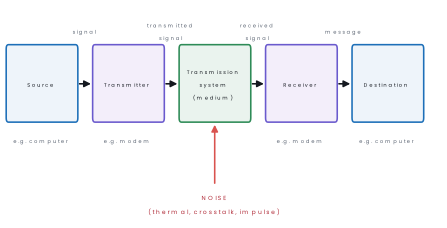
- The source produces the data.
- The transmitter converts it into a signal the medium can carry — a modem modulating digital bits onto an analogue carrier, for example.
- The transmission system carries the signal, and unavoidably adds noise.
- The receiver converts the received signal back into data — the modem at the far end demodulating.
- The destination consumes the data.
2.3 Elements of data transmission
A signal is the electrical, optical or electromagnetic representation of data. Signals are of two kinds:
| Analogue signal | Digital signal | |
|---|---|---|
| Shape | Continuous wave | Discrete levels (0 and 1) |
| Described by | Amplitude, frequency, phase | Bit rate, bit interval |
| Example | Human voice, radio broadcast | Data inside a computer |
| Noise | Accumulates and cannot be removed | Can be regenerated exactly |
Three more terms are examined constantly:
- Bandwidth — for an analogue channel, the range of frequencies it passes, in hertz; for a digital channel, the maximum bit rate, in bits per second. Larger bandwidth means more data per second.
- Bit rate — bits transmitted per second (bps, kbps, Mbps, Gbps).
- Baud rate — signal changes per second. If each signal change carries n bits then \text{bit rate} = \text{baud rate}\times n; they are equal only when one change carries one bit.
- Transmission mode — data may be sent serially (one bit after another on one wire; cheap, used over any distance) or in parallel (n bits at once on n wires; fast but only over short distances). Serial transmission is further divided into synchronous (a continuous stream timed by a shared clock) and asynchronous (one character at a time framed by start and stop bits).
2.4 Simplex, half duplex and full duplex
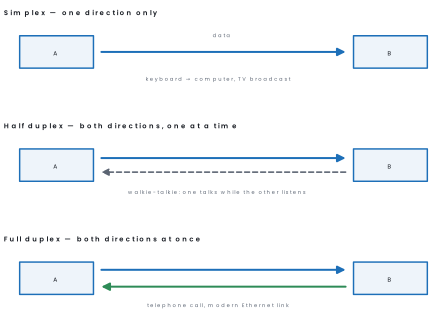
| Mode | Direction | Channel capacity used | Example |
|---|---|---|---|
| Simplex | One way only | Full capacity one way | Keyboard to CPU, radio and TV broadcast |
| Half duplex | Both ways, alternately | Full capacity, one direction at a time | Walkie-talkie, old coaxial Ethernet with a hub |
| Full duplex | Both ways simultaneously | Capacity shared, or two separate channels | Telephone, switched Ethernet, mobile call |
2.5 Concept of LAN and WAN
A computer network is two or more devices connected so that they can share data and resources. Networks are classified by the area they cover.
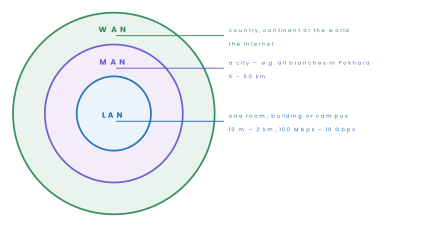
| Point | LAN | MAN | WAN |
|---|---|---|---|
| Area | A room, building or campus (up to ~2 km) | A city (5–50 km) | Country to worldwide |
| Ownership | Private — one organisation | One organisation or an ISP | Usually leased from telecom operators |
| Speed | Highest: 100 Mbps to 10 Gbps | High | Lowest per user; long-haul links are shared |
| Error rate | Very low | Low | Higher |
| Media | Twisted pair, fibre, Wi-Fi | Fibre, microwave | Fibre, satellite, leased lines |
| Cost of setup | Low | Medium | High |
| Example | A school computer lab | Cable TV or ISP network inside Kathmandu | The Internet, a bank's branch network |
A PAN (personal area network, a few metres — Bluetooth earphones) and a CAN (campus area network) are sometimes added at the small end.
Advantages of a computer network. Seven or eight points are expected in a long answer; each is explained here in plain words.
1. Resource sharing. Hardware such as printers and scanners, and software such as licensed programs, can be shared by many users.
A school with one laser printer on its LAN can serve all computers in the lab instead of buying a printer for each. This lowers the cost of equipment and its upkeep.
2. Fast communication. Users can send messages, files and video instantly over a network. Email, chat and video calls replace letters that once took days to reach a district. A student in Dhankuta can send an assignment to a teacher in Kathmandu in seconds.
3. Centralised data and easy backup. Data kept on a server can be used by many people and backed up in one place. When all students' records are in one database, there is no confusion about which copy is the latest.
If a computer fails, the data on the server are still safe.
4. Cost saving. Sharing resources and software licences, and replacing paper mail with email, reduces expenses. One fast Internet connection from an ISP can be shared by a whole office instead of one connection per desk.
Networked banking also saves travel cost for customers.
5. Reliability. Important data and services can be kept on more than one machine, so work continues when one fails. Banks run backup servers, so ATM and ConnectIPS services keep working if one site has a fault.
A mesh or ring with alternate paths adds the same safety to the cabling.
6. Scalability. New computers and services can be added to a network without rebuilding it. A school that opens a second computer lab simply adds a switch and a few cables. This lets the network grow with the organisation.
7. Centralised security and control. An administrator can set user names, passwords and permissions on the server for everyone. A teacher's computer can be allowed to edit marks while a student's computer can only read them.
Antivirus updates and software installation can also be controlled from one place.
8. Remote access and collaboration. Users can work on the same document or project from different places. Government offices, banks and hospitals connect branches in many districts to one system.
Online classes and cloud documents are simple examples that became common in Nepal's schools.
Disadvantages of a computer network.
1. High initial cost. Servers, switches, cables and the work of installing them are expensive. A small school may find it hard to afford a good network at the start.
2. Security risks. Because many people are connected, hackers can try to enter from outside and unauthorised users can try to read private data. Firewalls, passwords and encryption are therefore necessary.
3. Spread of malware. A virus or ransomware on one computer can travel over the network to all the others. One careless USB drive or email attachment can stop an entire lab.
4. Dependence on the server and the cable. If the main server or the central switch fails, many users lose their work together. This is the weakness of the star and bus topologies.
5. Need for skilled administration. A network needs a trained person to manage users, backup and security. Without such a person, small faults take a long time to repair.
6. Maintenance of cabling and devices. Cables break, connectors loosen and devices age. Regular checking is needed to keep the speed and reliability high.
7. Slow performance under heavy load. When many users download large files at the same time, the network slows for everybody. This is common in a crowded college network at peak hours, and it is solved by more bandwidth or better planning.
2.6 Transmission medium: guided and unguided
A guided (bounded/wired) medium carries the signal along a solid physical conductor — twisted pair, coaxial cable, optical fibre.
An unguided (unbounded/wireless) medium carries the signal through free space as an electromagnetic wave — radio, microwave, infrared, satellite.
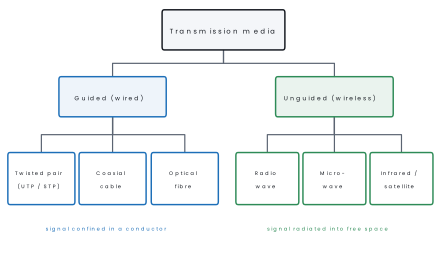
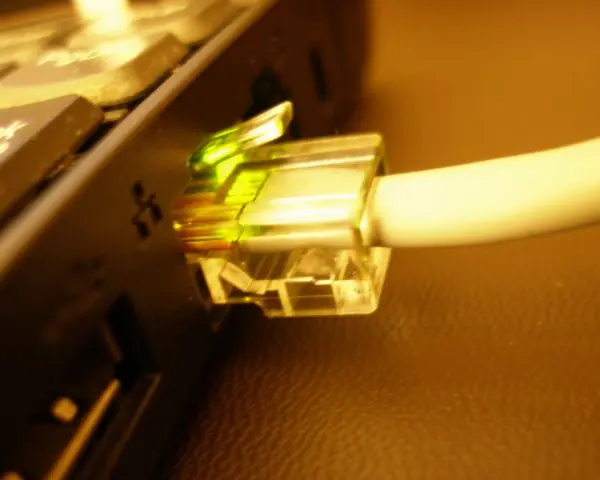
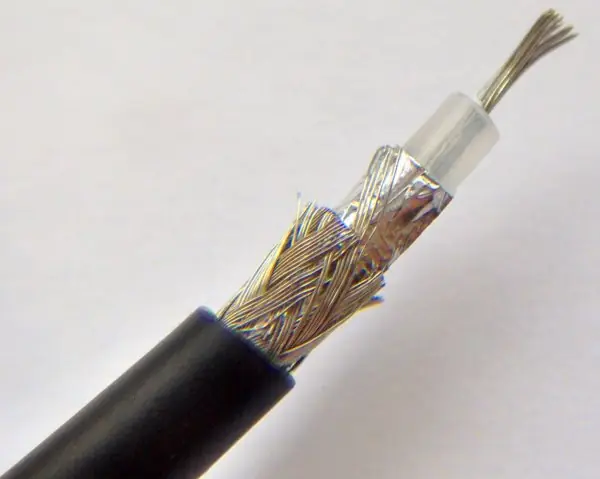
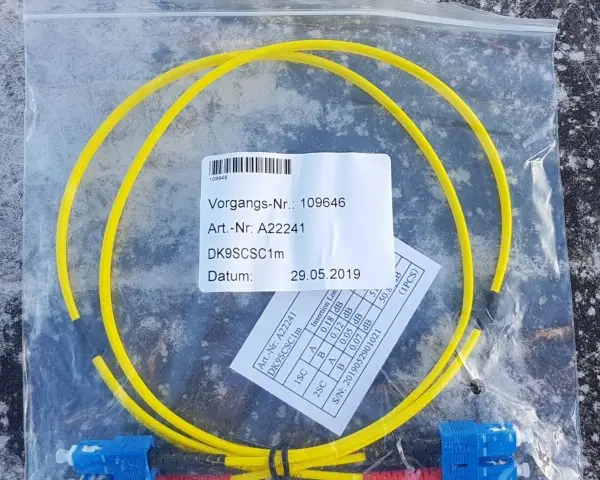
| Medium | Structure | Typical speed / bandwidth | Range before repeater | Notes |
|---|---|---|---|---|
| Twisted pair (UTP) | 4 pairs of insulated copper twisted together; RJ-45 plug | Cat 5e 1 Gbps (100 MHz); Cat 6 up to 10 Gbps over 55 m (250 MHz); Cat 6a 10 Gbps over 100 m (500 MHz) | 100 m | Cheapest, easiest to install; twisting cancels crosstalk; most LAN cabling |
| STP | UTP plus a metal shield | Same as UTP | 100 m | Better noise immunity, costlier, must be earthed |
| Coaxial | Copper core, insulator, braided shield, jacket | Up to ~1 Gbps; hundreds of MHz | ~500 m | Used by cable TV and cable internet; obsolete for LANs |
| Optical fibre | Glass core + cladding; light is carried by total internal reflection | Tbps possible; 10–100 Gbps routine | Many km (single-mode > 40 km) | Immune to EMI, very secure, very high bandwidth; costly, needs skilled splicing |
| Radio wave | Omnidirectional, 3 kHz–1 GHz | Up to a few hundred Mbps | Tens of km | Penetrates walls; FM radio, older wireless |
| Microwave | Line-of-sight dish, 1–300 GHz | Hundreds of Mbps to Gbps | ~50 km per hop | Needs clear line of sight; Wi-Fi uses 2.4, 5 and 6 GHz |
| Infrared | Line-of-sight light, < 1 mm wavelength | Low to moderate | A few metres | Cannot pass through walls, so it is secure inside a room; TV remotes |
| Satellite | Microwave relayed by a satellite | High | Global | Large propagation delay for geostationary satellites (~250 ms one way) |
| Point | Guided | Unguided |
|---|---|---|
| Path | Along a physical conductor | Through free space |
| Direction | Point-to-point | Usually broadcast |
| Interference | Low (shielded) | High (weather, obstacles, other transmitters) |
| Security | Higher — tapping needs physical access | Lower — anyone in range can receive |
| Installation | Cabling work, hard in difficult terrain | Quick, reaches remote hills and islands |
| Mobility | None | Full |
Current practice (2026). Wi-Fi 6/6E (IEEE 802.11ax) is the mainstream wireless LAN standard; Wi-Fi 7 (802.11be) was published in July 2025 and adds 320 MHz channels and 4096-QAM, and Wi-Fi 8 (802.11bn) is still under development with an expected release around 2028.
Nepal's fixed broadband is now mostly FTTH (fibre to the home); mobile data runs on 4G LTE, which Nepal Telecom launched on 1 January 2017 — 5G in Nepal has so far only reached the trial stage.
2.7 Transmission impairments
A signal that arrives is never exactly the signal that was sent. The differences are impairments.
| Impairment | What it is | Cause | Cure |
|---|---|---|---|
| Attenuation | Loss of signal strength with distance | Resistance of the medium | Amplifier (analogue), repeater (digital) |
| Distortion | Change in the shape of the signal | Different frequency components travel at different speeds | Equalisers; limit the bandwidth used |
| Noise | Unwanted energy added to the signal | See the four types below | Shielding, twisting, error detection |
| Crosstalk | Signal from one wire leaks into a neighbouring wire — you faintly hear another conversation | Electromagnetic coupling between adjacent conductors | Twisting the pairs, shielding (STP), fibre |
| Echo | The signal is reflected back to the sender, who hears a delayed copy of themselves | Impedance mismatch at a junction or hybrid | Echo suppressors and echo cancellers |
| Singing | A continuous howling or whistling tone — an echo that has become self-sustaining feedback | Echo plus excessive amplifier gain going round a loop | Reduce gain, use echo cancellers |
| Jitter | Variation in the arrival time (delay) of successive packets | Varying queueing delay in routers | Jitter buffer at the receiver, QoS |
| Bandwidth | A limit, not a fault: the channel simply cannot carry frequencies (or bit rates) above its bandwidth, so fast signals are rounded off | Physical properties of the medium | Use a wider medium — fibre instead of copper |
| Number of receivers | Each extra receiver tapped onto a line draws power and adds a reflection, so the signal weakens and distorts | Loading of the line | Use point-to-point links and switches instead of a shared bus |
The four standard kinds of noise: thermal (random electron motion, present in every conductor, also called white noise), intermodulation (two frequencies mixing to produce a third), crosstalk, and impulse (sudden spikes from lightning or switching — the worst for digital data).
2.8 Network architecture: client–server and peer-to-peer
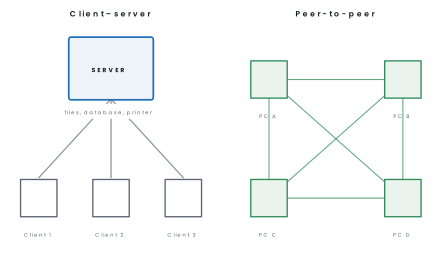
| Point | Client–server | Peer-to-peer |
|---|---|---|
| Roles | Dedicated server provides, clients request | Every node is both client and server |
| Best size | Medium to very large networks | Up to about 10 computers |
| Cost | High — server hardware, server OS, admin | Low — ordinary PCs, no extra software |
| Administration | Centralised: one place for accounts, backup, security | Each user administers their own machine |
| Security | Strong, centrally enforced | Weak, depends on every user |
| Performance | Scales well; server may become a bottleneck | Degrades as the number of peers grows |
| Failure | Server down = network unusable | One peer down affects only its own shares |
| Example | A school's ERP, any website | File and printer sharing in a small office; BitTorrent |
2.9 Basic terms
| Term | Meaning |
|---|---|
| IP address | A logical address identifying a host on a network. IPv4 is 32 bits written as four decimal octets (202.79.32.33); IPv6 is 128 bits written in hexadecimal. Assigned by software; changes when the host moves network. |
| Subnet mask | A 32-bit number of consecutive 1s then 0s (255.255.255.0) that tells a host which part of an IP address is the network and which is the host. |
| Default gateway | The IP address of the router interface on your own network. Any packet whose destination is outside the local network is handed to the gateway. |
| MAC address | The 48-bit physical address burned into a NIC by its manufacturer, written as 12 hexadecimal digits (00:1A:2B:3C:4D:5E). The first 24 bits are the manufacturer's OUI. Permanent and globally unique; works only within one LAN. |
| Internet | The global public network of networks, using TCP/IP; open to everyone. |
| Intranet | A private network inside one organisation using the same Internet technologies (web, email), accessible only to its employees. |
| Extranet | A controlled extension of an intranet to selected outsiders — suppliers, dealers, partners — usually over a VPN with a login. |
The MAC address is physical, permanent and local — it identifies a NIC and is used by switches inside one LAN (OSI layer 2).
The IP address is logical, changeable and global — it identifies a host on the Internet and is used by routers (layer 3). Moving a laptop from your school to a cybercafé changes its IP address but never its MAC address.
2.10 Network tools
- Cisco Packet Tracer — a free network simulator. You drag routers, switches, PCs and cables onto a canvas, configure them, and watch animated packets travel hop by hop. It lets a student build and debug a whole network without owning any hardware, so it is the standard lab tool for this course.
- Remote login — working on a distant computer as though you were sitting at it. Telnet (port 23) was the original tool but sends everything, including the password, as plain text; it has been replaced by SSH (Secure Shell, port 22), which encrypts the whole session. For a graphical desktop, Windows uses RDP (port 3389), and VNC and AnyDesk are common alternatives.
- Small diagnostic commands worth knowing:
ping(is the host reachable, and how long does a round trip take),tracert/traceroute(list the routers along the path),ipconfig/ifconfig(show my IP address, mask and gateway), andnslookup(find the IP address behind a domain name).
2.11 Network connecting devices
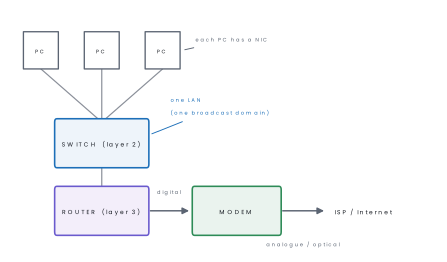
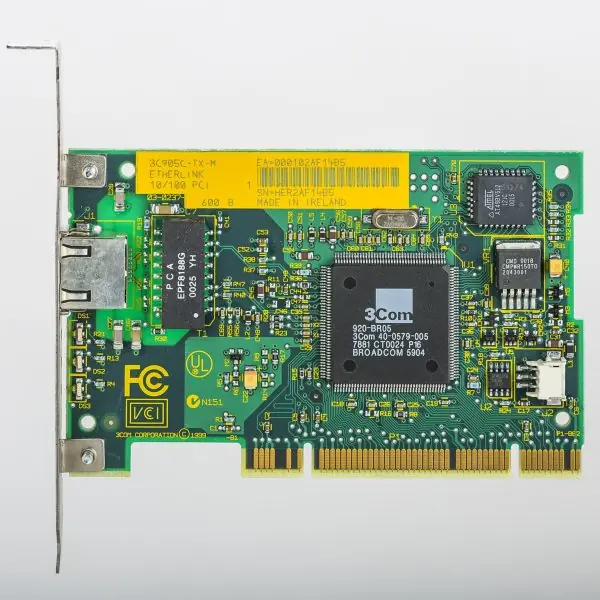
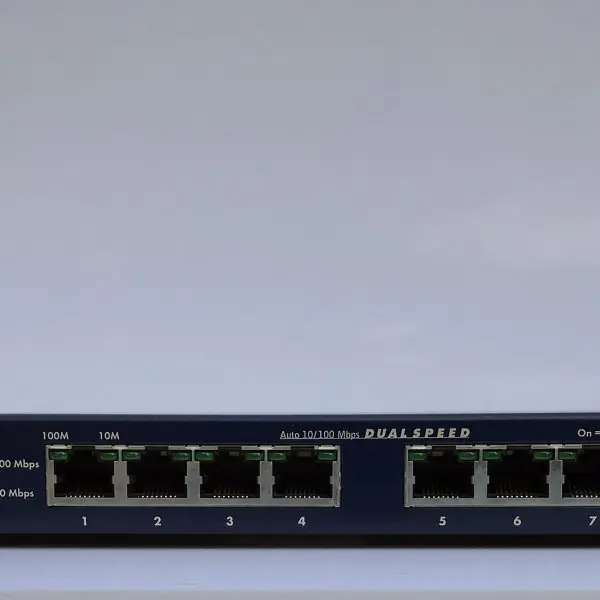
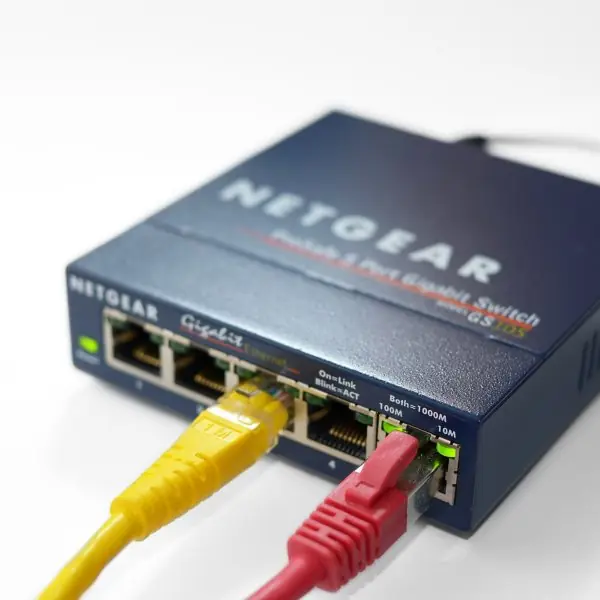
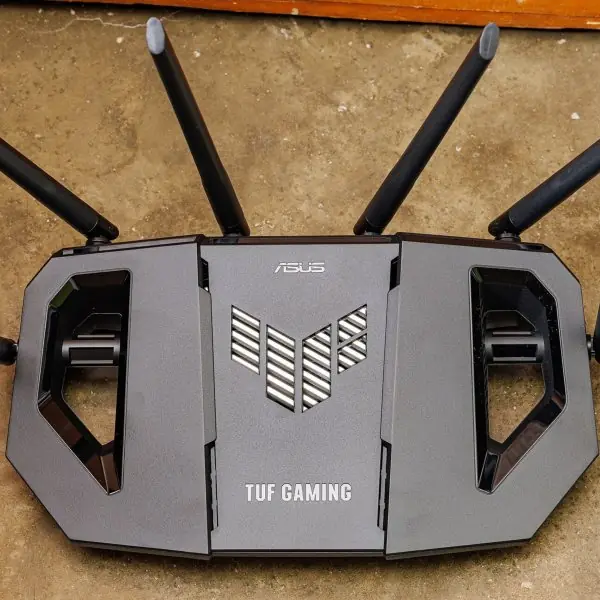
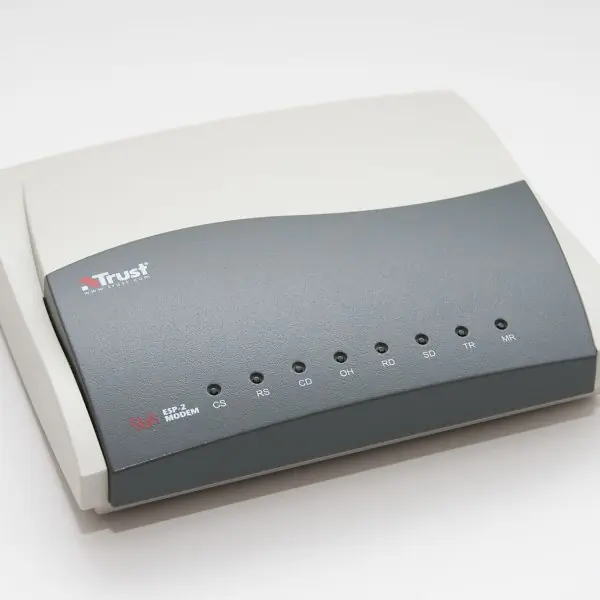
| Device | OSI layer | Function |
|---|---|---|
| NIC (network interface card) | 1 and 2 | Connects a computer to the medium; holds the MAC address; converts parallel data to serial signals |
| Modem (modulator–demodulator) | 1 | Modulates digital data onto an analogue carrier to send, demodulates on receipt — needed on telephone, cable and DSL lines |
| Repeater | 1 | Regenerates a weakened signal to extend distance |
| Hub | 1 | Multiport repeater: copies an incoming frame to every other port. Obsolete — wastes bandwidth and causes collisions |
| Bridge | 2 | Joins two LAN segments and filters traffic by MAC address |
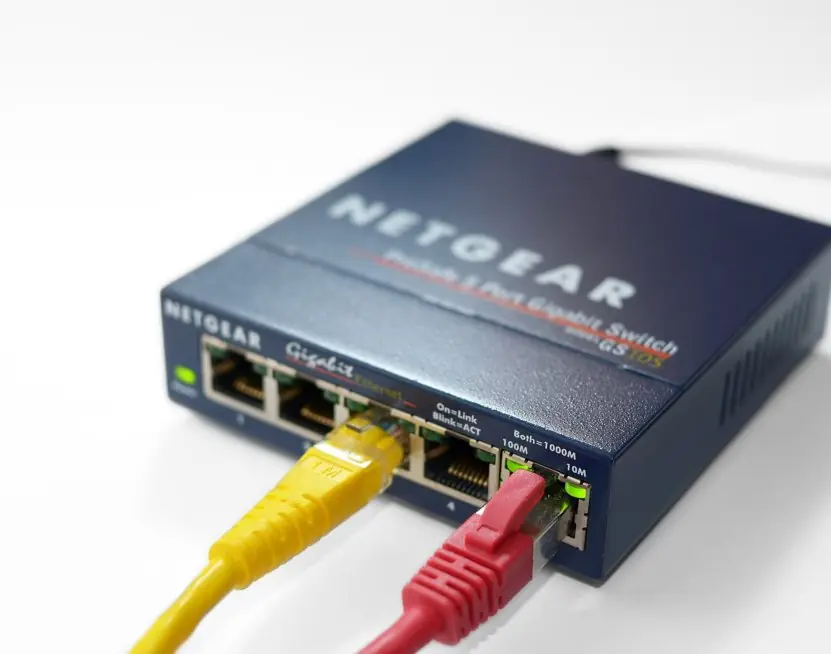
| Switch | 2 | Multiport bridge: learns which MAC address is on which port and forwards each frame only to that port. Full duplex, no collisions |
| Router | 3 | Joins different networks, reads the destination IP address and chooses the best path from its routing table |
| Gateway | All 7 | Joins networks that use different protocols, translating between them |
2.12 Network topologies
A topology is the arrangement of the nodes and links of a network. The physical topology is how the cables actually run; the logical topology is how data flows. A modern Ethernet network is usually a physical star that behaves logically like a bus.
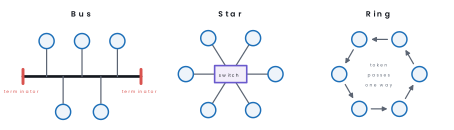
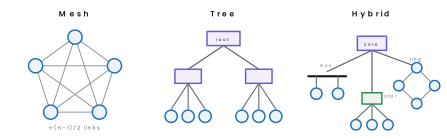
| Topology | Advantages | Disadvantages |
|---|---|---|
| Bus | Least cable, cheapest, easy to extend for a few nodes | One break in the backbone kills the whole network; collisions rise with traffic; hard to fault-find; needs terminators |
| Star | One cable fault affects one node only; easy to add or remove nodes; easy to manage; no collisions with a switch | Needs the most cable; the central switch is a single point of failure |
| Ring | Equal access for every node; no collisions (token passing); signal is regenerated at each node so it travels far | A single node or link failure breaks the ring (unless it is a dual ring); adding a node interrupts service; slow with many nodes |
| Mesh | Most reliable — many alternative paths; no traffic sharing; privacy | Very expensive: n(n-1)/2 links and n-1 ports per node; hard to install |
| Tree | Scales well; hierarchical, so easy to manage and to isolate groups | Failure of the root or a branch hub disconnects everything below it; much cabling |
| Hybrid | Combines the strengths of its parts; very flexible; scales to any size | Complex to design and manage; costly |
Problem. A mesh network connects 8 computers. How many cables are needed, how many ports must each computer have, and how many cables would a star with the same 8 computers need?
Solution. In a full mesh every pair of nodes has its own link, so the number of cables is
and each computer needs n-1 = 7 ports. A star needs one cable per node, i.e. 8 cables, plus a switch with 8 ports.
The mesh costs 3.5 times as much cable here, and the ratio grows with n — which is why mesh is used only for backbone links where reliability is worth the price.
2.13 Basic concept of the OSI reference model
The OSI (Open Systems Interconnection) model was published by ISO in 1984. It is a reference model: it divides the work of communication into seven independent layers, so that any layer may be changed without disturbing the rest.
Data travels down the seven layers at the sender, across the medium, and up the seven layers at the receiver. Each layer adds its own header to the data it receives from above — this is called encapsulation.
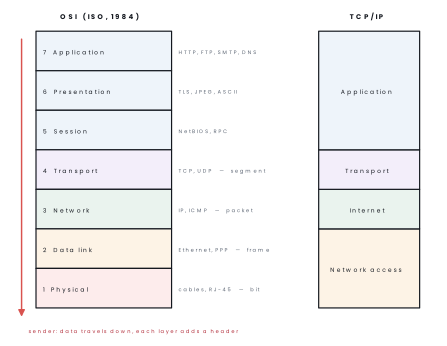
| # | Layer | Main function | PDU | Protocol / device |
|---|---|---|---|---|
| 7 | Application | Provides network services to the user's program | Data | HTTP, FTP, SMTP, DNS, Telnet |
| 6 | Presentation | Translation of formats, encryption/decryption, compression | Data | TLS/SSL, JPEG, MPEG, ASCII |
| 5 | Session | Establishes, manages, synchronises and terminates sessions | Data | NetBIOS, RPC, PPTP |
| 4 | Transport | End-to-end delivery, segmentation and reassembly, flow control, error control; port numbers | Segment | TCP (reliable), UDP (fast) |
| 3 | Network | Logical (IP) addressing and routing between networks | Packet | IP, ICMP — router |
| 2 | Data link | Framing, physical (MAC) addressing, error detection by CRC, access control | Frame | Ethernet, PPP — switch, bridge |
| 1 | Physical | Transmits raw bits: voltages, connectors, cables, data rate | Bit | RJ-45, fibre — hub, repeater |
Top-down (7→1): All People Seem To Need Data Processing. Bottom-up (1→7): Please Do Not Throw Sausage Pizza Away.
| Point | OSI | TCP/IP |
|---|---|---|
| Layers | 7 | 4 (Application, Transport, Internet, Network access) |
| Developed by | ISO, 1984 | US DoD/ARPANET, 1970s |
| Status | A theoretical reference model | The model actually used on the Internet |
| Layer independence | Strictly separated | Application layer merges OSI 5, 6 and 7 |
| Approach | Protocol-independent standard | Built around existing protocols (TCP, IP) |
2.14 Internet protocol addressing
An IPv4 address is 32 bits, written as four decimal octets separated by dots — dotted decimal notation. Each octet is 0–255, so the whole space holds 2^{32} \approx 4.3 billion addresses.
Every address has a network part (which network) and a host part (which machine on it); the subnet mask marks the boundary.
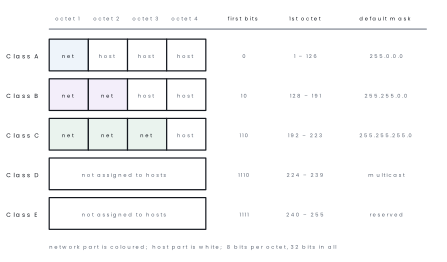
| Class | First bits | First octet | Default mask | Networks | Hosts per network | Use |
|---|---|---|---|---|---|---|
| A | 0 | 1 – 126 | 255.0.0.0 (/8) | 126 | 16,777,214 | Very large organisations |
| B | 10 | 128 – 191 | 255.255.0.0 (/16) | 16,384 | 65,534 | Medium organisations |
| C | 110 | 192 – 223 | 255.255.255.0 (/24) | 2,097,152 | 254 | Small networks |
| D | 1110 | 224 – 239 | — | — | — | Multicast |
| E | 1111 | 240 – 255 | — | — | — | Reserved / experimental |
Two subtractions to remember: the host part of all 0s is the network address
and all 1s is the broadcast address, so a network with n host bits has
2^{n}-2 usable hosts. 127.0.0.0/8 is reserved for loopback
(127.0.0.1 is always "this computer"), which is why class A stops at 126.
Private addresses are never routed on the Internet and may be reused inside
any organisation: 10.0.0.0/8, 172.16.0.0/12 and 192.168.0.0/16. A router
performing NAT (Network Address Translation) lets a whole school share one
public address.
Problem. A computer is configured with IP address 192.168.10.37 and subnet
mask 255.255.255.0. Find(a) its class,(b) the network address,(c) the
broadcast address,(d) the number of usable host addresses, and(e) write the IP
address in binary.
Solution.
(a) The first octet is 192, which lies in 192–223, so it is class C (and it is a private address).
(b) The mask 255.255.255.0 means the first 24 bits are network. Set the host
octet to 0: network address = 192.168.10.0.
(c) Set the host octet to all 1s (255): broadcast address = 192.168.10.255.
(d) 8 host bits remain, so 2^{8}-2 = 256-2 = \textbf{254} usable addresses, namely 192.168.10.1 to 192.168.10.254.
(e) Each octet in 8 bits: 192 = 11000000, 168 = 10101000, 10 = 00001010, 37 = 00100101, so the address is
11000000.10101000.00001010.00100101
Problem. The network 192.168.1.0/24 must be divided into 4 subnets. Give
the new subnet mask, and for each subnet the network address, the usable host
range and the broadcast address.
Solution. To make 4 subnets we must borrow b host bits with 2^{b} \ge 4, so b = 2. The prefix becomes 24 + 2 = 26, and the mask is
because the last octet 11000000 is 192. Host bits left = 32-26 = 6, so each subnet holds 2^{6} = 64 addresses of which 64-2 = 62 are usable. The block size is 64, so the subnets start at 0, 64, 128 and 192:
| Subnet | Network address | Usable host range | Broadcast |
|---|---|---|---|
| 1 | 192.168.1.0 | 192.168.1.1 – 192.168.1.62 | 192.168.1.63 |
| 2 | 192.168.1.64 | 192.168.1.65 – 192.168.1.126 | 192.168.1.127 |
| 3 | 192.168.1.128 | 192.168.1.129 – 192.168.1.190 | 192.168.1.191 |
| 4 | 192.168.1.192 | 192.168.1.193 – 192.168.1.254 | 192.168.1.255 |
Check: 4 \times 64 = 256 addresses, the whole class C block.
A /24 network has 256 addresses but only 254 usable ones — the all-zeros network address and the all-ones broadcast address can never be given to a computer. Writing 256 (or 255) in an exam loses the mark.
IPv6. Because IPv4's 4.3 billion addresses ran out — IANA's free pool was
exhausted in February 2011 — the Internet is migrating to IPv6, which uses
128 bits written as eight groups of four hexadecimal digits, for example
2001:0db8:85a3:0000:0000:8a2e:0370:7334.
It gives about 3.4\times10^{38} addresses, has no broadcast (it uses multicast instead), and needs no NAT.
Adoption has been slow but steady: traffic to Google from IPv6 users passed 50% for the first time in March 2026, up from roughly 43% at the start of 2025.

Chapter summary
- The five elements of data communication are message, sender, receiver, transmission medium and protocol; the communication model is source → transmitter → transmission system → receiver → destination, with noise added in the middle.
- Simplex = one direction; half duplex = both directions alternately; full duplex = both directions at once.
- LAN (a building, private, fastest) ⊂ MAN (a city) ⊂ WAN (country or world; the Internet is the largest WAN).
- Guided media (twisted pair, coaxial, fibre) confine the signal in a conductor; unguided media (radio, microwave, infrared, satellite) radiate it into space. Fibre has the highest bandwidth and immunity to interference.
- Impairments: attenuation, distortion, noise (thermal, intermodulation, crosstalk, impulse), echo, singing, jitter; bandwidth and the number of receivers limit what a channel can do.
- Client–server centralises resources and security; peer-to-peer is cheap and suits fewer than ten machines.
- MAC address = 48-bit, physical, permanent, layer 2. IP address = 32-bit (IPv4), logical, changeable, layer 3. Subnet mask splits network from host; the gateway is the router's address.
- Topologies: bus (one backbone, terminators), star (central switch), ring (one-way loop), mesh (n(n-1)/2 links), tree (hierarchy of stars), hybrid.
- OSI has 7 layers — Physical, Data link, Network, Transport, Session, Presentation, Application — against TCP/IP's 4. Routers work at layer 3, switches at layer 2, hubs and repeaters at layer 1.
- IPv4 classes: A (1–126, /8), B (128–191, /16), C (192–223, /24), D multicast, E reserved. A network with n host bits has 2^{n}-2 usable hosts. IPv6 is 128 bits.
Practice questions
Group A — Multiple choice (1 mark each)
- Which is not one of the five elements of data communication? [1]amessagebprotocolcbandwidthdtransmission medium
- A walkie-talkie is an example of which communication mode? [1]asimplexbhalf duplexcfull duplexdbroadcast
- Which device works at the network layer of the OSI model? [1]ahubbswitchcrouterdrepeater
- The default subnet mask of a class B address is [1]a255.0.0.0b255.255.0.0c255.255.255.0d255.255.255.255
- In which topology does the failure of the central device stop the whole network? [1]abusbringcstardmesh
- A MAC address is how many bits long? [1]a32b48c64d128
- Unwanted coupling of a signal from one wire into a neighbouring wire is called [1]aechobjitterccrosstalkdattenuation
Answers to Group A
1. (c) — bandwidth is a property of the channel, not one of the five elements.
2. (b) — both can talk, but only one at a time, over one shared channel.
3. (c) — routers read IP addresses, which live at layer 3.
4. (b) — class B uses the first two octets for the network.
5. (c) — every node in a star hangs off the central switch.
6. (b) — 48 bits, written as 12 hexadecimal digits.
7. (c) — that is the definition of crosstalk.
Group B — Short answer (5 marks each)
- Draw the block diagram of a communication system and explain the function of each block. [5]
- Differentiate between guided and unguided transmission media on any five points, giving two examples of each. [5]
- Define topology. Draw bus, star and ring topologies and state one advantage and one disadvantage of each. [5]
- Explain any five transmission impairments and state how each can be reduced. [5]
- A host has IP address
172.16.45.9with mask255.255.0.0. State its class, network address, broadcast address and the number of usable hosts on that network. Also distinguish an IP address from a MAC address. [5] - What is meant by client–server and peer-to-peer architecture? Compare them on any four points. [5]
Answers to Group B
1. A communication system moves a message from a sender to a receiver through a medium.
(Draw the block diagram of section 2.2: source, transmitter, transmission medium with noise, receiver, destination, in a line from left to right.) The source (sender) produces the message, such as a voice or a file.
The transmitter (encoder) converts the message into a signal that the medium can carry; a modem or a network card does this job. The transmission medium is the path of the signal, either guided (cable) or unguided (air).
Noise is unwanted disturbance that is added on the way and can damage the signal, so the receiver may not get exactly what was sent. The receiver (decoder) converts the signal back to the original message form.
The destination is the person or device that finally uses the message.
For example, when you make a call with a mobile phone, your voice is the message, the phone is the transmitter, the air and the tower network form the medium, and the other phone is the receiver.
A protocol, the set of rules, makes sure both sides understand each other. If any block fails, the communication fails.
2.
| Basis | Guided (wired) media | Unguided (wireless) media |
|---|---|---|
| Path | Signal follows a physical cable | Signal travels through air or space |
| Examples | Twisted pair, coaxial, optical fibre | Radio waves, microwave, satellite, infrared |
| Speed and quality | Usually stable; fibre is the fastest | Varies with weather and distance |
| Security | Harder to tap without touching the cable | Easier to intercept |
| Installation | Cabling is costly in hills and rivers | Easy to reach remote places |
| Mobility | Fixed to the cable | Users can move around |
A fibre link between two Kathmandu offices is a guided medium chosen for speed and safety, whereas a Wi-Fi router or a satellite dish in a Himalayan village is an unguided medium chosen for reach and convenience.
Most real networks combine the two: cables inside buildings and between cities, and wireless for the last metres to the user and for places that cables cannot reach.
The choice depends on cost, distance, speed, security and the land to be covered, so neither type is simply better than the other in every situation.
3. Topology is the physical or logical arrangement in which the devices of a network are connected. (Draw the three figures of section 2.12.) In a bus, all computers are attached to one common cable with terminators at both ends.
Advantage it is cheap and needs little cable.
Disadvantage a break in the main cable stops the whole network and the speed falls as more computers are added. In a star, every computer is connected to a central switch or hub.
Advantage a fault in one cable affects only that computer, and new computers are easy to add.
Disadvantage if the central device fails, the whole network stops, and more cable is needed than for a bus. In a ring, each computer is connected to exactly two neighbours so that a closed loop is formed, and data travel in one direction.
Advantage traffic is orderly and collisions are avoided.
Disadvantage a break in the ring or the failure of one node can stop the network, and adding a node disturbs it.
Most schools and offices use the star topology with a switch because it is easy to manage and to repair, while bus and ring are now seen mainly in older networks or inside backbone designs.
The right choice depends on cost, size and the need for reliability.
4. Transmission impairments are the faults that make the received signal different from the transmitted signal. Five main ones are as follows.
(i) Attenuation is the loss of signal strength with distance; it is reduced by using repeaters or amplifiers and better cables.
(ii) Distortion changes the shape of the signal because different frequencies travel at different speeds; equalisers and shorter cable runs reduce it.
(iii) Noise is unwanted energy such as thermal noise, electrical interference and lightning; shielded cable, fibre and filters reduce it.
(iv) Crosstalk is the unwanted coupling of a signal from one wire into a neighbouring wire; twisting the pairs and shielding the cable reduce it, which is why twisted pair is twisted.
(v) Delay and jitter mean that the signal arrives late or at uneven intervals, which harms voice and video calls; better bandwidth and priority for real-time traffic reduce it.
In a long cable run between two buildings of a college, attenuation and noise are the usual problems, and a repeater or an optical-fibre link is the standard remedy.
A network designer must therefore choose the medium and the distance with these impairments in mind.
6. In the client-server architecture, one or more powerful computers, the servers, hold the shared resources and serve requests from many clients.
In the peer-to-peer (P2P) architecture, every computer is equal: each can share its own files and use files shared by others, with no dedicated server.
| Basis | Client-server | Peer-to-peer |
|---|---|---|
| Control | Centralised on the server | Each computer controls itself |
| Security | Strong, with central user accounts | Weak, set on every computer |
| Cost | Higher (server, administrator) | Low |
| Backup | One place | Each computer separately |
| Suitable size | Large networks | Small networks, up to about ten computers |
| Failure | Server failure affects all | One failure affects only that computer |
A bank, a university or a website uses client-server, because many users need secure and consistent data.
Two friends sharing files between their laptops, or a small shop with two computers, can use peer-to-peer because it needs no extra equipment.
Many organisations use a mix: a server for important records and peer-sharing for small files within a team.
5. The first octet 172 lies in 128–191, so it is class B (and a private address, since it is inside 172.16.0.0/12).
With mask 255.255.0.0 the first two octets are the network, so the network address is 172.16.0.0 and the broadcast address is 172.16.255.255. There are 16 host bits, so 2^{16}-2 = 65{,}534 usable hosts.
An IP address is a 32-bit logical address assigned by software, used by routers between networks, and it changes when the host joins another network; a MAC address is a 48-bit physical address burned into the NIC, used by switches inside one LAN, and it never changes.
Group C — Long answer (8 marks each)
-
(a) Explain the OSI reference model with a neat diagram, naming each layer and stating its main function and one protocol. [5](b) Compare the OSI model with the TCP/IP model on any three points. [3]
-
(a) What is a network topology? Explain bus, star, ring and mesh topologies with diagrams, listing the advantages and disadvantages of each. [6](b) A full mesh network is to be built for 10 computers. Calculate the number of cables and the number of ports required per computer, and say why a star is preferred in a school laboratory. [2]
Answer outline to Group C question 2(b)
Number of cables = n(n-1)/2 = (10\times 9)/2 = \textbf{45}, and each computer needs n-1 = \textbf{9} ports.
A star needs only 10 cables and one switch, is far cheaper, lets a faulty cable be replaced without touching other machines, and can be extended simply by adding a port — so it is the practical choice for a lab, while mesh is reserved for backbone links where redundancy justifies the cost.
Group D — Long answer (10 marks each), with full model answers
- Explain the OSI reference model with a neat diagram. Compare it with TCP/IP. [10]
- What is a topology? Explain bus, star, ring, mesh, tree and hybrid topologies with diagrams, advantages and disadvantages. [10]
- Describe the network connecting devices and the transmission media used in a computer network. [10]
Model answer D1: the OSI model (10 marks)
Introduction. The OSI (Open Systems Interconnection) reference model was published by ISO in 1984.
It divides the work of network communication into seven layers so that products of different makers can work together, and so that one layer can be changed without disturbing the others.
(Draw the seven-layer figure of section 2.13 beside the four-layer TCP/IP model.)
The seven layers. Data go down the layers at the sender and up at the receiver; each layer adds its own header, which is called encapsulation.
| Layer | Name | Main function | Example |
|---|---|---|---|
| 7 | Application | Gives network services to the user's program | HTTP, SMTP, FTP, DNS |
| 6 | Presentation | Translation, compression, encryption | TLS, JPEG, ASCII |
| 5 | Session | Opens, manages and closes a dialogue | NetBIOS, RPC |
| 4 | Transport | End-to-end delivery, segments, error and flow control | TCP, UDP |
| 3 | Network | Logical (IP) addressing and routing | IP, ICMP, router |
| 2 | Data link | Frames, MAC addresses, error detection on one link | Ethernet, switch |
| 1 | Physical | Raw bits as electrical, light or radio signals | Cable, hub, RJ45 |
A memory aid for the order from the top is All People Seem To Need Data Processing; from the bottom, Please Do Not Throw Sausage Pizza Away.
OSI versus TCP/IP.
| Basis | OSI | TCP/IP |
|---|---|---|
| Layers | 7 | 4 |
| Origin | ISO, a reference model | US defence research, the real Internet protocols |
| Use | Teaching and standards | Used in practice |
| Top layers | Application, presentation, session separate | Combined into one application layer |
| Bottom layers | Data link and physical separate | Combined into network access |
Advantages of layering. Each layer is simple to design and test, faults are easier to locate, and a new technology can replace one layer without rewriting the rest.
For example, when a browser in Pokhara opens a website, HTTP at the application layer, TCP at the transport layer, IP at the network layer and Ethernet or Wi-Fi at the lower layers each do their own part.
Conclusion. The OSI model is a clear map of how data move through a network, and although the Internet uses TCP/IP, the seven-layer language is still used to describe devices and faults.
Model answer D2: network topologies (10 marks)
Introduction. A topology is the arrangement of the devices and links of a network. It may be physical (the real cabling) or logical (the way data flow). The choice decides cost, speed, reliability and the ease of repair. (Draw the figures of section 2.12.)
Explanation.
- Bus: all nodes share one backbone cable with a terminator at each end. It is cheap, but a cable break stops everything and speed falls with load.
- Star: every node connects to a central switch. It is easy to add nodes and to find faults, but the switch is a single point of failure.
- Ring: each node connects to two neighbours in a closed loop and data move in one direction. Traffic is orderly, but one break can stop the ring.
- Mesh: every node is linked to every other node. A full mesh of n nodes needs n(n-1)/2 links, so 10 computers need 45 links and 9 ports each. It is the most reliable and the most costly.
- Tree: stars are joined in a hierarchy through a root switch. It scales well for a college with several blocks, but the failure of the root cuts off the branches under it.
- Hybrid: a mixture of two or more topologies, for example a star in each floor joined by a ring or mesh backbone. It is flexible but complex to design.
| Topology | Advantages | Disadvantages |
|---|---|---|
| Bus | Cheap, little cable | Break stops all; slow under load |
| Star | Easy to manage; one fault is isolated | Switch failure stops all |
| Ring | Orderly, no collisions | One break stops the ring |
| Mesh | Very reliable, many paths | Very expensive, many ports |
| Tree | Easy to extend in groups | Depends on the root device |
| Hybrid | Flexible, fits large sites | Costly and complex |
Conclusion. A school laboratory normally uses a star because it is cheap and easy to repair, whereas a bank may use a mesh between its main data centres because reliability is worth the cost. No topology is best everywhere.
Model answer D3: network devices and transmission media (10 marks)
Introduction. A network has two kinds of parts: the media that carry the signals and the devices that connect and control them. (Refer to the media strip and the device strip of sections 2.6 and 2.11.)
Transmission media. Guided media use a cable. Twisted pair (UTP or STP) carries most LAN traffic up to 100 m and ends in an RJ45 plug.
Coaxial cable has a copper core, an insulator, a shield and a jacket; it is used for cable TV and older Ethernet.
Optical fibre carries light through glass, has very high bandwidth, is free from electrical noise and covers many kilometres, so it is used for backbone and Internet links.
Unguided media use air: radio waves (Wi-Fi, FM), microwave (tower-to-tower links across hills) and satellite and infrared links.
Network connecting devices.
- NIC: connects a computer to the medium and holds the 48-bit MAC address.
- Modem: converts digital data to an analogue carrier and back for telephone, cable or DSL lines.
- Repeater: regenerates a weakened signal to extend the distance.
- Hub: copies every frame to every port; it is now obsolete because it wastes bandwidth.
- Bridge: joins two LAN segments and filters traffic by MAC address.
- Switch: learns which MAC address is on which port and sends each frame only there, giving full duplex and no collisions.
- Router: joins different networks, reads the IP address and chooses the best path; the Wi-Fi router at home joins the home LAN to the ISP.
- Gateway: joins networks that use different protocols and translates between them.
| Item | Layer | Key point |
|---|---|---|
| Twisted pair | 1 | Cheap, 100 m per segment |
| Fibre | 1 | Fastest, longest, noise-free |
| Hub / repeater | 1 | Signal level only |
| Switch / bridge | 2 | Uses MAC addresses |
| Router | 3 | Uses IP addresses |
| Gateway | 7 | Protocol translation |
Conclusion. A good network design matches the medium to the distance and speed required and the device to the layer it must work at: a switch for the LAN, a router for other networks and fibre where long distance and high speed are needed.
Practise more: Computer Science question bank